

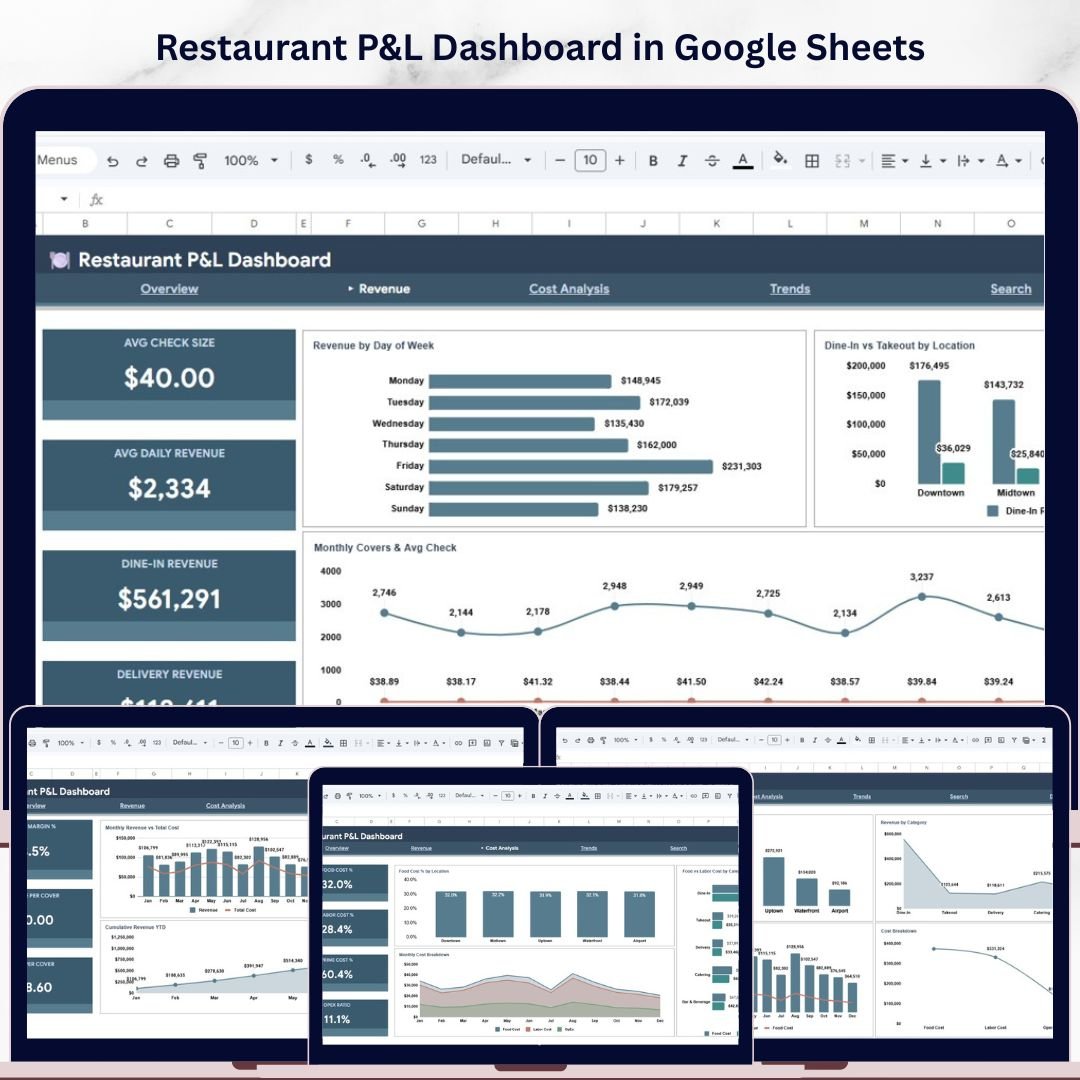
🔑 Key Features of Restaurant P&L Dashboard in Google Sheets
Restaurant P&L Dashboard in Google Sheets is a professionally designed, interactive analytics template built for restaurant owners, food service managers, hospitality finance teams, and F&B consultants who need to monitor total revenue, food cost, labor cost, gross profit, operating expenses, and covers across multiple restaurant locations — all from one powerful Google Sheets dashboard that works on any device. This template includes 6 interactive sheet tabs covering Overview, Revenue, Cost Analysis, Trends, Search, and Data, making it one of the most comprehensive Google Sheets Dashboard Templates available for the restaurant industry.
Whether you operate a single restaurant or oversee a chain of locations, this dashboard transforms your raw P&L data into stunning, actionable visual insights. No software installation needed — simply open in Google Sheets and start tracking your restaurant’s financial health. If you have been searching for a modern, data-driven way to analyze restaurant profitability, the Restaurant P&L Dashboard in Google Sheets is the solution you need. Also explore our Restaurant P&L Dashboard in HTML and Restaurant P&L Dashboard in Power BI for alternative platforms.
📦 What’s Inside the Restaurant P&L Dashboard in Google Sheets
This template includes 6 dedicated sheet tabs, each designed to give you deep insights into your restaurant’s financial performance:
📊 Overview Page — The main dashboard view displays 5 high-level KPI cards: Total Revenue, Total Food Cost, Total Labor Cost, Gross Profit, and Total Covers. Below the cards, 4 interactive charts provide instant analysis: Revenue by Location, Revenue by Category, Monthly Revenue vs Food Cost, and Cost Breakdown by Cost Type. Multiple slicers let you filter the entire dashboard by location, category, time period, and more for quick drill-down analysis.
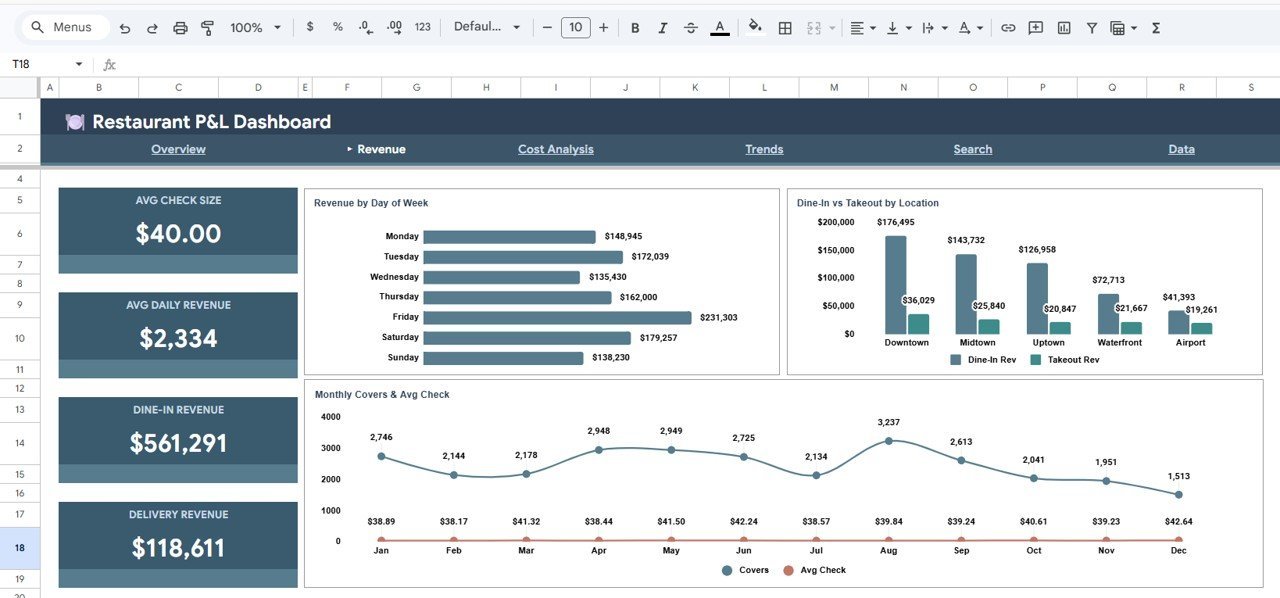
💰 Revenue Page — Dedicated revenue analysis with 3 powerful charts: Revenue by Day of Week to identify your busiest days, Dine-In vs Takeout by Location to compare service channels across branches, and Monthly Covers and Avg Check to track guest traffic and average spend trends over time.
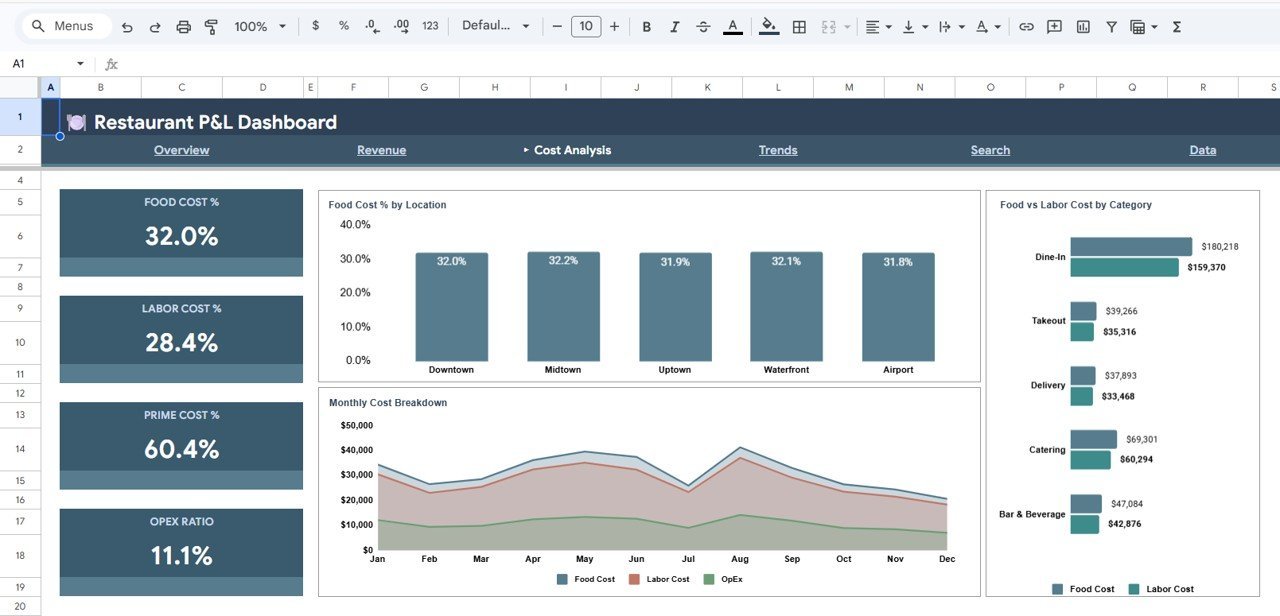
📉 Cost Analysis Page — Deep cost insights with 3 analytical charts: Food Cost % by Location to benchmark food costs across branches, Food vs Labor Cost by Category to see which revenue categories have the highest cost burden, and Monthly Cost Breakdown by Cost Type to track how your operating costs change month over month.
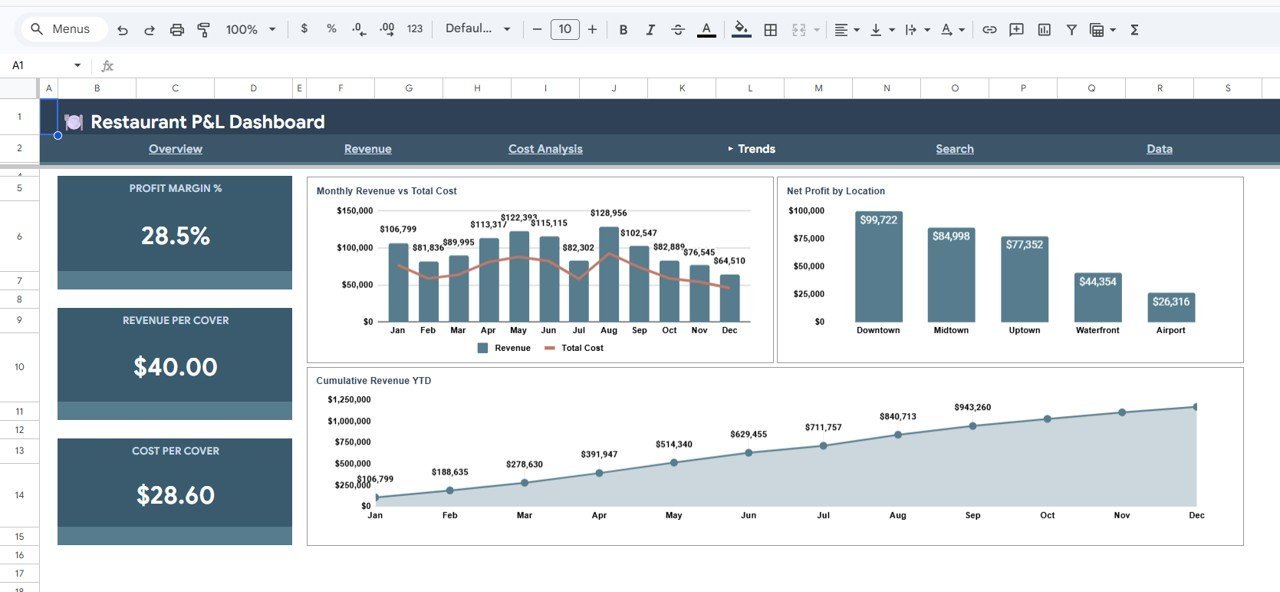
📈 Trends Page — Long-term performance trends with 3 charts: Monthly Revenue vs Total Cost to visualize profitability gaps, Net Profit by Location to compare branch-level bottom lines, and Cumulative Revenue YTD by Month to track year-to-date growth progress.
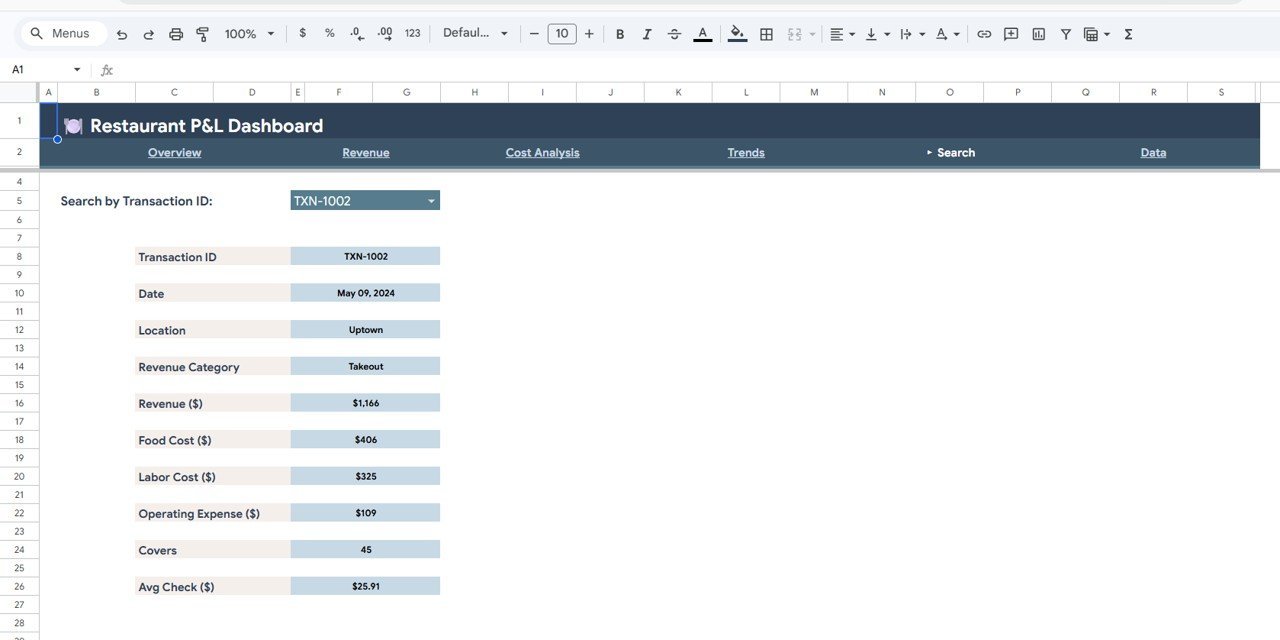
🔍 Search Page — A built-in search functionality where you can look up any transaction by Transaction ID using a dropdown. It instantly displays the Transaction ID, Date, Location, Revenue Category, Revenue, Food Cost, Labor Cost, Operating Expense, Covers, and Avg Check for the selected record.
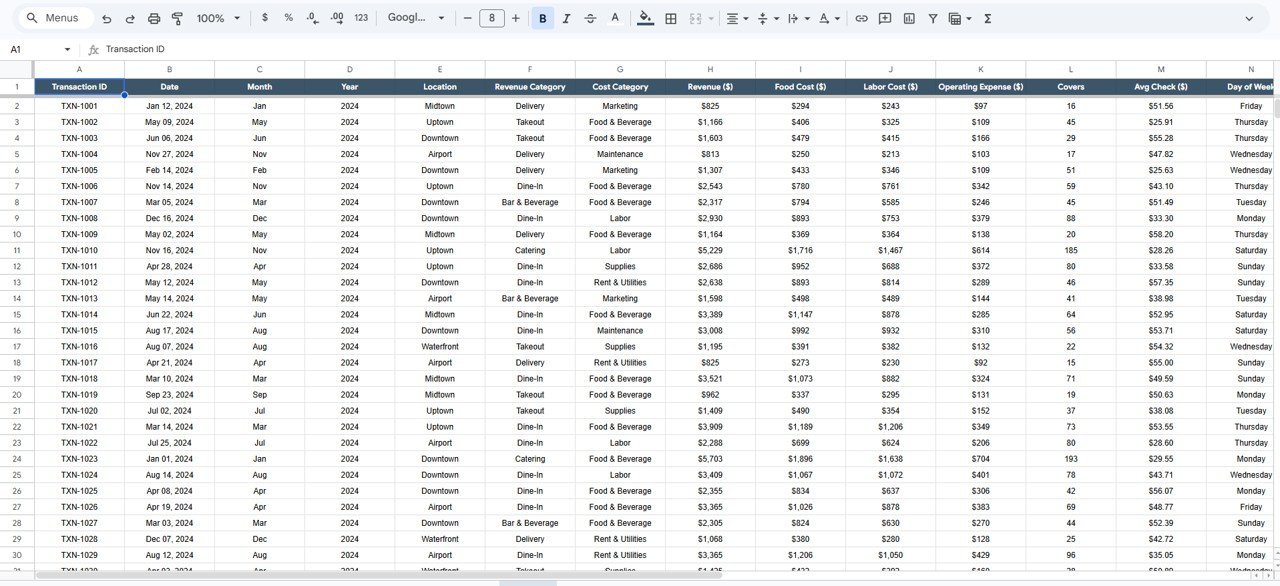
📋 Data Sheet — The raw data entry sheet where you add your restaurant transaction data in the required format. Simply replace the sample data with your own records and the entire dashboard updates automatically.
⚙️ How to Use the Restaurant P&L Dashboard in Google Sheets
1️⃣ Open the PDF guide included in your download and click the Google Sheets copy link to create your own editable copy in Google Drive.
2️⃣ Navigate to the Data sheet tab and replace the sample data with your restaurant’s actual transaction records including date, location, revenue category, revenue, food cost, labor cost, operating expense, and covers.
3️⃣ Once your data is entered, all 5 dashboard pages — Overview, Revenue, Cost Analysis, Trends, and Search — will auto-update with your real numbers, charts, and KPI cards.
4️⃣ Use the slicers and dropdown filters to drill down into specific locations, categories, or time periods for targeted analysis.
👥 Who Can Benefit from This Restaurant P&L Dashboard in Google Sheets
🍽️ Restaurant Owners and Operators — Monitor revenue, costs, and profit across all locations from a single dashboard.
📊 F&B Finance Managers — Track food cost percentages, labor costs, and operating expenses with precision.
🏨 Hospitality Consultants — Deliver professional P&L analysis reports to restaurant clients using this ready-made template.
📈 Multi-Location Managers — Compare branch-level performance side by side and identify top and bottom performers.
🎓 Culinary School Students — Learn restaurant financial management with real-world dashboard analytics.
❓ Frequently Asked Questions
What KPIs does the Restaurant P&L Dashboard in Google Sheets track?
The Restaurant P&L Dashboard in Google Sheets tracks 5 key performance indicators including Total Revenue, Total Food Cost, Total Labor Cost, Gross Profit, and Total Covers. It also calculates Food Cost Percentage, Net Profit by Location, and Average Check per cover across all your restaurant branches.
Can I use this dashboard for multiple restaurant locations?
Yes. The dashboard is designed for multi-location restaurants. Every chart and KPI can be filtered by location using built-in slicers, and dedicated charts like Revenue by Location and Net Profit by Location let you compare branches directly.
Do I need advanced Google Sheets skills to use this template?
No. Simply replace the sample data in the Data sheet with your own restaurant transaction data and all charts, KPIs, and dashboard pages update automatically. No formulas to edit and no coding required.
What is the best Google Sheets template for tracking restaurant profit and loss?
The Restaurant P&L Dashboard in Google Sheets from NextGenTemplates is one of the best options available. It includes 6 dedicated pages covering Overview, Revenue Analysis, Cost Analysis, Trends, Search, and Data entry — all with interactive charts and slicers for comprehensive restaurant financial tracking.
Can I customize the charts and add more data fields?
Yes. Since this is a native Google Sheets file, you can customize chart styles, add additional data columns, create new calculated fields, and modify the layout to match your specific restaurant reporting needs.
How is this different from the Excel or Power BI version?
The Google Sheets version works entirely in your browser via Google Drive — no desktop software needed. It offers cloud-based collaboration, real-time sharing, and access from any device. For desktop-based reporting, check out the Restaurant P&L Dashboard in Excel or the Power BI version.
🔗 Explore Related Templates
📌 Food and Beverage Dashboard in Google Sheets — A comprehensive F&B analytics dashboard for tracking food and beverage performance metrics.
📌 Food Service KPI Scorecard in Google Sheets — Track essential food service KPIs with a clean scorecard layout.
📌 Coffee Chains Dashboard in Excel — Analyze coffee chain operations with detailed sales and cost tracking.
📖 Click here to read the Detailed Blog Post
Watch the step-by-step video tutorial:
































Reviews
There are no reviews yet.