
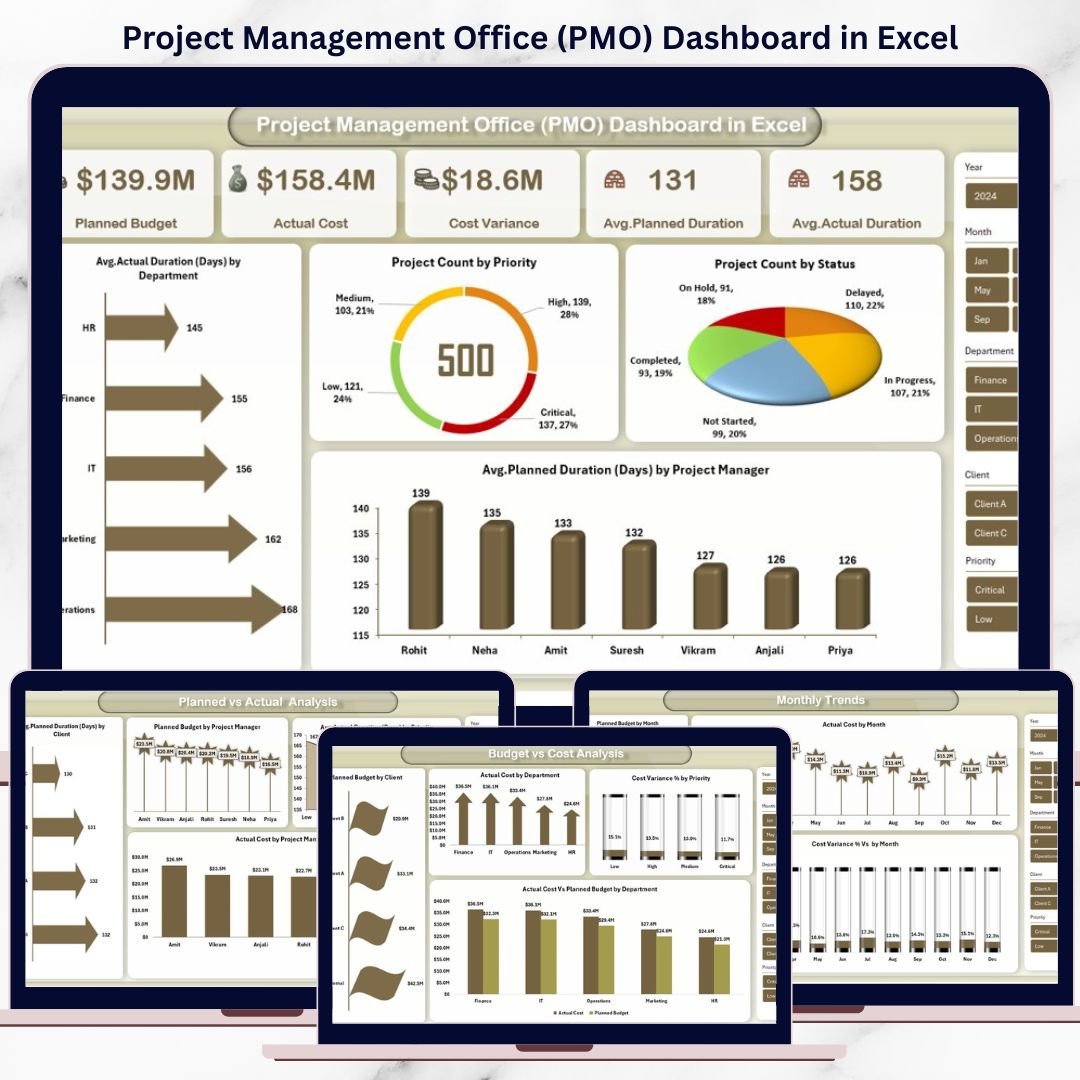

Managing multiple projects without clear visibility often leads to missed deadlines, budget overruns, and poor decision-making. When project data is scattered across files, emails, or tools, PMO teams struggle to maintain control. That is exactly where the Project Management Office (PMO) Dashboard in Excel becomes a game-changing solution.
This ready-to-use PMO Dashboard in Excel transforms raw project data into powerful visual insights. Instead of spending hours on manual reporting, you can instantly track budgets, costs, timelines, priorities, and performance across departments, clients, and project managers. Built entirely in Microsoft Excel, this dashboard is flexible, cost-effective, and easy to use—without the need for complex software.
Whether you manage a few projects or a full project portfolio, this PMO Dashboard gives you clarity, control, and confidence in every decision.
## 🚀 Key Features of Project Management Office (PMO) Dashboard in Excel
📊 Centralized Project Visibility – Monitor all projects from a single dashboard
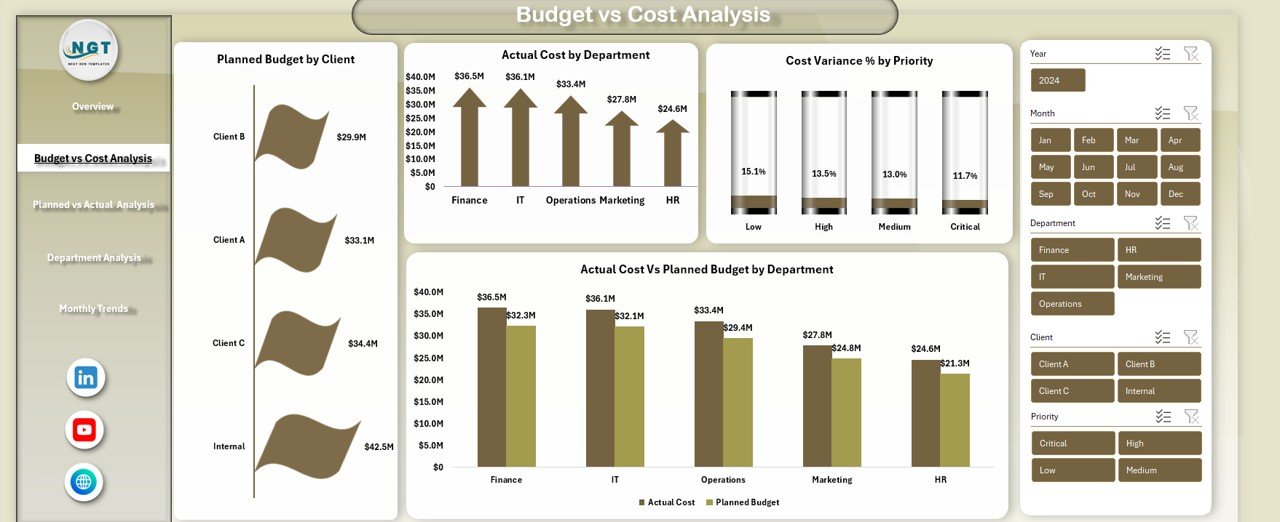
💰 Budget vs Actual Cost Tracking – Instantly identify cost overruns and savings
⏱ Planned vs Actual Duration Analysis – Track delivery performance accurately
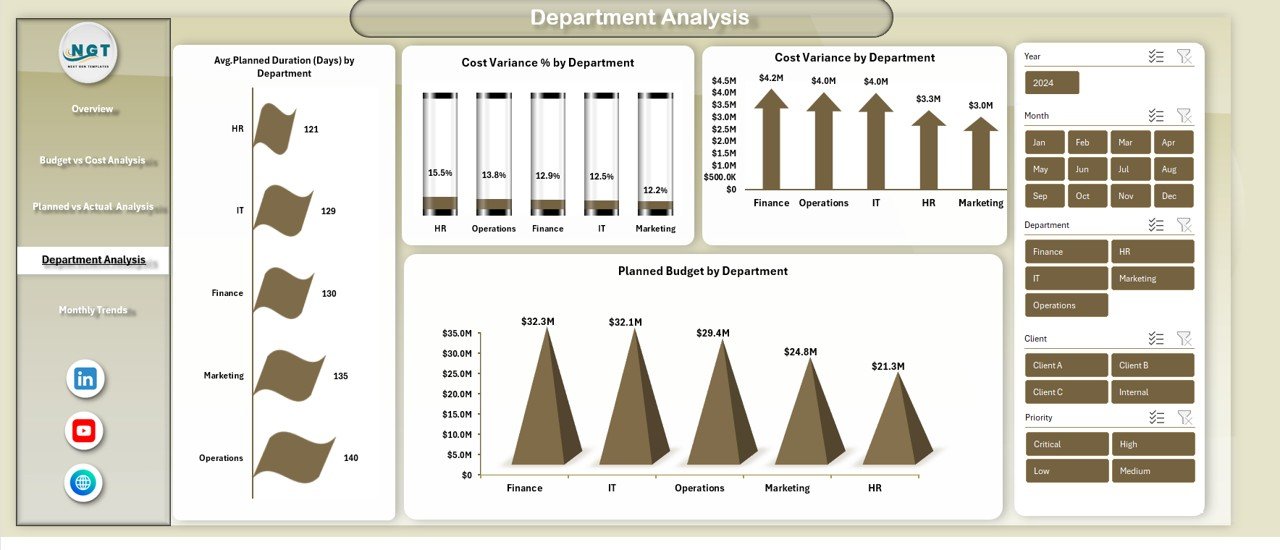
📈 Department & Manager-Level Insights – Compare performance across teams
🧭 Priority & Status Monitoring – View project distribution by priority and status
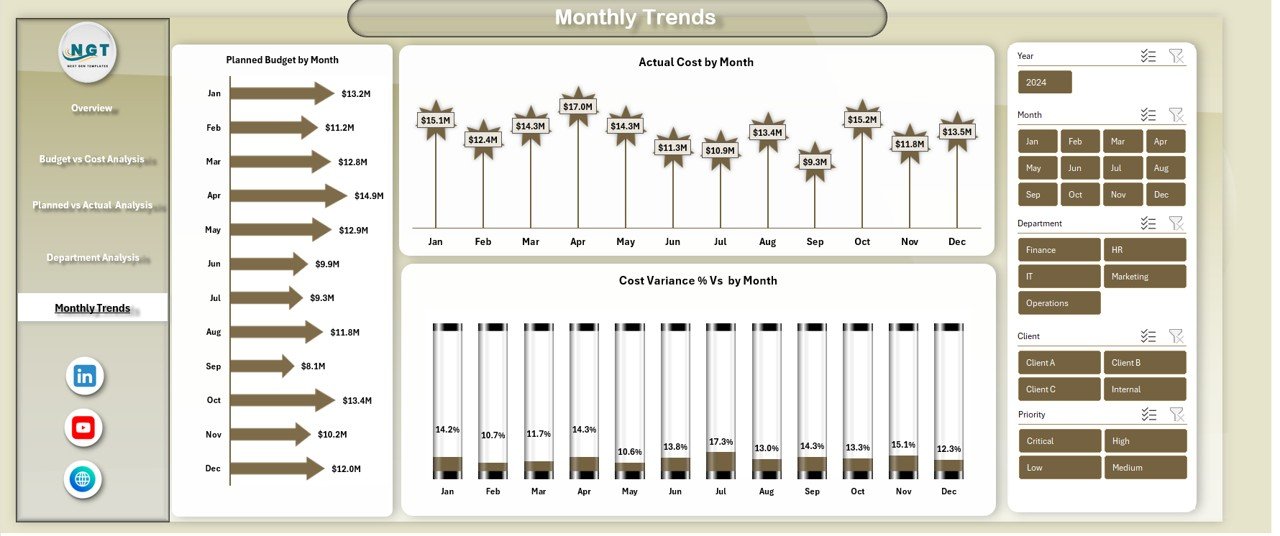
📅 Monthly Trend Analysis – Identify spending and variance patterns over time
🎯 Interactive Slicers – Filter data by department, client, manager, or month
🧩 Fully Customizable in Excel – Modify KPIs, charts, and layouts easily

## 📦 What’s Inside the Project Management Office (PMO) Dashboard in Excel
This PMO Dashboard includes multiple structured analytical sheets designed for complete portfolio-level analysis:
📌 Overview Sheet
-
Planned Budget
-
Actual Cost
-
Cost Variance
-
Avg. Planned Duration (Days)
-
Avg. Actual Duration (Days)
-
Avg. Actual Duration by Department
-
Project Count by Priority
-
Project Count by Status
-
Avg. Planned Duration by Project Manager
📌 Budget vs Cost Analysis Sheet
-
Planned Budget by Client
-
Actual Cost by Department
-
Cost Variance % by Priority
-
Actual Cost vs Planned Budget by Department
📌 Planned vs Actual Analysis Sheet
-
Planned Duration by Client
-
Planned Budget by Project Manager
-
Actual Cost by Project Manager
-
Actual Duration by Priority
📌 Department Analysis Sheet
-
Avg. Planned Duration by Department
-
Cost Variance % by Department
-
Cost Variance by Department
-
Planned Budget by Department
📌 Monthly Trends Sheet
-
Planned Budget by Month
-
Actual Cost by Month
-
Cost Variance % by Month
Each sheet is designed to answer critical PMO questions quickly and visually.
## 🛠 How to Use the Project Management Office (PMO) Dashboard in Excel
1️⃣ Enter or import your project data into the structured Excel tables
2️⃣ Update planned budget, actual cost, and duration fields
3️⃣ Refresh pivot tables with one click
4️⃣ Use slicers to filter by department, client, manager, or time
5️⃣ Analyze KPIs and trends directly on the dashboard
No advanced Excel skills are required. Basic Excel knowledge is enough to start using this dashboard confidently.
## 👥 Who Can Benefit from This Project Management Office (PMO) Dashboard in Excel
🏢 PMO Heads and Directors
📋 Project Managers and Portfolio Managers
💼 Finance and Cost Control Teams
⚙ Operations and Delivery Leaders
🏗 IT, Engineering, and Consulting Firms
📊 Organizations managing multi-project environments
If your organization wants transparency, control, and faster reporting—this dashboard is built for you.
Click here to read the Detailed Blog Post
Watch the step-by-step video tutorial:


























Reviews
There are no reviews yet.