
Human Resource (HR) compliance is a critical responsibility for every organization. Companies must follow labor laws, workplace regulations, internal policies, and compliance standards to ensure fair treatment of employees and maintain legal protection. However, monitoring HR compliance manually can quickly become complex because HR teams manage large volumes of employee records, training data, policy documentation, and regulatory audits.
Without a structured monitoring system, HR managers may struggle to track compliance performance, identify potential risks, and ensure that employees follow company policies. As organizations grow, these challenges become even more difficult to manage.
This is where the HR Compliance KPI Dashboard in Google Sheets becomes an extremely powerful tool.
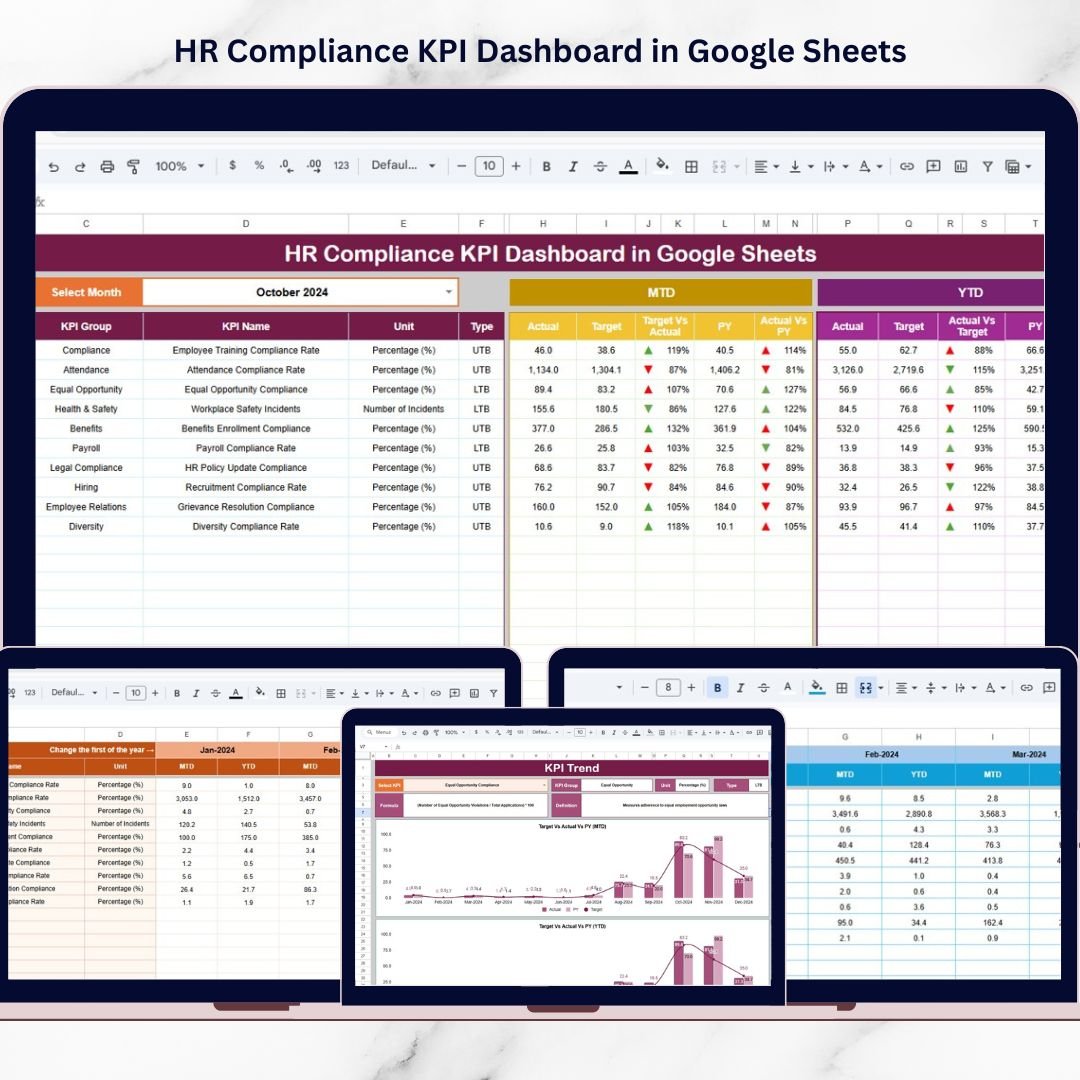
The HR Compliance KPI Dashboard in Google Sheets is a ready-to-use analytics template designed to help HR teams track compliance performance using structured Key Performance Indicators (KPIs). Instead of reviewing multiple reports and spreadsheets, HR leaders can monitor all compliance metrics in one centralized dashboard.
This dashboard displays each KPI along with its unit, aggregation formula, KPI definition, and performance type (Lower the Better or Upper the Better). Because the dashboard includes automated calculations and visual indicators, HR managers can quickly evaluate compliance performance and identify areas that require improvement.
Built on Google Sheets, this template also supports cloud-based collaboration. HR teams can access and update compliance data from anywhere, allowing organizations to maintain real-time compliance monitoring.
Whether you manage HR governance, regulatory reporting, or employee compliance programs, this dashboard provides clear insights that help organizations reduce compliance risks and improve HR transparency.

📊 Key Feature of HR Compliance KPI Dashboard in Google Sheets
The HR Compliance KPI Dashboard includes powerful features that simplify compliance monitoring and performance analysis.
📈 Centralized Compliance KPI Dashboard
The dashboard displays all HR compliance KPIs in one interface, allowing managers to review performance quickly.
📅 Monthly KPI Monitoring
Users can select a month from the dropdown menu, and the dashboard automatically updates all KPI values and comparisons.
📊 MTD and YTD Performance Analysis
Track both Month-to-Date (MTD) and Year-to-Date (YTD) compliance performance to understand short-term and long-term trends.
📉 Actual vs Target Comparisons
Evaluate HR compliance performance by comparing actual values with predefined targets.
📊 Previous Year Performance Comparison
Analyze how current compliance performance compares with previous year results.
🚦 Visual Performance Indicators
Conditional formatting with arrows and indicators highlights whether performance is improving or declining.
📈 KPI Trend Analysis
Analyze trends for individual KPIs using the KPI Trend worksheet.
☁️ Cloud-Based Collaboration
Google Sheets allows HR teams to update and monitor compliance data in real time.
⚡ Data-Driven HR Decision Making
HR managers can quickly identify compliance gaps and take corrective action.
📦 What’s Inside the HR Compliance KPI Dashboard in Google Sheets
This ready-to-use template contains six structured worksheets designed to support HR compliance monitoring.
📊 Dashboard Sheet – Main Compliance Monitoring Page
Displays all compliance KPIs in one view with MTD Actual, Target, Previous Year values, and performance comparisons.
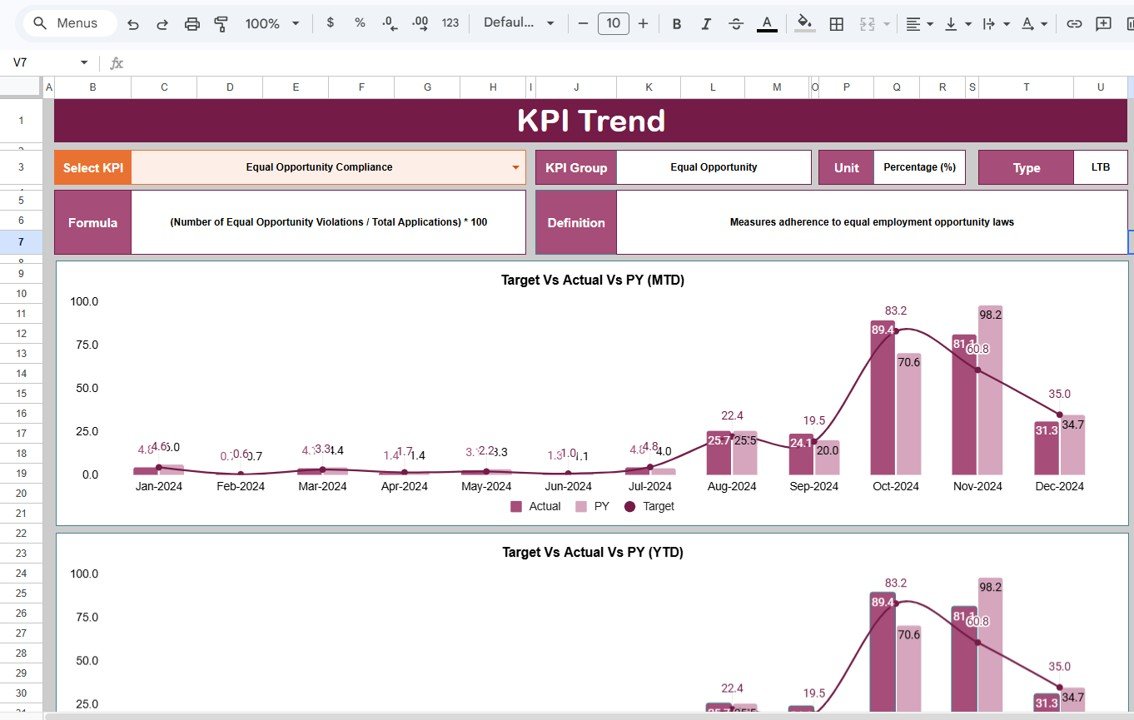
📈 KPI Trend Sheet – Performance Trend Analysis
Allows users to select any KPI and analyze historical performance trends through visual charts.
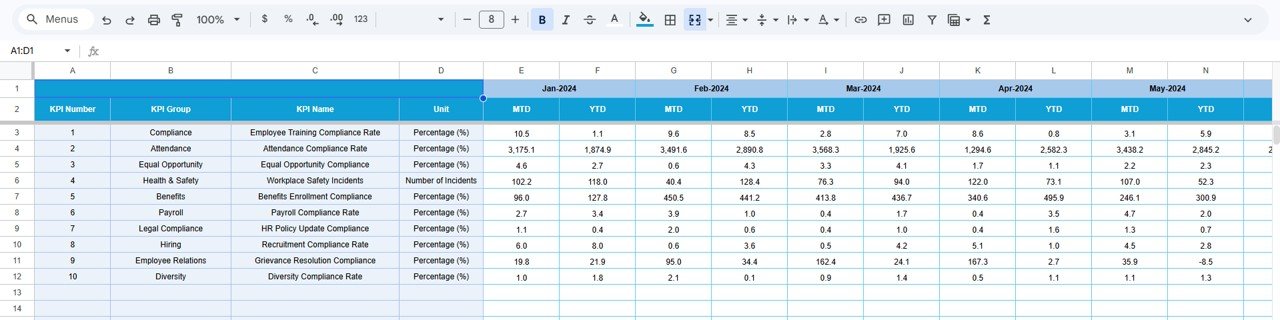
📂 Actual Number Sheet – KPI Data Entry
HR teams enter actual KPI values for each month in this sheet.
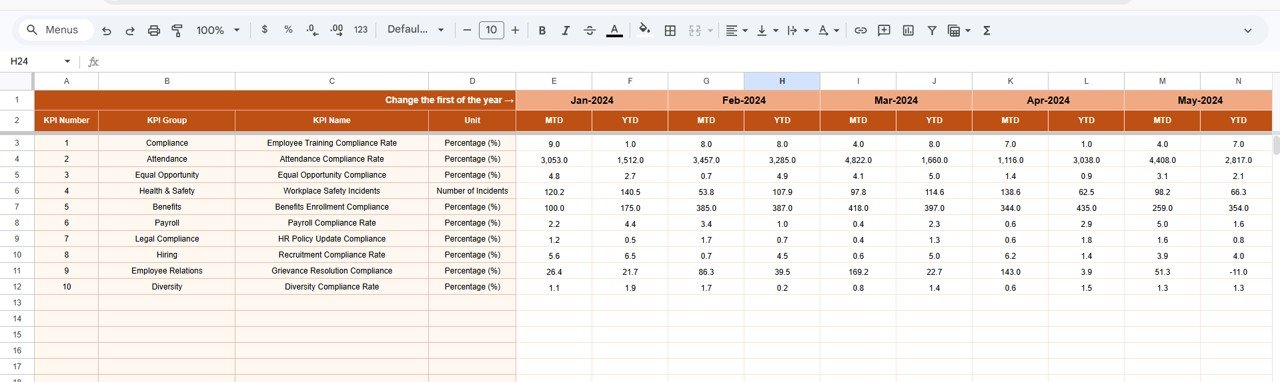
🎯 Target Sheet – KPI Target Management
Contains monthly target values for each KPI, which define expected compliance performance.
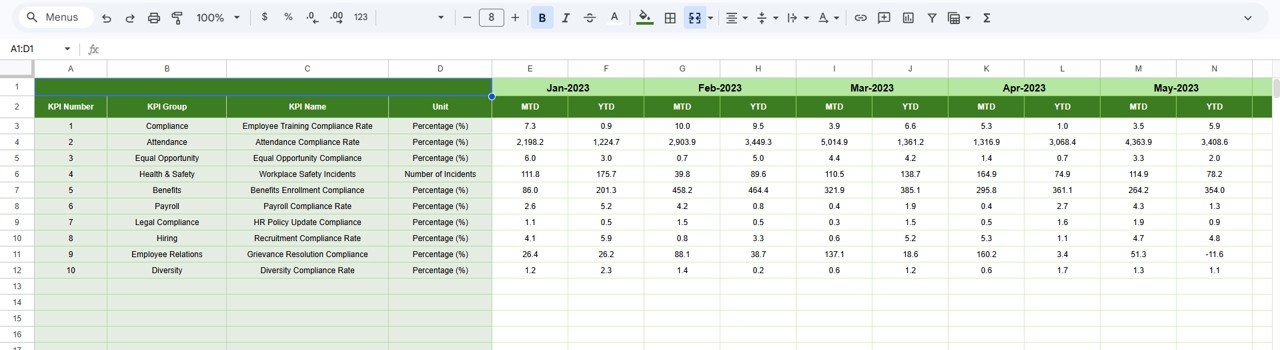
📅 Previous Year Number Sheet – Historical Comparison
Stores KPI values from the previous year to enable performance comparison and trend analysis.
📚 KPI Definition Sheet – KPI Documentation
Contains detailed information about each KPI including KPI Name, KPI Group, Unit, Formula, and Definition.
Together, these sheets create a complete HR compliance monitoring system.
⚙️ How to Use the HR Compliance KPI Dashboard in Google Sheets
Using the HR Compliance KPI Dashboard is simple and requires no advanced technical skills.
Step 1 – Define HR Compliance KPIs
Identify key compliance metrics such as training completion rate, policy adherence, and documentation accuracy.
Step 2 – Enter KPI Data
Input actual performance values for each KPI in the Actual Number sheet.
Step 3 – Set KPI Targets
Enter monthly target values in the Target sheet.
Step 4 – Monitor Dashboard Performance
Select the month in the dashboard and review KPI performance comparisons.
Step 5 – Analyze KPI Trends
Use the KPI Trend sheet to analyze how compliance metrics change over time.
By following these steps, organizations can create a structured HR compliance monitoring process.
👥 Who Can Benefit from This HR Compliance KPI Dashboard in Google Sheets
This dashboard is useful for many professionals responsible for HR governance and compliance monitoring.
👩💼 HR Managers – Track employee compliance and policy adherence.
📊 HR Analysts – Monitor compliance KPIs and identify improvement areas.
🏢 Corporate Compliance Teams – Track regulatory compliance and risk indicators.
📈 Executives & Business Leaders – Gain visibility into HR governance and compliance performance.
📚 HR Consultants & Advisors – Use structured KPIs to evaluate HR compliance systems.
🎓 HR Students & Researchers – Analyze HR compliance performance using structured datasets.
Organizations that implement structured compliance dashboards can significantly improve HR governance, reduce compliance risks, and enhance workplace transparency.
### Click hare to read the Detailed blog post
Watch the step-by-step video tutorial: