



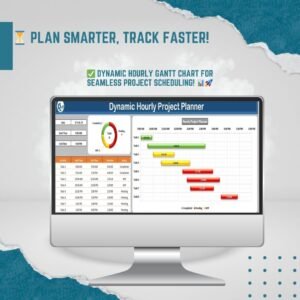
The Dynamic Hourly Gantt Chart for Projects is an Excel-based project planning tool that breaks daily work down to the hour. It is built for project managers, event planners, freelancers and teams who need to schedule tasks precisely and track real-time status. The outcome is a color-coded hourly timeline that shows what is completed, what is in progress and what is still pending.
This hourly Gantt chart goes further than charts built around days or weeks. It is a practical Gantt chart template for client tasks, hourly operations or scheduling several employees, and it keeps every activity visible across the team.

Key Features of the Hourly Gantt Chart
1. Hourly Task Breakdown
Most Gantt charts work at a daily or weekly level. This tool gives you an hourly breakdown of project activities. You can assign exact time slots to each task, which helps you use time well and avoid scheduling conflicts.
2. Real-Time Status Updates with Color Coding
The chart updates task statuses from your input data and sorts each task into one of three groups:
- Completed: finished tasks, shown in green
- Work in Progress (WIP): ongoing tasks, shown in yellow
- Pending: unfinished tasks, shown in red
Project managers and team members can see project progress at a glance at any time.
3. Customizable Fields
You can personalize these fields:
- Activity Name
- Start & End Time
- Duration of Task
- Task Status
Because the structure is flexible, you can fit the chart to your own workflow. It suits industries such as IT development, construction, event planning and corporate management.
4. Interactive Hourly Timeline
The interactive hourly timeline helps you:
- Spot overlapping tasks and dependencies
- Adjust schedules quickly when delays happen
- Share progress clearly with stakeholders
The color-coded Gantt view makes complex schedules easier to read, so everyone can stay on track with project deadlines.
5. Automatic Task Duration Calculation
The template calculates task duration automatically from the start and end times. This cuts manual data entry errors and keeps your time tracking accurate.
6. Collaboration and Reporting
The intuitive project timeline is easy to share across teams. It supports:
- Better task visibility and accountability
- Real-time task tracking for project managers
- Better resource allocation and prioritization
What’s Inside the Template
| Component | What It Does |
|---|---|
| Task input area | Enter Activity Name, Start & End Time and Task Status for each activity |
| Duration calculation | Works out each task’s duration from its start and end times |
| Hourly Gantt timeline | Shows each activity across hourly time slots |
| Status color coding | Green for Completed, yellow for WIP, red for Pending |
Why This Gantt Chart Template Is Worth Having
- Flexible and easy to use: no complex formulas or extra software needed
- Visually clear: color coding supports quick decisions
- Time-saving: calculations and tracking are automated
Who It’s For
This Excel-based hourly Gantt chart suits:
- Project Managers: plan and allocate tasks efficiently
- Event Planners: schedule every stage of an event by the hour
- Software Developers: track coding and testing timelines
- Freelancers & Consultants: manage several client projects with precision
- Construction Teams: organize step-by-step site work schedules
If you need a project management Excel template that tracks work by the hour instead of by the day, this tool is built for that job.
How to Use It
- Open the template in Excel.
- Enter each activity name with its start and end time.
- Let the template calculate the duration of each task.
- Set or update the task status (Completed, WIP or Pending) as work moves forward.
- Review the color-coded hourly timeline to spot overlaps and delays, then share it with your team or stakeholders.
Click here to read the detailed blog post
Watch the step-by-step video tutorial:
Frequently Asked Questions
What is an hourly Gantt chart?
An hourly Gantt chart plots tasks across hourly time slots instead of days or weeks. You get a detailed view of when each activity starts, how long it lasts and whether it overlaps with other work.
Which software does this template use?
The Dynamic Hourly Gantt Chart for Projects is an Excel-based tool. It needs no complex formulas or extra software.
How are task statuses shown?
Tasks are color-coded by status. Completed tasks appear in green, Work in Progress (WIP) tasks in yellow and Pending tasks in red.
Does it calculate task duration automatically?
Yes. Task duration is calculated automatically from the start and end times you enter. This reduces manual errors in time tracking.
Can I customize the chart for my industry?
Yes. You can personalize the Activity Name, Start & End Time, Duration of Task and Task Status fields. This lets the chart fit workflows in IT development, construction, event planning, corporate management and more.
Is it useful for team task tracking?
Yes. The shareable timeline improves task visibility and accountability. It also gives project managers real-time tracking of every activity.
Also check our Quality Analysis Dashboard in Power BI
Last updated: October 2026
Compatibility and Requirements
- Works in Microsoft Excel desktop (Excel 2016 or later, or Microsoft 365).
- For help with the Excel features it uses, see Microsoft’s guide Create a chart from start to finish.
Related Gantt Chart Templates
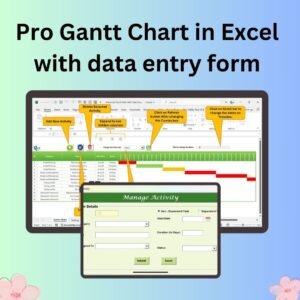
- Pro Gantt Chart in Excel with data entry form: a Gantt chart with a data entry form.
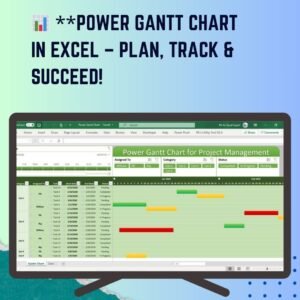
- Power Gantt Chart in Excel
- Dynamic Project Planner Gantt Chart in Excel: plan projects by day instead of by hour.
- Project Plan Gantt Chart in Google Sheet: a Gantt chart in Google Sheets.
- Project Management Pro Bundle: 9 project templates for Excel and Google Sheets.
Browse all Excel charts and visualization templates or the Excel project management templates.


























Reviews
There are no reviews yet.