Cybersecurity has become one of the most critical priorities for modern organizations. As businesses increasingly rely on digital systems, cloud platforms, online transactions, and connected networks, the risk of cyber threats continues to grow. Companies now face challenges such as data breaches, ransomware attacks, phishing attempts, insider threats, and system vulnerabilities. Therefore, organizations must continuously monitor cybersecurity performance to protect their digital infrastructure.
However, tracking cybersecurity performance manually can be extremely complex. Security teams often deal with multiple monitoring tools, system logs, incident reports, and vulnerability scans. As a result, managers may struggle to gain a clear overview of the organization’s security posture.
This is where the Cybersecurity KPI Scorecard in Google Sheets becomes extremely valuable.
The Cybersecurity KPI Scorecard in Google Sheets is a ready-to-use monitoring template designed to track and evaluate cybersecurity performance indicators in a structured and visual format. Instead of reviewing multiple security reports, decision-makers can analyze all important cybersecurity metrics in one centralized scorecard.
Because the scorecard displays actual vs target values, performance indicators, and trend analysis, security teams can quickly identify vulnerabilities, monitor response efficiency, and evaluate overall cybersecurity health.
Built on Google Sheets, this template also supports cloud collaboration, allowing multiple team members to update data and monitor performance in real time. Whether you manage IT security, compliance, or risk management, this scorecard helps organizations implement data-driven cybersecurity monitoring.
🔐 Key Feature of Cybersecurity KPI Scorecard in Google Sheets
The Cybersecurity KPI Scorecard includes several powerful features that simplify cybersecurity monitoring and analysis.
📊 Centralized KPI Scorecard Dashboard
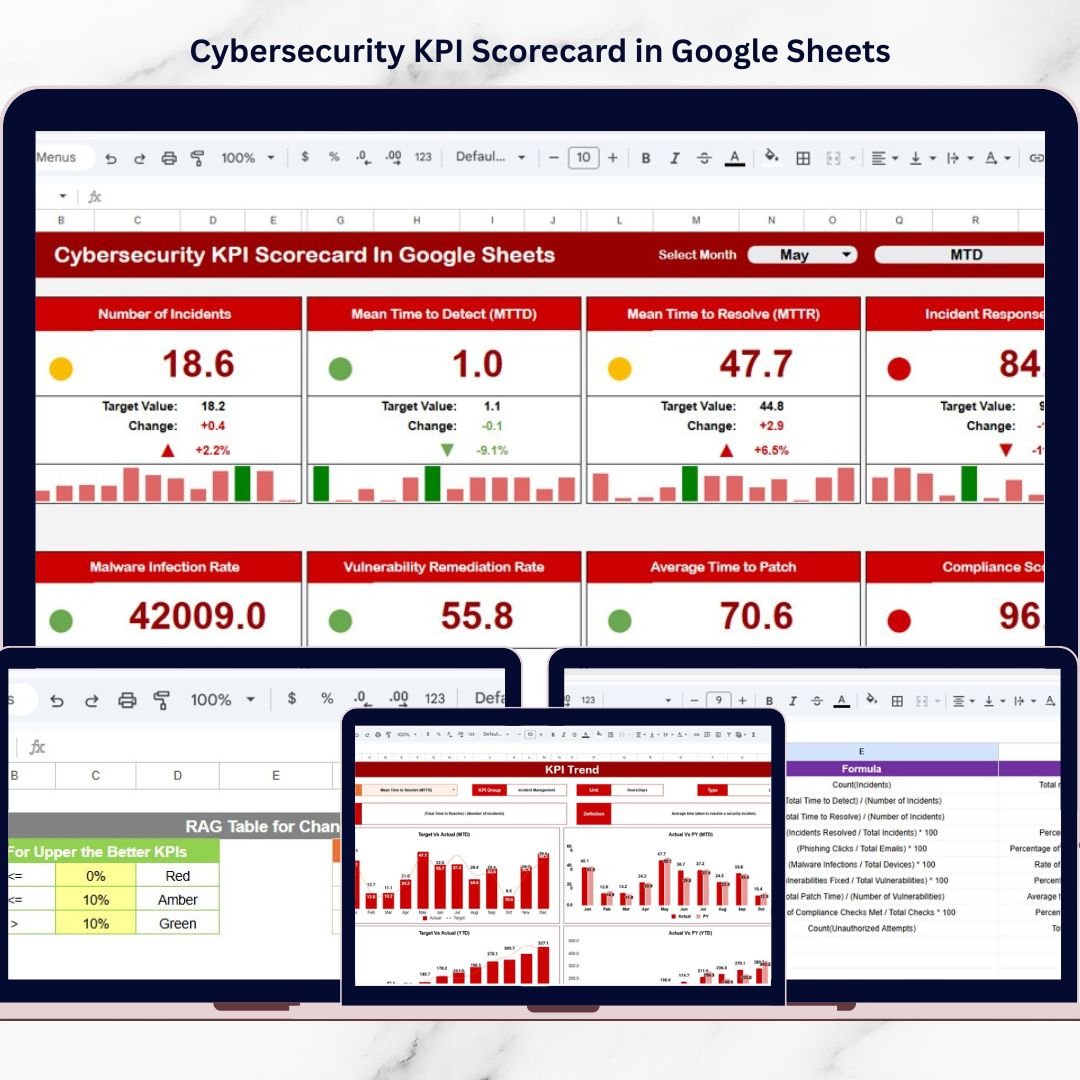
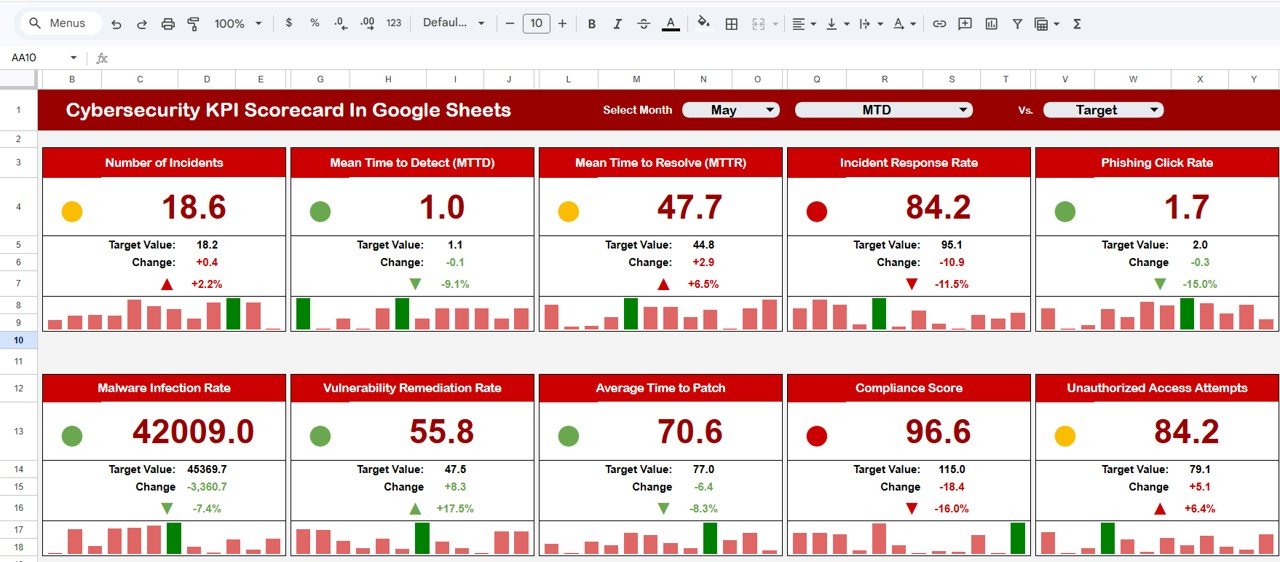
The scorecard displays 10 cybersecurity KPIs in a single view, allowing security teams to evaluate overall security performance quickly.
📅 Monthly Performance Monitoring
Users can select any month from the dropdown menu, and the scorecard automatically updates all KPI values and indicators.
📈 MTD and YTD Performance Analysis
The template allows users to analyze Month-to-Date (MTD) and Year-to-Date (YTD) cybersecurity performance trends.
🚦 Traffic Light Performance Indicators
Color indicators highlight performance levels clearly:
🟢 Green – Performing well
🟡 Yellow – Moderate performance
🔴 Red – Requires improvement
📉 Actual vs Target Comparisons
Managers can compare actual KPI values with targets to evaluate whether cybersecurity goals are being achieved.
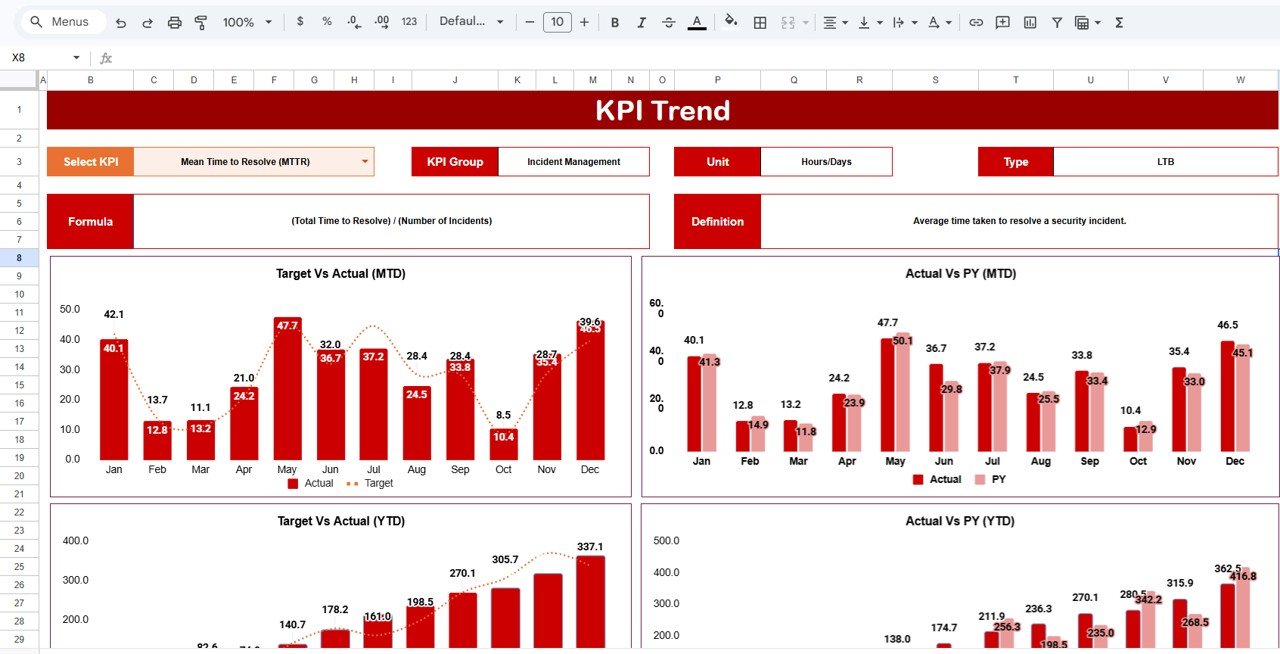
📊 Trend Monitoring for Individual KPIs
Users can select any KPI to view historical performance trends through automated charts.
☁️ Cloud-Based Collaboration
Because the template is built in Google Sheets, teams can access and update cybersecurity data from anywhere.
⚡ Faster Cybersecurity Decision Making
Visual performance indicators help managers quickly identify risks and respond proactively.
📦 What’s Inside the Cybersecurity KPI Scorecard in Google Sheets
This template contains multiple structured worksheets that work together to monitor cybersecurity performance.
📊 Scorecard Sheet – Main Security Performance View
Displays all cybersecurity KPIs in one screen with Actual vs Target comparisons, performance indicators, and percentage change analysis.
📈 Trend Sheet – KPI Performance Trends
Allows users to analyze historical trends for individual KPIs. By selecting a KPI from the dropdown menu, users can view charts showing performance changes over time.
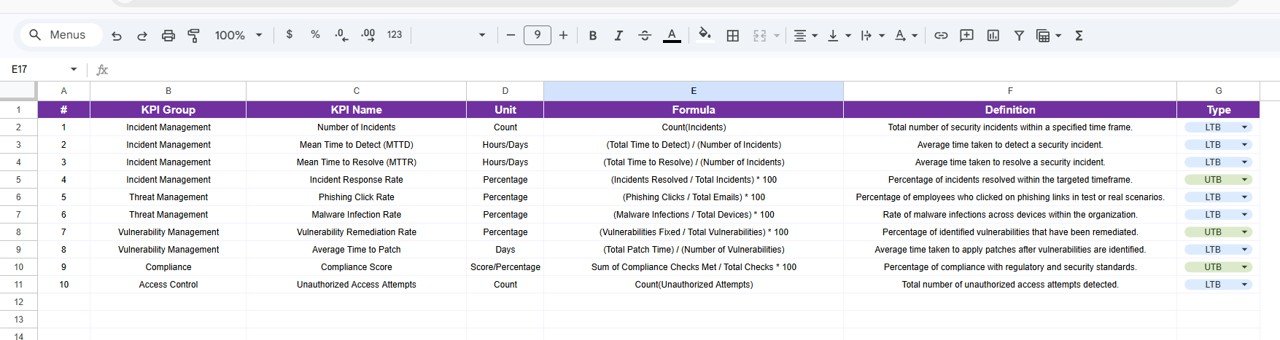
📚 KPI Definition Sheet – KPI Documentation
Contains detailed information about each KPI including KPI Name, KPI Group, Measurement Unit, Formula, and Definition.
📂 Data Input Sheet – Security Data Entry
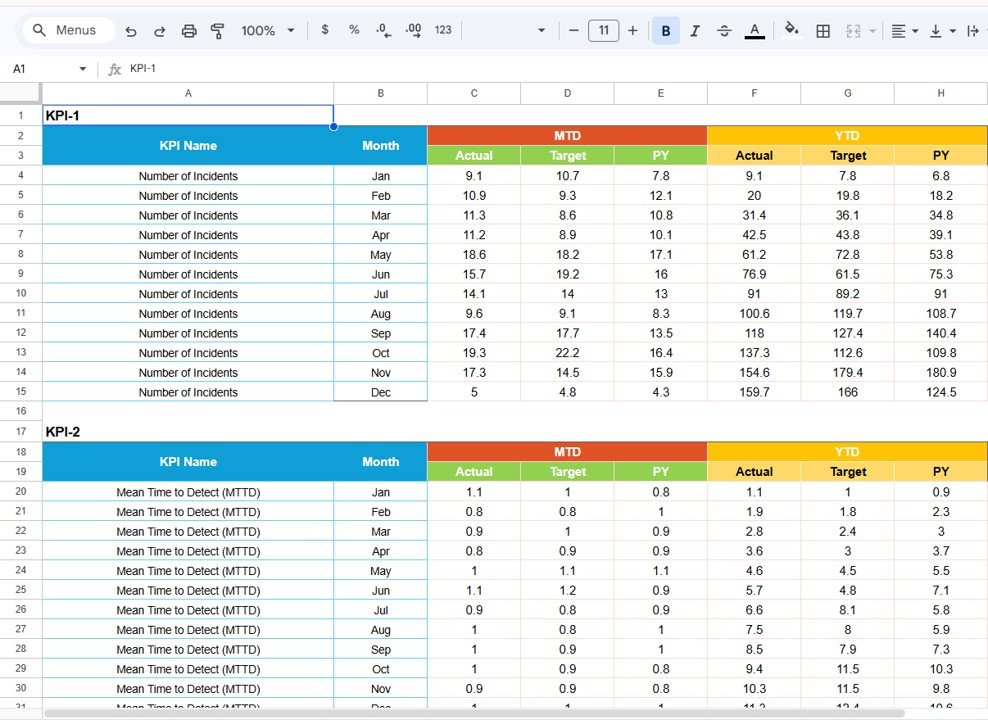
Security teams enter KPI performance values here, including Month, KPI Name, Actual Value, and Target Value.
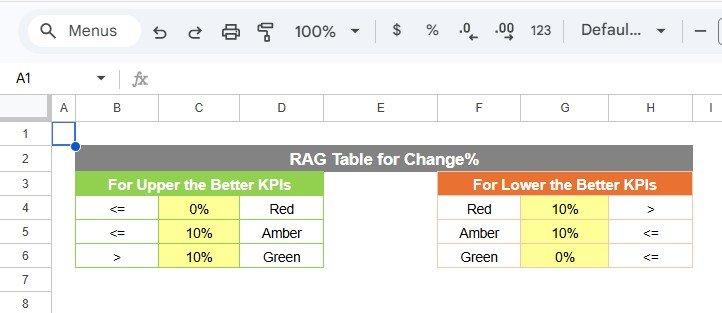
🎨 Colour Settings Sheet – Indicator Configuration
Controls the color thresholds used in performance indicators such as traffic lights and KPI status ranges.
Together, these sheets create a complete cybersecurity performance monitoring system.
⚙️ How to Use the Cybersecurity KPI Scorecard in Google Sheets
Using the Cybersecurity KPI Scorecard is simple and requires no advanced technical expertise.
Step 1 – Define Cybersecurity KPIs
Identify key security metrics such as vulnerability levels, incident response time, and compliance performance.
Step 2 – Enter KPI Data
Record monthly KPI values and target values in the Data Input sheet.
Step 3 – Select Reporting Period
Choose the desired month using the dropdown menu in the scorecard.
Step 4 – Monitor KPI Performance
Analyze performance indicators to determine whether KPIs meet targets.
Step 5 – Review KPI Trends
Use the Trend sheet to identify improvements or potential security risks.
By following these steps, organizations can create a consistent cybersecurity monitoring process.
👥 Who Can Benefit from This Cybersecurity KPI Scorecard in Google Sheets
This template is valuable for many professionals involved in cybersecurity and risk management.
🛡️ Cybersecurity Teams – Monitor vulnerabilities, threats, and incident response performance.
💻 IT Security Managers – Track security KPIs and evaluate security posture.
🏢 Corporate Risk Management Teams – Monitor cybersecurity risks across the organization.
📊 Compliance Officers – Track security compliance metrics and audit performance.
📈 Executives & Decision Makers – Gain clear visibility into cybersecurity performance.
🎓 Cybersecurity Analysts & Researchers – Study security performance using structured KPI data.
Organizations that implement structured cybersecurity scorecards can significantly improve security monitoring, risk detection, and incident response efficiency.
### Click hare to read the Detailed blog post
Watch the step-by-step video tutorial: