Managing customer feedback efficiently is one of the biggest challenges for modern businesses. Every organization collects feedback from surveys, reviews, social media, support tickets, and customer interactions. However, without a structured system, companies often miss response deadlines, forget review meetings, or fail to track compliance tasks properly.
That is where the Customer Feedback Analysis Compliance Calendar in Excel becomes an essential business tool.
This professionally designed Excel template helps organizations schedule feedback review meetings, track response deadlines, monitor compliance tasks, and organize customer improvement initiatives — all in one centralized calendar system.
Instead of relying on scattered spreadsheets, emails, or manual reminders, teams can manage all feedback-related activities using a structured calendar that provides annual, monthly, and daily views.
As a result, businesses improve customer satisfaction, enhance accountability, and ensure timely responses to customer concerns.
## Key Feature of Customer Feedback Analysis Compliance Calendar in Excel
📅 Annual Calendar Overview
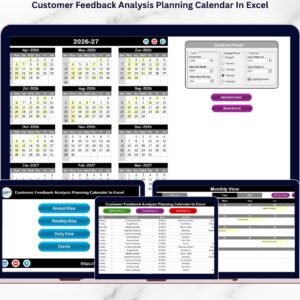
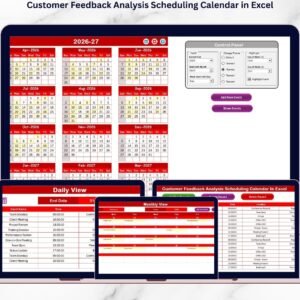
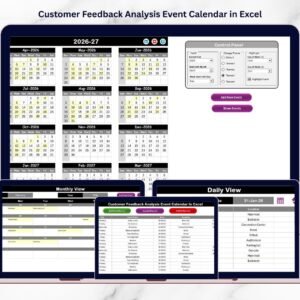
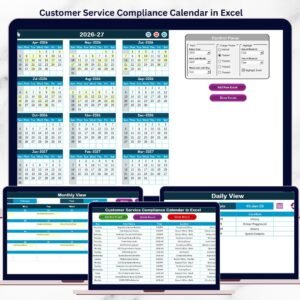
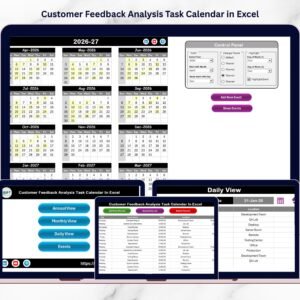
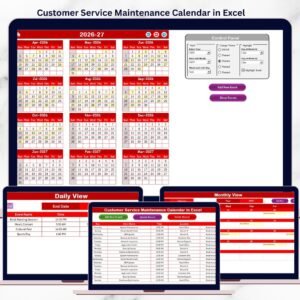
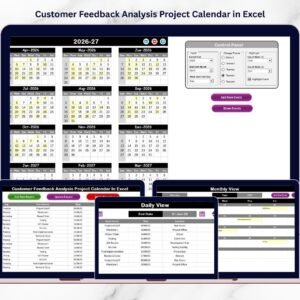
Easily visualize the entire year with a full 12-month calendar layout. This allows teams to plan feedback reviews, compliance checks, and response deadlines effectively.
📊 Monthly Planning Calendar
The monthly calendar displays scheduled events and meetings clearly. It also highlights multiple events in a single day to ensure nothing is missed.
📋 Detailed Daily Event Tracking
The Daily View provides a structured list of feedback activities within a selected date range, making it easier to monitor tasks and upcoming events.
🎨 Built-in Color Themes
The template includes 5 professional color themes that instantly change the look of the calendar for better visual clarity.
⚙️ Flexible Control Panel
Users can easily customize the calendar by selecting the year, starting month, and starting day of the week.
🟡 Event Highlight Feature
Important feedback events can be highlighted automatically, making critical activities easy to identify.
➕ Quick Event Creation
Add new feedback review meetings or compliance tasks quickly using the Add New Event button.
🔎 Instant Event Visibility
The Show Event feature allows users to instantly view all events scheduled for a selected date.
🗂 Centralized Event Database
All events are stored in a structured Events Sheet, ensuring organized data management and automatic calendar updates.

## What’s Inside the Customer Feedback Analysis Compliance Calendar in Excel
This Excel template includes five well-structured worksheets that help teams manage feedback activities efficiently.
Home Sheet
The Home Sheet acts as the navigation dashboard. It includes quick buttons to move between Annual View, Monthly View, Daily View, and the Events database.
Annual View Sheet
This sheet displays all 12 months of the year in one view. It also contains a powerful control panel where users can customize the calendar settings and apply themes.
Monthly View Sheet
The Monthly View shows detailed schedules for a selected month. It also indicates when multiple events are scheduled on the same date.
Daily View Sheet
This sheet provides a list of events within a selected date range. Teams can track meetings, response deadlines, and compliance tasks clearly.
Events Database Sheet
This sheet stores all event data including Event Name, Date, Time, Location, and Description, ensuring the calendar remains organized and automated.
## How to Use the Customer Feedback Analysis Compliance Calendar in Excel
Using this calendar template is simple and requires no advanced Excel skills.
First, start from the Home Sheet, which acts as the navigation dashboard.
Next, select the Annual View to plan feedback review meetings and compliance activities throughout the year.
Then, move to the Monthly View to analyze scheduled feedback events for a specific month.
If you want to monitor events in detail, use the Daily View and select the desired date range.
To create new feedback events:
1️⃣ Select the desired date
2️⃣ Click Add New Event
3️⃣ Enter event details
4️⃣ Click Submit
The event will automatically appear in the calendar.
If you want to review events scheduled for a particular date, simply click the Show Event button.
## Who Can Benefit from This Customer Feedback Analysis Compliance Calendar
This Excel template is designed for organizations that regularly analyze and respond to customer feedback.
👩💻 Customer Support Teams – Track complaint reviews, response deadlines, and service improvement activities.
📊 Quality Assurance Teams – Monitor compliance reviews and customer experience improvements.
📈 Product Management Teams – Schedule feedback analysis sessions and product improvement discussions.
📣 Marketing Teams – Monitor customer sentiment and review feedback insights regularly.
🏢 Business Owners and Managers – Gain full visibility of feedback operations and ensure accountability across teams.
A structured feedback management system helps organizations respond to customer concerns quickly and improve service quality continuously.
By implementing this Customer Feedback Analysis Compliance Calendar in Excel, businesses can streamline feedback analysis, monitor compliance tasks, and organize customer improvement initiatives effectively.
As a result, companies improve customer satisfaction, operational efficiency, and decision-making.
Click here to read the Detailed blog post
Watch the step-by-step video tutorial: