Managing aerospace and defense programs demands precision, discipline, and real-time performance visibility. However, many organizations still rely on complex spreadsheets and fragmented reports. As a result, leaders struggle to track revenue, budget, cost variance, compliance, and schedule performance in one centralized system.
That is exactly why the Aerospace and Defense Dashboard in Google Sheets becomes an essential management tool.
This ready-to-use and fully interactive dashboard transforms raw operational and financial data into actionable intelligence. Instead of reviewing disconnected reports, you can monitor program performance, evaluate cost variance, track compliance, and analyze regional operations — all within one dynamic Google Sheets interface.
Because the solution runs in Google Sheets, cross-functional teams can collaborate in real time while maintaining structured data control and transparency.
🚀 Key Feature of Aerospace and Defense Dashboard in Google Sheets
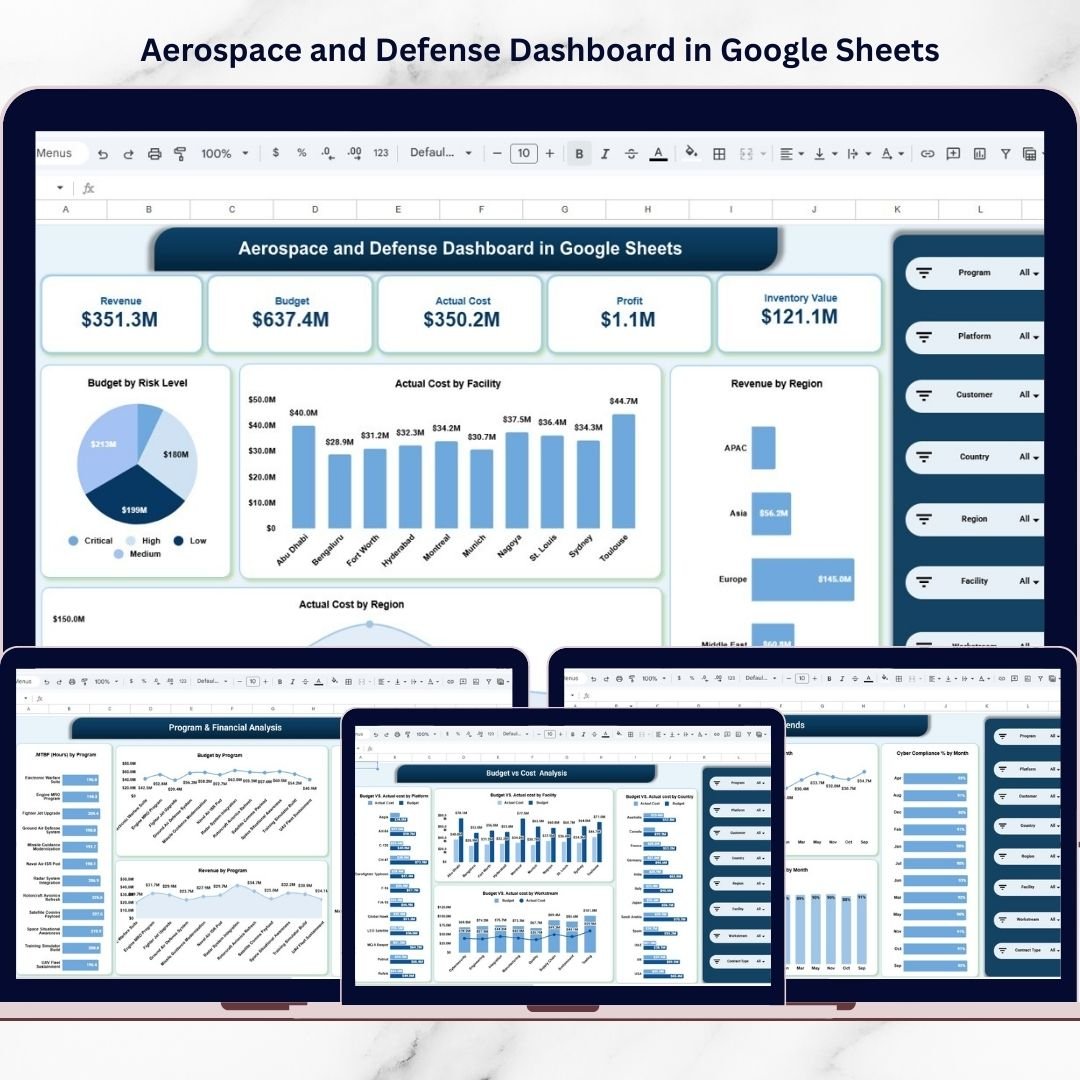
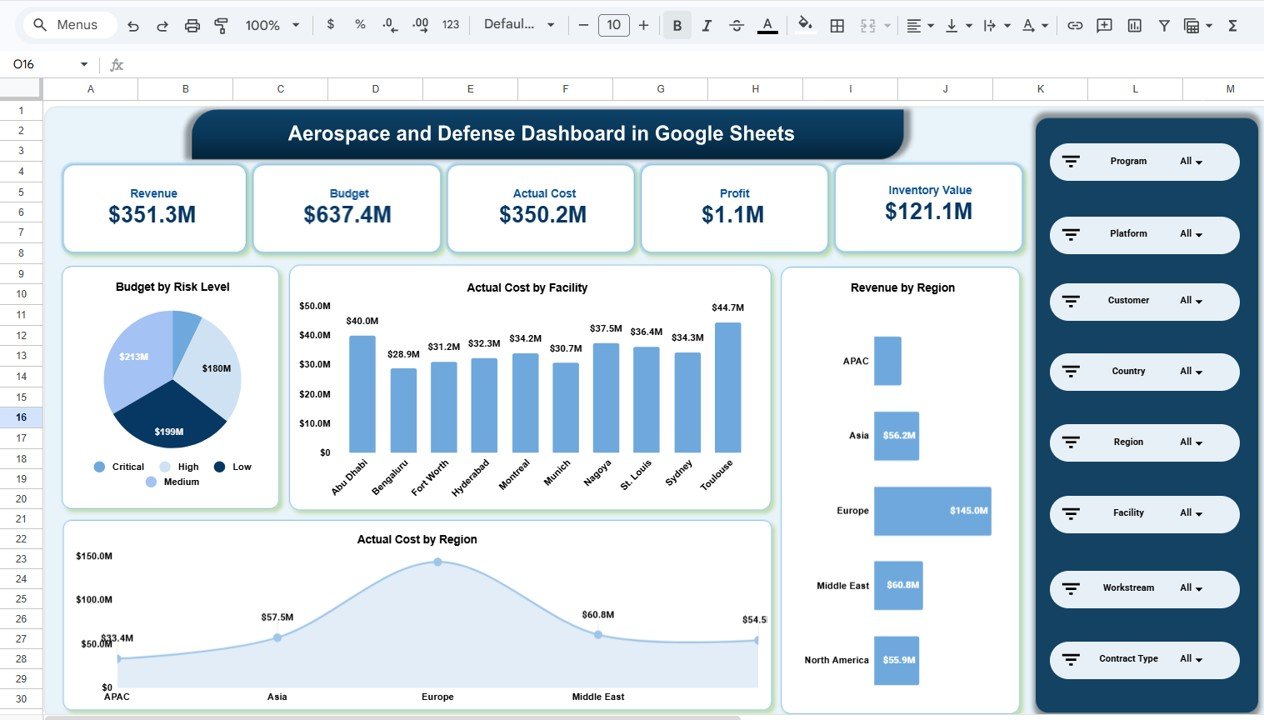
✅ Executive KPI Snapshot – Instantly view Revenue, Budget, Actual Cost, Profit, and Inventory Value.
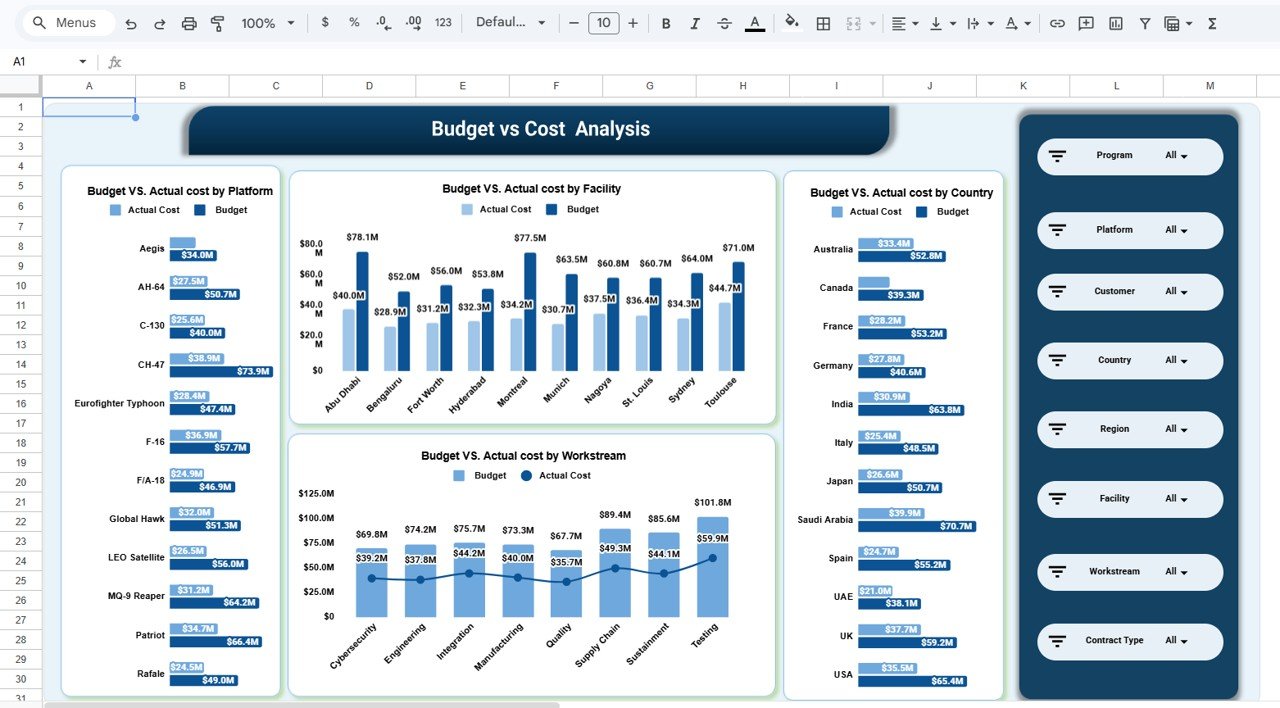
✅ Budget vs Actual Cost Analysis – Identify cost variance by platform, facility, country, and workstream.
✅ Program-Level Intelligence – Monitor MTBF, revenue, and budget by program.
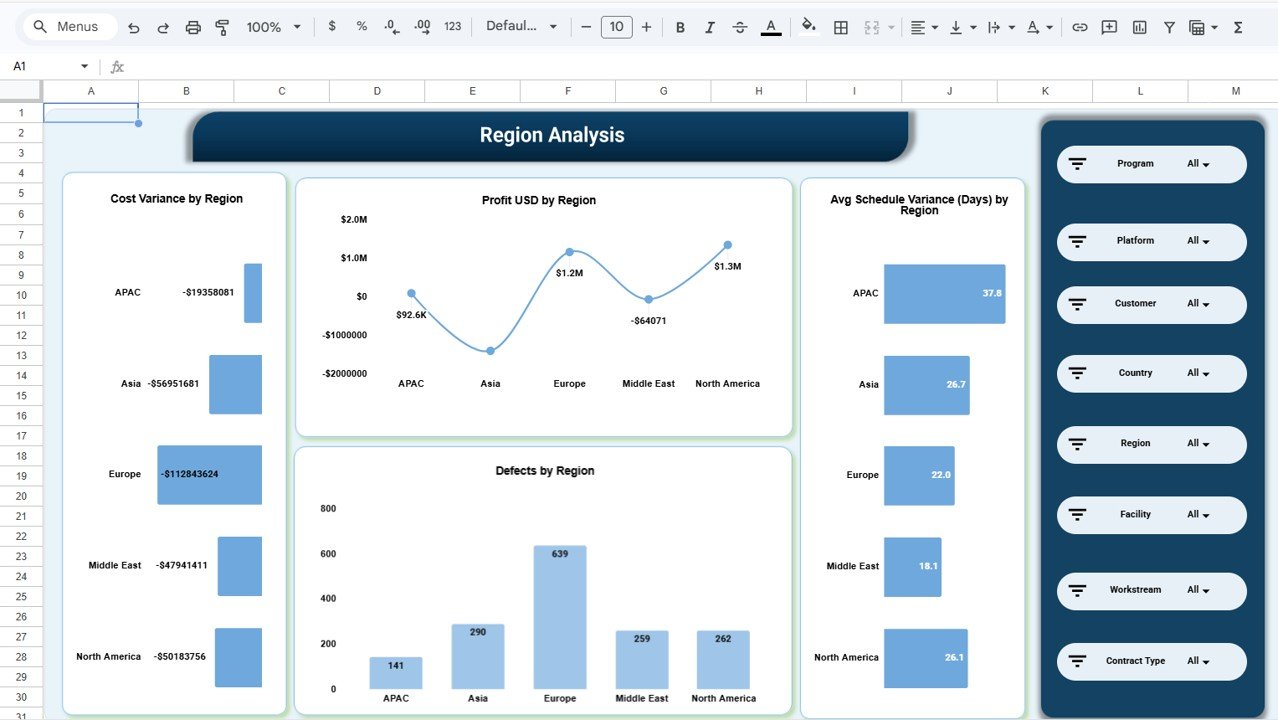
✅ Regional Performance Tracking – Analyze profit, cost variance, and schedule variance by region.
✅ Compliance & Quality Monitoring – Track cyber compliance % and defect metrics.
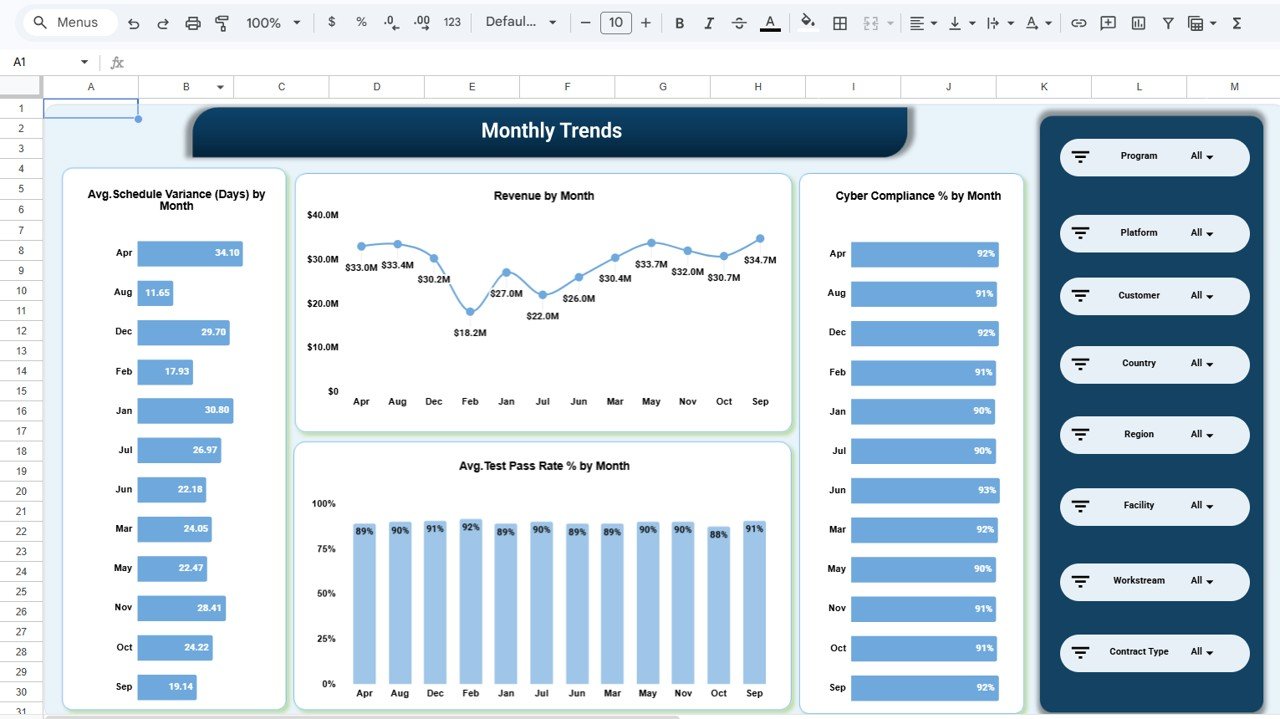
✅ Monthly Trend Analysis – Review revenue, schedule variance, and test pass rate trends.
✅ Google Sheets Collaboration – Enable secure and real-time teamwork across departments.
Because of these features, aerospace and defense leaders gain complete program visibility without expensive BI systems.
📦 What’s Inside the Aerospace and Defense Dashboard in Google Sheets
This professionally structured solution includes multiple analytical pages designed for comprehensive oversight.
1️⃣ Overview Page – Leadership Summary
Provides high-level operational clarity with:
-
Revenue
-
Budget
-
Actual Cost
-
Profit
-
Inventory Value
Visual insights include:
-
Budget by Risk Level (Critical, High, Medium, Low)
-
Actual Cost by Facility
-
Revenue by Region
-
Actual Cost by Region
This page gives executives instant financial health visibility.
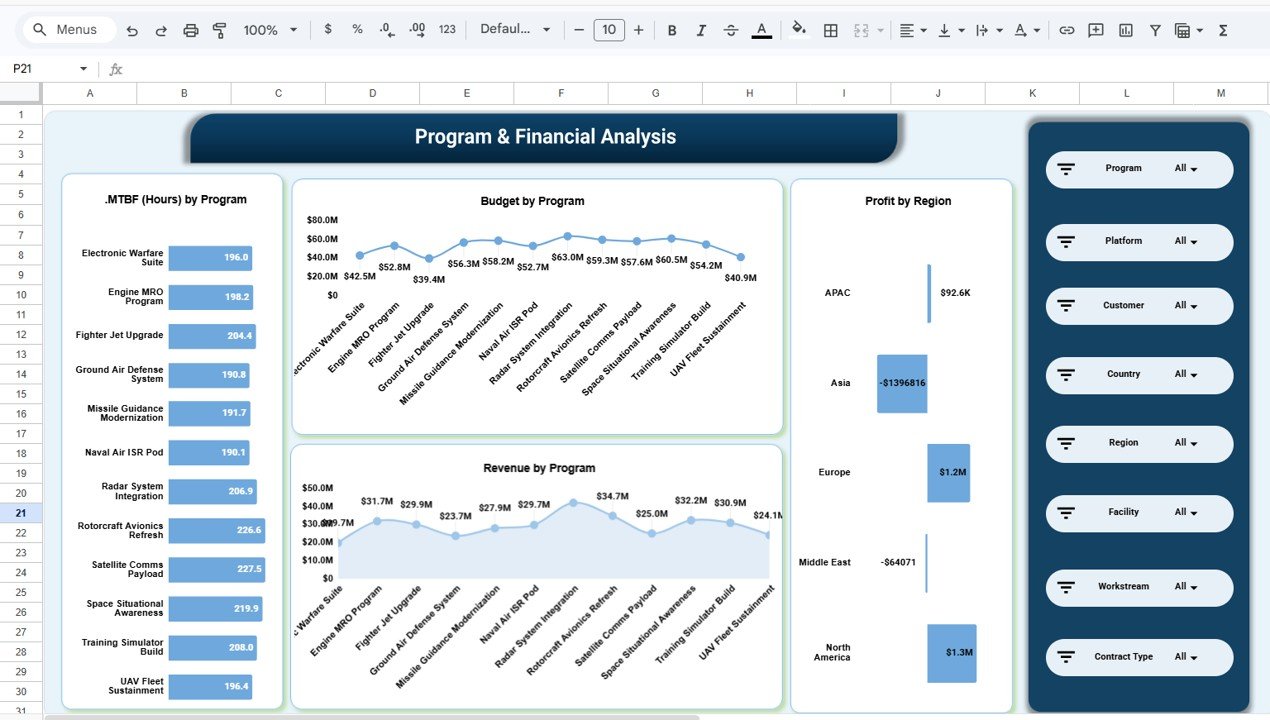
2️⃣ Program & Financial Analysis Page – Program Performance
Focuses on program-level metrics such as:
-
MTBF (Mean Time Between Failures) by Program
-
Budget by Program
-
Revenue by Program
-
Profit by Region
This helps identify strong and underperforming programs quickly.
3️⃣ Budget vs Cost Analysis Page – Variance Control
Provides detailed financial variance reports:
-
Budget vs Actual Cost by Platform
-
Budget vs Actual Cost by Facility
-
Budget vs Actual Cost by Country
-
Budget vs Actual Cost by Workstream
This ensures proactive financial risk management.
4️⃣ Region Analysis Page – Geographic Intelligence
Offers deep regional insights including:
-
Cost Variance by Region
-
Profit by Region
-
Average Schedule Variance (Days)
-
Defects by Region
This supports global operational control.
5️⃣ Monthly Trends Page – Time-Based Tracking
Monitors performance trends across:
-
Average Schedule Variance by Month
-
Revenue by Month
-
Average Test Pass Rate %
-
Cyber Compliance %
Trend visibility improves forecasting and long-term planning.
Together, these pages create a complete aerospace and defense performance intelligence system.
⚙️ How to Use the Aerospace and Defense Dashboard in Google Sheets
Getting started is straightforward:
-
Open the Google Sheets template
-
Enter financial and operational data
-
Use filters to drill down by program, region, or facility
-
Review executive KPI cards for instant clarity
-
Analyze budget vs cost variance regularly
-
Monitor compliance and schedule performance monthly
-
Use trend analysis for forecasting decisions
Within minutes, your program data transforms into strategic oversight intelligence.
👥 Who Can Benefit from This Aerospace and Defense Dashboard in Google Sheets
This dashboard is designed for organizations requiring structured program monitoring.
Perfect for:
-
✈️ Aerospace Manufacturers
-
🛡️ Defense Contractors
-
📊 Program Managers
-
💰 Financial Controllers
-
🧾 Compliance Officers
-
🏢 Executive Leadership
Because aerospace and defense operations demand disciplined oversight, this dashboard supports both strategic and operational roles.
By implementing the Aerospace and Defense Dashboard in Google Sheets, your organization gains:
-
Centralized program visibility
-
Real-time financial monitoring
-
Early cost variance detection
-
Improved compliance tracking
-
Regional performance insights
-
Smarter strategic decision-making
In high-stakes aerospace and defense environments, reactive reporting is risky. You need structured, real-time oversight.
This dashboard delivers exactly that.
🔗 Click here to read the Detailed blog post
Watch the step-by-step video tutorial: