


The best free performance appraisal template is a plain form from Microsoft Create or Vertex42 when you review a handful of staff once a year. Once you need scores, trends and reviewer consistency, a paid template pays off: the Performance Appraisal KPI Dashboard in Excel costs $12.99 and replaces scattered forms.
Last updated: November 2026
Key takeaways
- A free performance appraisal template from Microsoft Create or Vertex42 costs $0 and works for one-off annual reviews of a small team.
- Free forms record opinions but do not calculate trends, so comparing 30 or more employees across departments gets slow.
- The Performance Appraisal KPI Dashboard in Excel ($12.99) is our top pick for tracking appraisal KPIs against targets.
- The Employee Performance Review Dashboard in Google Sheets ($6.99) is the cheapest dashboard in this list and supports shared editing.
- All eight paid templates in this post together cost $89.92, but most teams need only one or two of them.
 Launch offer
SUMIFS, XLOOKUP, FILTER, LAMBDA and checking AI-written formulas, with real business projects. 11h 47m of video by PK, with practice files, quizzes and a capstone.
Free performance appraisal templates and paid upgrades compared
| Template | Format | Best For | Price |
|---|---|---|---|
| Microsoft Create appraisal forms | Word / Excel | One-off annual reviews, tiny teams | Free |
| Vertex42 generic review forms | Word / Excel | Simple scoring sheets | Free (check each file’s licence) |
| Performance Appraisal KPI Dashboard in Excel (Best overall) | Excel | KPI-based appraisals with goals | $12.99 |
| Performance Appraisal KPI Dashboard in Power BI | Power BI | MTD and YTD appraisal KPIs | $11.99 |
| Performance Appraisal KPI Dashboard in Google Sheets | Google Sheets | Cloud-based KPI appraisals | $9.99 |
| Employee Performance Review Dashboard in Excel | Excel | Department, role and reviewer analysis | $17.99 |
| Employee Performance Review Dashboard in Power BI | Power BI | Five-page review analytics with row-level security | $17.99 |
| Employee Performance Review Dashboard in Google Sheets (Best value) | Google Sheets | Shared HR review tracking | $6.99 |
| Employee Performance Review Report in Excel | Excel | Summary and employee-level report | $6.99 |
| Annual Performance Appraisal Calendar in Excel | Excel | Scheduling review dates | $4.99 |
How we picked these
We searched the Next Gen Templates catalog for products tied to performance appraisals, employee reviews and review scheduling. We kept only paid, complete tools that cover a distinct stage of the appraisal cycle: KPI tracking, score analysis, reporting or scheduling.
For the free side, we list only sources that are genuinely free to download: Microsoft Create and Vertex42. We did not include any free file we could not verify, and we excluded loosely related HR products such as payroll or recruitment sheets.
Where can I find a free performance appraisal template?
Two sources cover most needs. Microsoft Create offers editable employee evaluation and review forms that open in Word or Excel. Vertex42 publishes generic review and scoring sheets in spreadsheet formats. Always read the licence on each file before using it commercially.
A free form does one job well: it gives a manager and an employee a shared page for ratings and comments. It will not total scores across a department, compare this year to last year or show whether one reviewer scores harder than the rest.
If you search for a performance review template free or an employee performance appraisal template, you will land on this same type of form. They are a fair starting point, and the next section shows where they stop being enough.
When does a free performance appraisal form stop being enough?
Free forms break down at three points. The first is volume: once you have more than a few dozen reviews per cycle, copying scores into a master sheet takes longer than the reviews themselves. The second is consistency: without a reviewer breakdown you cannot see that one manager rates everyone as excellent.
The third is follow-up. A form captures a score once a year, but goals, deadlines and trends need a running record. That is the gap the paid templates below fill, at prices from $4.99 to $17.99.
The 8 best paid performance appraisal templates for 2026
These eight are ranked by how directly they handle appraisals, with KPI-based appraisal dashboards first. Each one is a one-time purchase, with the price shown.
1. Performance Appraisal KPI Dashboard in Excel: best overall
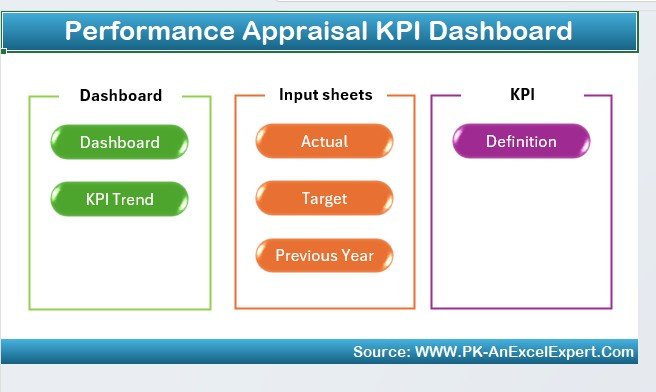
This dashboard turns appraisal criteria into tracked KPIs. It is our number one pick because it covers goals, metrics, charts and review deadlines in one workbook, and it costs $12.99.
Who it is for: HR managers, team leaders and business owners who want evaluations based on data.
- KPI tracking for productivity, quality of work, attendance, goal achievement and team collaboration
- Customizable evaluation metrics to match your own appraisal criteria
- Goal achievement tracking against company objectives
- Charts that show performance trends and top performers
- Automated reminders for review deadlines
Use cases: set quarterly goals for each employee and check progress before the annual review; compare attendance and quality scores before a salary discussion; spot the lowest-scoring KPI across a team of 20 and plan training around it; keep promotion decisions tied to recorded numbers instead of memory.
Price: $12.99. Get the performance appraisal KPI dashboard in Excel.
Best for: managers who want one Excel file to run the whole appraisal cycle.
2. Performance Appraisal KPI Dashboard in Power BI
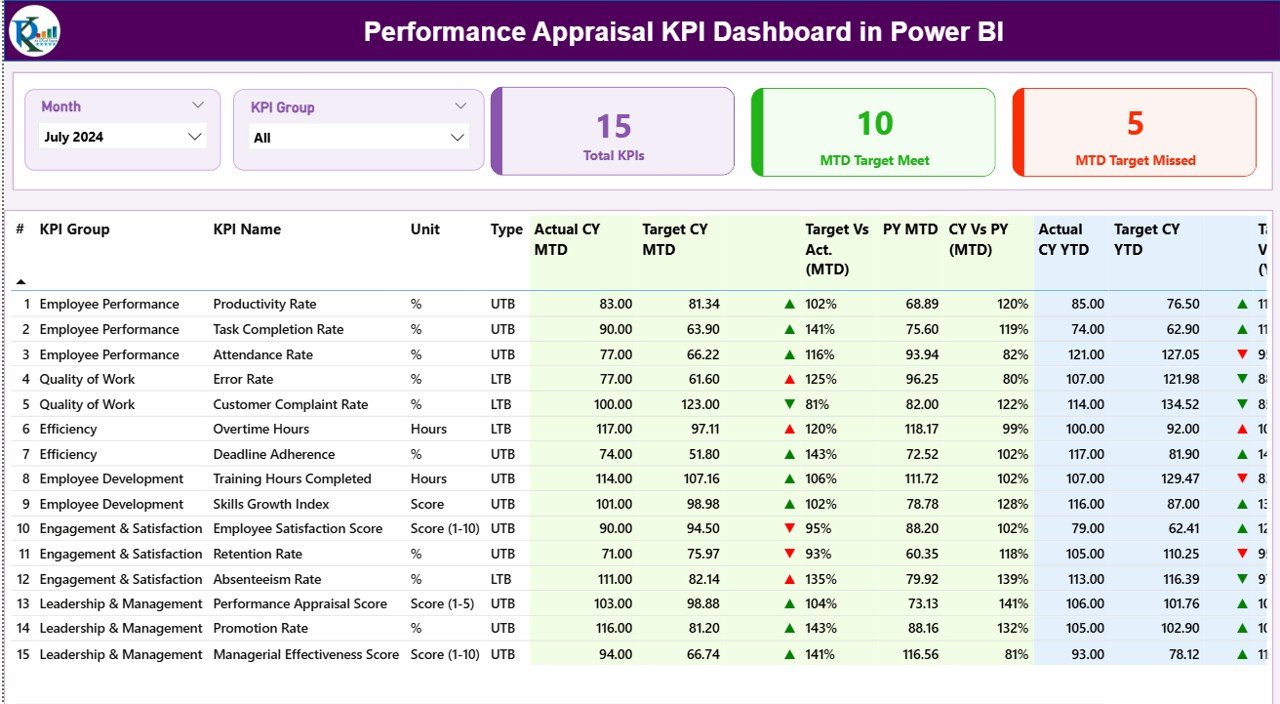
This is the Power BI version of the appraisal dashboard, priced at $11.99. It centralizes all appraisal KPIs and reads its data from Excel, so updating it needs no technical work.
Who it is for: organizations already using Power BI that want executive-ready appraisal reporting.
- MTD and YTD performance monitoring
- Month and KPI group slicers
- Green and red icons for targets met or missed
- A KPI table comparing actuals, targets and previous-year values
- Drill-through KPI definitions that explain formulas and intent
Use cases: show leadership which KPI groups missed target this month; compare current-year results to last year in one table; explain a KPI formula to an employee by drilling into its definition; filter by month to prepare for a mid-year review.
Price: $11.99. See the Power BI appraisal dashboard.
Best for: HR teams who want clear target-status icons and transparent KPI definitions.
3. Performance Appraisal KPI Dashboard in Google Sheets
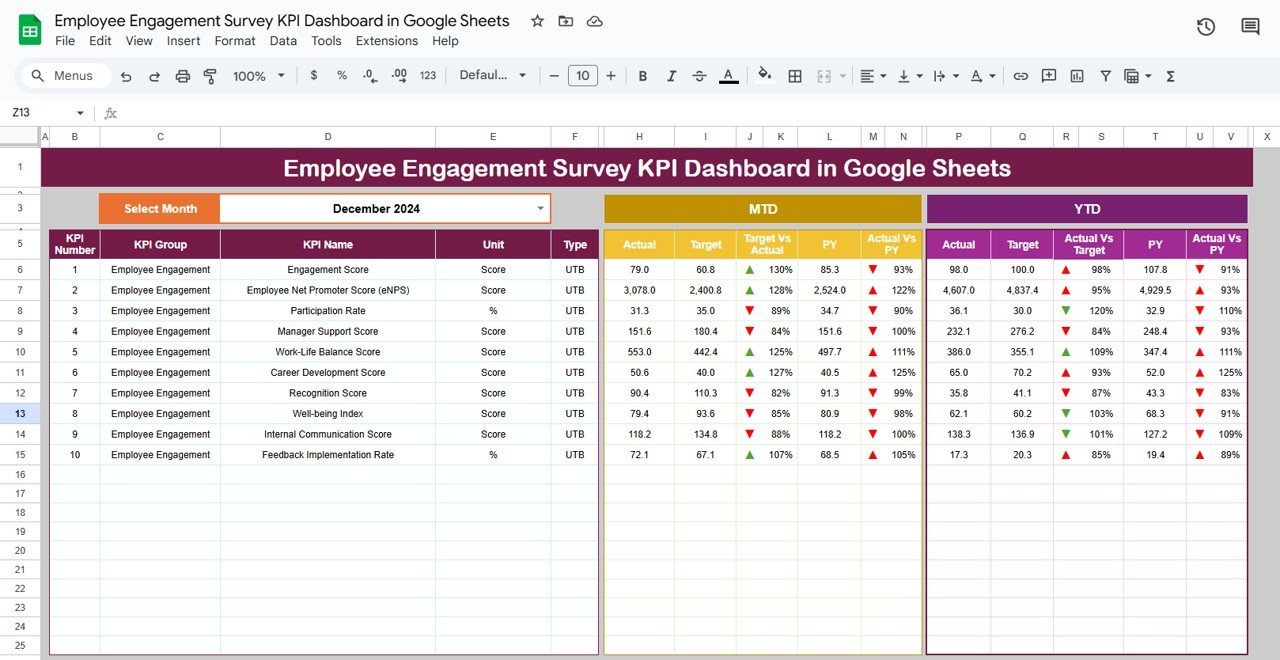
The Google Sheets edition costs $9.99 and runs fully in the browser. You update the data, select the month and the dashboard refreshes.
Who it is for: HR teams and managers who work together in a shared cloud file and do not want BI software.
- MTD and YTD appraisal tracking
- Target versus actual comparison
- Previous-year benchmarking
- KPI-wise trend analysis
- Structured KPI definitions and real-time collaboration
Use cases: let three managers enter scores at the same time; compare each KPI to the prior year; identify consistent performers and gaps; remove ambiguity by keeping KPI definitions beside the numbers.
Price: $9.99. Open the Google Sheets appraisal dashboard.
Best for: remote or hybrid teams that review together in Google Sheets.
4. Employee Performance Review Dashboard in Excel
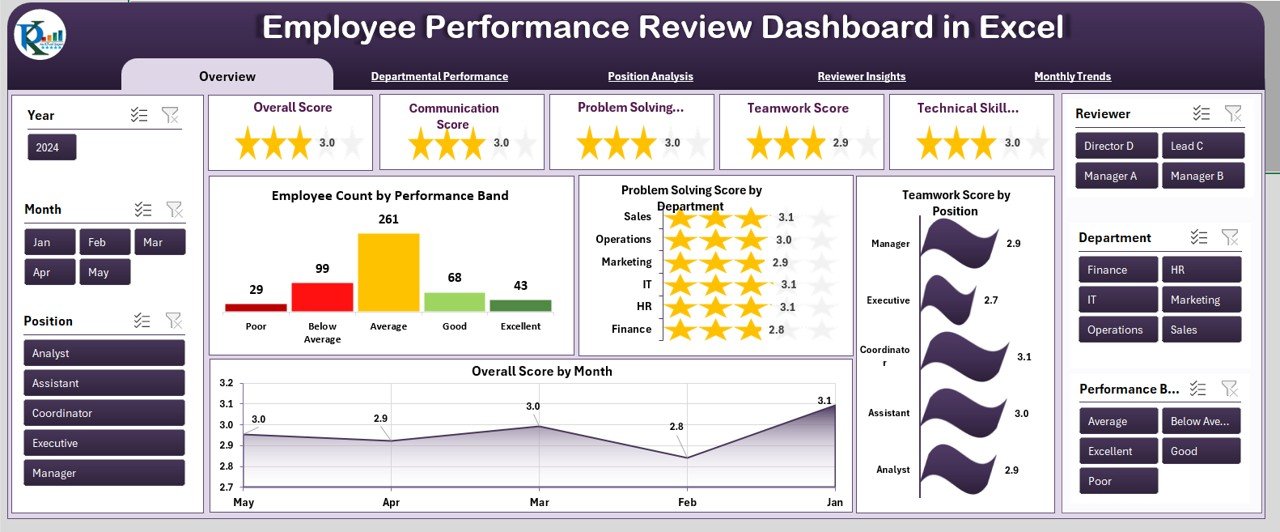
At $17.99, this is the most detailed Excel option. It analyses review scores by department, position, reviewer and month, with a page navigator at the top of every sheet.
Who it is for: HR business partners, department heads and small business owners with several teams.
- Overview page with employee count by performance band
- Departmental pages for technical skill, communication and teamwork
- Position analysis and reviewer insights
- Monthly trends including punctuality score
- Page navigator for quick movement between sheets
Use cases: see which department scores lowest on problem solving; check whether one reviewer’s scores differ from others; follow communication scores month by month; compare roles before planning training.
Price: $17.99. View the employee performance review dashboard in Excel.
Best for: multi-department companies that want to audit reviewer consistency.
5. Employee Performance Review Dashboard in Power BI
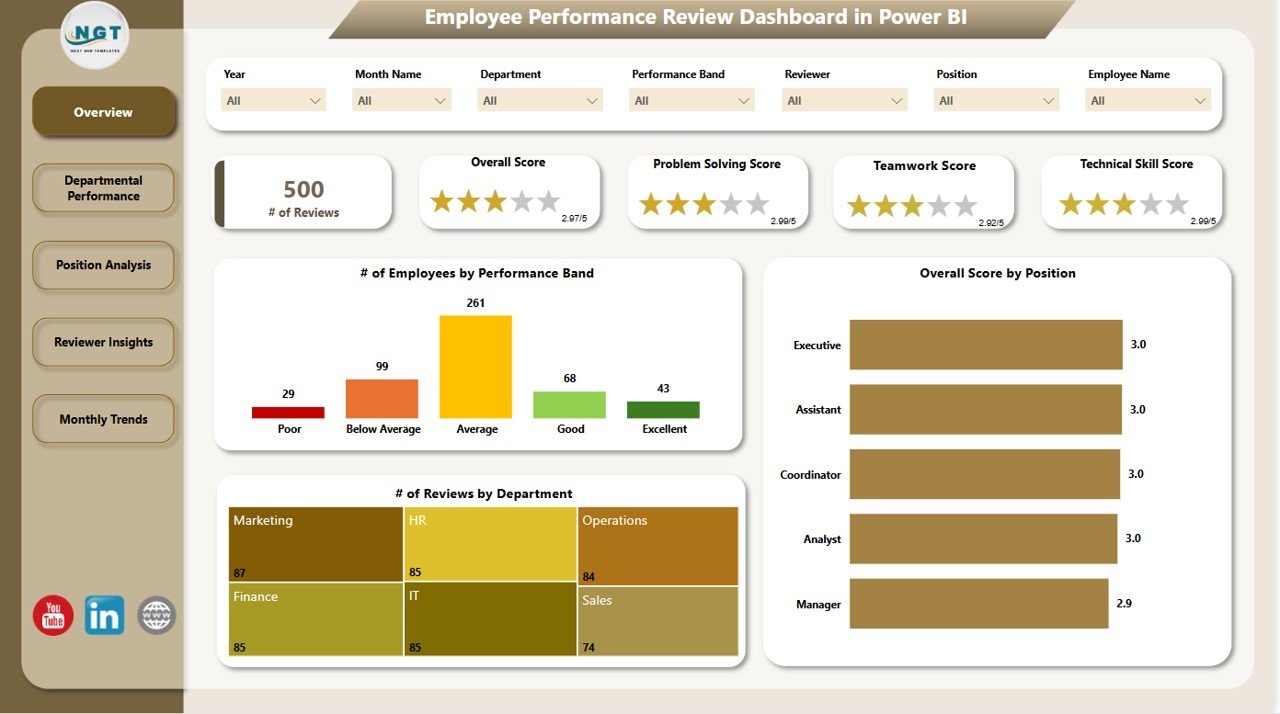
This Power BI dashboard costs $17.99 and has five pages: Overview, Department, Position, Reviewer and Monthly Trends. Each page has seven slicers.
Who it is for: HR teams that handle sensitive employee data and need access control.
- Scorecards for communication, teamwork, punctuality and technical skills
- Seven custom slicers per page
- Position and department analysis
- Reviewer insights page to check fairness
- Role-based access using Power BI row-level security
Use cases: give each department head access to only their own team; filter by date to prepare for a review meeting; compare reviewer consistency across a cycle; spot growth patterns in monthly trends.
Price: $17.99. Check the Power BI employee review dashboard.
Best for: larger organizations that need row-level security on review data.
6. Employee Performance Review Dashboard in Google Sheets: best value

At $6.99, this is the cheapest full dashboard here. It is built entirely in Google Sheets and updates charts as new data is added.
Who it is for: HR teams and managers who want collaborative review analysis at a low price.
- Overview cards for average, communication, problem-solving, teamwork and technical skill scores
- Employee count by performance band: Excellent, Good or Needs Improvement
- Departmental performance page
- Reviewer insights and monthly trends
- Multiple HR members can update together
Use cases: find which department needs problem-solving training; see overall score by month across the year; let several HR staff enter data at once; band your team to decide where coaching goes first.
Price: $6.99. Get the Google Sheets review dashboard.
Best for: small teams that want the lowest-cost route from forms to a dashboard.
7. Employee Performance Review Report in Excel
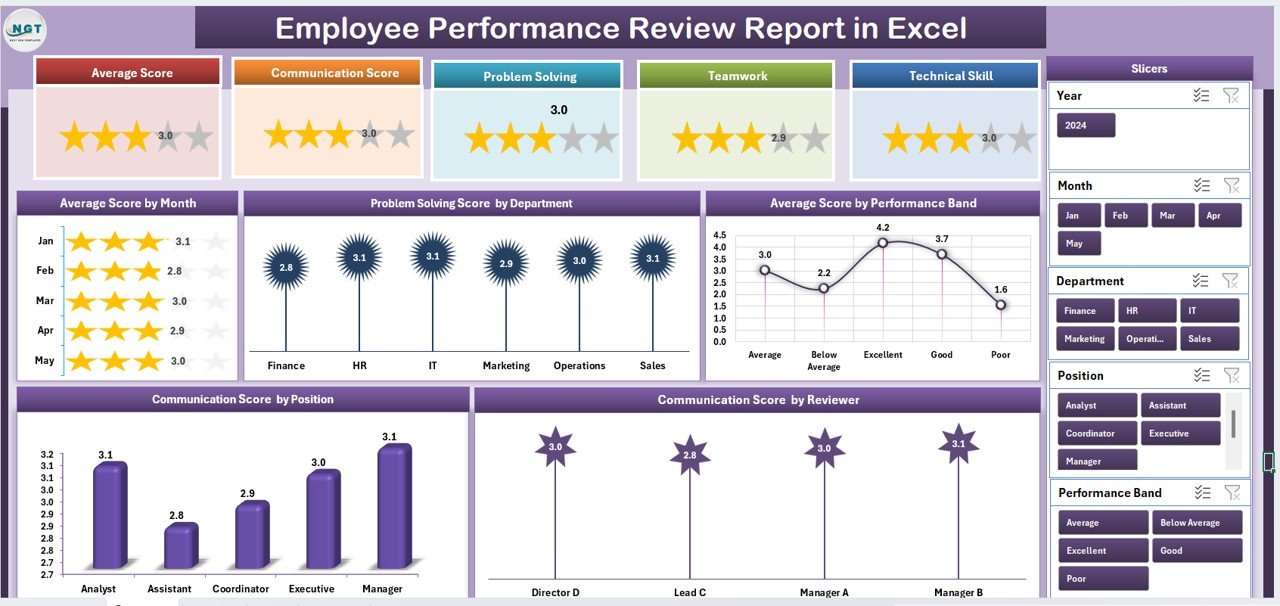
This $6.99 workbook has a summary page, an employee-level report page, a data sheet and a support sheet. It is 100% Excel with no extra software.
Who it is for: HR teams, managers and small businesses that want a report to bring to review meetings.
- KPI cards for top and low performers and average scores
- Charts by department, position and reviewer
- Slicers for department, reviewer, position or month
- Employee-level records across communication, problem solving, teamwork, leadership and innovation
- Central data sheet that updates every page
Use cases: print an employee’s detailed page for a one-to-one; identify skill gaps by position; filter to one reviewer’s scores; list your lowest performers before a training budget meeting.
Price: $6.99. Download the employee performance review report in Excel.
Best for: managers who need a per-employee report page for review conversations.
8. Annual Performance Appraisal Calendar in Excel

The calendar does one thing: it schedules reviews. It costs $4.99 and is the lowest-priced product in this post.
Who it is for: HR coordinators and managers who miss review dates.
- Annual, monthly and daily views
- Five color themes and weekday highlighting
- Add, update and delete review events
- Adjustable starting month, week and year to match your fiscal year
- Home sheet with quick navigation buttons
Use cases: plan all annual reviews at the start of the year; move the calendar to a fiscal year that starts in April; see a busy month at a glance before you book more sessions; pair it with any free form.
Price: $4.99. Get the annual performance appraisal calendar in Excel.
Best for: pairing with a free appraisal form so reviews happen on time.
Mid-post CTA: start with the top pick
If you only buy one template, the Performance Appraisal KPI Dashboard in Excel at $12.99 covers goals, KPIs, charts and reminders. For the lowest entry price with a full dashboard, choose the Google Sheets review dashboard at $6.99. Watch walkthroughs on the Next Gen Templates YouTube channel.
How do I choose between a free form and a paid template?
| Your situation | Pick |
|---|---|
| Fewer than 10 employees, one review a year | Free form from Microsoft Create or Vertex42 |
| Need KPIs, goals and deadlines | Performance Appraisal KPI Dashboard in Excel, $12.99 |
| Team works in Google Sheets | Google Sheets dashboards, $9.99 or $6.99 |
| Company reports in Power BI | Power BI dashboards, $11.99 or $17.99 |
| Need to audit reviewers across departments | Employee Performance Review Dashboard, Excel or Power BI |
| Reviews keep slipping | Annual Performance Appraisal Calendar, $4.99 |
A simple rule: if you spend more than an hour per cycle copying scores into a master sheet, a template under $20 pays for itself. For a wider comparison, read our guide to performance review templates in Excel and Google Sheets.
Bundle-versus-single maths
All eight templates add up to $89.92. Most teams do not need that. A typical pairing is the KPI dashboard ($12.99) plus the calendar ($4.99), which is $17.98. A Google Sheets team could pair the review dashboard ($6.99) with the calendar ($4.99) for $11.98. These are sums of the individual prices, not a bundle discount.
When a template is NOT the right answer
A template is the wrong tool in some cases. If you have hundreds of employees and need approvals, e-signatures, 360-degree feedback and payroll integration, buy dedicated HR software. Tools such as BambooHR or Lattice cover workflows a spreadsheet cannot.
If you only review five people a year, a free form is enough and a dashboard is wasted money. If your company forbids employee data in personal spreadsheets or cloud files, use the HR system your IT team already approves. The Power BI dashboards offer row-level security, but check your data policy before loading review scores anywhere.
Finally, no template fixes poor appraisal criteria. If managers do not agree on what a good score means, a dashboard will only display that disagreement faster.
Related reading on performance tracking
Teams that track appraisals often also want group-level views. See our picks for team performance dashboards, the guide to quality assurance dashboards in Google Sheets and Power BI, and the roundup of supplier management Excel templates for vendor performance tracking. For factory teams, there is also the apparel manufacturing KPI dashboard in Power BI.
Frequently asked questions
What is a performance appraisal template?
A performance appraisal template is a structured form or spreadsheet for rating an employee against set criteria such as quality, teamwork and goals. It gives managers a consistent format, records scores and comments, and makes year-to-year comparison possible. Simple versions are a single page; advanced ones are dashboards.
Where can I get a free performance appraisal template?
Microsoft Create and Vertex42 both offer free review and evaluation forms in Word or Excel. Download one, adapt the rating criteria to your roles and check the licence on the file. They suit small teams reviewing once a year.
Is there a free performance review template for Excel?
Yes. Microsoft Create and Vertex42 provide free Excel-based review and scoring sheets. They record ratings well but do not usually build dashboards. If you want charts, trends and reviewer analysis, paid options start at $6.99 for the Employee Performance Review Report in Excel.
What should an employee performance appraisal include?
It should include the employee and reviewer names, review period, clear rating criteria, scores for skills such as communication, problem solving and teamwork, goal progress, written comments and agreed development actions. Adding targets and previous-year results makes the appraisal more objective and easier to defend.
How often should performance appraisals be done?
Many organizations run a formal appraisal once or twice a year, with lighter check-ins in between. The right rhythm depends on your business. Whatever you choose, schedule it in advance. The Annual Performance Appraisal Calendar in Excel ($4.99) helps you plan every review date.
When is it worth paying for an appraisal template?
Pay when you review more than a few employees, need KPIs against targets, or want to compare departments and reviewers. If copying scores into a master sheet takes over an hour per cycle, a $6.99 to $17.99 template usually saves more time than it costs.
Can I run performance appraisals in Google Sheets?
Yes. The Performance Appraisal KPI Dashboard in Google Sheets ($9.99) tracks target versus actual, previous-year comparison and KPI trends. The Employee Performance Review Dashboard in Google Sheets ($6.99) adds department and reviewer analysis. Both allow several HR users to work in one shared file.
Which format is better: Excel, Google Sheets or Power BI?
Excel suits offline work and detailed customization. Google Sheets suits shared editing in the browser. Power BI suits interactive reporting, slicers and row-level security. Choose the tool your team already uses, because adoption matters more than format.
Can a dashboard make appraisals fairer?
It can help. Dashboards with reviewer insights show whether some reviewers score consistently higher or lower, and KPI definitions keep criteria clear. They cannot replace calibration conversations between managers, but they give those conversations real numbers to work from.
Get more performance appraisal templates
Start free if your needs are simple, then move up when forms stop scaling. The Performance Appraisal KPI Dashboard in Excel is $12.99, and the Employee Performance Review Dashboard in Google Sheets is $6.99. Tutorials and demos are on the Next Gen Templates YouTube channel.