

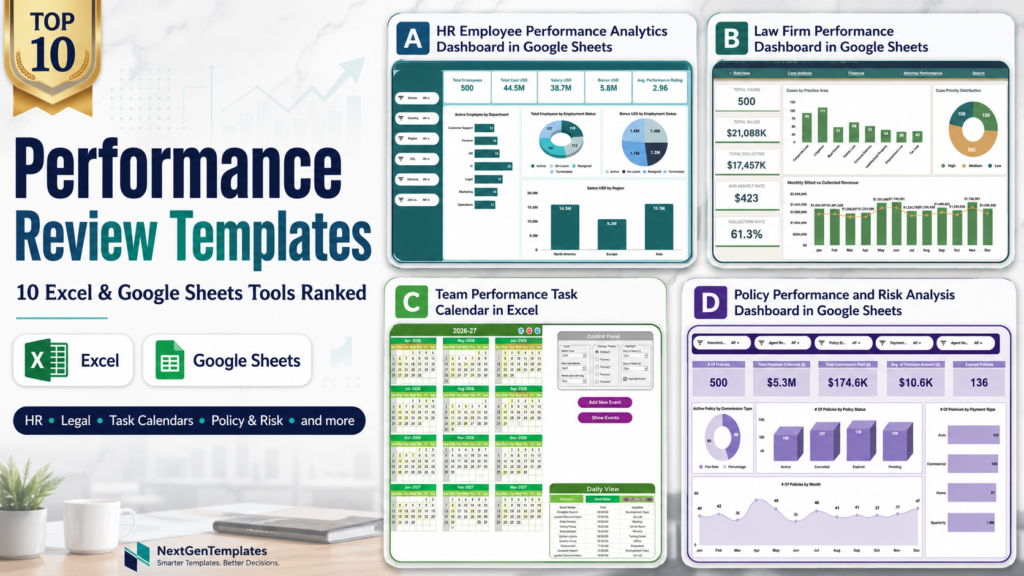
A good performance review template turns scattered notes, ratings, schedules, and KPI evidence into a manager-ready employee appraisal system. For many US teams, quarterly reviews and annual appraisal cycles still happen in messy spreadsheets, disconnected HR files, and last-minute manager emails. That creates two problems: managers spend too much time preparing the review, and HR teams struggle to compare performance consistently across departments, locations, and business units.
Dedicated performance management SaaS can be valuable, but it is not always the right first step. For example, 15Five lists its Perform plan at $11 per user per month, billed annually. A 25-person team can quickly reach $3,300 per year before add-ons, while the most expensive template in this roundup is a one-time $17.99 Excel purchase. This guide compares 10 Excel and Google Sheets tools from NextGenTemplates for managers, HR teams, operations leaders, IT teams, legal teams, and compliance owners who need a practical performance dashboard without rolling out a full HR suite.
Comparison Table: 10 Performance Review Templates Ranked
| Template | Format | Best For | Price |
|---|---|---|---|
| #1 HR Employee Performance Analytics Dashboard in Google Sheets | Google Sheets | HR employee appraisal analytics, workforce cost, and performance trends | $6.99 |
| #2 Law Firm Performance Dashboard in Excel | Excel | Legal team performance, billing, collections, and attorney productivity | $17.99 |
| #3 Law Firm Performance Dashboard in Google Sheets | Google Sheets | Collaborative law firm performance reviews and practice-area reporting | $9.99 |
| #4 Team Performance Task Calendar in Excel | Excel | Task deadlines, review prep, and team accountability calendars | $4.99 |
| #5 Team Performance Project Calendar In Excel | Excel | Project milestones, manager check-ins, and review-cycle planning | $4.99 |
| #6 Team Performance Staff Duty Calendar in Excel | Excel | Duty rosters, staff schedules, and operational performance routines | $4.99 |
| #7 Team Performance Compliance Calendar in Excel | Excel | Compliance training, audit schedules, and policy review accountability | $4.99 |
| #8 Team Performance Event Calendar In Excel | Excel | Employee events, training sessions, and review meeting scheduling | $4.99 |
| #9 Policy Performance and Risk Analysis Dashboard in Google Sheets | Google Sheets | Policy performance, risk ownership, and insurance operations reviews | $9.99 |
| #10 Network Performance KPI Dashboard in Google Sheets | Google Sheets | IT performance reviews, uptime KPIs, and technical team scorecards | $9.99 |
Why Performance Review Templates Matter Now
Employee engagement is still under pressure: Gallup reported that only 31% of US employees were actively engaged in 2025, unchanged from 2024 after falling from a 2020 peak. That makes quarterly check-ins, visible goals, and clean appraisal records more important, not less.
Development conversations are a weak spot: Gallup also found that only 31% of employees strongly agreed that someone at work encourages their development, while 28% strongly agreed their opinions count. A structured employee appraisal process helps managers prepare better development conversations instead of relying on memory.
Retention risk shows up in review season: Gallup noted that 51% of employees were actively looking or keeping an eye out for job openings. A performance dashboard cannot fix culture alone, but it can help managers identify coaching gaps, workload imbalance, and missed follow-ups before annual reviews become exit interviews.
Manager time has a real cost: The US Bureau of Labor Statistics reported private-industry management, professional, and related occupations at $67.21 per hour in total compensation in December 2025. Saving even a few hours per appraisal cycle can matter when several managers are preparing reviews at once.
Per-seat SaaS adds up: Lattice lists a $11 seat/month package and notes a $4,000 minimum annual agreement on its pricing page. Templates are not a replacement for enterprise HRIS governance, but they are a low-risk way to standardize review evidence before buying bigger software.
The 10 Best Performance Review and Performance Dashboard Templates
#1. HR Employee Performance Analytics Dashboard in Google Sheets
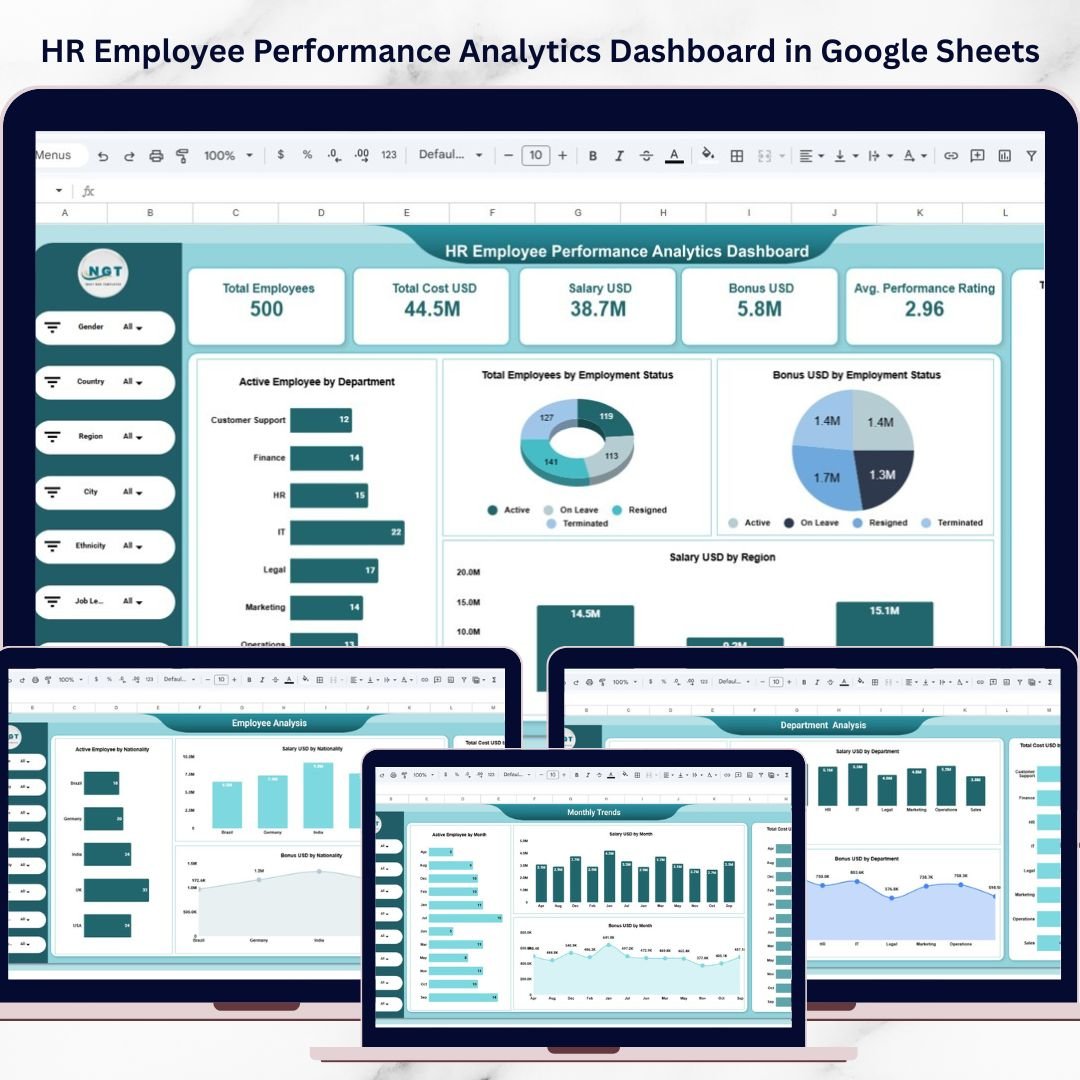
This is the strongest overall performance review template in the list because it was built around employee analytics, workforce cost, compensation, departments, regions, and average performance ratings. HR teams can use it to bring review evidence into one Google Sheets dashboard instead of building a new spreadsheet every appraisal cycle. It works especially well when HR needs a shareable dashboard for managers who want a clear view of total employees, salary cost, bonus distribution, workforce trends, and employee performance indicators.
Screenshot section: The featured image shows a polished HR dashboard layout with KPI cards, workforce visuals, and filter-ready reporting. Inside the template are five analytical pages: Overview, Region Analysis, Department Analysis, Employee Analysis, and Monthly Trends. That gives HR enough structure for annual reviews, quarterly check-ins, and leadership reporting.
- Prepare employee appraisal meetings with performance and compensation context.
- Compare workforce cost by department, region, or employee group.
- Track monthly HR trends before quarterly review discussions.
- Give department managers a collaborative Google Sheets performance dashboard.
Price: $6.99. Get the HR Employee Performance Analytics Dashboard in Google Sheets.
#2. Law Firm Performance Dashboard in Excel
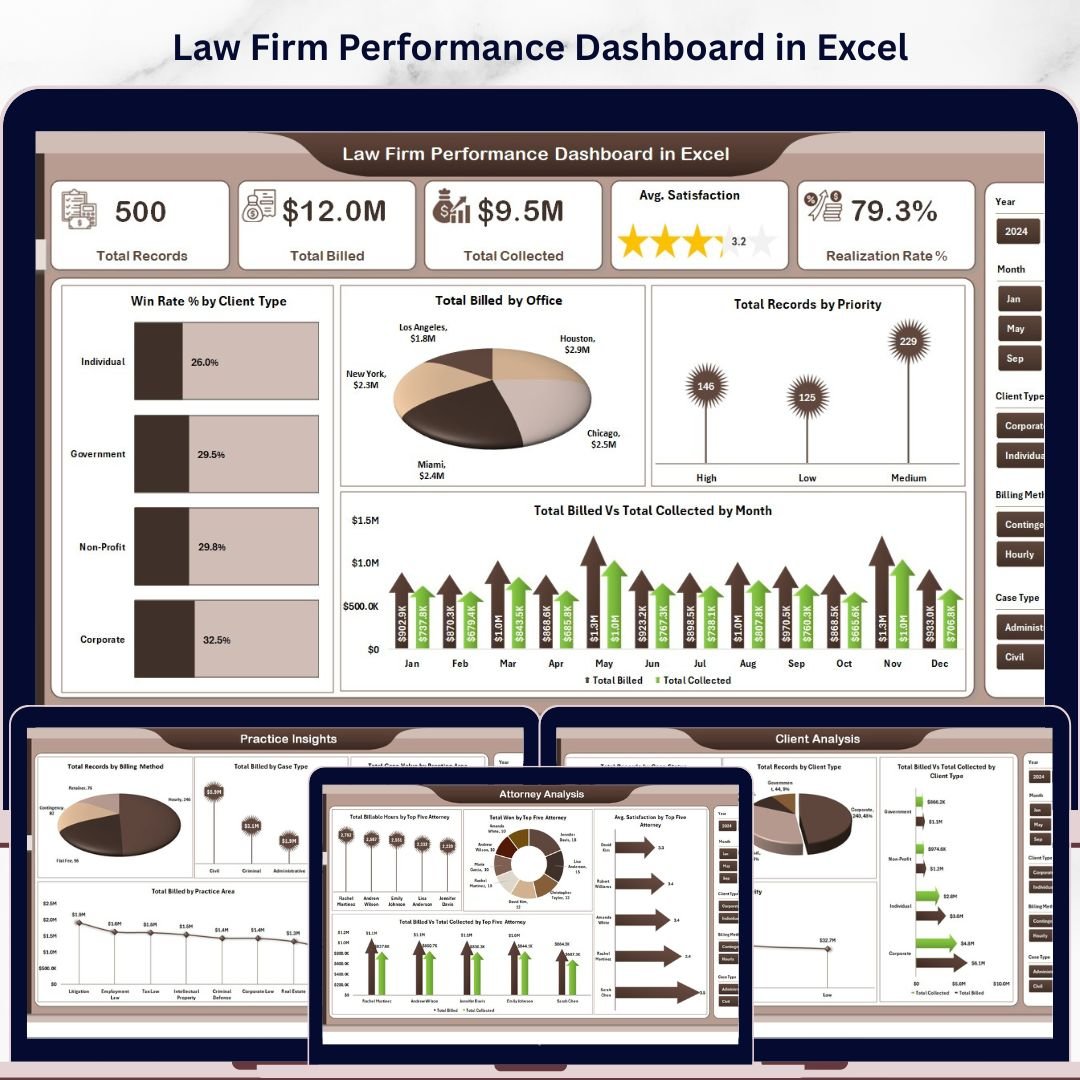
The Law Firm Performance Dashboard in Excel ranks high because it connects performance reviews to measurable legal operations outcomes. Managing partners and legal operations managers can evaluate attorney productivity, billed versus collected revenue, realization rate, client satisfaction, practice area performance, and financial trends. That makes it much more useful than a generic employee appraisal form for law firms where the review conversation needs evidence from billing, collections, case priorities, and client outcomes.
Screenshot section: The dashboard includes five interactive pages: Overview, Attorney Analysis, Practice Insights, Client Analysis, and Financial Trend. The screenshot shows a professional dashboard design with KPI cards and charts built for partner meetings. Since it is an Excel dashboard, it is well suited for teams that already manage legal reporting in Microsoft Excel.
- Review attorney performance using billable hours, wins, and collection metrics.
- Prepare partner-level scorecards for quarterly performance conversations.
- Compare practice areas by revenue, case value, and billing method.
- Support compensation discussions with cleaner performance dashboard evidence.
Price: $17.99. Get the Law Firm Performance Dashboard in Excel.
#3. Law Firm Performance Dashboard in Google Sheets
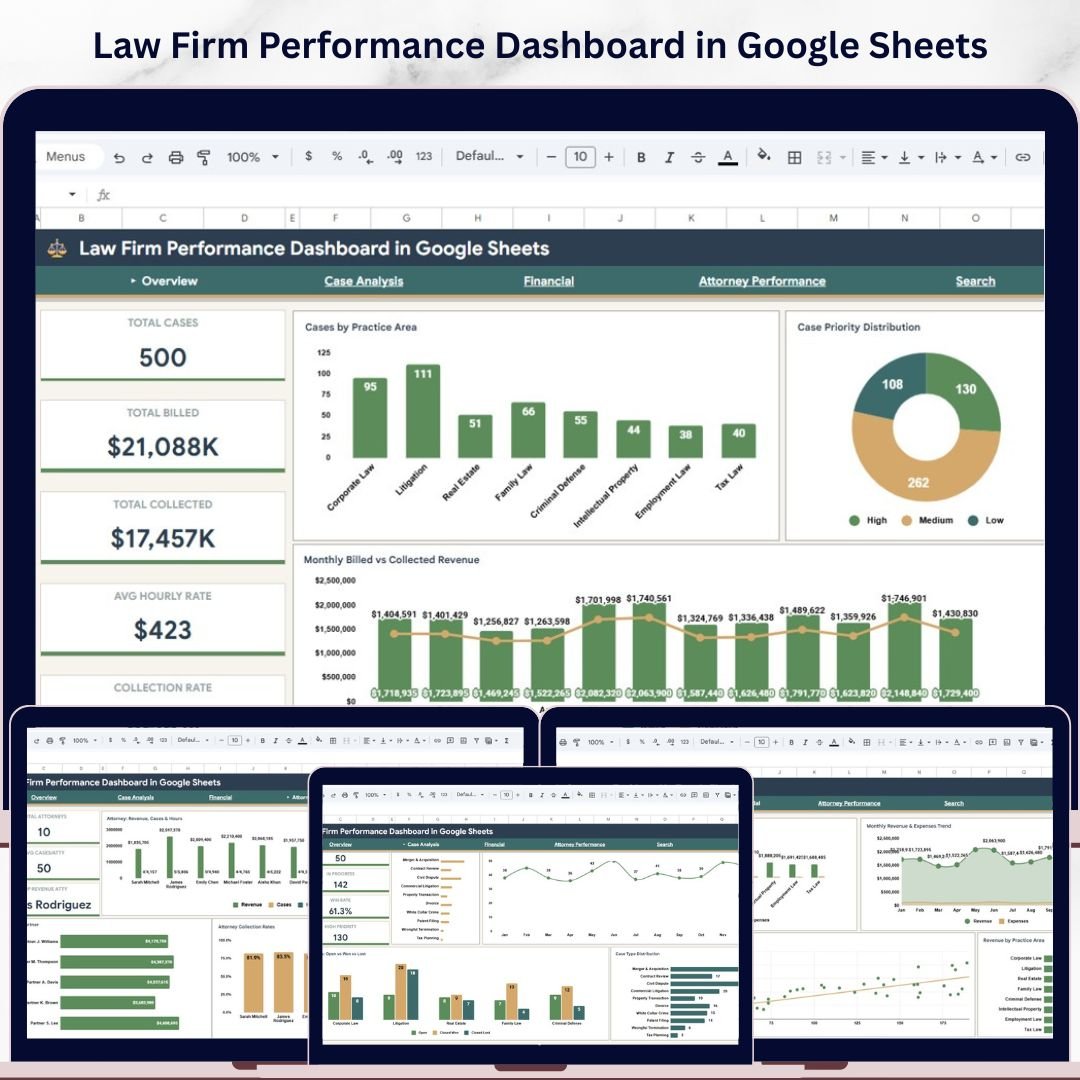
This Google Sheets version is best for firms that want cloud collaboration during performance review season. It tracks law firm operations through case management, billing, collections, attorney revenue, case priority, case status, and practice-area analysis. The main advantage over the Excel version is accessibility: managers, administrators, finance leads, and partners can review the same file in Google Drive without passing attachments around.
Screenshot section: The product includes six pages: Overview, Case Analysis, Financial, Attorney Performance, Search, and Data Sheet. The screenshot shows a dashboard-style layout with KPI cards and charts that can support attorney reviews, monthly operations meetings, and annual appraisal packets. The Search page is useful when a manager needs to pull a case record quickly during a review discussion.
- Run collaborative attorney performance reviews in Google Sheets.
- Track billed, collected, average hourly rate, and collection rate KPIs.
- Filter legal performance data by practice area, priority, case status, or time period.
- Use case lookup during manager, partner, or finance review meetings.
Price: $9.99. Get the Law Firm Performance Dashboard in Google Sheets.
#4. Team Performance Task Calendar in Excel
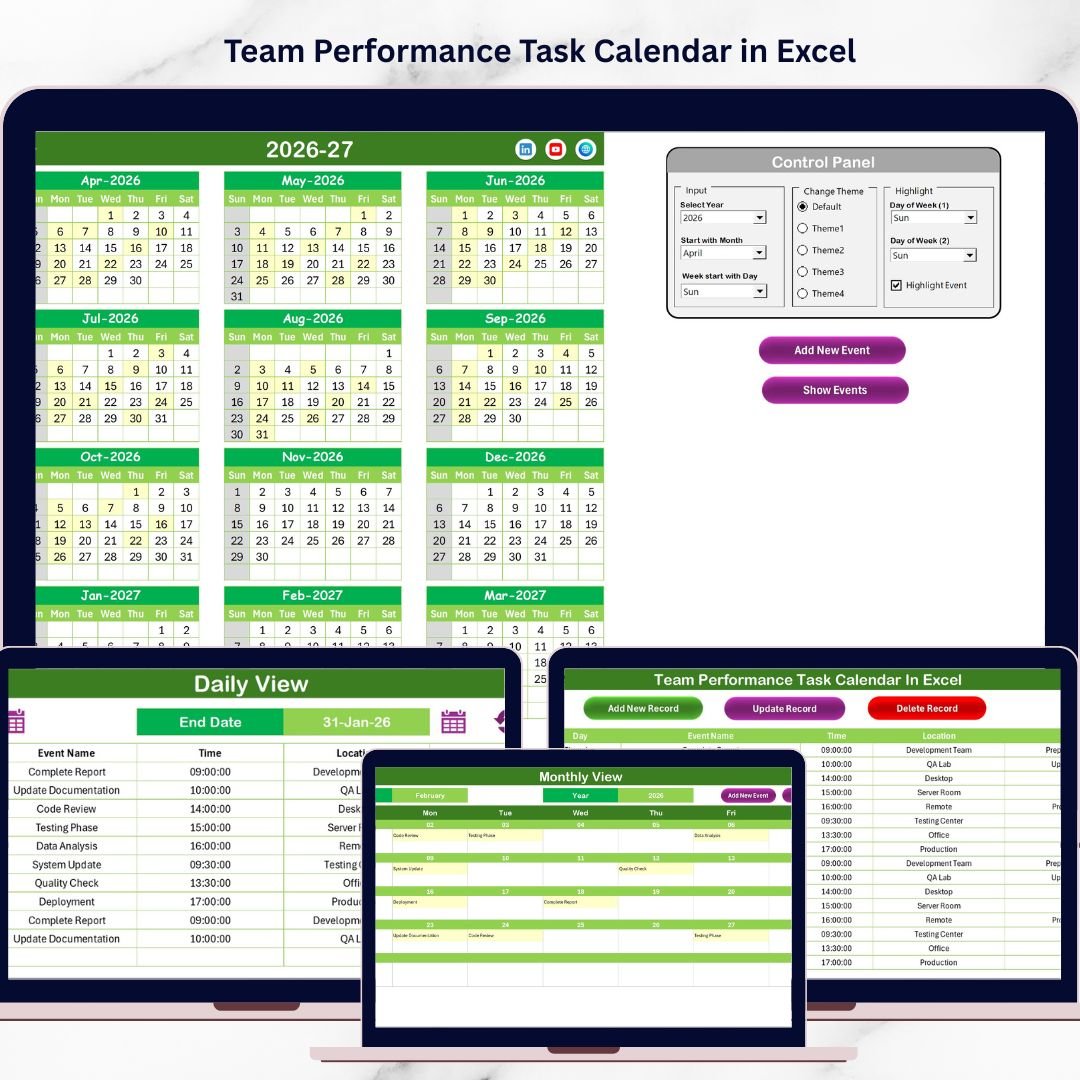
A performance review process breaks down when managers cannot reconstruct what happened during the quarter. The Team Performance Task Calendar in Excel helps solve that problem by organizing meetings, deadlines, performance tasks, and team activities in annual, monthly, and daily views. It is not an analytics dashboard, but it is a strong operational companion for employee appraisal preparation because it gives managers a visible history of tasks, deadlines, and follow-ups.
Screenshot section: The featured image shows the Excel calendar interface. Inside the workbook are five sheets: Home, Annual View, Monthly View, Daily View, and Events. The Events sheet acts as the database for review checkpoints, task deadlines, meetings, training sessions, and performance follow-ups.
- Schedule quarterly check-ins and annual appraisal meetings.
- Track task deadlines that should be discussed during reviews.
- Keep manager follow-ups visible across a full year.
- Use daily event tracking to prepare accurate review notes.
Price: $4.99. Get the Team Performance Task Calendar in Excel.
#5. Team Performance Project Calendar In Excel
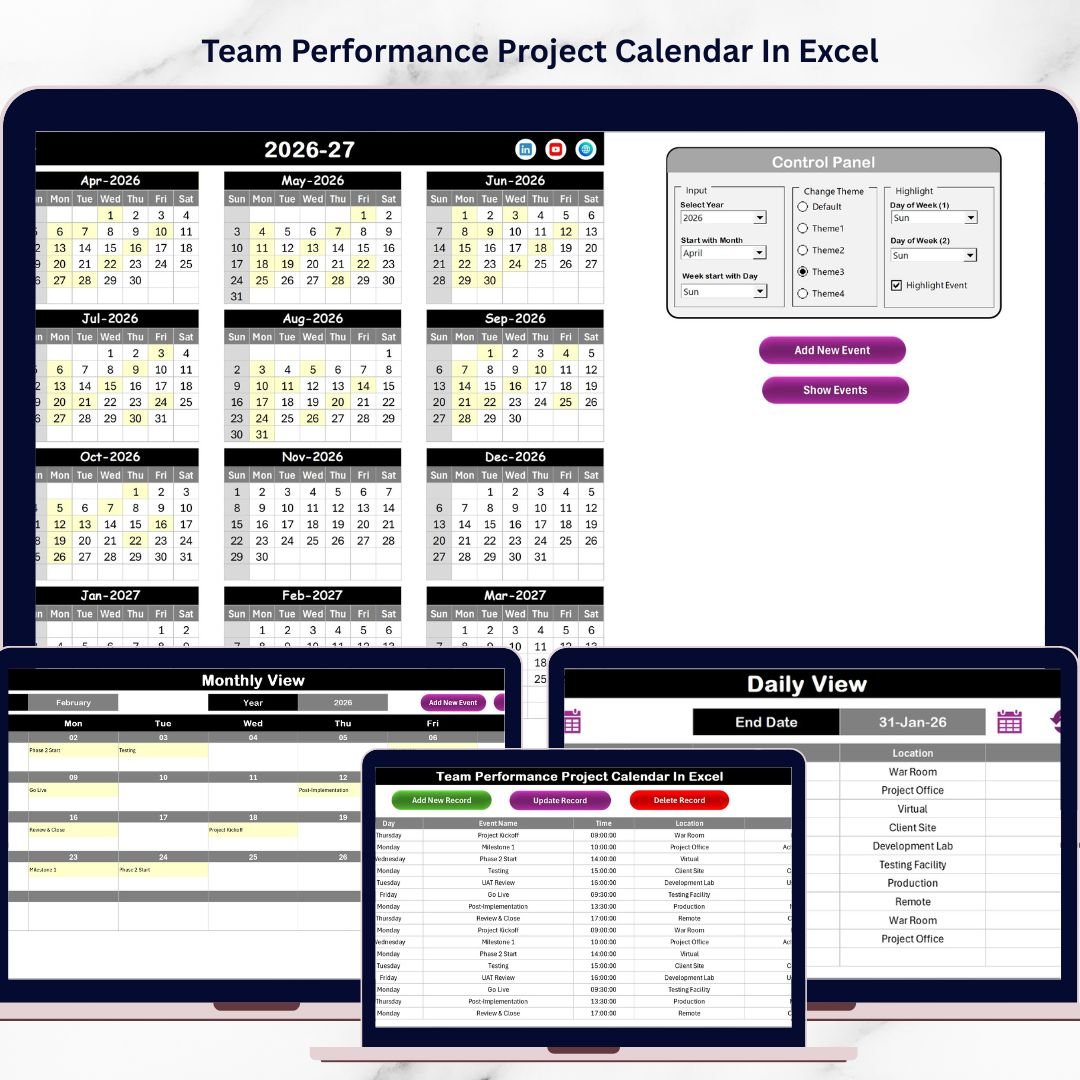
For project-based teams, employee appraisal conversations often depend on milestones, delivery dates, meetings, and project accountability. The Team Performance Project Calendar In Excel gives managers a structured calendar system for tracking project activity throughout the year. It is useful for teams that do not need a full project management SaaS tool but still want a manager-friendly record of what was scheduled, completed, delayed, or escalated.
Screenshot section: The product includes a Home sheet, Annual View, Monthly View, Daily View, and Events Sheet. The screenshot highlights the project calendar interface and its workbook-style planning structure. Managers can use the annual view for long-term review cycles and the daily view for detailed event evidence.
- Plan project review milestones and appraisal checkpoints.
- Track meetings, deadlines, and team activities in one Excel workbook.
- Prepare quarterly performance notes based on project timelines.
- Give project managers a simple alternative to per-user planning tools.
Price: $4.99. Get the Team Performance Project Calendar In Excel.
#6. Team Performance Staff Duty Calendar in Excel
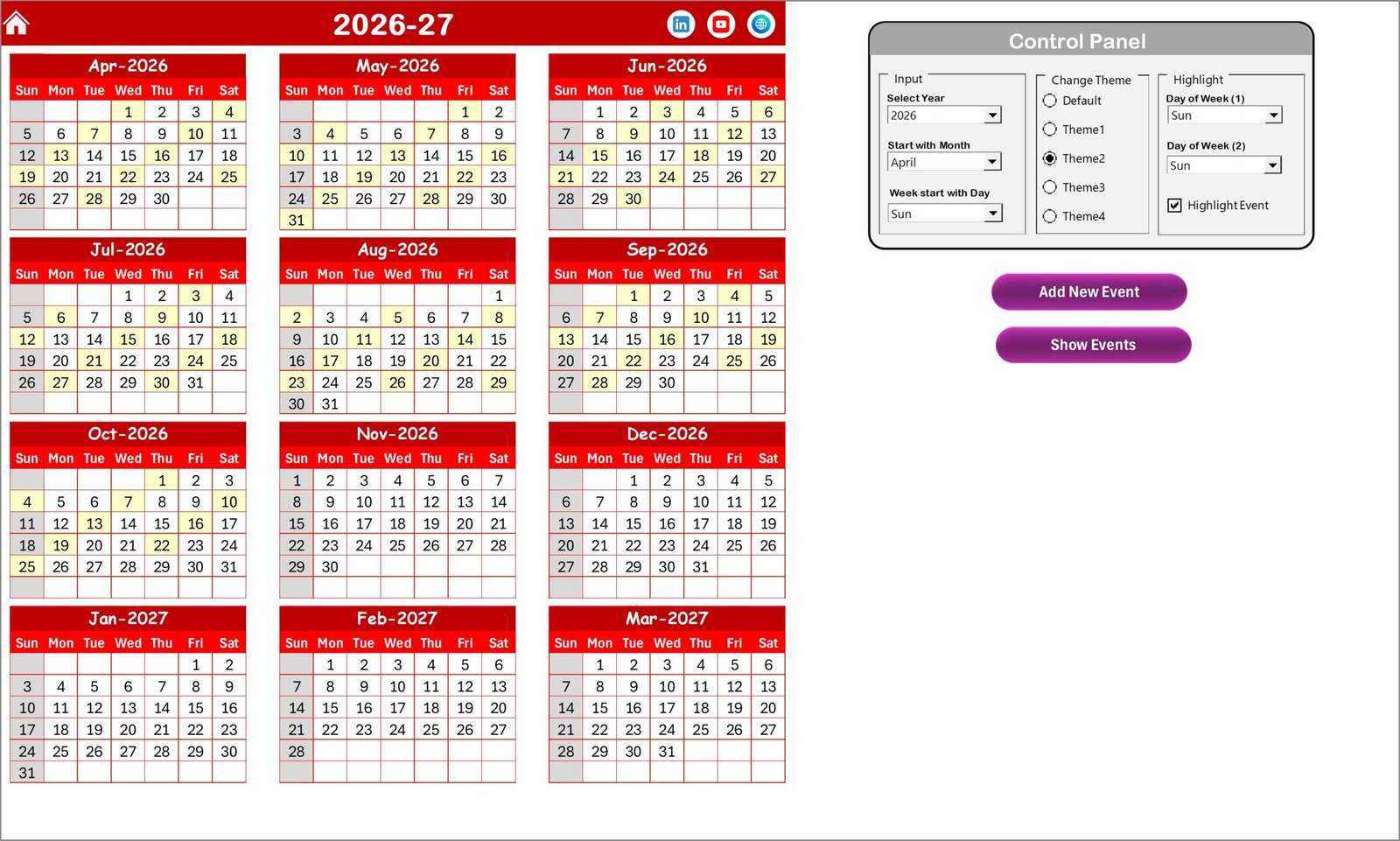
The Team Performance Staff Duty Calendar in Excel is best for operations-heavy teams where review conversations depend on staffing coverage, duty assignments, schedule discipline, and event coordination. It helps managers track responsibilities across annual, monthly, and daily views, which is valuable when performance reviews need more than subjective feedback. For HR teams, it can also support attendance-related conversations, duty rotation planning, and operational accountability.
Screenshot section: The screenshot shows the workbook calendar design. Inside are five interactive worksheets: Home, Annual View, Monthly View, Daily View, and Events. The template also includes an event management structure with event IDs, dates, times, locations, and descriptions.
- Track staff duties and responsibility assignments before reviews.
- Plan duty rosters for departments, branches, or service teams.
- Review recurring scheduling issues during quarterly appraisals.
- Document staff events and operational commitments in Excel.
Price: $4.99. Get the Team Performance Staff Duty Calendar in Excel.
#7. Team Performance Compliance Calendar in Excel

Compliance performance is often reviewed after something goes wrong: a missed filing, late training, delayed policy review, or audit issue. The Team Performance Compliance Calendar in Excel helps move that work into a visible schedule. For HR, legal, operations, and risk teams, it can become the calendar layer behind compliance-related performance reviews, especially when accountability needs to be tied to deadlines and recurring obligations.
Screenshot section: The featured image shows a clean Excel calendar structure. The workbook includes Home, Annual View, Monthly View, Daily View, and an Events database. It supports compliance events, training schedules, regulatory deadlines, audits, and internal policy reviews.
- Schedule compliance training that affects employee appraisal outcomes.
- Track audit deadlines and responsible team owners.
- Document missed or completed compliance tasks during reviews.
- Give managers a single calendar for policy and risk follow-up.
Price: $4.99. Get the Team Performance Compliance Calendar in Excel.
#8. Team Performance Event Calendar In Excel
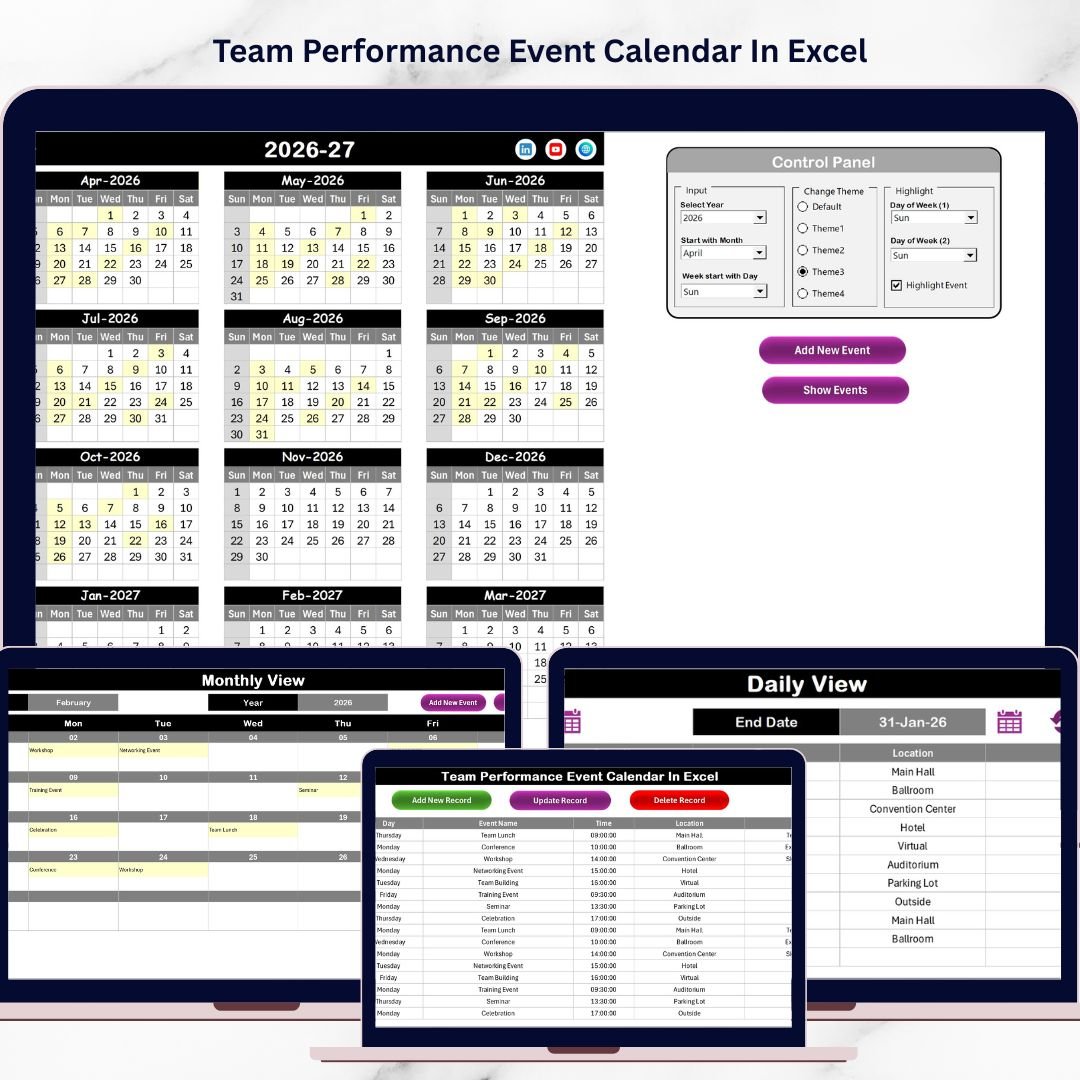
Not every employee appraisal needs a complex scorecard. Sometimes managers simply need a clean way to track events, meetings, training sessions, workshops, review dates, and team activities. The Team Performance Event Calendar In Excel is built for that lighter but still important use case. It is a good fit for HR departments and team leaders who want to coordinate review meetings, training events, and team performance activities without building a calendar from scratch.
Screenshot section: The screenshot shows the Excel event calendar interface. Inside the template are annual, monthly, and daily calendar views, a Home navigation sheet, and a central Events database. Managers can add events, show event details, and organize review-related activity in a familiar Excel file.
- Schedule appraisal meetings, training events, and manager check-ins.
- Track workshops or employee development activities.
- Coordinate team review events across departments.
- Use the Events database as a lightweight review activity log.
Price: $4.99. Get the Team Performance Event Calendar In Excel.
#9. Policy Performance and Risk Analysis Dashboard in Google Sheets
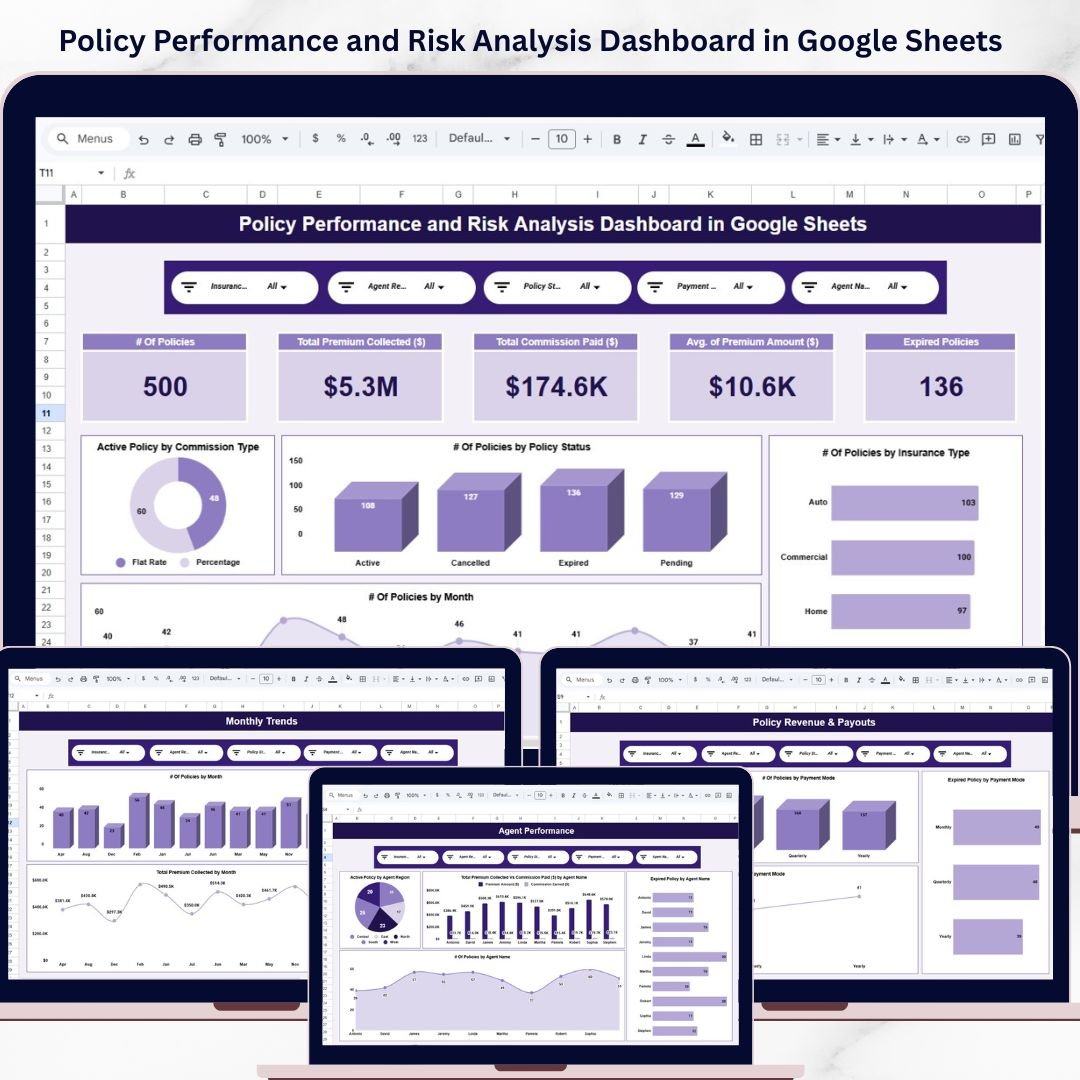
This template is more specialized, but it belongs in the roundup because many employee appraisal cycles depend on policy ownership, risk control, claims performance, and compliance outcomes. The Policy Performance and Risk Analysis Dashboard in Google Sheets is best for insurance, risk, compliance, and operations teams that need a cloud dashboard for policy activity. It helps managers evaluate whether teams are monitoring active policies, expired policies, premium trends, claims, loss ratio, and risk exposure.
Screenshot section: The image shows a Google Sheets dashboard built for policy performance. Inside are seven sheets, including Overview, Policy Type Analysis, Risk and Claims Analysis, Premium and Revenue Analysis, Monthly Trends, Data Sheet, and Search Sheet. The Search Sheet is useful for audits and review discussions.
- Review policy ownership and operational risk performance.
- Track premium, claims, loss ratio, and risk score trends.
- Prepare audit evidence for compliance-linked appraisals.
- Share policy performance dashboards with distributed teams.
Price: $9.99. Get the Policy Performance and Risk Analysis Dashboard in Google Sheets.
#10. Network Performance KPI Dashboard in Google Sheets
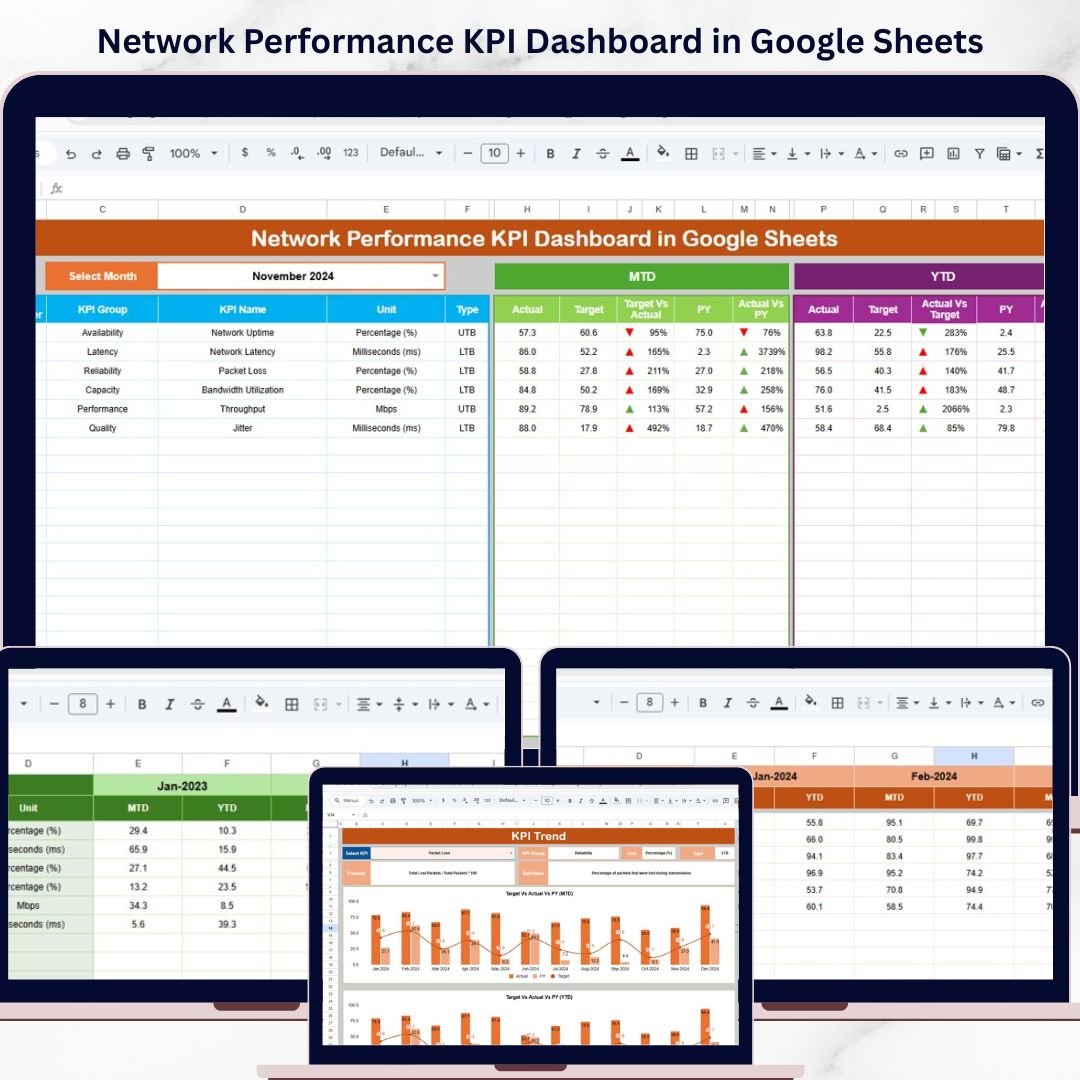
The Network Performance KPI Dashboard in Google Sheets is the best fit for IT managers who need objective performance data for technical teams. Instead of turning employee appraisal conversations into vague feedback about reliability or responsiveness, managers can discuss uptime, latency, bandwidth, target versus actual performance, and KPI trends. This makes the dashboard useful for network engineers, IT service providers, telecom teams, and technical operations groups.
Screenshot section: The screenshot shows a Google Sheets KPI dashboard with performance indicators, trend visuals, and target comparisons. The workbook includes a Dashboard sheet, KPI Trend sheet, Actual Data sheet, Target sheet, Previous Year sheet, and KPI Definition sheet. That structure supports both monthly IT reporting and review-ready scorecards.
- Bring uptime, latency, and bandwidth evidence into IT appraisals.
- Compare MTD and YTD performance against network targets.
- Track KPI trends for network engineering review cycles.
- Give IT leaders a shareable Google Sheets performance dashboard.
Price: $9.99. Get the Network Performance KPI Dashboard in Google Sheets.
How to Choose the Right Performance Review Template
Choose an HR dashboard when the review is employee-centered. If your main goal is employee appraisal, workforce analytics, department comparison, salary cost analysis, or HR leadership reporting, start with the HR Employee Performance Analytics Dashboard in Google Sheets. It is the most direct match for the keyword performance review template because it connects people, performance, compensation, and workforce trends.
Choose an industry dashboard when performance is operational. Legal, insurance, IT, and compliance teams often need performance reviews tied to measurable business outputs. For legal operations, choose the Law Firm Performance Dashboard in Excel or the Google Sheets law firm performance dashboard. For IT teams, choose the Network Performance KPI Dashboard in Google Sheets. For risk teams, choose the Policy Performance and Risk Analysis Dashboard in Google Sheets.
Choose a calendar when the review process needs structure. The Excel calendar templates are best when managers need to schedule check-ins, document tasks, plan training sessions, track duty rosters, or monitor compliance deadlines. Use the task calendar for review prep, the project calendar for milestone-heavy teams, the staff duty calendar for schedule accountability, the compliance calendar for audit obligations, and the event calendar for training and review meeting coordination.
Choose Google Sheets for collaboration and Excel for control. Google Sheets is better when HR, managers, and leadership need shared access in Drive. Excel is better when users want a local workbook, familiar ribbon controls, pivot-based analysis, and a one-file planning system. For a broader template library, explore the Google Sheets dashboard templates and Excel dashboard templates on NextGenTemplates.
Frequently Asked Questions
What is the best performance review template in this list?
The best overall choice is the HR Employee Performance Analytics Dashboard in Google Sheets because it directly supports employee appraisal, workforce reporting, department analysis, and performance trend review. It is the most HR-centered option in the roundup.
What is the difference between an employee appraisal template and a performance dashboard?
An employee appraisal template usually captures review comments, ratings, and goals. A performance dashboard visualizes evidence such as KPIs, trends, costs, deadlines, productivity, or operational results. Many managers need both: a dashboard for evidence and an appraisal form for final review documentation.
Are these templates a replacement for performance management software?
These templates are best for teams that need a practical, low-cost performance review system before investing in full SaaS. They do not replace enterprise HRIS workflows, approval routing, e-signatures, or advanced compliance controls.
Which template is best for quarterly reviews?
For quarterly employee reviews, use the HR Employee Performance Analytics Dashboard in Google Sheets and pair it with the Team Performance Task Calendar in Excel. The dashboard shows performance evidence, while the calendar tracks review meetings and follow-ups.
Which template is best for law firm performance reviews?
For law firms, choose the Law Firm Performance Dashboard in Excel if managers work mainly in Excel. Choose the Law Firm Performance Dashboard in Google Sheets if partners and administrators need collaborative cloud access.
Which template is best for IT performance reviews?
The Network Performance KPI Dashboard in Google Sheets is the strongest fit for IT teams because it tracks uptime, latency, bandwidth, target versus actual results, MTD performance, and YTD performance trends.
Which template is best for compliance-related performance reviews?
The Team Performance Compliance Calendar in Excel is best for planning compliance deadlines, training sessions, audits, and policy reviews. The Policy Performance and Risk Analysis Dashboard in Google Sheets is better when you need policy KPIs, claims data, and risk analysis.
Can managers customize these templates?
Yes. Excel templates can be edited in Microsoft Excel, and Google Sheets templates can be copied into Google Drive. Managers can adjust sample data, filters, event records, and review categories based on their team workflow.
Do these templates work for small businesses?
Yes. Small businesses often benefit most because they may not need an expensive per-seat SaaS platform. A one-time Excel or Google Sheets template can provide structure for review cycles, manager check-ins, and team reporting.
How should HR teams use these templates during annual appraisal cycles?
HR teams should define review dates, collect performance data monthly or quarterly, use dashboards to summarize evidence, and ask managers to document follow-ups before the annual appraisal meeting. This reduces last-minute review writing and improves consistency.
Final Recommendation
If you need one performance review template for HR reporting, start with the HR Employee Performance Analytics Dashboard in Google Sheets. If you need industry-specific review evidence, choose the dashboard that matches the team: law firm, policy risk, or network performance. If your biggest problem is review-cycle discipline, add one of the Team Performance Excel calendars so managers can schedule, track, and document performance conversations throughout the year.
About the author: Built by PK – Microsoft Certified Professional with 15+ years of Excel, Google Sheets, and Power BI experience. Founder of NextGenTemplates, reaching 300K+ subscribers across YouTube channels. Every template is hand-built and tested before release.
Last updated: June 5, 2026.
Related reading: if your team runs on shared spreadsheets, compare our roundup of Google Sheets business templates for teams — 12 shareable tools under $15.