

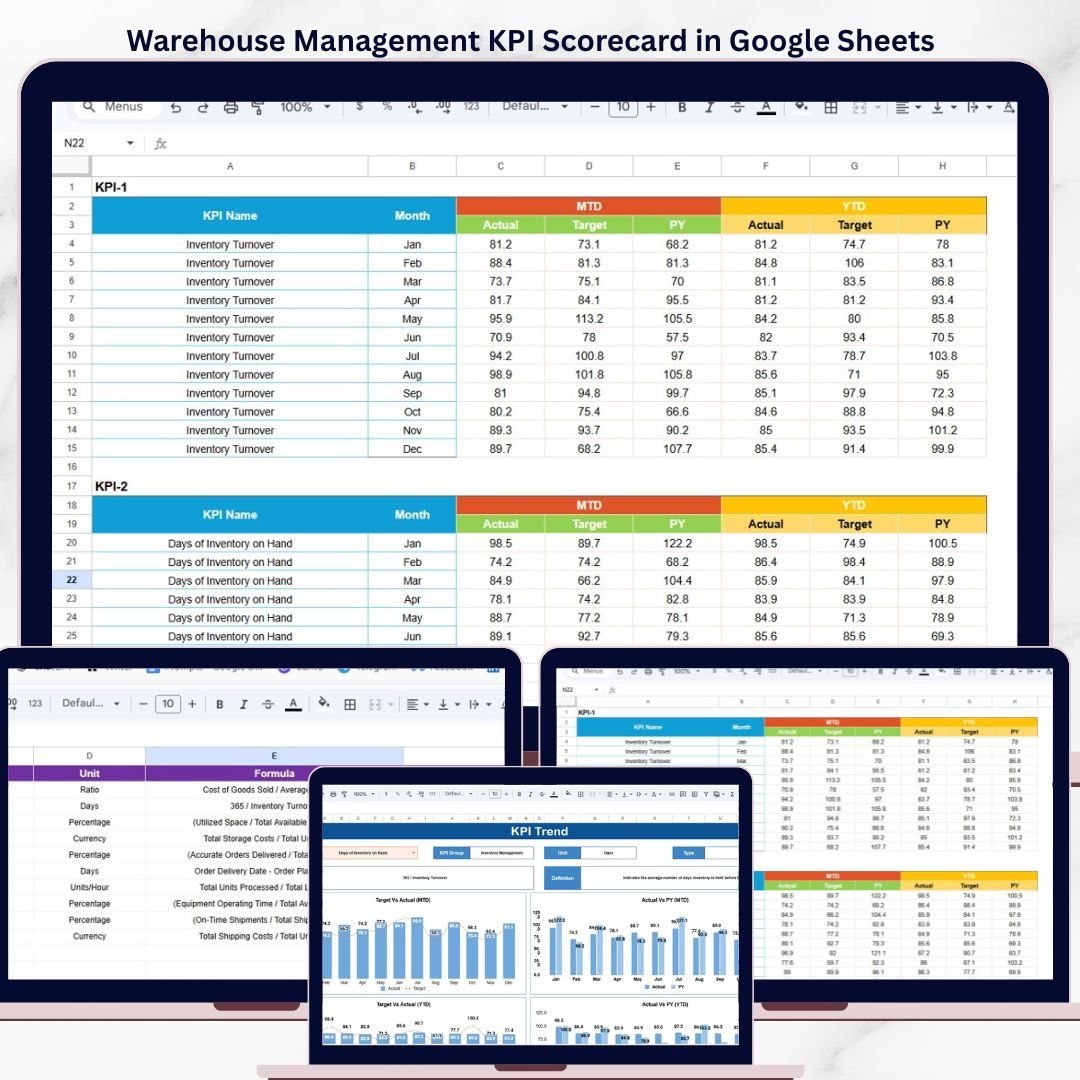
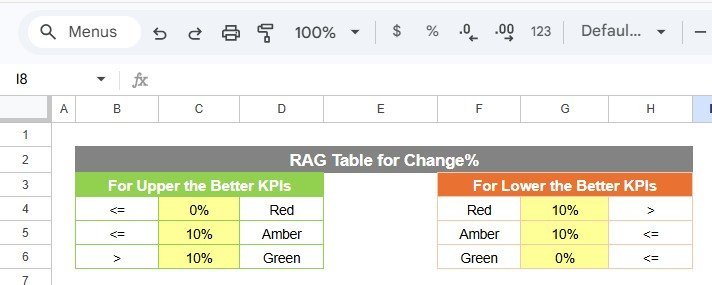
The Warehouse Management KPI Scorecard in Google Sheets tracks 10+ warehouse KPIs across 4 structured worksheets, with MTD and YTD toggle, Actual vs Target comparison, Previous Year benchmarking, and color-coded visual indicators. Setup takes under 10 minutes — copy the template to Google Drive, replace the sample data, and every scorecard metric updates automatically.
🌍 Join 8,400+ teams in 40+ countries using NextGenTemplates to replace paid SaaS tools with one-time-purchase Excel, Google Sheets, Power BI, and HTML templates.
✅ Instant download · One-time payment · No subscription · No per-user fees · Lifetime access
🔑 Key Features of Warehouse Management KPI Scorecard in Google Sheets
📊 4 Structured Worksheets — The Warehouse Management KPI Scorecard in Google Sheets includes a Scorecard sheet (main dashboard), KPI Trend sheet for deep-dive analysis, Input Data sheet for monthly data entry, and a KPI Definition sheet documenting every metric’s formula and classification.
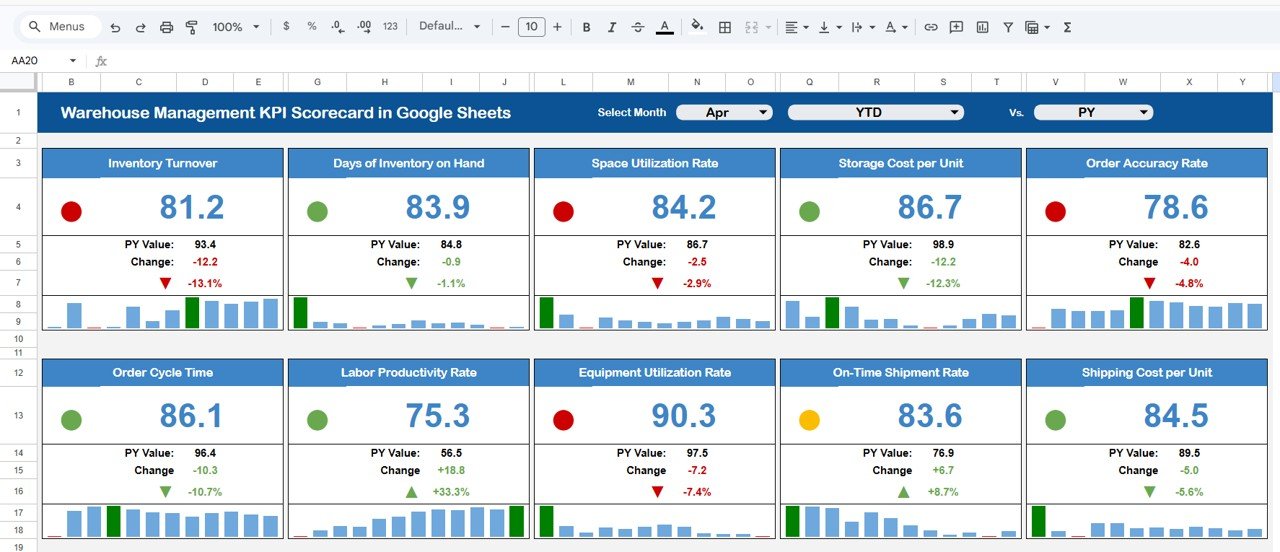
📈 Scorecard Sheet with MTD/YTD Toggle — The main Scorecard sheet displays all warehouse KPIs in a single view. Dropdown menus let you select the reporting month, switch between Month-to-Date and Year-to-Date, and compare Actual performance against Target or Previous Year values. Each KPI row shows the KPI name, group, unit, actual value, target value, variance percentage, and a color-coded status indicator.
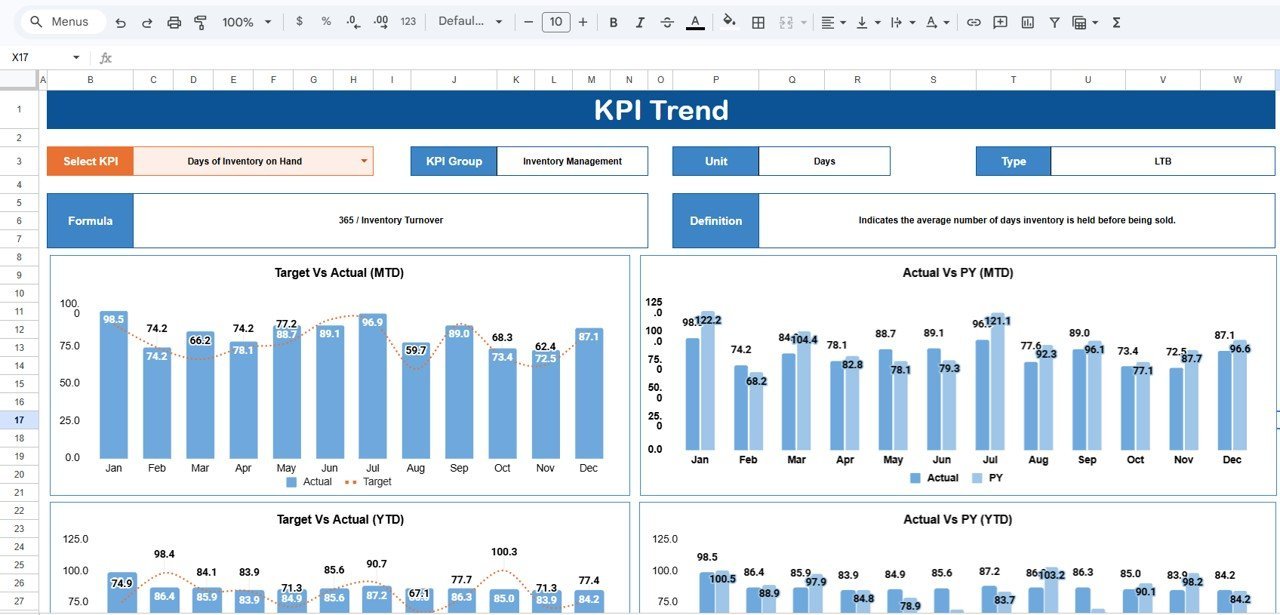
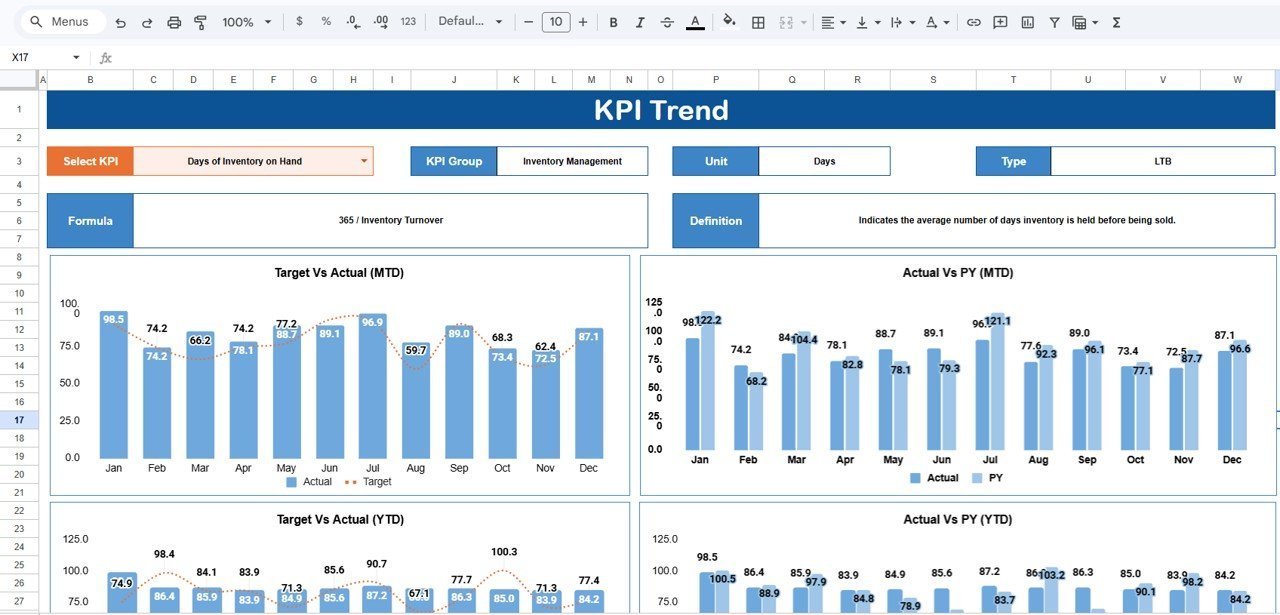
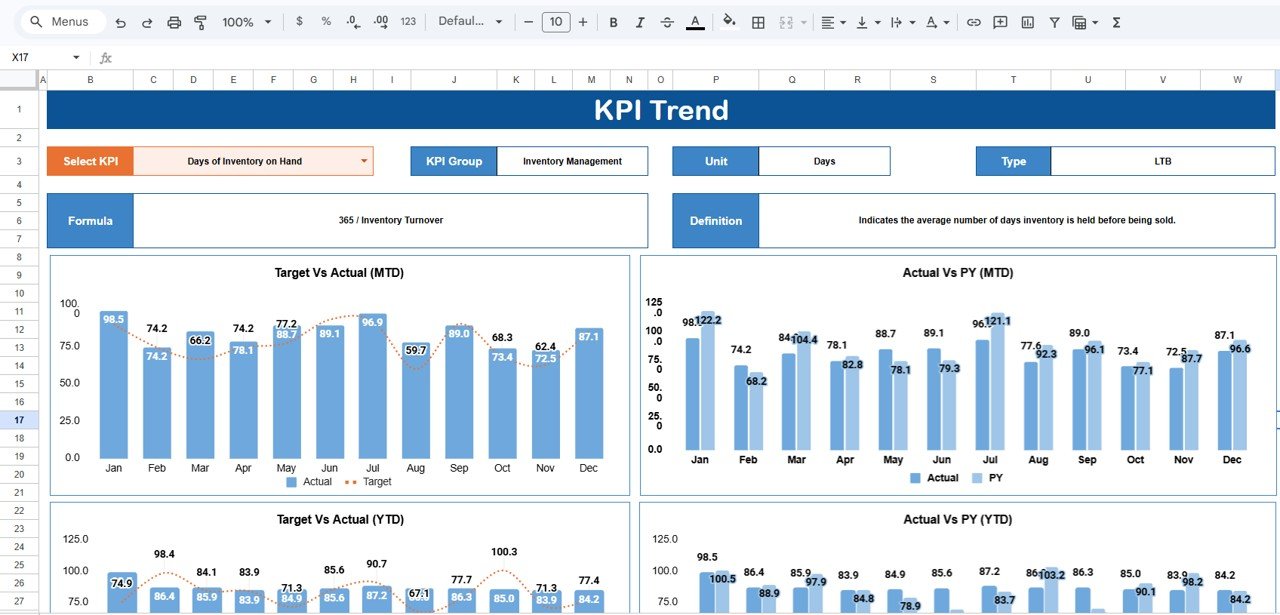
🔍 KPI Trend Analysis with 12-Month Charts — Select any KPI from the dropdown on the KPI Trend sheet to see its group, unit, type (Lower the Better or Upper the Better), formula, and definition. Below the metadata, two trend charts display MTD and YTD performance for Actual, Target, and Previous Year across all 12 months — making seasonal patterns and performance shifts visible at a glance.
📋 Structured Input Data Sheet — Enter monthly Actual values, Target values, and Previous Year figures in one clean sheet. The scorecard and trend charts pull directly from this data, so updates reflect instantly across all views. If you already use Google Sheets Dashboard Templates, this scorecard integrates naturally into your existing workflow.
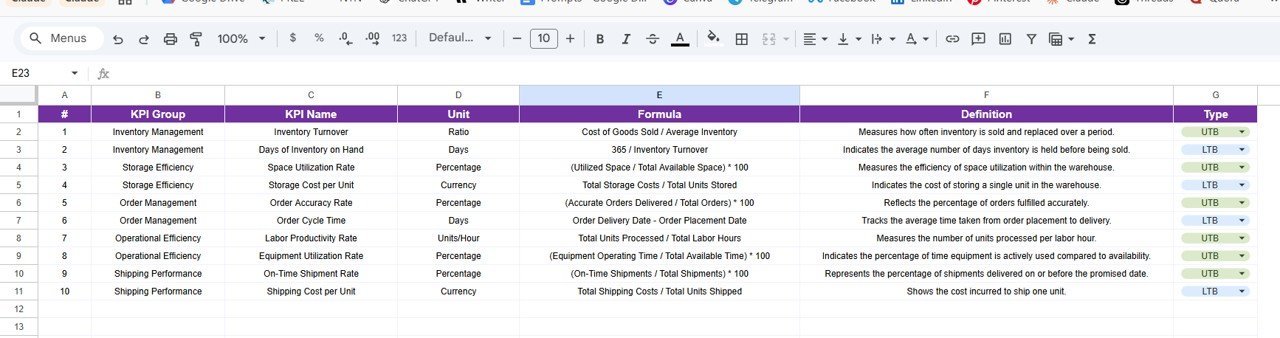
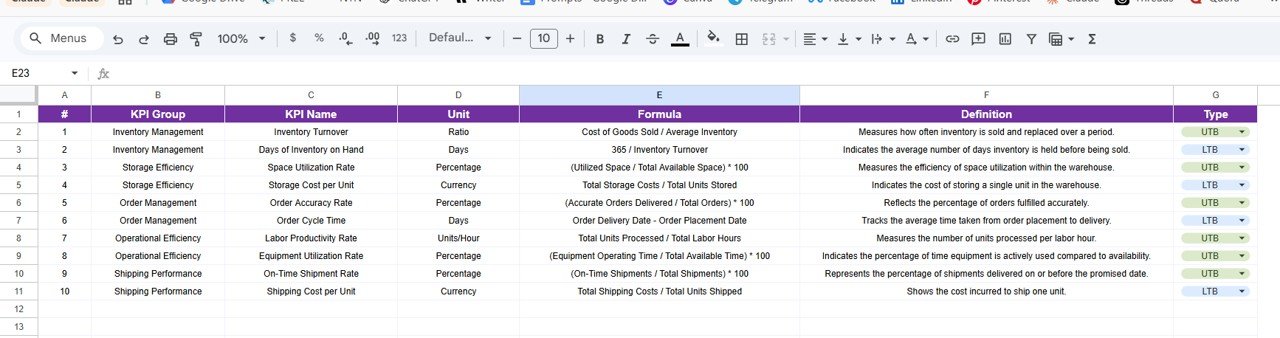
📘 KPI Definition Sheet for Governance — Every KPI is documented with its name, group, unit of measurement, formula, definition, and type classification (UTB or LTB). This ensures every team member measures and interprets warehouse performance the same way.
Warehouse Management KPI Scorecard in Google Sheets
📦 What’s Inside the Warehouse Management KPI Scorecard
📌 1. Scorecard Sheet (Main Dashboard) — The command center for warehouse performance. Select the month from a dropdown, toggle between MTD and YTD, and switch between Vs Target and Vs Previous Year comparison modes. All KPIs display with actual values, target values, previous year values, variance percentages, and visual status indicators (green for on-track, red for below-target).
KPI Trend Sheet
📌 2. KPI Trend Sheet — Select any KPI name from the dropdown in cell C3. The sheet shows the KPI Group, Unit, Type (LTB or UTB), Formula, and Definition. Two trend charts visualize 12 months of MTD and YTD data for Actual, Target, and Previous Year — helping warehouse managers spot patterns in order accuracy, pick efficiency, or inventory turnover over time.
Input Data Sheet
📌 3. Input Data Sheet — The data entry hub. Record monthly Actual values, Target values, and Previous Year data for each KPI. The Scorecard and KPI Trend sheets connect directly to this sheet, so every update propagates automatically — no manual formula edits needed.
KPI Definition Sheet
📌 4. KPI Definition Sheet — Document each KPI’s name, group, unit, formula, and definition. This reference sheet ensures reporting consistency across shifts, warehouses, and departments — especially useful when onboarding new team members or presenting to leadership.
📊 Warehouse Management KPI Scorecard in Google Sheets vs. Microsoft Excel Scorecard vs. Zoho Inventory / NetSuite ERP — Where This Fits
| Feature | Warehouse KPI Scorecard (Google Sheets) | Microsoft Excel Scorecard | Zoho Inventory / NetSuite ERP |
|---|---|---|---|
| Cost | $9.99 one-time | $14.99 one-time | $59–$999 / user / month |
| Platform | Google Sheets (free) | Microsoft Excel (license required) | Cloud SaaS (browser) |
| Setup Time | Under 10 minutes | Under 15 minutes | Weeks to months |
| Real-Time Collaboration | ✅ Built-in (Google Sheets) | Requires OneDrive/SharePoint | ✅ Yes |
| Mobile Access | ✅ Google Sheets app | Limited on mobile | ✅ Yes |
| MTD/YTD Toggle | ✅ Built-in dropdowns | ✅ Built-in dropdowns | Report module only |
| Customizable KPIs | ✅ Fully editable | ✅ Fully editable | Limited without admin plan |
| Year-1 Cost at 5 Users | $9.99 total | $14.99 + Excel licenses | $3,540–$59,940 |
| KPI Trend Charts | ✅ 12-month trends | ✅ 12-month trends | Varies by plan |
For warehouse teams that want structured KPI tracking with MTD/YTD analysis and real-time collaboration without paying $59–$999 per user per month, the Warehouse Management KPI Scorecard in Google Sheets sits in the sweet spot.
👥 Who This Template Is For — and Who It’s Not For
✅ This template is built for:
- Warehouse managers at companies with 1–20 warehouse locations tracking order accuracy, pick efficiency, inventory turnover, and storage utilization
- Operations directors who need a shared, browser-based KPI scorecard for weekly or monthly warehouse performance reviews
- Supply chain analysts monitoring warehouse metrics against targets and previous year benchmarks
- Small business owners managing warehouse operations without dedicated WMS software
❌ This template is NOT for:
- Enterprise warehouse operations needing real-time IoT sensor integration, barcode scanning, and automated putaway workflows
- Organizations requiring SOC 2 compliance, audit trails, and role-based access control for warehouse data
- Teams processing 50,000+ SKUs needing automated PO creation and 3PL shipping integrations
⚙️ How to Use the Warehouse Management KPI Scorecard
- Open the PDF guide and click the Google Sheets copy link to create your editable copy in Google Drive
- Go to the KPI Definition sheet and review or customize the KPI names, groups, units, formulas, and definitions
- Navigate to the Input Data sheet and replace the sample Actual, Target, and Previous Year values with your own monthly warehouse data
- Open the Scorecard sheet, select the reporting month from the dropdown, and toggle between MTD and YTD views
- Switch between Vs Target and Vs Previous Year modes to see performance from both angles
- Use the KPI Trend sheet to drill into any individual KPI and review 12-month trend charts
💼 Real-World Use Cases
Vikram manages a 3-warehouse distribution operation in Mumbai. He uses the Warehouse Management KPI Scorecard in Google Sheets every Monday to review order accuracy rate, pick efficiency, and inventory turnover across all three locations. The MTD vs Target view helped him spot that Warehouse 2’s pick accuracy dropped below 94% in March — leading to a process audit that identified a labeling issue on the receiving dock. The team fixed it in one shift, and pick accuracy returned to 98.5% by April.
Lisa runs warehouse operations for a mid-size e-commerce brand in Dallas. She replaced a $150/month WMS reporting add-on with this Google Sheets scorecard. Her 4-person warehouse team accesses the same scorecard from their browsers during daily standups. The YTD trend charts showed that shipping cost per order increased 18% year-over-year — prompting a carrier renegotiation that saved roughly $12,000 annually.
Carlos is a supply chain consultant serving manufacturers in Mexico City. He duplicates this scorecard for each client, customizes the KPI Definition sheet with their specific warehouse metrics, and delivers a branded performance review in a single 3-day engagement. The Vs Previous Year comparison is especially useful during quarterly business reviews with plant managers.
❓ Frequently Asked Questions
What KPIs does the Warehouse Management KPI Scorecard track?
The Warehouse Management KPI Scorecard in Google Sheets tracks 10+ warehouse KPIs including order accuracy rate, pick efficiency, inventory turnover, storage utilization, shipping cost per order, on-time shipment rate, and receiving accuracy. Each KPI is displayed with Actual, Target, and Previous Year values plus MTD and YTD comparisons.
How long does setup take?
Setup takes under 10 minutes. Copy the template to your Google Drive using the link in the PDF guide, replace the sample data in the Input Data sheet with your own warehouse metrics, and every scorecard view and trend chart refreshes automatically.
Can I customize the KPIs for my warehouse?
Yes. The KPI Definition sheet lets you rename, add, or remove KPIs. Update the KPI name, group, unit, formula, and definition — the Scorecard and Trend sheets dynamically pick up any changes from the Input Data sheet.
How does this compare to Zoho Inventory or NetSuite ERP?
Zoho Inventory charges $59–$249 per user per month, and NetSuite ERP starts at roughly $999 per month. The Warehouse Management KPI Scorecard in Google Sheets costs $9.99 one-time with no recurring fees. For teams under 20 warehouse locations that need KPI visibility and trend analysis, this scorecard delivers the same performance insights at a fraction of the cost.
Does this scorecard work on mobile devices?
Yes. Since it runs on Google Sheets, you can access the scorecard from any device using the Google Sheets app. Review warehouse KPIs, check performance status, and share the scorecard with team members from your phone or tablet during warehouse walks or meetings.
Can multiple team members use this scorecard at the same time?
Yes. Google Sheets supports real-time collaboration. Multiple warehouse team members can view the scorecard, enter data in the Input Data sheet, and review KPI trends simultaneously — no file-sharing conflicts or version control issues.
Is there an Excel version of this scorecard?
Yes. The Warehouse Management KPI Scorecard is also available as an Excel scorecard on NextGenTemplates — pick the format that matches your team’s tooling.
👤 About the Author
Built by PK — Microsoft Certified Professional with 15+ years of Excel, Google Sheets, and Power BI experience. Founder of NextGenTemplates, reaching 300K+ subscribers across YouTube channels (@PK-AnExcelExpert, @NextGenTemplates, @NeoTechNavigators). Every template is hand-built and tested before release.
🔗 Explore Related Templates
📊 Also available as: Warehouse Management KPI Scorecard in Excel
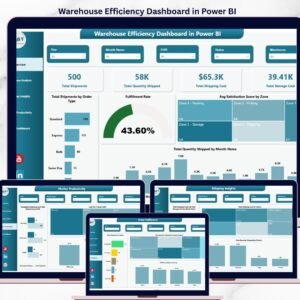
📊 Warehouse Efficiency Dashboard in Power BI — 5-page dashboard tracking shipments, fulfillment, pick time, and shift productivity
📊 Procurement Management Dashboard in Google Sheets — Track procurement spend, PO analysis, and supplier performance
📊 Logistics Efficiency KPI Scorecard in Excel — Logistics-focused KPI tracking with trend analysis
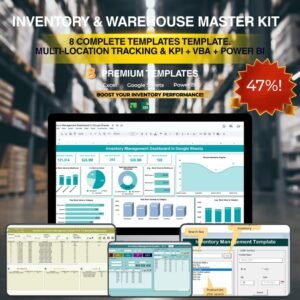
💎 Save 36% — Get all 8 warehouse & inventory templates in the Inventory & Warehouse Master Kit Bundle for $69.99 →
Browse all Google Sheets Dashboard Templates
📖 Click here to read the Detailed Blog Post
🎥 Visit our YouTube channel for step-by-step video tutorials
👉 YouTube.com/@NextGenTemplates






























Reviews
There are no reviews yet.