

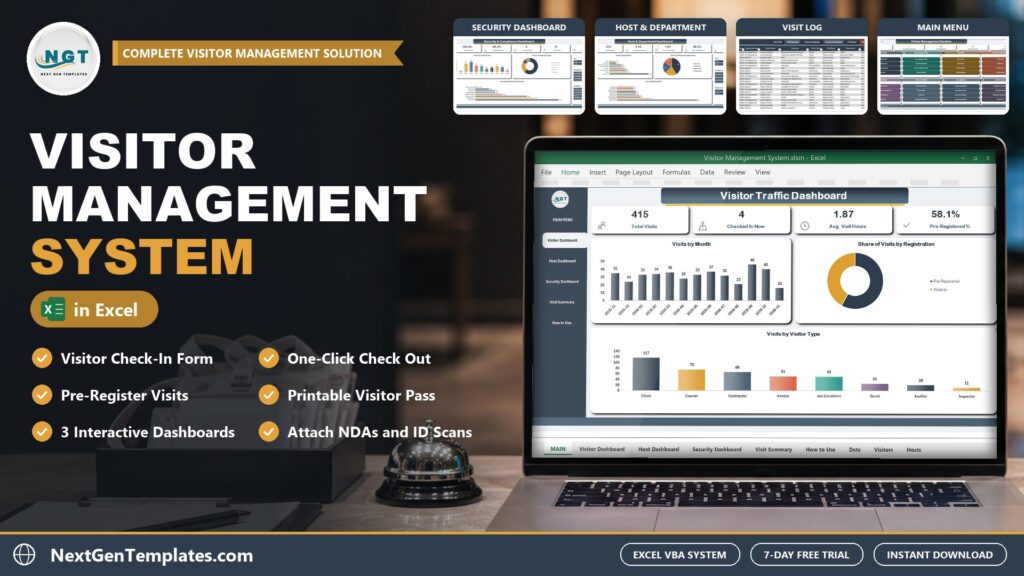
A paper visitor logbook tells you who signed in, but not who is still in the building, who overstayed or whether the ID and NDA were checked. The Visitor Management System V1.0 in Excel VBA keeps all of it in one Excel file and works out the visit hours and overstays for you.
Watch the Visitor Management System in Excel VBA: Check-In and Log walkthrough
 Launch offer
Record, read and write your own Excel macros and UserForms, and use AI assistants as your VBA tutor without trusting them blindly. 6h 12m of video by PK, with practice files and a capstone.
What Is a Visitor Management System in Excel?
A visitor sign in sheet records arrivals only. This visitor management system in Excel is a macro-enabled Excel workbook for a reception desk, front office or security desk, an Excel VBA visitor management tool that runs on your own PC. You register your hosts and regular visitors, then log each visit through a three-tab check-in form: the visit itself, the check-in details and the security checks. The workbook stamps the check-in and check-out times, tracks the visit from Pre-Registered to Checked In and Checked Out, and keeps a Visit Log that you can filter and print.
Inside the System
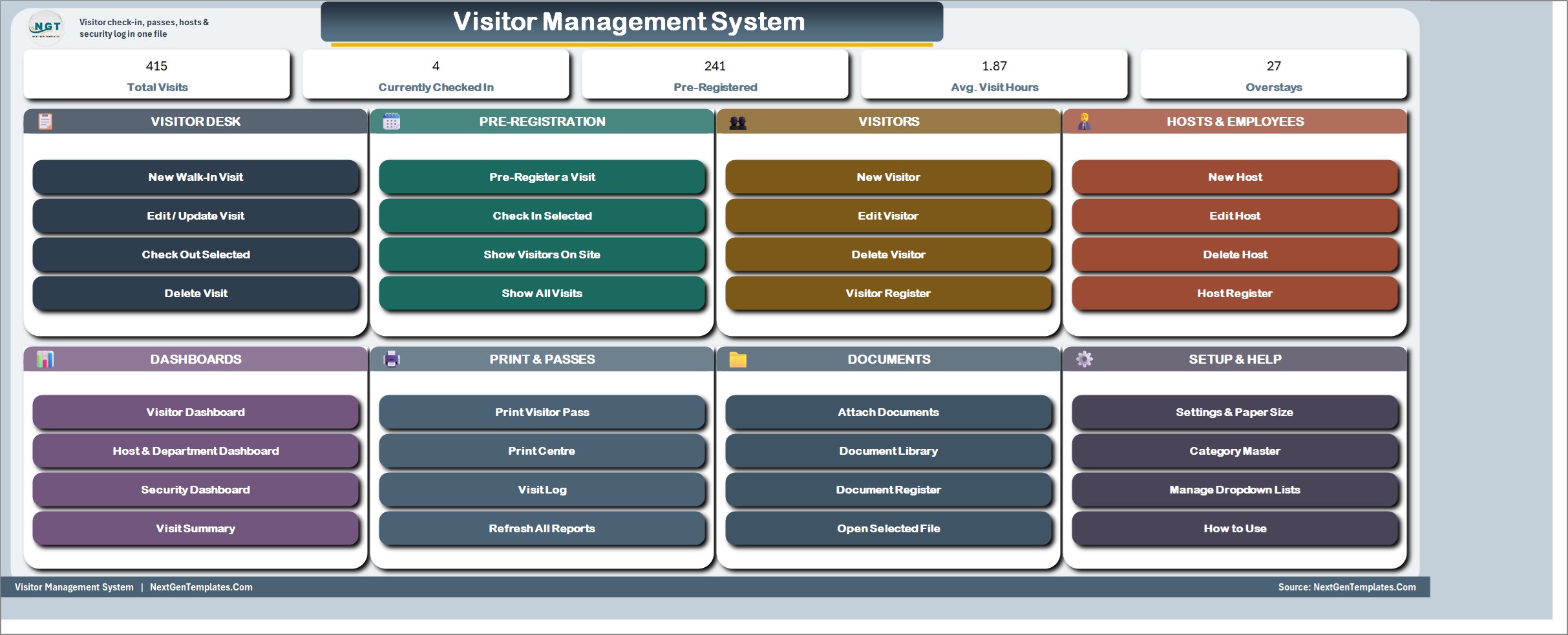
MAIN menu
The file opens here every time. Five live KPI chips (Total Visits, Currently Checked In, Pre-Registered, Average Visit Hours and Overstays) sit above colour-coded cards for the Visitor Desk, Pre-Registration, Visitors, Hosts and Employees, Dashboards, Print and Passes, Documents, and Setup and Help. Every job starts from one of its buttons.
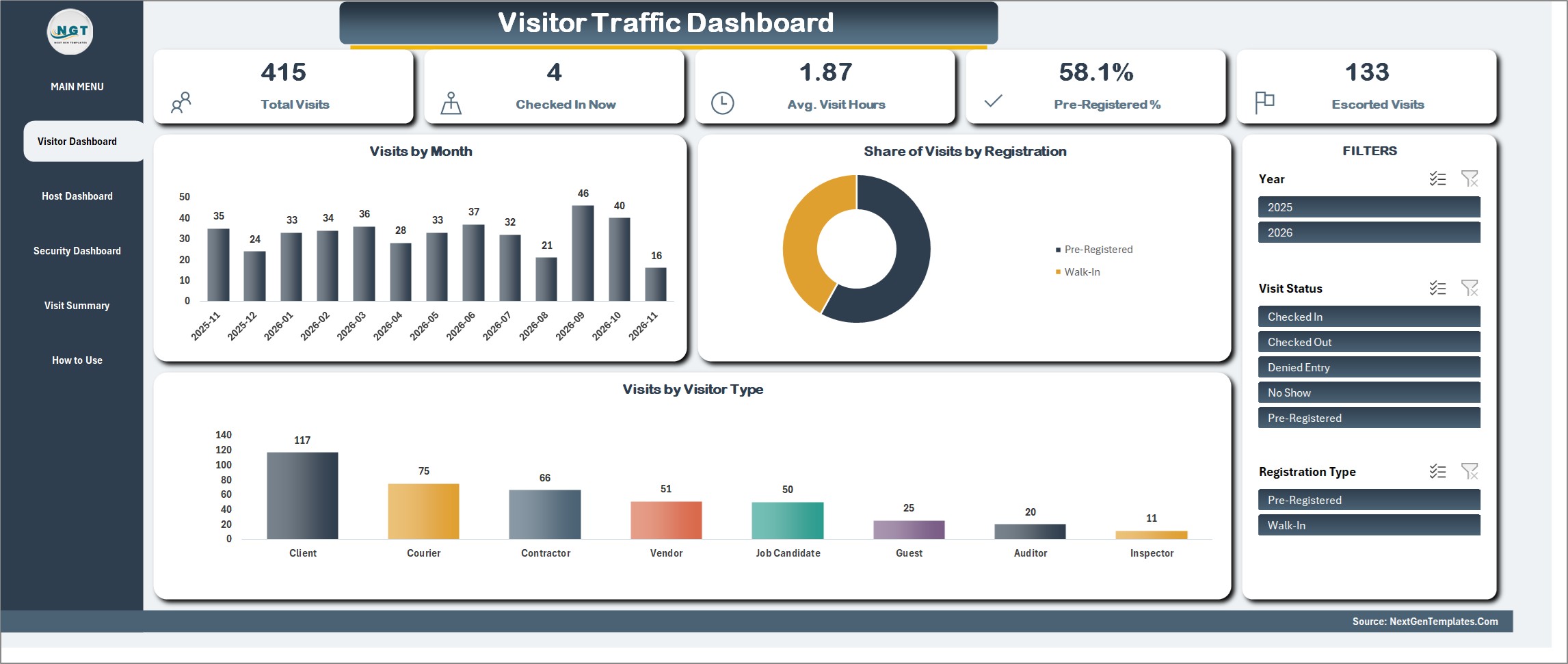
Visitor Traffic Dashboard
Total Visits, Checked In Now, Average Visit Hours, Pre-Registered percent and Escorted Visits, with Visits by Month, Share of Visits by Registration and Visits by Visitor Type. Slicers for Year, Visit Status and Registration Type drive every figure and chart on the page.
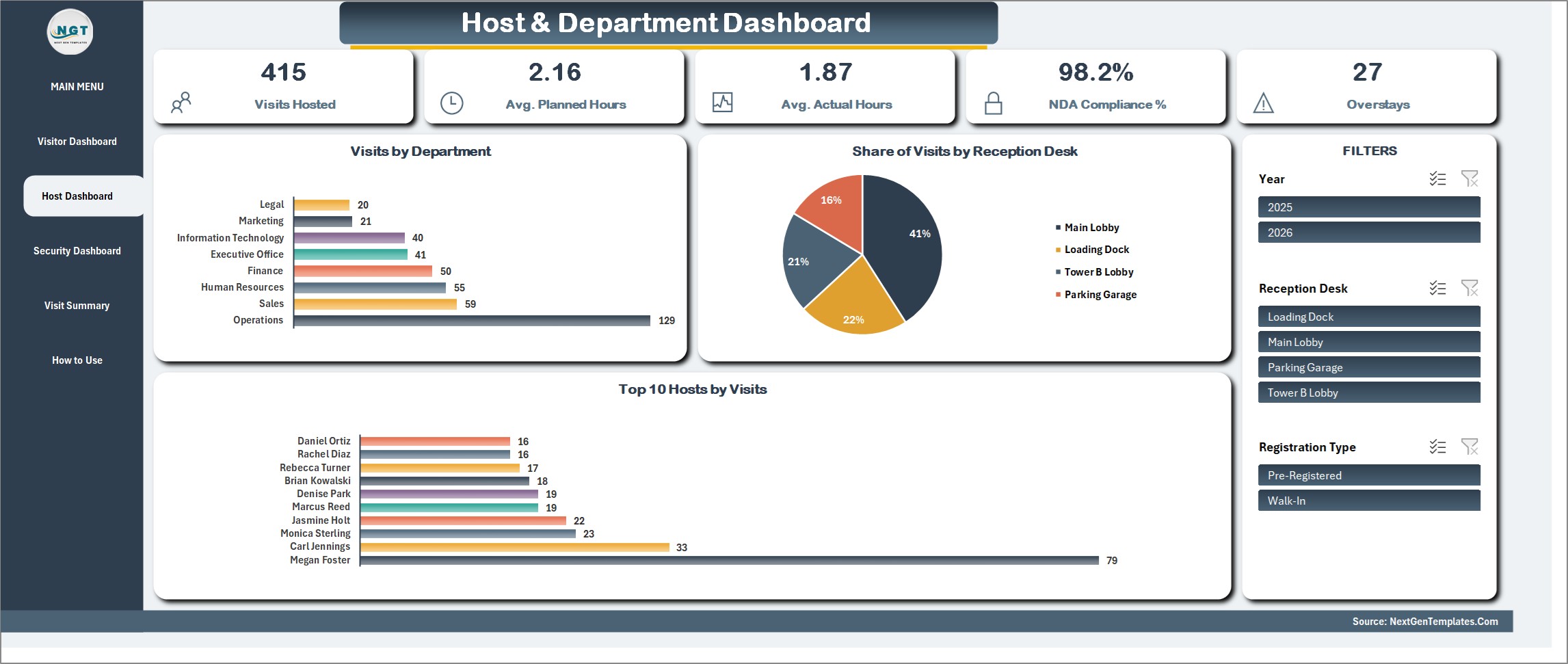
Host and Department Dashboard
Visits Hosted, Average Planned and Actual Hours, NDA Compliance percent and Overstays, with Visits by Department, Share of Visits by Reception Desk and the Top 10 Hosts. Filter by Year, Reception Desk and Registration Type.
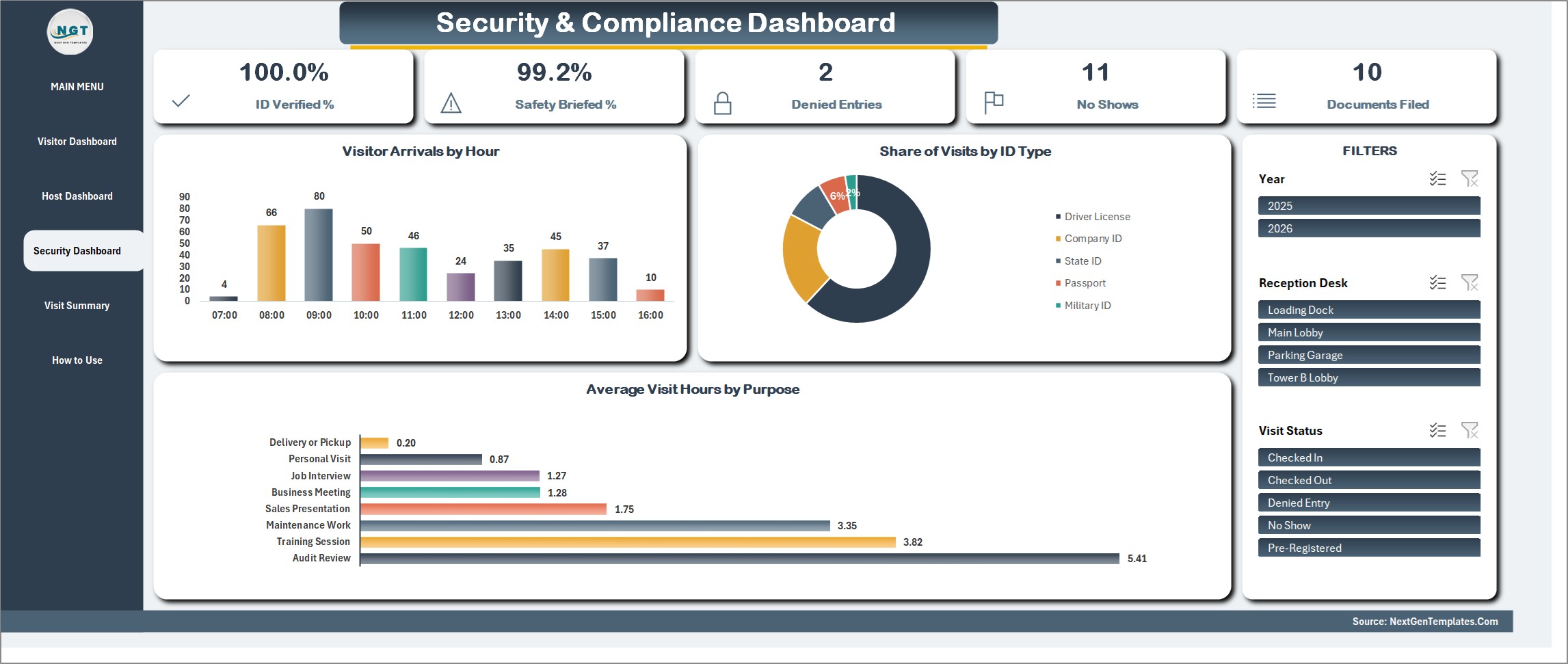
Security and Compliance Dashboard
ID Verified percent, Safety Briefed percent, Denied Entries, No Shows and Documents Filed, with Visitor Arrivals by Hour, Share of Visits by ID Type and Average Visit Hours by Purpose.
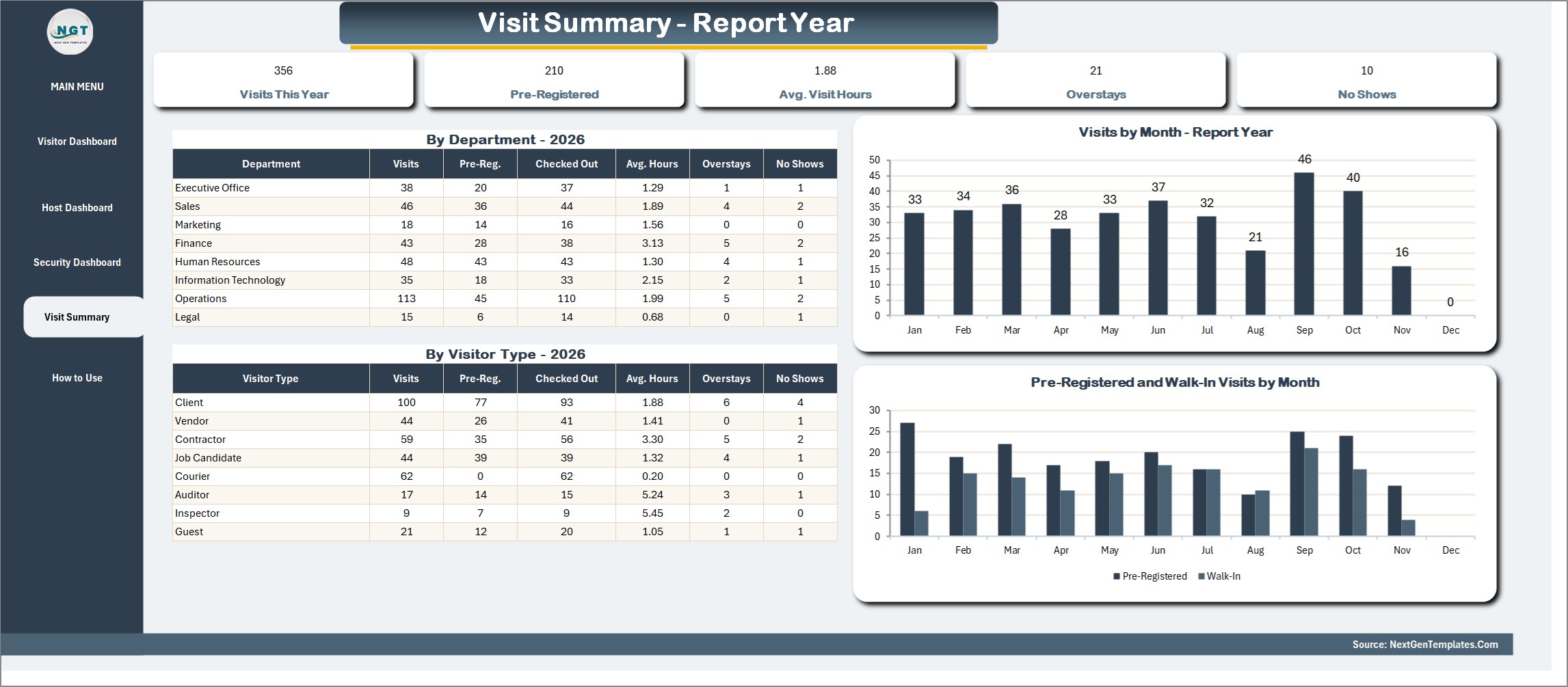
Visit Summary
Visits, pre-registered visits, average visit hours, overstays and no shows for the report year, by department and by visitor type, with Visits by Month and Pre-Registered and Walk-In Visits by Month charts.
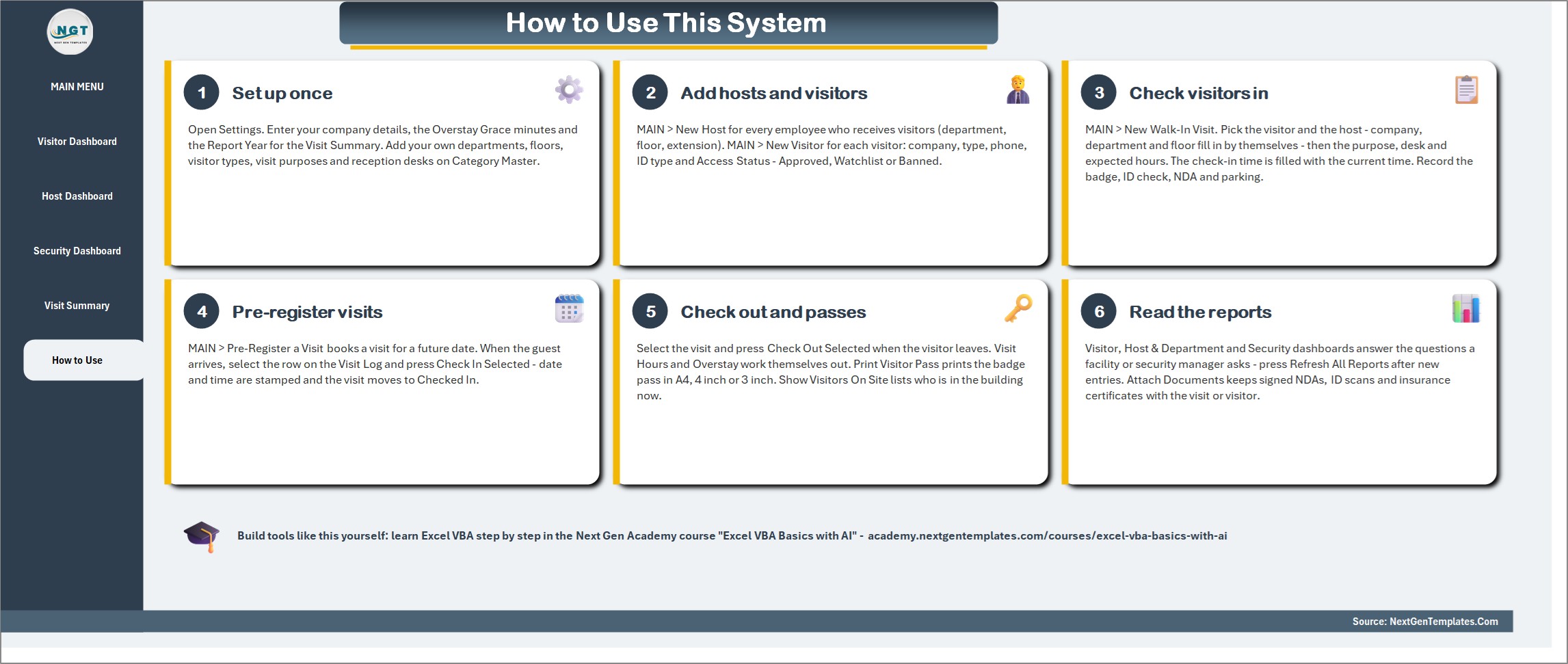
How to Use
Six numbered steps on one page: set up once, add hosts and visitors, check visitors in, pre-register visits, check out and print passes, and read the reports.
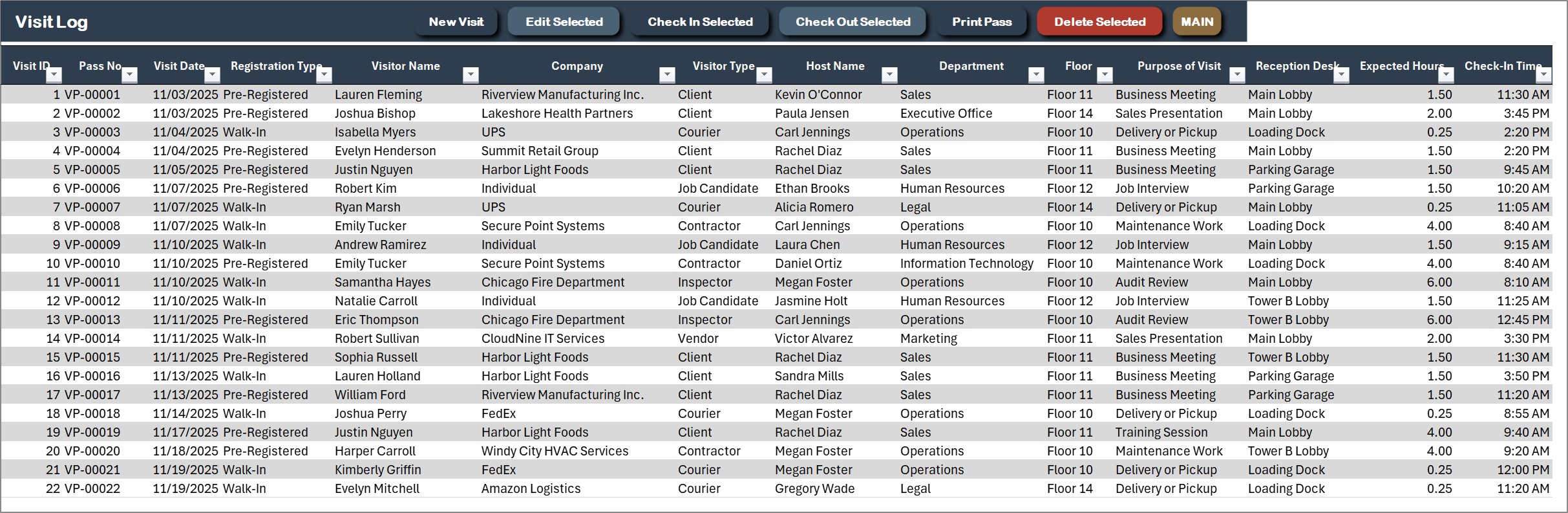
Visit Log
One row per visit: pass number, visit date, registration type, visitor, company, visitor type, host, department, floor, purpose, reception desk, expected hours and check-in and check-out time. New Visit, Edit Selected, Check In Selected, Check Out Selected, Print Pass and Delete Selected sit on the action bar.
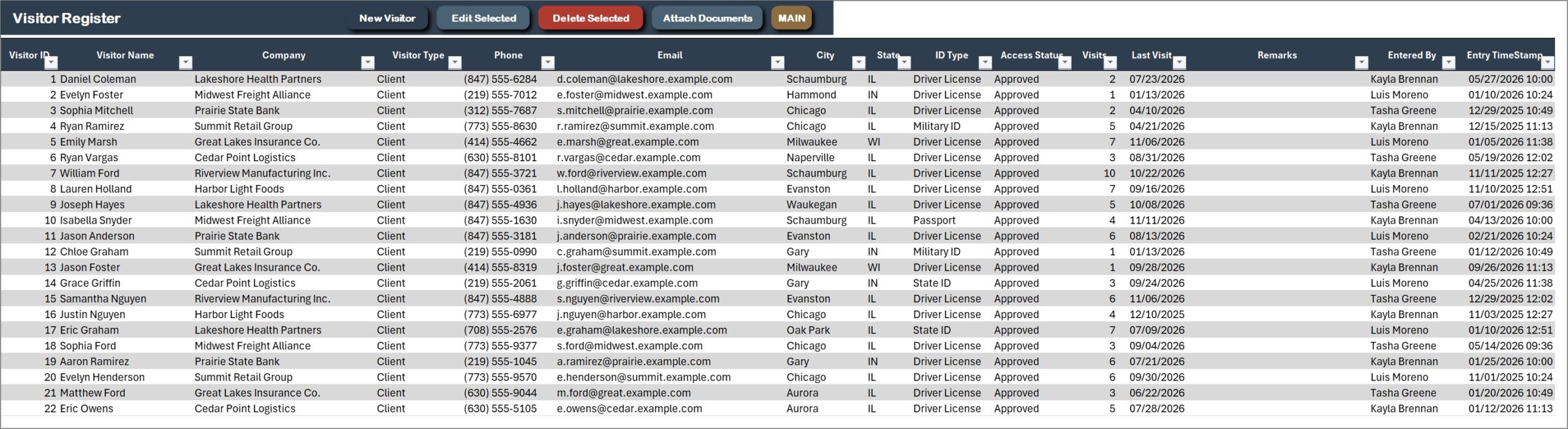
Visitor Register
Clients, vendors, contractors, couriers, auditors and guests with their company, contact details, ID type and an access status of Approved, Watchlist or Banned, plus the visits and last visit date for each person.
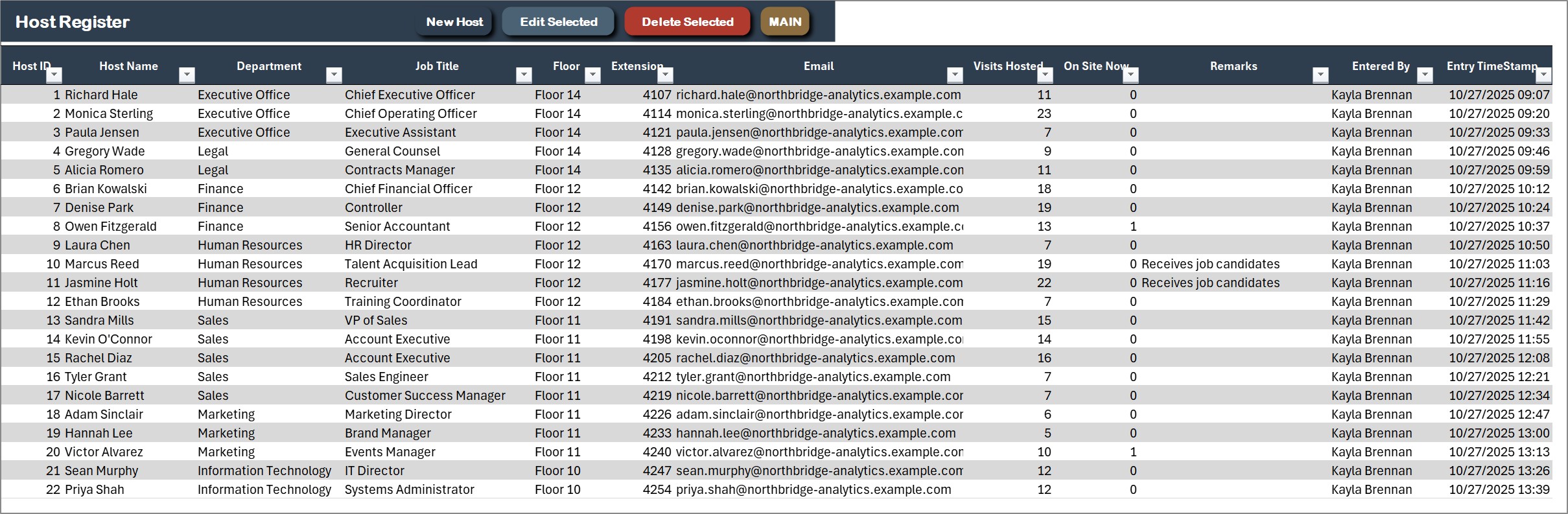
Host Register
Every employee who receives visitors, with department, job title, floor and extension, and the visits hosted and visitors on site now for each host.
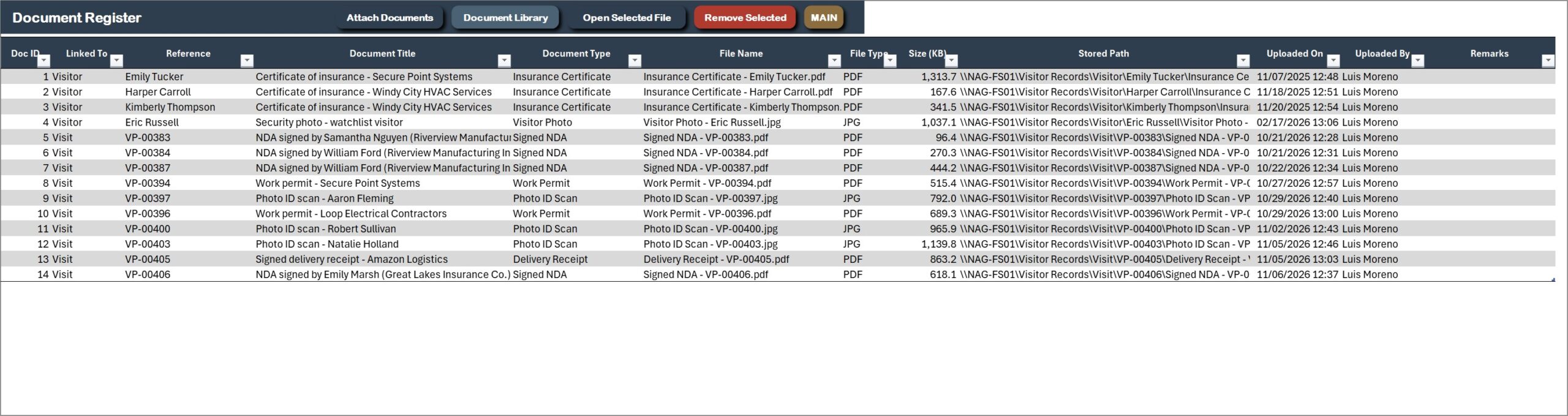
Document Register
Signed NDAs, ID scans, insurance certificates and work permits linked to the visit or visitor they belong to, with file type, size and who uploaded them. Open Selected File opens any of them in one click.
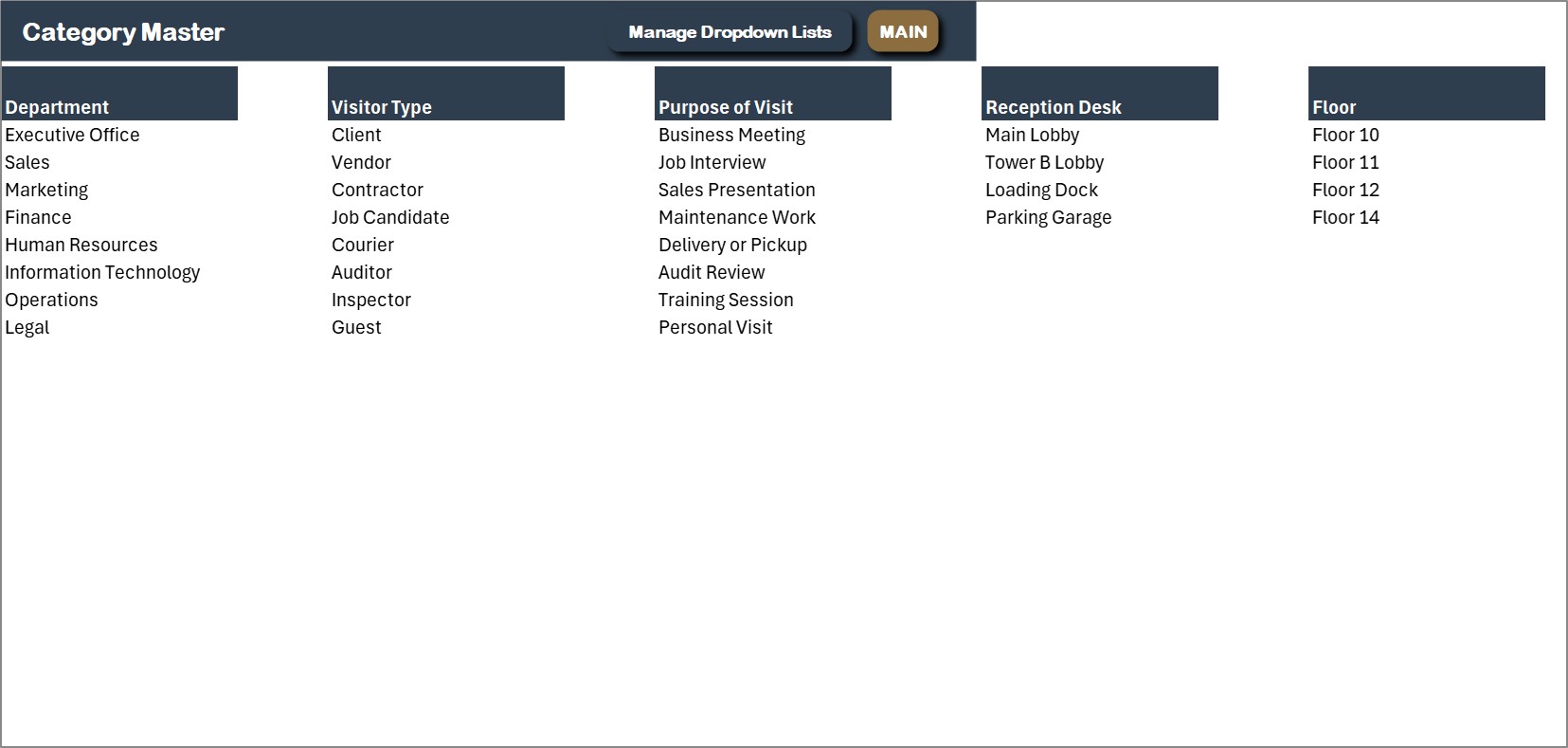
Category Master
Departments, visitor types, purposes of visit, reception desks and floors in one place. Extend them here or from the Manage Dropdown Lists form and every drop-down follows.
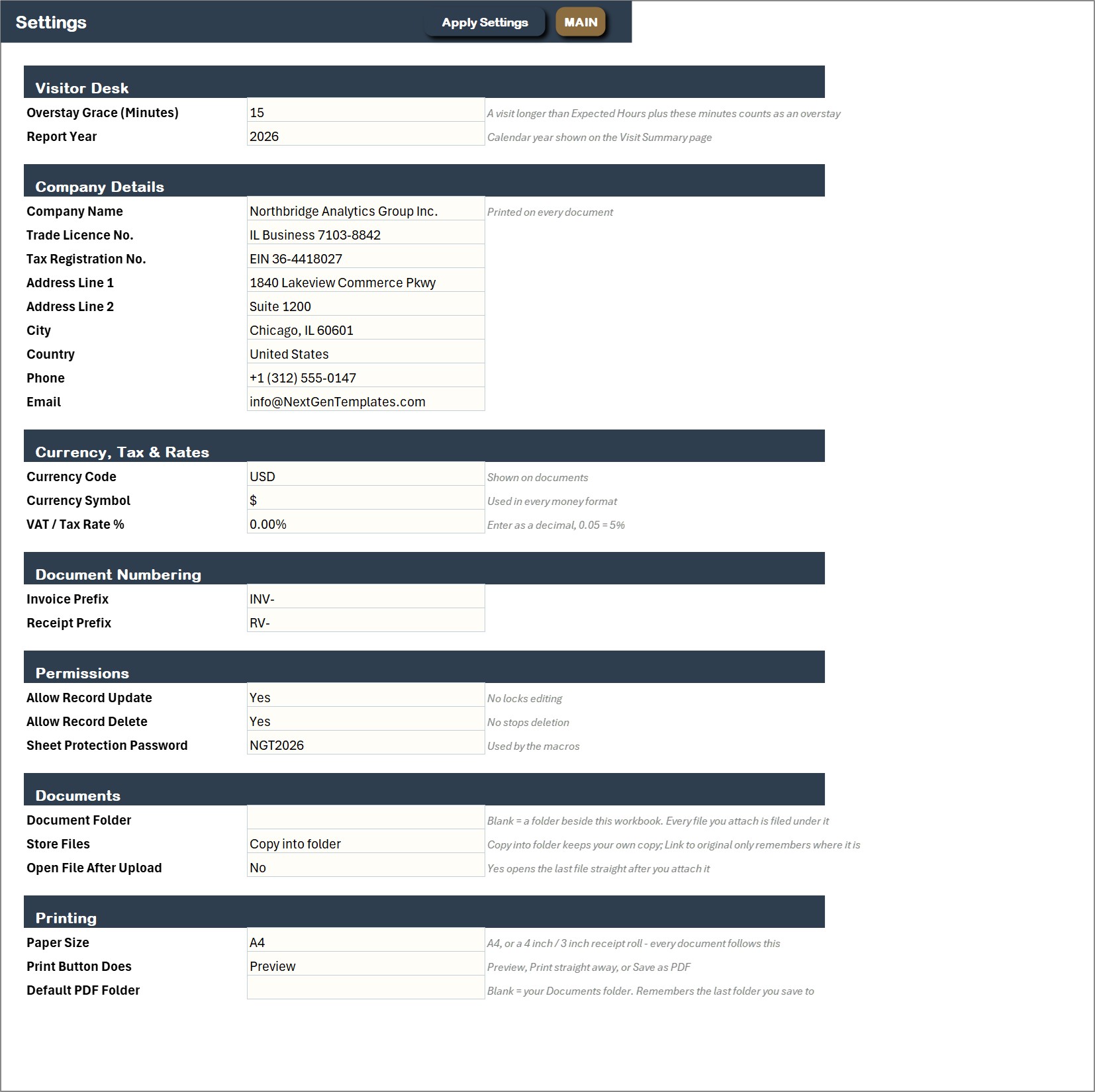
Settings
Overstay grace minutes, the Report Year, company details, currency, permissions, the document folder and the paper size for printing.
How a Visit Moves Through the System
A guest is pre-registered for Tuesday morning. When they arrive, you select the visit on the Visit Log and press Check In Selected, and the visitor management system in Excel stamps the date and time. A courier with no booking is a New Walk-In Visit: pick the visitor and the host, fill the purpose, ID type and desk, and save. At any moment Show Visitors On Site lists everyone in the building. When the visitor leaves, Check Out Selected stamps the time, works out the visit hours and flags an overstay if the visit ran past the plan plus your grace minutes. In the sample file, 415 visits average 1.87 hours, 27 were overstays and 4 visitors are still on site.
Good Habits for a Visitor Log in Excel
Check visitors out as they leave, because the on-site list and the visit hours depend on it. Keep one record per visitor so repeat visits add up and the access status stays right. Mark the ID as verified and the NDA as signed on the visit itself, not later. Pre-register regular guests the day before so the desk only has to press Check In Selected. Set an overstay grace that fits your building, then watch the Overstays figure on the Host and Department dashboard. Attach signed NDAs and ID scans to the visit, which saves a search later.
Pros and Limits
- One file for the visit, the host, the security checks and the documents
- One-click check in and check out with automatic visit hours and overstays
- No subscription, and your data stays on your PC
- Needs Excel 2016 or later for Windows with macros enabled
- Single user, no host email alerts, photo capture or kiosk sign-in, and it does not work on Mac or in Excel for the web
Frequently Asked Questions
What is the Visitor Management System in Excel VBA?
It is one macro-enabled Excel file that runs the visitor log of a reception desk, front office or security desk: who came, who they visited, when they checked in and out, whether their ID was verified and whether they overstayed. Visits go in through a check-in form, and the dashboards update themselves.
How do I check a visitor in and out?
Choose New Walk-In Visit, fill the Visit, Check-In and Security tabs and save: the check-in time is filled in for you. When the visitor leaves, select the visit and press Check Out Selected. It stamps the time and works out the visit hours and any overstay.
Can I pre-register visitors?
Yes. Pre-Register a Visit books a guest for a future date. When the guest arrives, select the row on the Visit Log and press Check In Selected, which stamps the date and time and moves the visit to Checked In.
Can I see who is in the building right now?
Yes. Show Visitors On Site filters the Visit Log to every visit that is checked in and not yet checked out, which is the list you need in an emergency. Show All Visits clears the filter.
What security details does it record?
Badge number, ID type, ID verified, NDA signed, safety briefing, escort, vehicle plate, parking spot and items declared. The Visitor Register also holds an access status of Approved, Watchlist or Banned.
Can I print a visitor pass?
Yes. Print Visitor Pass produces a pass in A4, 4 inch or 3 inch size. Choose the paper size once on the Settings sheet and every printout follows it.
Which Excel do I need?
Microsoft Excel 2016 or later for Windows with macros enabled. It does not work on Mac, in Excel for the web or in Google Sheets, because the entry forms are VBA UserForms.
Can I try it before I buy?
Yes. A 7-day free trial is available from the product page. It is a separate file with every form, register and dashboard working, and it stops working after 7 days.
Is sample data included?
Yes. The file ships with 415 visits, 110 visitors, 26 hosts and 14 documents for a demo company, plus an illustrated PDF user manual, so every dashboard is populated when you open it.
Get the Visitor Management System
Get the system here: Visitor Management System V1.0 in Excel VBA. You can try it free for 7 days first. For another macro-enabled system, see the Warranty Claim Management System in Excel VBA.