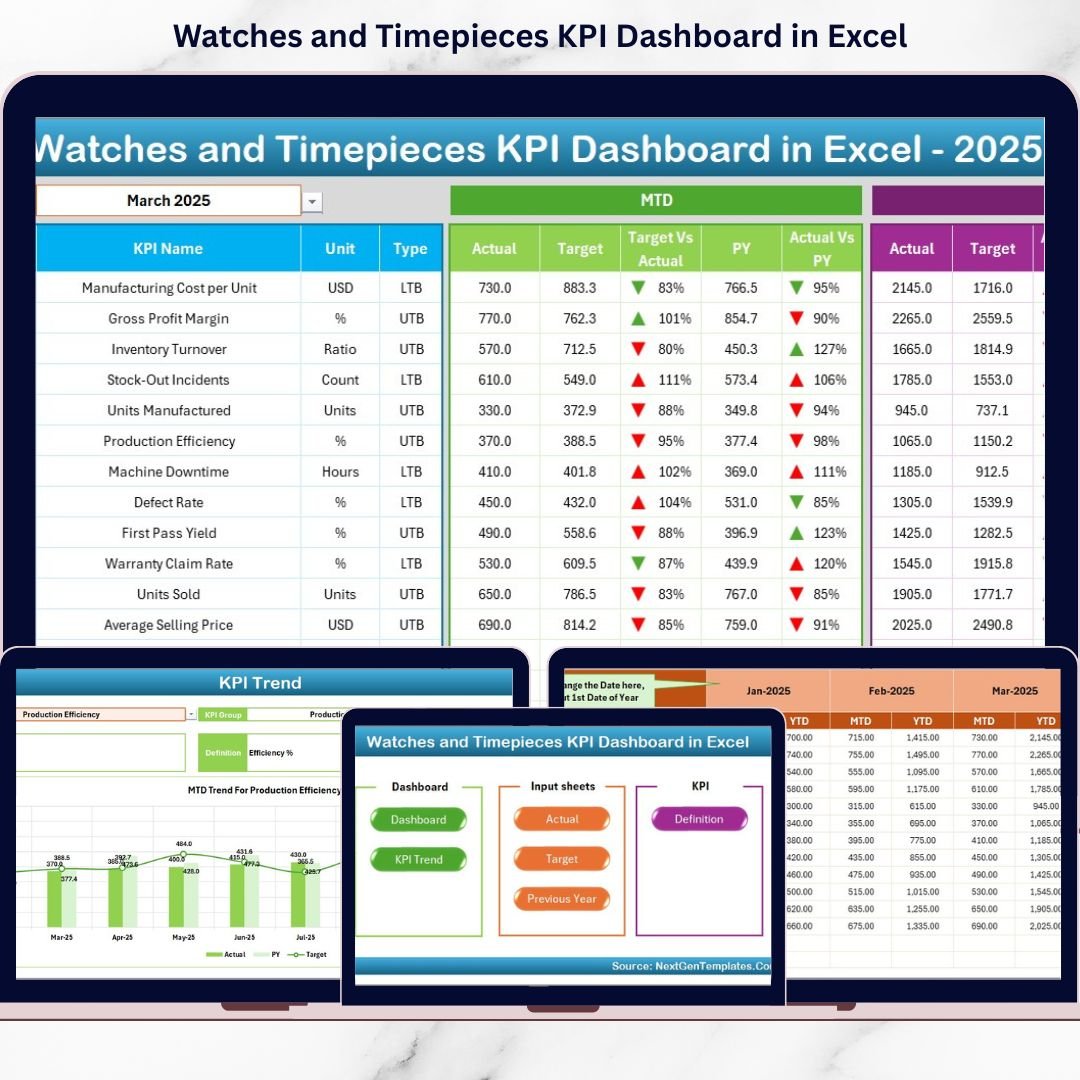


The Watches and Timepieces KPI Dashboard industry runs on precision ⌚📊. Trends shift quickly. Luxury demand rises during wedding seasons and festivals. Smartwatch sales spike during product launches. Meanwhile, inventory costs increase the moment slow-moving models sit in stock too long.
Therefore, tracking performance monthly and yearly is not optional — it is essential.
However, many watch retailers and manufacturers still depend on scattered spreadsheets. As a result, they miss seasonal spikes. They fail to monitor aging inventory. They struggle to compare targets with actual performance.
That is exactly why the Watches and Timepieces KPI Dashboard in Excel becomes a powerful solution.
This ready-to-use Excel template transforms complex watch business data into a structured, interactive, and easy-to-understand dashboard. Instead of juggling multiple files, you monitor sales growth, inventory turnover, profit margins, sell-through rates, and year-over-year performance — all in one centralized system.
Because it is built in Excel, you get flexibility, automation, drop-down filters, conditional formatting arrows, and dynamic trend charts — without investing in expensive BI software.
If you want clarity, control, and confidence in your watch business decisions, this dashboard is built for you.
🔑 Key Features of Watches and Timepieces KPI Dashboard in Excel
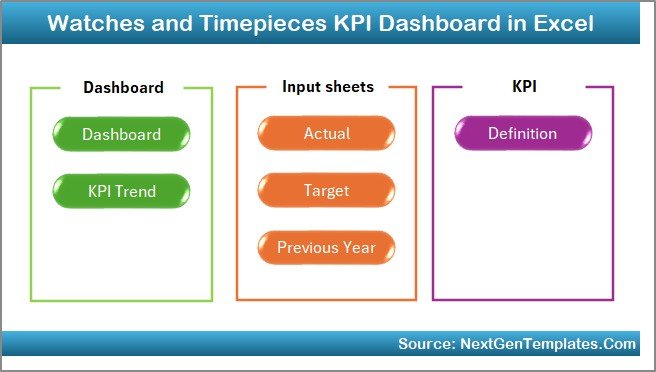
⌚ 7 Structured Worksheets
Complete KPI tracking system with clear sheet separation.
📊 MTD & YTD Performance Tracking
Monitor monthly and yearly performance instantly.
🎯 Target vs Actual Comparison
Identify performance gaps immediately.
📈 Previous Year (PY) Comparison
Track year-on-year growth trends.
📦 Inventory Performance Monitoring
Detect slow-moving and aging stock.
📉 Conditional Formatting Indicators
Up/Down arrows highlight performance visually.
🔄 Dynamic Month Selection (Cell D3)
Switch months and refresh the dashboard instantly.
📚 KPI Definition Master Sheet
Clear documentation of KPI formulas and logic.
📦 What’s Inside the Watches and Timepieces KPI Dashboard in Excel
This dashboard contains 7 powerful worksheets:
1️⃣ Home Sheet – Navigation Center
-
6 interactive navigation buttons
-
One-click access to all sheets
-
Clean, professional layout
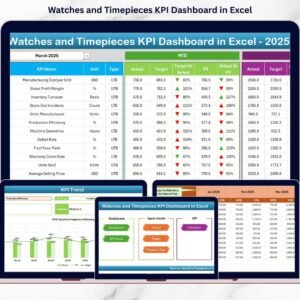
2️⃣ Dashboard Sheet – Main Performance View

The core reporting sheet.
🔹 Select month from Cell D3
🔹 Dashboard updates automatically
MTD Section Includes:
-
MTD Actual
-
MTD Target
-
MTD Previous Year
-
Target vs Actual %
-
PY vs Actual %
-
Up/Down performance arrows
YTD Section Includes:
-
YTD Actual
-
YTD Target
-
YTD Previous Year
-
Target vs Actual %
-
PY vs Actual %
Within seconds, you understand business health.
3️⃣ KPI Trend Sheet – Deep KPI Analysis
🔹 Select KPI from Cell C3
🔹 View KPI Group, Unit, Type (LTB/UTB)
🔹 MTD Trend Chart
🔹 YTD Trend Chart
🔹 Actual vs Target vs PY comparison
Perfect for analyzing inventory turnover drops or margin fluctuations.
4️⃣ Actual Numbers Input Sheet
-
Enter first month in Cell E1
-
Input MTD and YTD actual values
-
Dashboard updates automatically
5️⃣ Target Sheet
-
Enter monthly MTD targets
-
Enter YTD targets
-
Enables accurate variance tracking
6️⃣ Previous Year Sheet
-
Input last year’s numbers
-
Compare seasonal growth patterns
-
Track year-on-year performance
7️⃣ KPI Definition Sheet
-
KPI Name
-
KPI Group
-
Unit
-
Formula
-
Definition
-
Type (LTB or UTB)
Ensures clarity and long-term consistency.
🛠️ How to Use the Watches and Timepieces KPI Dashboard in Excel
1️⃣ Enter first month in Actual sheet (Cell E1)
2️⃣ Input MTD & YTD actual numbers
3️⃣ Add monthly targets
4️⃣ Enter previous year numbers
5️⃣ Review KPI definitions
6️⃣ Go to Dashboard sheet
7️⃣ Select month from Cell D3
8️⃣ Analyze performance
Within minutes, you get structured insights.
👥 Who Can Benefit from This Watches and Timepieces KPI Dashboard?
⌚ Watch Retail Stores
💎 Luxury Timepiece Brands
📱 Smartwatch Companies
🏬 Distributors & Wholesalers
🏭 Manufacturers
🛒 E-commerce Watch Sellers
Whether you manage one outlet or multiple branches, this template scales with your business.
🚀 Why Choose Excel for Watch KPI Tracking?
✔ Familiar interface
✔ No subscription cost
✔ Quick implementation
✔ Easy customization
✔ Flexible KPI additions
✔ Perfect for small & mid-sized businesses
Instead of complex BI tools, you get a practical and powerful Excel solution.
📈 How This Dashboard Supports Growth
When you track:
-
Inventory Turnover Ratio
-
Stock Aging %
-
Gross Profit Margin
-
Sell-Through Rate
-
Average Selling Price
-
Sales Growth %
You:
✔ Identify high-performing models
✔ Eliminate slow-moving stock
✔ Improve pricing strategy
✔ Increase margin
✔ Improve working capital efficiency
Growth becomes measurable — and manageable.
### Click here to read the Detailed blog post
🔗 Visit our YouTube channel to learn step-by-step video tutorials
👉 https://youtube.com/@PKAnExcelExpert