

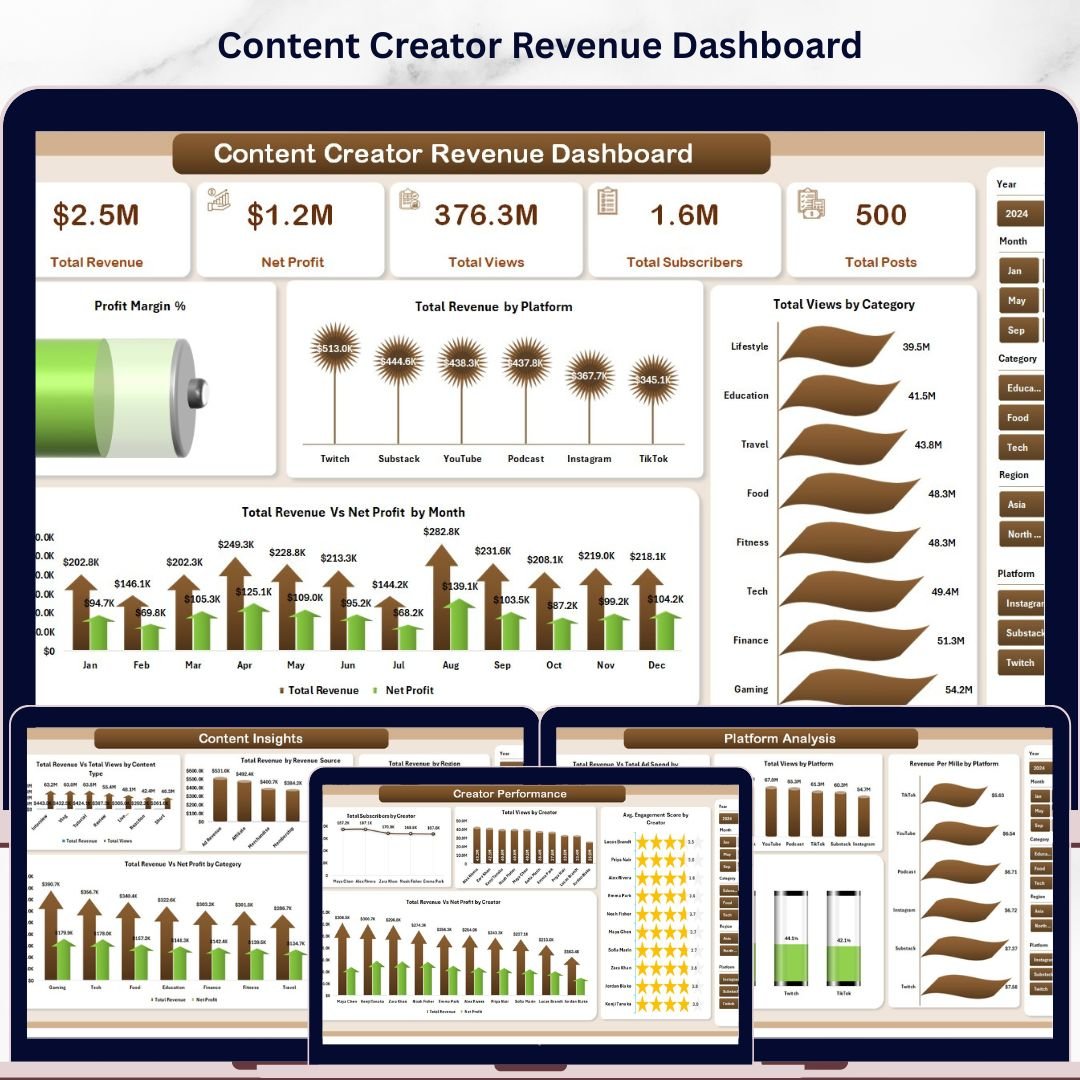
🔑 Key Features of Content Creator Revenue Dashboard in Excel
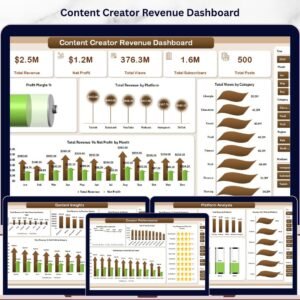
Content Creator Revenue Dashboard in Excel is a premium, interactive analytics template built specifically for YouTubers, bloggers, podcasters, social media influencers, and digital content creators who want to track their revenue, views, subscribers, and profitability across multiple platforms — all inside Microsoft Excel. This dashboard includes 5 interactive analysis pages covering Overview, Revenue Trend, Platform Analysis, Creator Performance, and Content Insights, plus a dedicated Data Sheet and a Support Sheet with pivot tables that power the entire dashboard automatically. It tracks 5 key performance indicators including Total Revenue, Net Profit, Total Views, Total Subscribers, and Total Posts across multiple dimensions like platform, category, creator, region, and revenue source.
If you are looking for more Excel Dashboard Templates, explore our full collection of professionally designed templates for every business need. This Content Creator Revenue Dashboard in Excel is one of the most comprehensive content creator analytics solutions available, featuring 16+ interactive charts across 5 dedicated analysis pages.
📦 What’s Inside the Content Creator Revenue Dashboard in Excel
1 — Overview Page: The Overview page presents high-level KPI cards for Total Revenue, Net Profit, Total Views, Total Subscribers, and Total Posts. Below the cards, you will find charts showing Profit Margin % by Overall, Total Revenue by Platform, Total Views by Category, and Total Revenue Vs Net Profit by Month. The Profit Margin % chart provides an instant health check of your content business profitability, while the platform-wise revenue breakdown helps you identify which channels generate the most income. Multiple slicer filters are available so you can quickly drill down into the data by platform, category, creator, or time period.
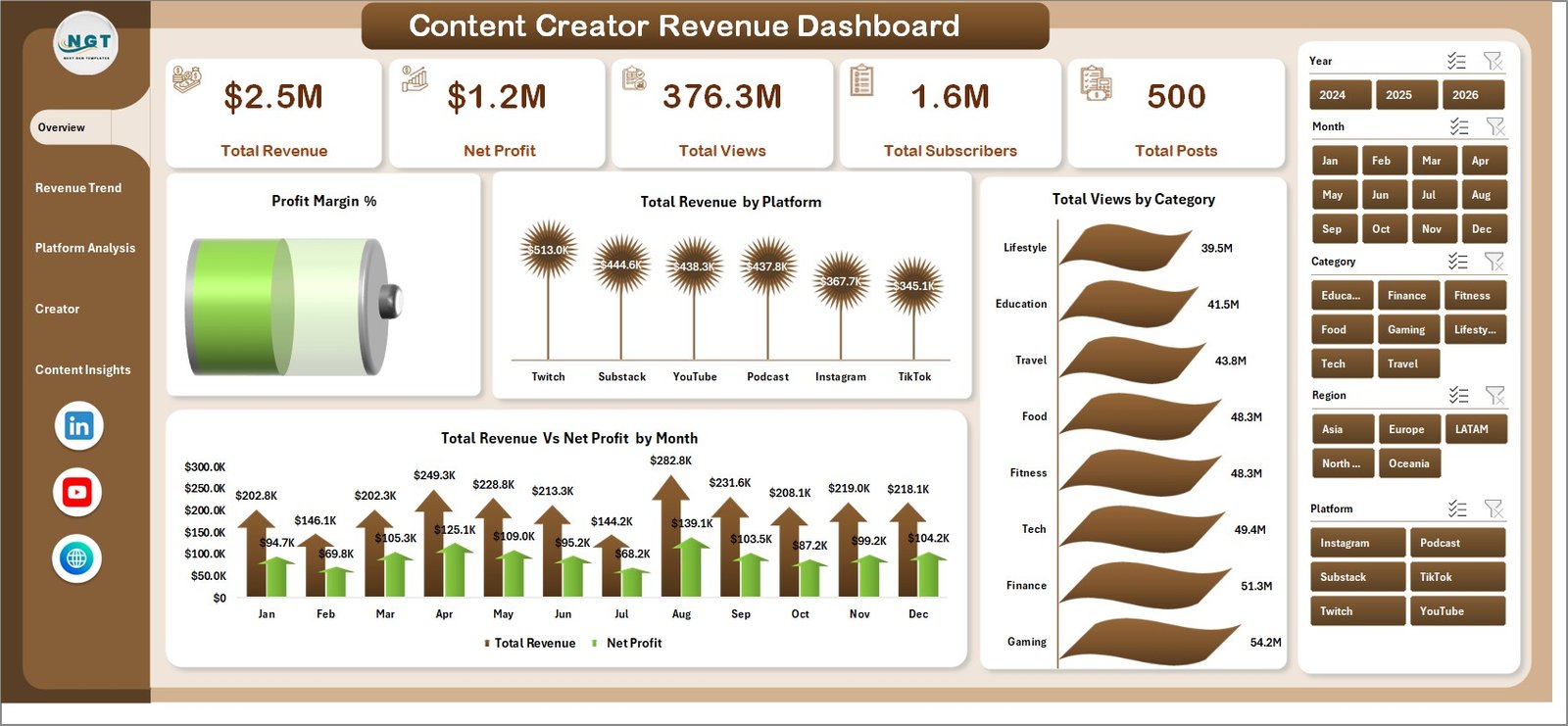 Content Creator Revenue Dashboard
2 — Revenue Trend: This page focuses on time-based trend analysis with charts for Total Views Vs Total Subscribers by Month, Total Revenue Vs Net Profit by Year, Revenue Per Mile by Month, and Total Revenue Vs Total Production Cost by Month. The Revenue Per Mile metric helps you understand how efficiently your content monetizes per thousand views, while the production cost comparison reveals your true content ROI over time.
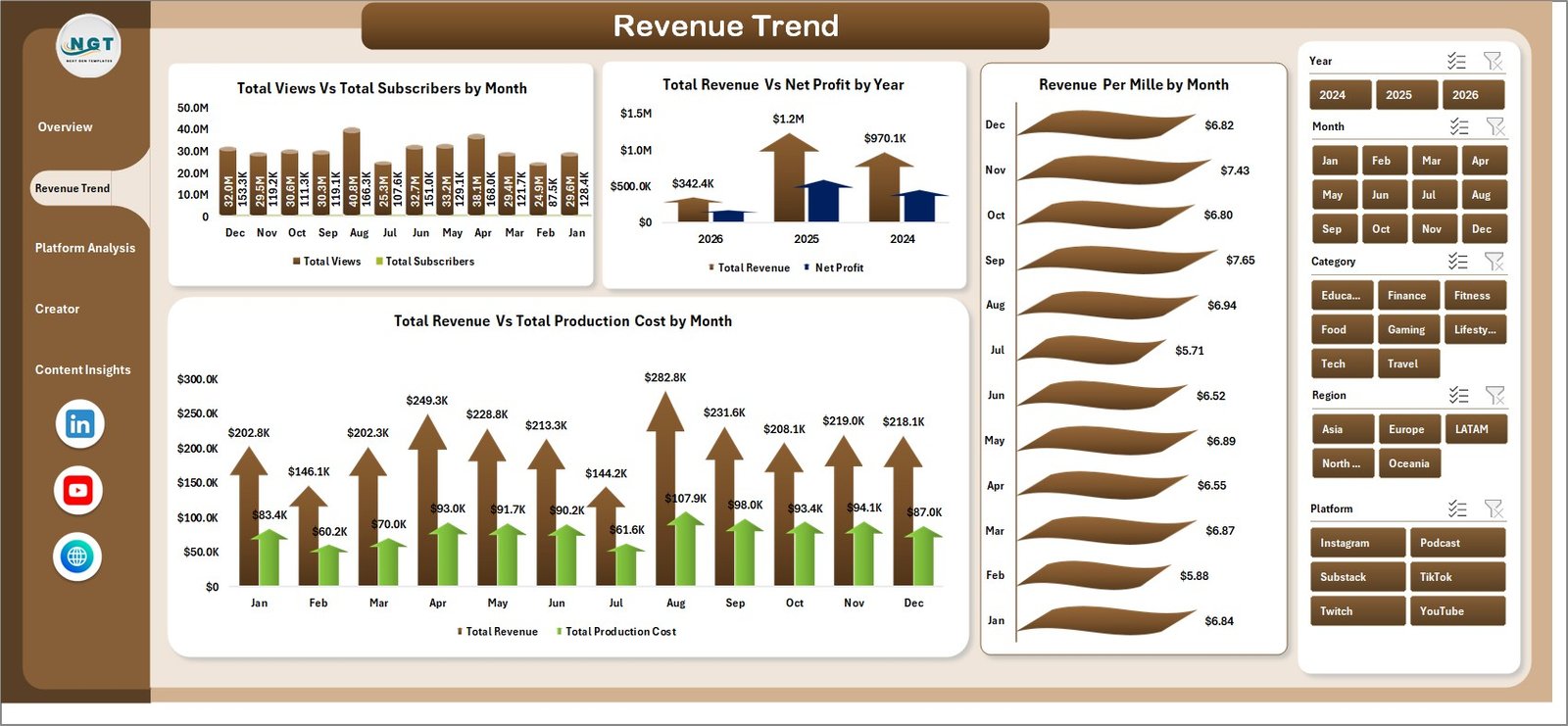 Revenue Trend
3 — Platform Analysis: Dive deep into platform-level performance with charts showing Total Revenue Vs Total Ad Spend by Platform, Total Views by Platform, Revenue Per Mile by Platform, and Profit Margin % by Platform. This page is essential for content creators who publish across YouTube, Instagram, TikTok, blogs, and podcasts — helping you allocate time and budget to the most profitable platforms.
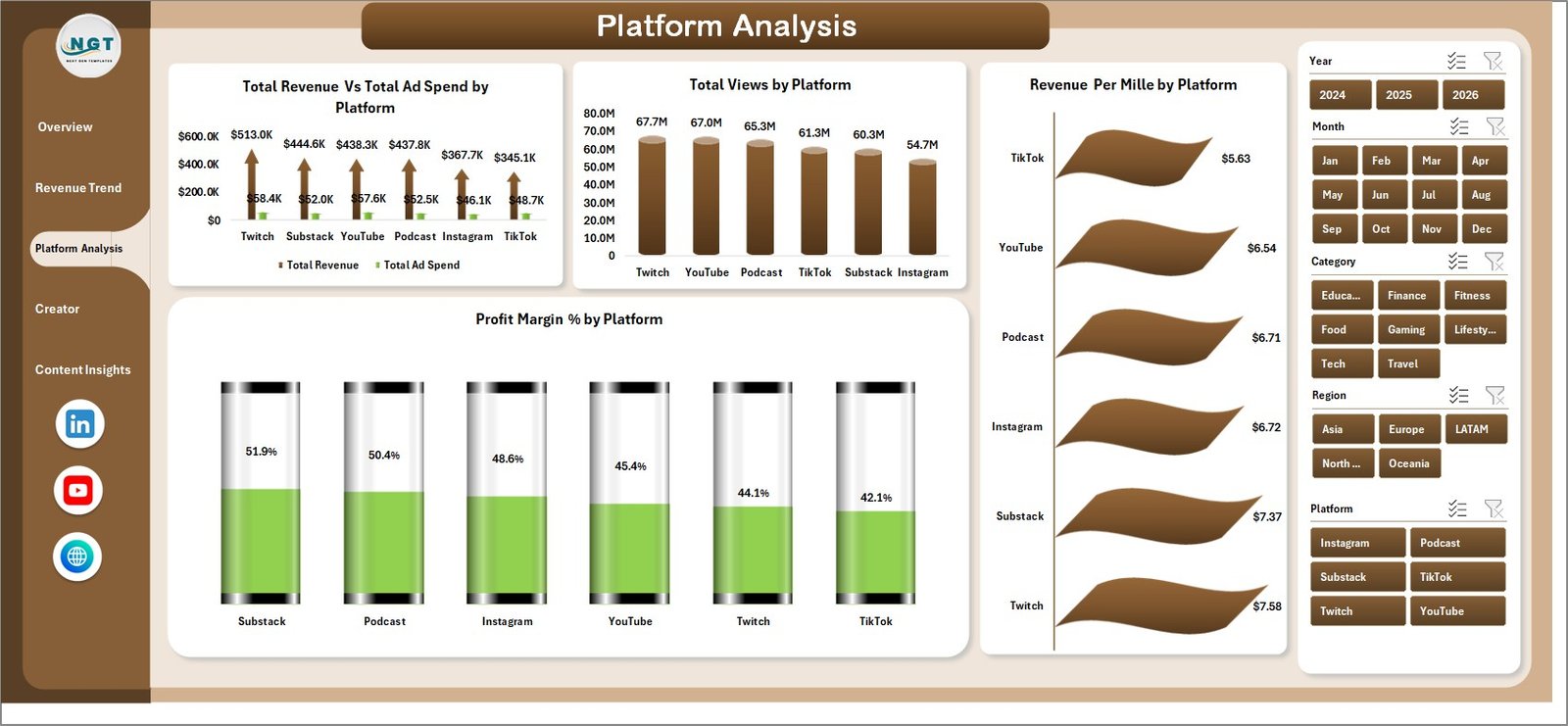 Platform Analysis
4 — Creator Performance: Compare individual creator performance with charts for Total Subscribers by Creator, Total Views by Creator, Avg Engagement Score by Creator, and Total Revenue Vs Net Profit by Creator. Perfect for content teams, agencies, or multi-creator brands that need to benchmark individual contributor performance side by side.
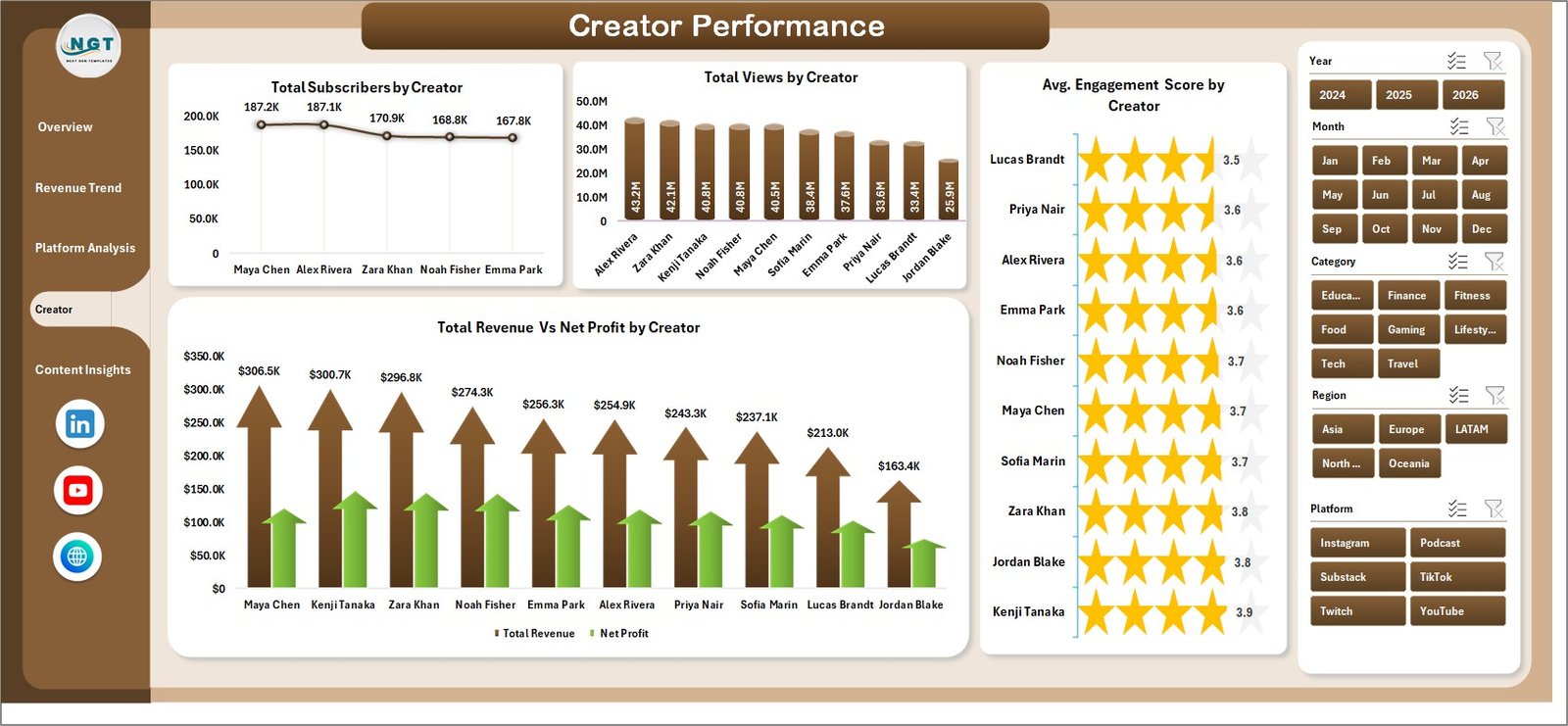 Creator Performance
5 — Content Insights: Understand what content drives the most results with charts for Total Revenue Vs Total Views by Content, Total Revenue by Revenue Source, Total Revenue by Region, and Total Revenue Vs Net Profit by Category. This page helps you identify your highest-earning content types, geographic revenue distribution, and revenue source mix between ads, sponsorships, and merchandise.
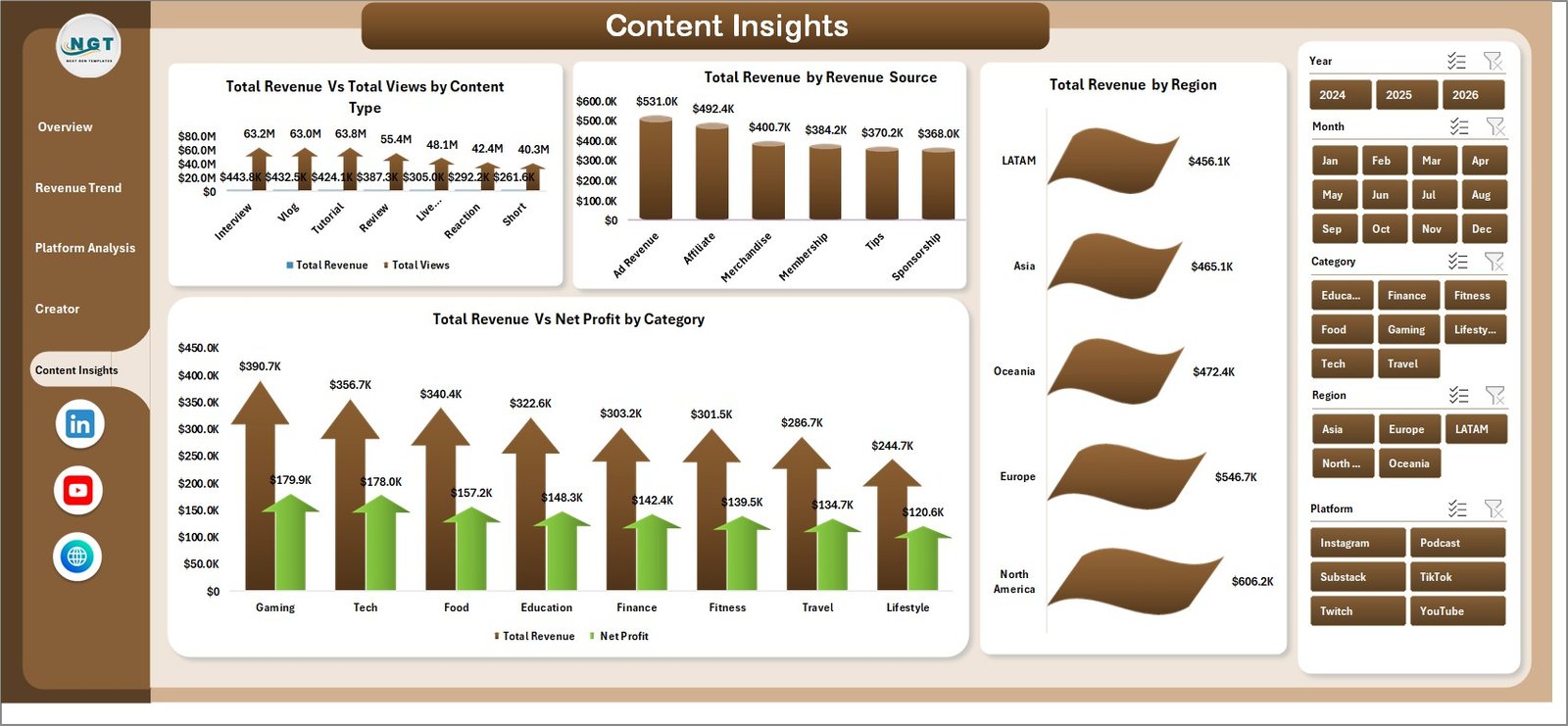 Content Insights
6 — Data Sheet: This is where you add your content creator data. Simply paste your data in the same format as the sample data provided, and all dashboard pages will update once you refresh the pivot tables.
 Data Sheet Tab
7 — Support Sheet: This sheet contains all the pivot tables that power the dashboard charts dynamically. After updating data in the Data Sheet, go to the Data tab in the Excel Ribbon and click Refresh All. All pivot tables and charts will refresh automatically. You can keep this sheet hidden for a cleaner view.
 Support Sheet Tab
Also check out the YouTube Channel Analytics Dashboard in Excel for a complementary analytics solution focused specifically on YouTube metrics.
⚙️ How to Use the Content Creator Revenue Dashboard in Excel
1️⃣ Download and open the Excel file on your desktop or laptop
2️⃣ Navigate to the Data Sheet tab and replace the sample data with your own content creator revenue data
3️⃣ Go to the Data tab in the Excel Ribbon and click Refresh All to update all pivot tables and charts
4️⃣ Use the slicers on the Overview page to filter by platform, category, creator, and time period
5️⃣ Explore all 5 analysis pages for different perspectives on your content business performance
6️⃣ Compare platform profitability on the Platform Analysis page to optimize your content strategy
👥 Who Can Benefit from This Content Creator Revenue Dashboard
📌 YouTube creators and influencers tracking revenue across multiple income streams
📌 Content marketing managers analyzing ROI and performance by platform
📌 Freelance content creators monitoring production costs against revenue
📌 Digital marketing agencies managing creator portfolios and reporting to clients
📌 Podcasters and bloggers tracking subscriber growth and monetization metrics
📌 Social media managers benchmarking creator engagement and revenue contribution
Explore more marketing analytics dashboards in our Marketing Dashboard Templates collection.
❓ Frequently Asked Questions
What KPIs does the Content Creator Revenue Dashboard in Excel track?
The Content Creator Revenue Dashboard in Excel tracks 5 key performance indicators: Total Revenue, Net Profit, Total Views, Total Subscribers, and Total Posts. It also calculates Profit Margin %, Revenue Per Mile (RPM), and Avg Engagement Score across 5 interactive analysis pages.
Do I need advanced Excel skills to use this content creator dashboard?
No. Simply replace the sample data in the Data Sheet with your own content creator revenue data and click Refresh All from the Data tab. All pivot tables, charts, and KPI cards update automatically — no VBA, macros, or formulas to edit.
Can I track revenue from multiple platforms like YouTube, Instagram, and TikTok?
Yes. The dashboard includes a dedicated Platform Analysis page that breaks down revenue, views, RPM, and profit margin by each platform. You can add data for YouTube, Instagram, TikTok, blogs, podcasts, or any other content platform in the Data Sheet.
What is the best Excel dashboard for content creators?
The Content Creator Revenue Dashboard in Excel by NextGenTemplates is one of the most comprehensive options available. It includes 5 interactive pages covering revenue trends, platform analysis, creator performance, and content insights — all powered by pivot tables for automatic updates.
Can I use this dashboard to compare performance across multiple creators?
Yes. The Creator Performance page includes charts for subscribers, views, engagement score, and revenue vs profit by individual creator — making it perfect for content teams and agencies managing multiple creators.
🔗 Explore Related Templates
📌 YouTube Channel Analytics Dashboard in Excel — Track YouTube views, revenue, subscribers, and audience insights in a dedicated Excel dashboard
📌 YouTube Channel Analytics Dashboard in Power BI — Advanced YouTube analytics with Power BI interactivity
📌 YouTube Channel Analytics Dashboard in HTML — Browser-based YouTube analytics dashboard
📖 Click here to read the Detailed Blog Post
🎥 Visit our YouTube channel to learn step-by-step video tutorials
👉 YouTube.com/@NextGenTemplates

























Reviews
There are no reviews yet.