

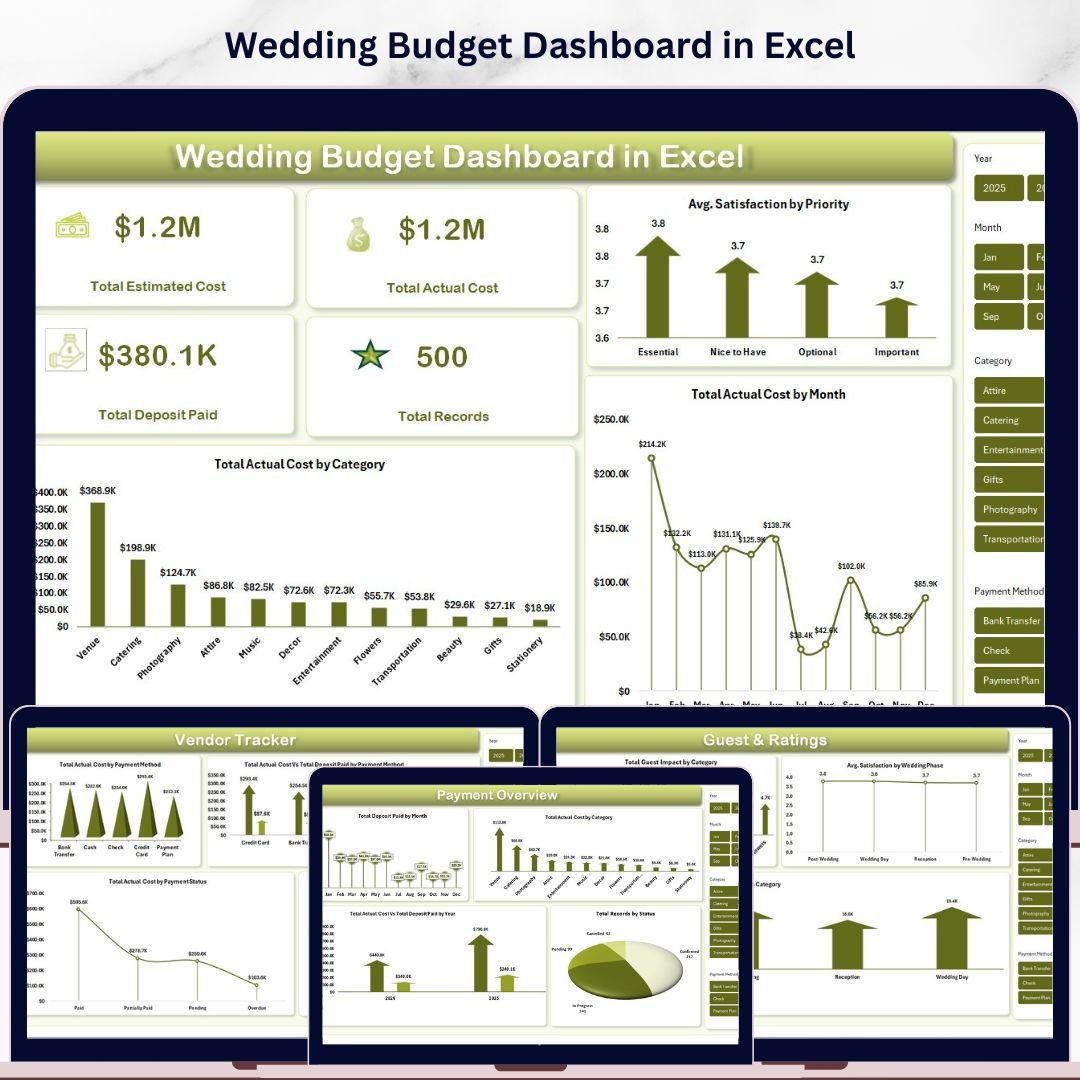
Wedding Budget Dashboard in Excel is a professionally designed, ready-to-use Excel dashboard template built for couples, wedding planners, and event coordinators who want to take full control of their wedding expenses. This interactive Excel dashboard includes 5 dynamic analysis pages, a structured data sheet, and a support sheet — all powered by pivot tables that refresh automatically when you update your data. With built-in slicers, KPI cards, and insightful charts, tracking every dollar of your wedding budget has never been easier.
Whether you are planning a small intimate ceremony or a grand celebration, this template helps you monitor estimated vs. actual costs, track vendor payments, analyze guest impact, and keep your wedding finances organized from start to finish. It is the perfect companion for anyone who wants a data-driven approach to wedding planning.
🔑 Key Features of Wedding Budget Dashboard in Excel
📌 5 Interactive Dashboard Pages – Overview, Budget Analysis, Vendor Tracker, Payment Overview, and Guest & Ratings pages provide a comprehensive view of your wedding finances from every angle.
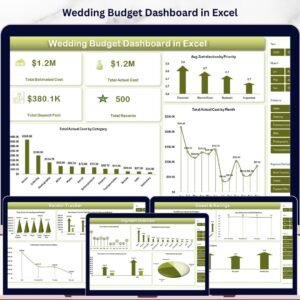
📌 4 High-Level KPI Cards – Instantly see your Total Estimated Cost, Total Actual Cost, Total Deposit Paid, and Total Records right on the Overview page.
📌 Multiple Dynamic Charts – Visualize your spending patterns with charts showing Avg. Satisfaction by Priority, Total Actual Cost by Month, Total Actual Cost by Category, and many more across all pages.
📌 Built-in Slicers for Quick Filtering – Apply filters instantly on the Overview page to slice your data by category, priority, vendor, month, or payment status without any manual sorting.
📌 Vendor Payment Tracking – Monitor payment methods, deposit vs. actual amounts, payment status, and vendor satisfaction scores all in one dedicated page.
📌 Pivot Table Powered – All charts and KPIs are driven by pivot tables on the Support sheet. Simply refresh data from the Excel Ribbon and the entire dashboard updates automatically.
📌 No VBA or Macros Required – Works with standard Excel features. Just open, enter your data, and start analyzing.
📦 What’s Inside the Wedding Budget Dashboard in Excel
This template includes 7 sheets designed to give you a complete wedding budget management experience:
📊 Overview Page – Your command center with KPI cards for Total Estimated Cost, Total Actual Cost, Total Deposit Paid, and Total Records. Charts include Avg. Satisfaction by Priority, Total Actual Cost by Month, and Total Actual Cost by Category. Multiple slicers let you filter the dashboard instantly.
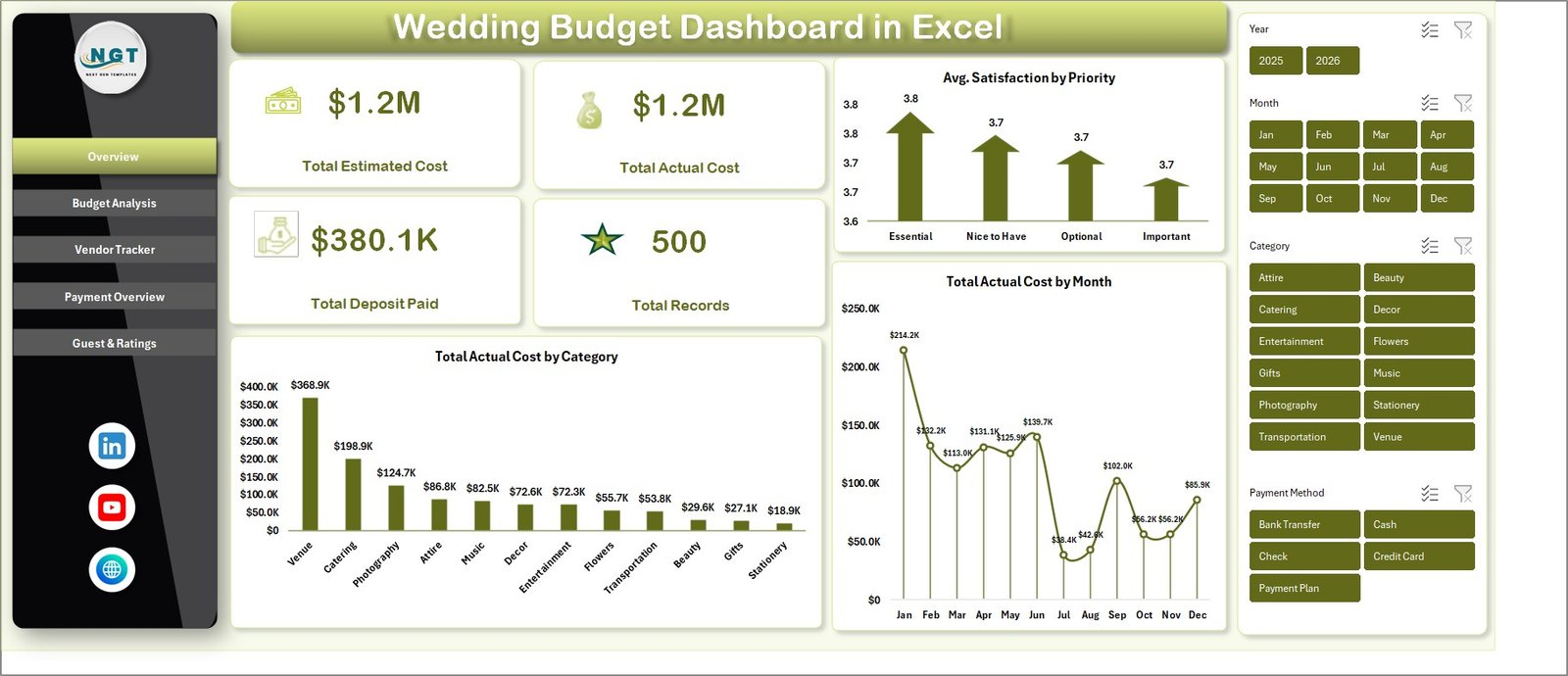 Wedding Budget Dashboard in Excel
📊 Budget Analysis Page – Deep dive into your spending with Total Actual Cost by Category, Total Actual Cost by Priority, and Total Estimated Cost vs Total Actual Cost by Wedding Phase.
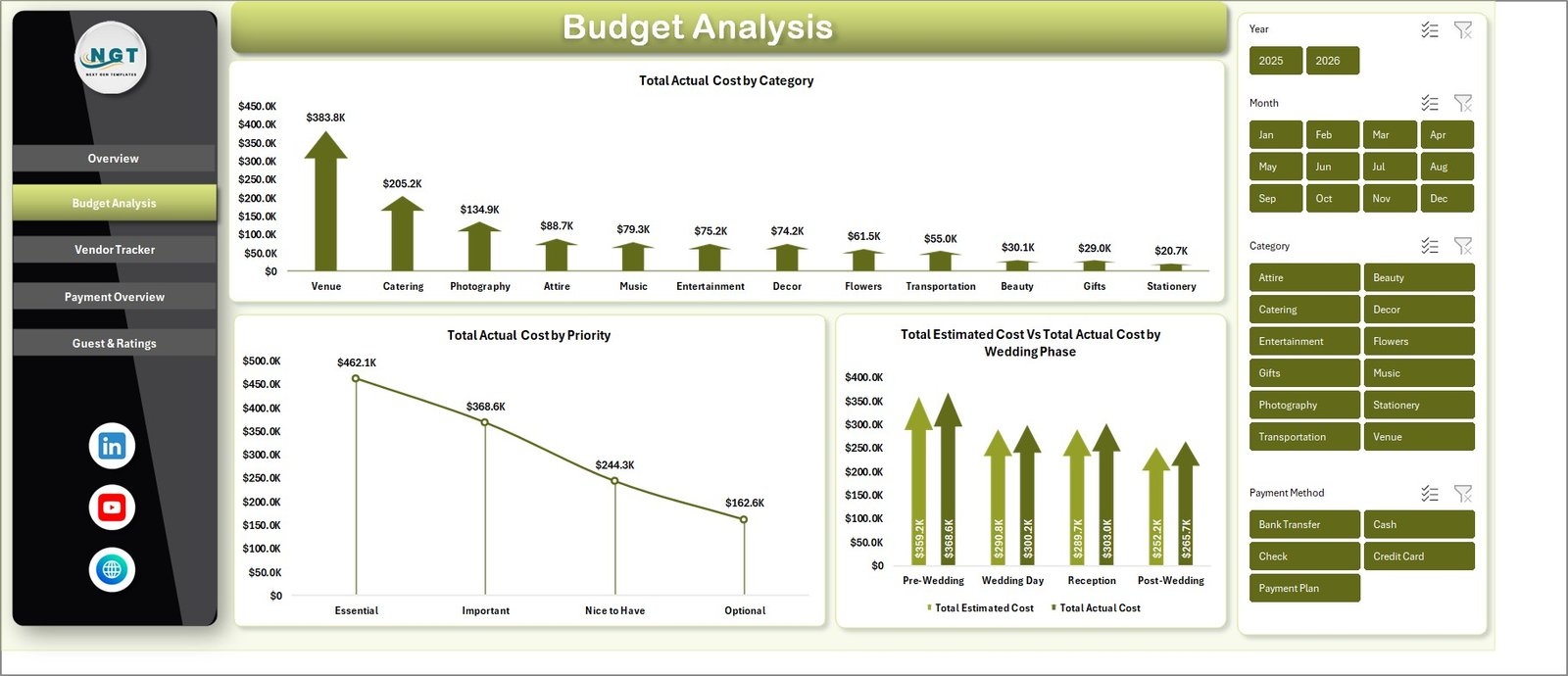 Budget Analysis
📊 Vendor Tracker Page – Analyze vendor-related finances with Total Actual Cost by Payment Method, Total Actual Cost vs Total Deposit Paid by Payment Method, Total Actual Cost by Payment Status, and Avg. Satisfaction by Vendor.
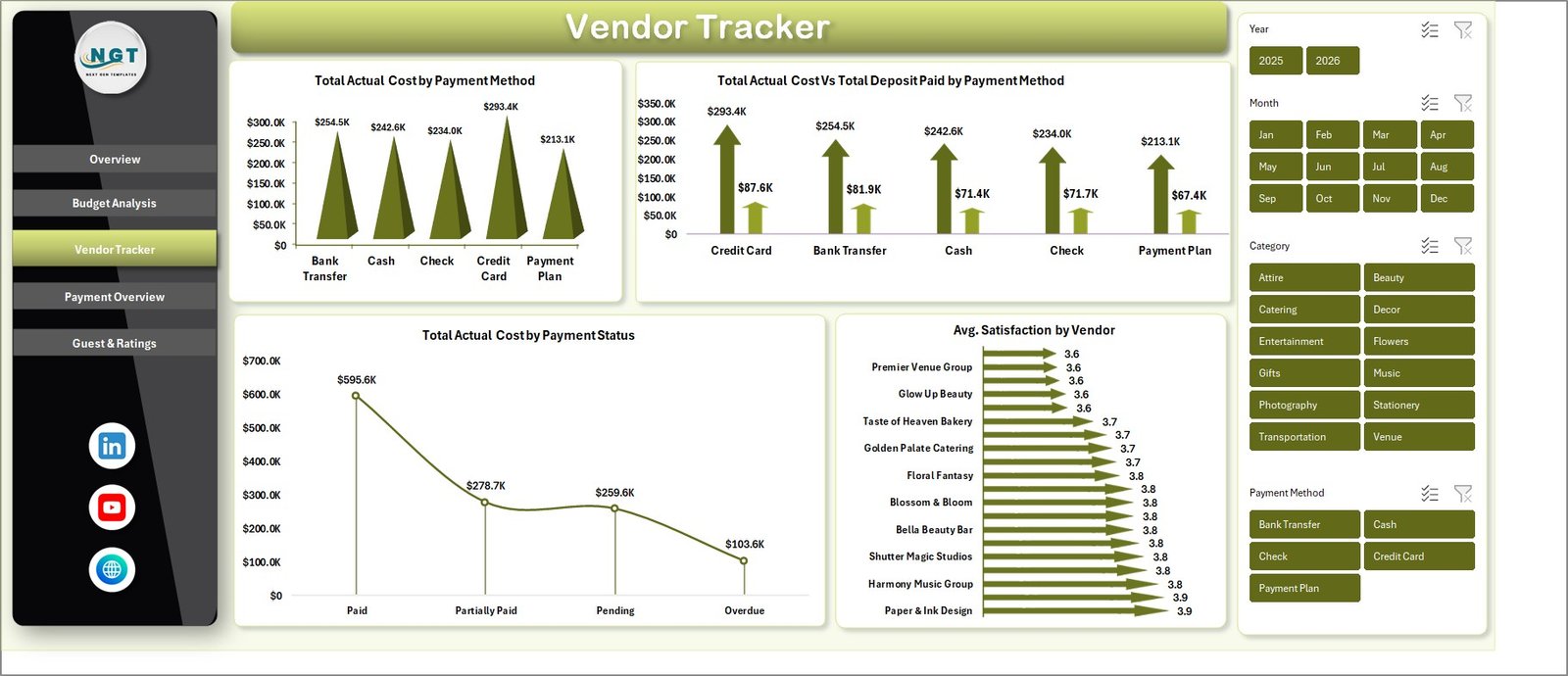 Vendor Tracker
📊 Payment Overview Page – Track payment timelines and breakdowns with Total Deposit Paid by Month, Total Actual Cost by Category, Total Actual Cost vs Total Deposit Paid by Year, and Total Records by Status.
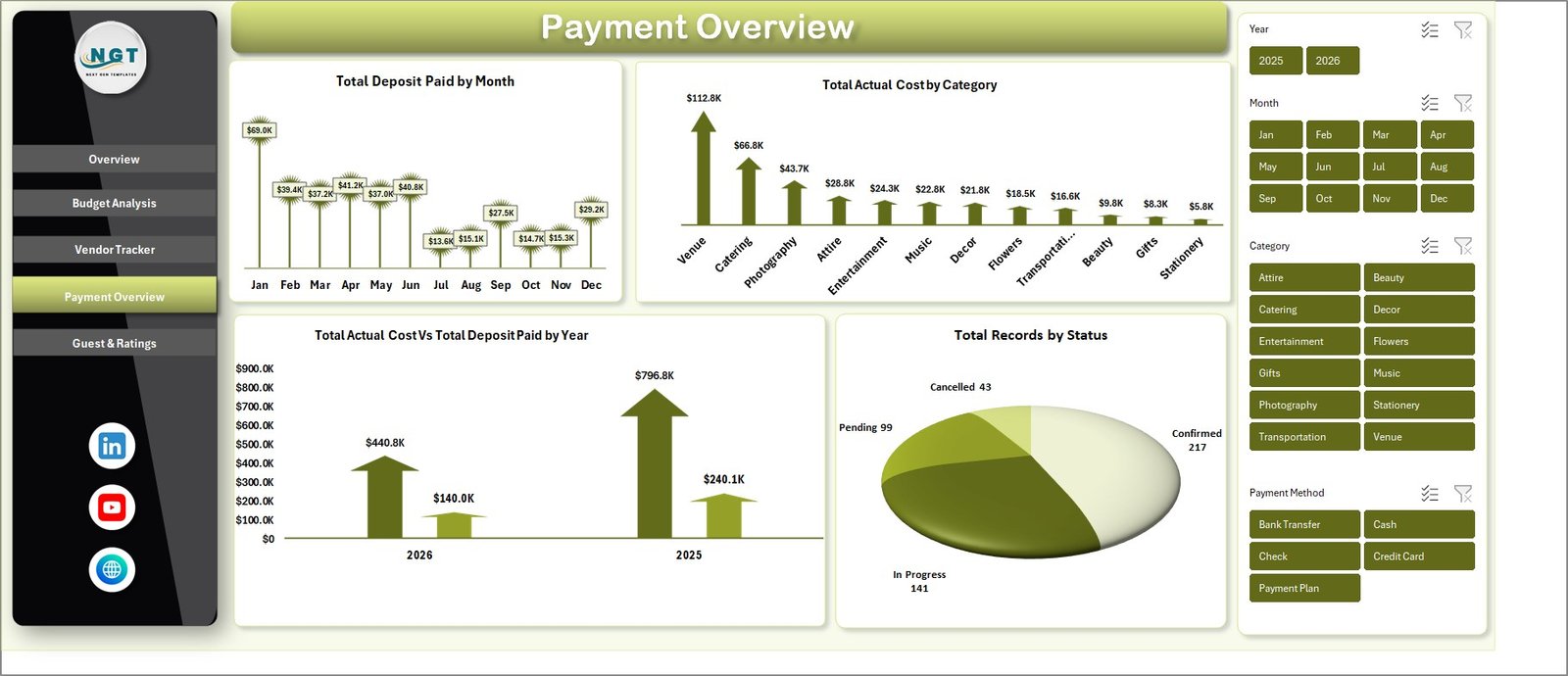 Payment Overview
📊 Guest & Ratings Page – Understand guest impact and satisfaction with Total Guest Impact by Category, Avg. Satisfaction by Wedding Phase, and Wedding Phase by Category analysis.
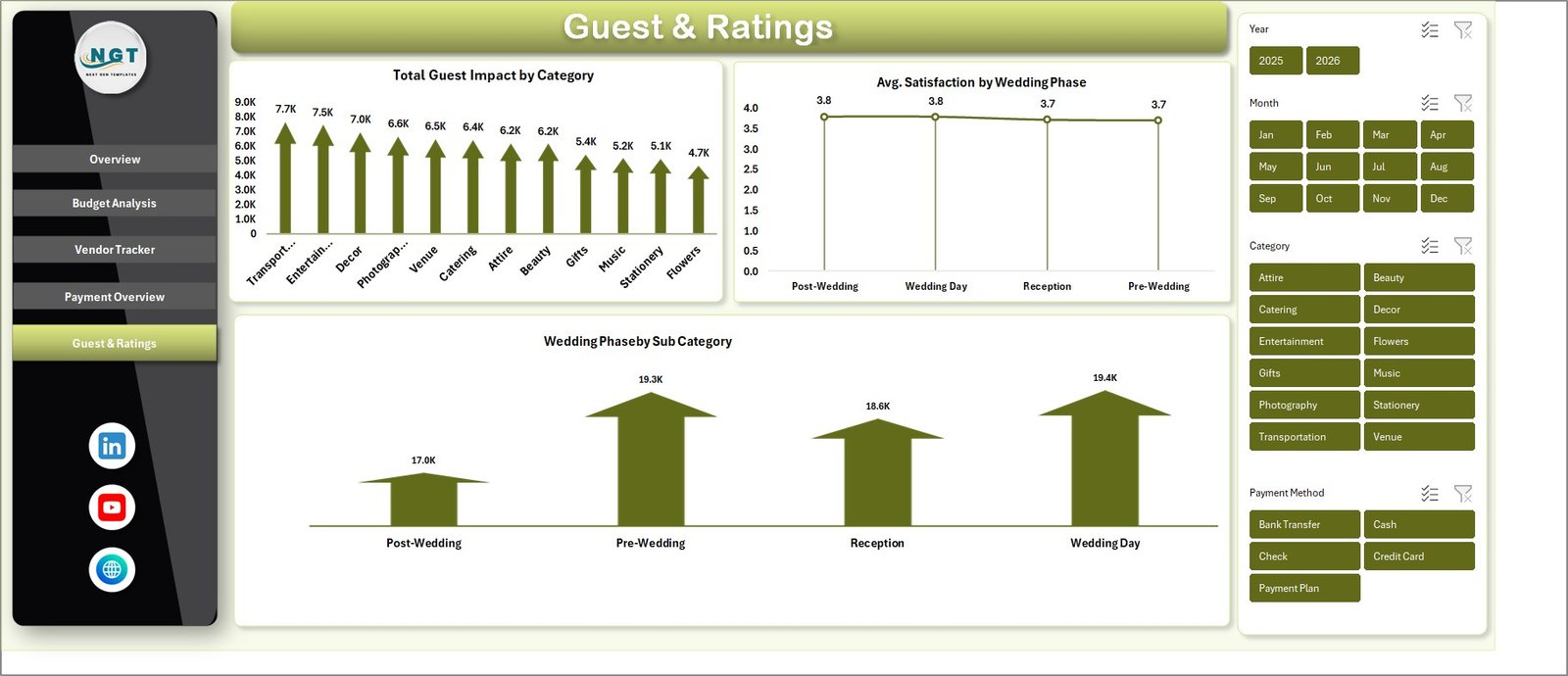 Guest & Ratings
📊 Data Sheet – This is where you enter all your wedding budget data. Simply add your records in the same format provided and the entire dashboard updates when you refresh.
 Data Sheet Tab
📊 Support Sheet – Contains all the pivot tables that power the dashboard. Go to Data tab in the Excel Ribbon and click Refresh All after updating data. You can keep this sheet hidden.
 Support Sheet Tab
⚙️ How to Use the Wedding Budget Dashboard in Excel
1️⃣ Download and open the file in Microsoft Excel (2016 or later recommended).
2️⃣ Navigate to the Data Sheet tab and replace the sample data with your actual wedding budget entries — including categories, vendors, estimated and actual costs, deposits, and payment methods.
3️⃣ Go to the Data tab in the Excel Ribbon and click “Refresh All” to update all pivot tables and charts instantly.
4️⃣ Use the slicers on the Overview page to filter your dashboard by category, priority, month, or vendor.
5️⃣ Explore each dashboard page — Budget Analysis, Vendor Tracker, Payment Overview, and Guest & Ratings — to gain actionable insights about your wedding spending.
👥 Who Can Benefit from This Wedding Budget Dashboard in Excel
💍 Couples planning their wedding who want to stay on top of every expense
💍 Professional wedding planners managing multiple client budgets
💍 Event coordinators tracking vendor payments and deposits
💍 Families helping organize and fund wedding celebrations
💍 Financial advisors helping clients plan for major life events
❓ Frequently Asked Questions
What KPIs does the Wedding Budget Dashboard in Excel track?
The Wedding Budget Dashboard in Excel tracks 4 key metrics on the Overview page: Total Estimated Cost, Total Actual Cost, Total Deposit Paid, and Total Records. Additional analysis across 5 pages covers cost breakdowns by category, priority, payment method, vendor satisfaction, guest impact, and wedding phase comparisons.
Do I need advanced Excel skills to use this wedding budget template?
No. This template requires no VBA or macros. Simply replace the sample data in the Data Sheet tab with your own wedding expenses, click Refresh All in the Data tab, and all charts and KPI cards update automatically.
Can I customize the categories and vendors in this Excel wedding budget tracker?
Yes. You can add, modify, or remove categories, vendors, payment methods, and other fields directly in the Data Sheet. The pivot tables and charts adapt dynamically to any changes when you refresh.
How is this different from a simple wedding budget spreadsheet?
Unlike basic spreadsheets, this template includes 5 interactive dashboard pages with visual charts, KPI cards, slicers for instant filtering, vendor tracking, payment analysis, and guest impact metrics — giving you a complete financial picture of your wedding planning.
What version of Excel do I need for this wedding budget dashboard?
This template works best with Microsoft Excel 2016 or later, including Microsoft 365. It uses pivot tables and slicers which are standard Excel features available in all modern versions.
Can a wedding planner use this template for multiple weddings?
Yes. You can duplicate the file for each wedding project. Each copy operates independently with its own data, making it perfect for professional wedding planners managing multiple clients.
🔗 Explore Related Templates
📌 Wedding Planning KPI Dashboard in Excel — Track key wedding planning performance indicators with dedicated KPI scorecards and trend analysis.
📌 Event Management Dashboard in Excel — A comprehensive event tracking dashboard for managing budgets, tasks, and logistics for any event type.
📌 Monthly Budget Planner Template in Excel — Plan and track your monthly personal or household finances with this easy-to-use budget planner.
📌 Personal Finance Dashboard in Excel — A full personal finance tracking dashboard covering income, expenses, savings, and investments.
📖 Click here to read the Detailed Blog Post<
Watch the step-by-step video tutorial:
/h3>





















Reviews
There are no reviews yet.