Managing multiple office leases across regions, industries, and lease types is not easy. One missed renewal, one overlooked maintenance spike, or one untracked security deposit can cost thousands.
What if you could see every lease detail, financial exposure, renewal risk, and monthly trend in one powerful interactive dashboard?
That’s exactly what the Office Lease Management Dashboard in Power BI delivers.
This ready-to-use Power BI solution transforms your raw lease data into dynamic visual insights. Instead of reviewing scattered spreadsheets, you can monitor rent, maintenance, deposits, renewals, expirations, and trends — all from a centralized, professional dashboard.
If you want smarter financial control, stronger renewal planning, and complete lease visibility, this dashboard is your competitive advantage.
🚀 Key Feature of Office Lease Management Dashboard in Power BI
✨ 5 Fully Interactive Dashboard Pages
Designed to cover financial analysis, lease type comparison, industry performance, and monthly trends.
📊 Powerful KPI Cards
Instantly view Monthly Rent, Annual Rent, Maintenance Charges, and Security Deposits.
🔍 Smart Slicers (Filters)
Filter data by Region, Industry, Lease Type, and Lease Status in seconds.
📈 Financial Exposure Tracking
Monitor annual commitments and deposit exposure without manual calculations.
🔄 Renewal & Expiration Insights
Track Renewed %, Expired %, and Terminated leases proactively.
📅 Monthly Trend Analysis
Identify seasonal maintenance spikes and peak renewal months.
💼 Industry-Level Performance
Analyze which industries generate higher rent and better renewal rates.
⚡ Enterprise-Ready Performance
Handles small portfolios (10–20 leases) to large datasets (1000+ leases).
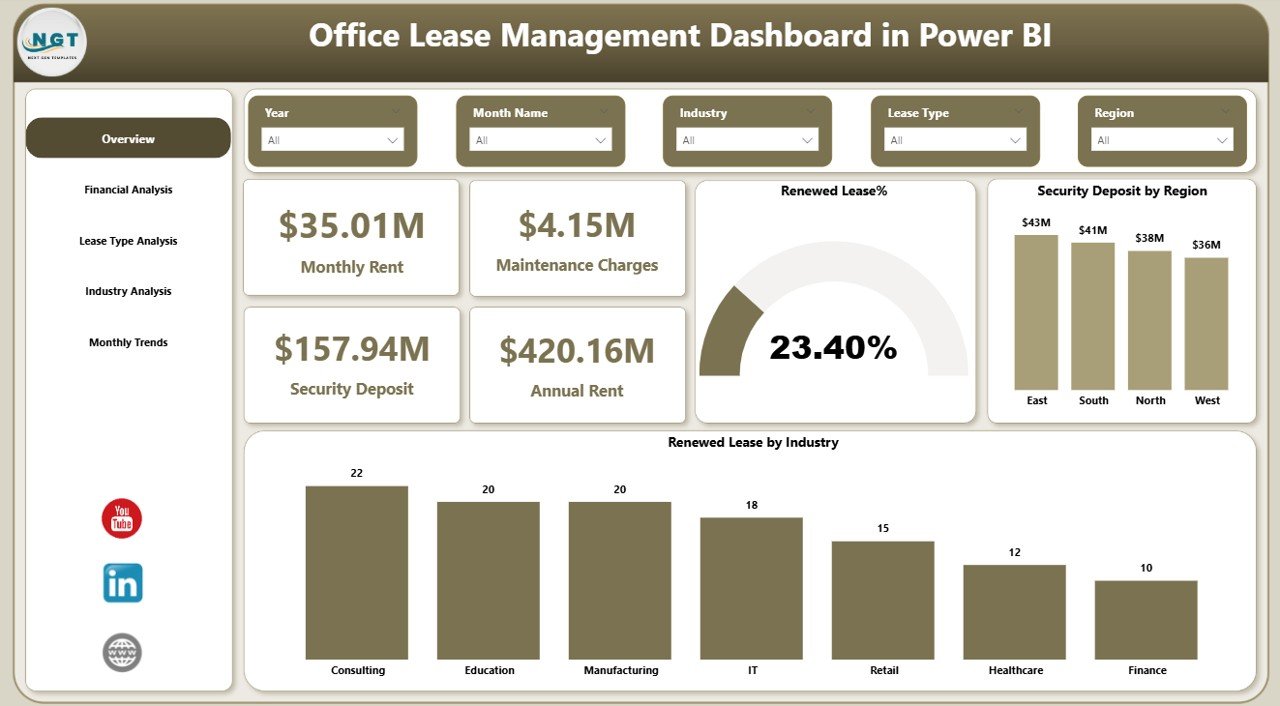
📦 What’s Inside the Office Lease Management Dashboard in Power BI
You get 5 professionally designed dashboard pages, each built for strategic decision-making:
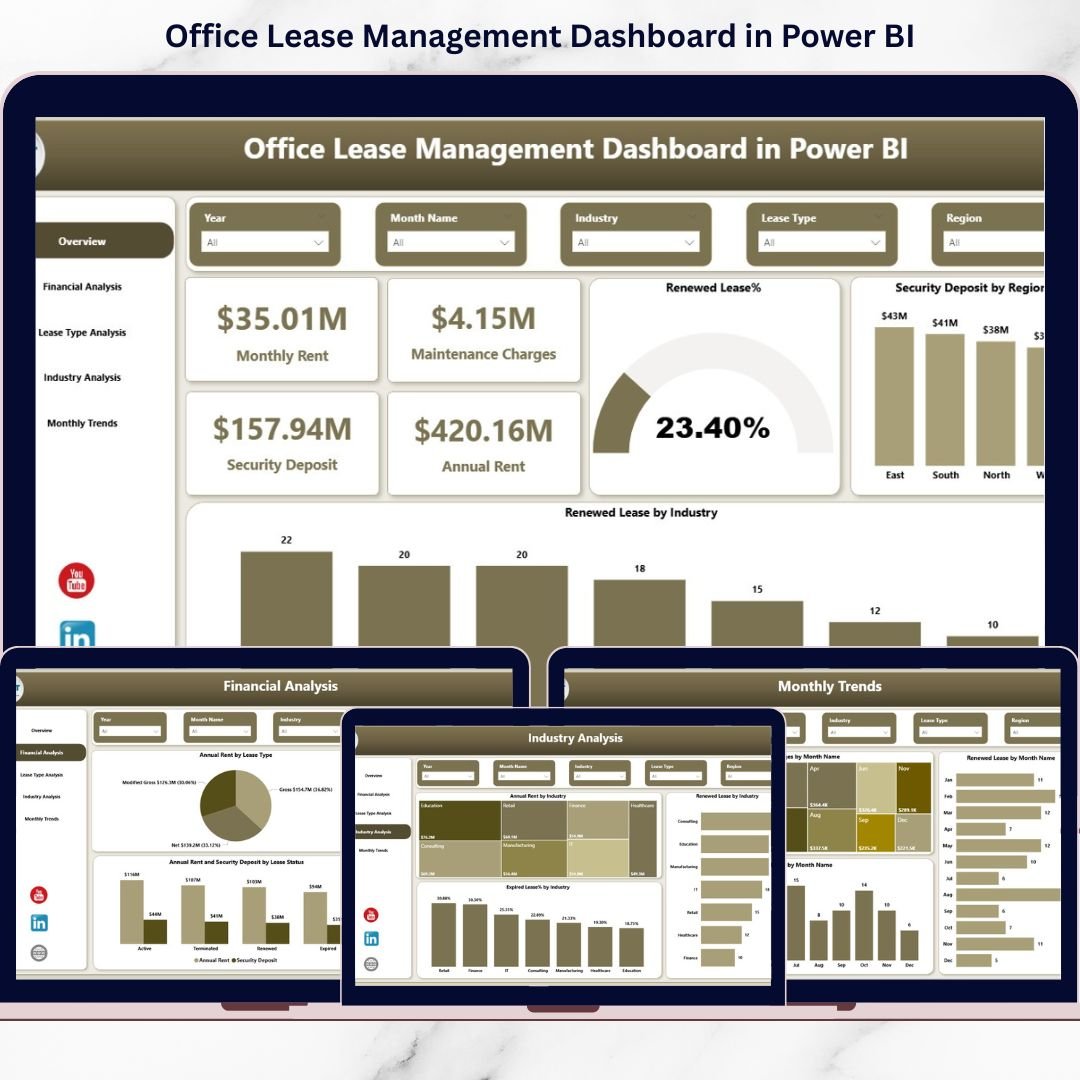
1️⃣ Overview Page
Your central control panel showing:
-
Monthly Rent
-
Maintenance Charges
-
Security Deposit
-
Annual Rent
-
Renewed Lease %
-
Security Deposit by Region
This page gives instant portfolio health visibility.
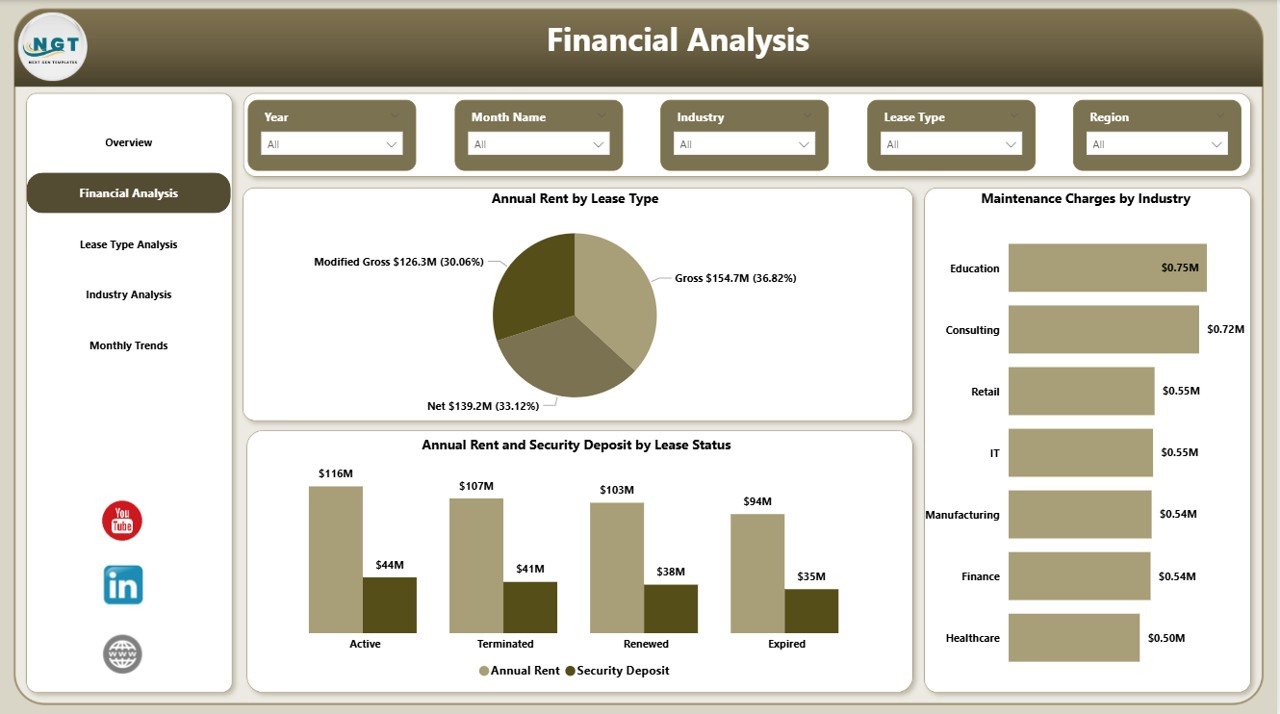
2️⃣ Financial Analysis Page
Deep dive into:
-
Annual Rent by Lease Type
-
Maintenance Charges by Industry
-
Annual Rent & Deposit by Lease Status
Perfect for budgeting and financial forecasting.
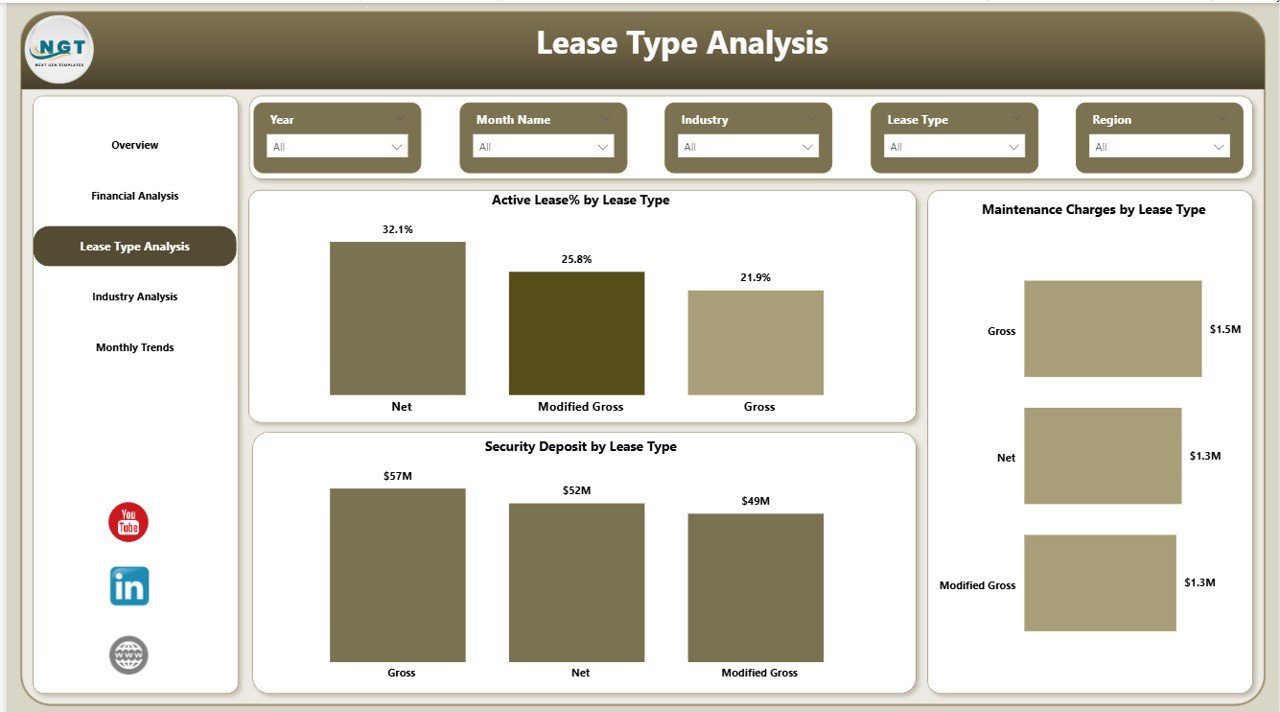
3️⃣ Lease Type Analysis Page
Compare lease structures with:
-
Active Lease % by Type
-
Security Deposit by Lease Type
-
Maintenance Charges by Lease Type
Make smarter structural decisions.
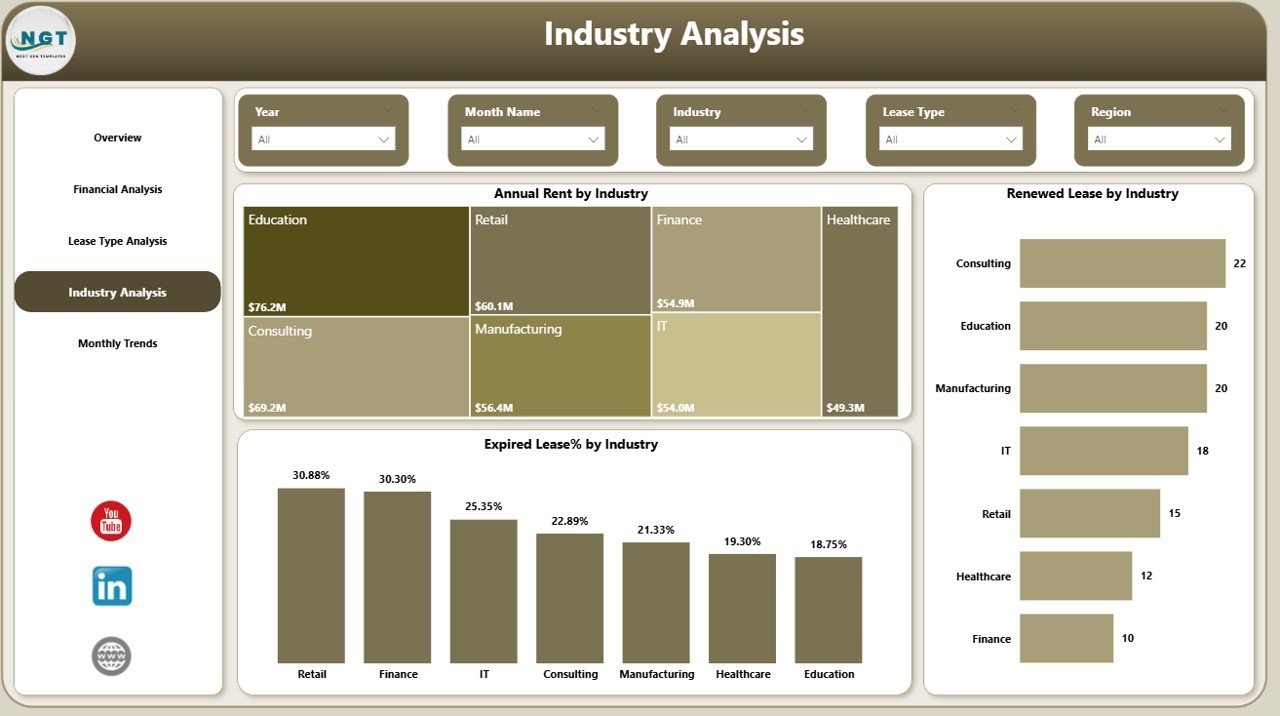
4️⃣ Industry Analysis Page
Understand industry contribution through:
-
Annual Rent by Industry
-
Renewed Lease by Industry
-
Expired Lease % by Industry
Identify high-performing and risky industries.
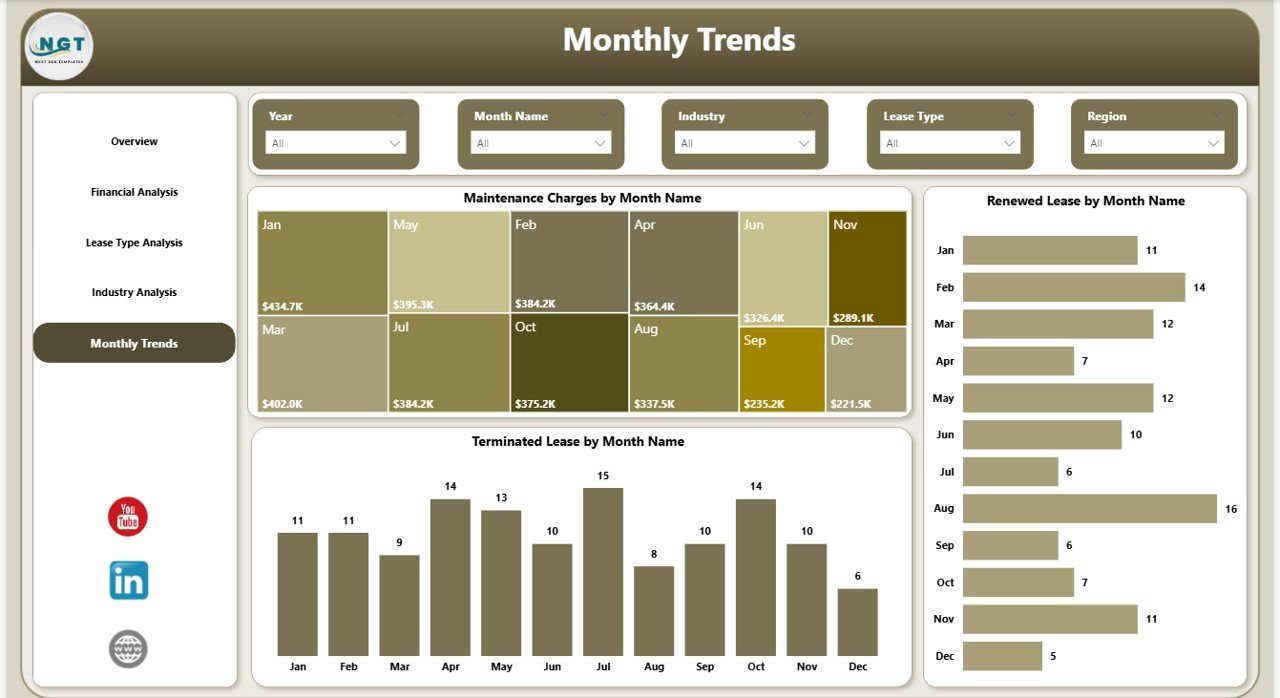
5️⃣ Monthly Trends Page
Track time-based performance:
-
Maintenance Charges by Month
-
Renewals by Month
-
Terminations by Month
Spot patterns before they impact your bottom line.
🛠 How to Use the Office Lease Management Dashboard in Power BI
Using this dashboard is simple:
1️⃣ Import your structured lease data into Power BI.
2️⃣ Ensure fields like Rent, Deposit, Lease Type, Industry, Status, Start Date, and End Date are updated.
3️⃣ Use slicers to filter by region or industry.
4️⃣ Review KPI cards for financial exposure.
5️⃣ Analyze renewal risks before deadlines.
Update your data monthly (or weekly for active portfolios) to maintain accuracy.
Within minutes, you’ll have complete lease visibility.
👥 Who Can Benefit from This Office Lease Management Dashboard in Power BI
🏢 Corporate Real Estate Teams
🏬 Multi-location Businesses
🏦 Finance & Accounting Departments
🏢 Facility Management Teams
📊 Business Analysts
🏭 Organizations Leasing Across Industries
🚀 Enterprises Managing Large Portfolios
💼 Small Businesses Managing 10–20 Leases
Whether you manage a few offices or hundreds of properties, this dashboard gives you control.
This dashboard helps you:
-
Reduce renewal penalties
-
Control maintenance costs
-
Improve financial forecasting
-
Identify high-risk leases
-
Strengthen negotiation strategies
-
Present lease insights confidently in management meetings
Stop relying on scattered spreadsheets.
Start managing leases strategically.
Click here to read the Detailed blog post
Watch the step-by-step video tutorial: