


Knowledge Process Outsourcing (KPO) organizations operate in high-value, expertise-driven environments. From research and analytics to financial modeling, legal services, and consulting support, every deliverable depends on accuracy, productivity, turnaround time, and client satisfaction. Knowledge Process Outsourcing (KPO) KPI Dashboard in Excel However, when performance data remains scattered across spreadsheets or manual reports, leadership teams lose visibility and control.
Knowledge Process Outsourcing (KPO) KPI Dashboard in Excel That is exactly why the Knowledge Process Outsourcing (KPO) KPI Dashboard in Excel becomes a strategic performance management solution 🚀.
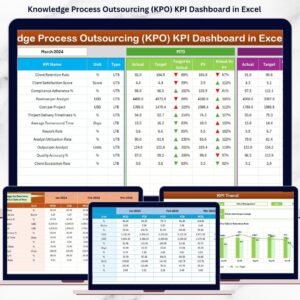
This ready-to-use Excel dashboard transforms complex KPO performance data into clear KPIs, instant comparisons, and actionable trends, helping organizations improve delivery quality, optimize productivity, and strengthen client outcomes.
Designed for KPO service providers, research firms, analytics teams, consulting organizations, and shared service centers, this dashboard allows you to track MTD and YTD performance, compare targets vs actuals, analyze trends, and standardize KPI governance—all inside Microsoft Excel, without expensive BI tools or complex systems.
🔑 Key Features of Knowledge Process Outsourcing (KPO) KPI Dashboard in Excel
📊 Centralized KPO Performance Monitoring
Track productivity, quality, delivery, cost, and client KPIs in one structured dashboard.
📅 Dynamic Month Selection
Select any reporting month and instantly refresh all KPIs.
🎯 Target vs Actual Tracking
Identify performance gaps early and take corrective actions.
📈 MTD & YTD Performance Analysis
Balance short-term delivery with long-term strategic goals.
🔁 Current Year vs Previous Year Comparison
Measure real improvement using year-over-year benchmarks.
📉 KPI-Wise Trend Analysis
Understand workload patterns, efficiency shifts, and quality trends.
📘 Clear KPI Definitions & Standardization
Ensure consistent interpretation across analysts, managers, and leadership.
⚡ 100% Excel-Based & Easy to Use
No BI tools, no coding—simple, flexible, and business-ready.
📂 What’s Inside the Knowledge Process Outsourcing (KPO) KPI Dashboard in Excel

🏠 Home Sheet
A clean index page with 6 navigation buttons for one-click access to all worksheets.
📊 Dashboard Sheet
The core performance overview showing all KPIs with MTD and YTD metrics.
Includes:
-
Actual vs Target (MTD & YTD)
-
Previous Year comparison
-
Target vs Actual %
-
CY vs PY %
-
Visual ▲ / ▼ indicators using conditional formatting
📈 KPI Trend Sheet
Deep-dive analysis for individual KPIs.
Features:
-
KPI selection drop-down
-
MTD trend chart (Actual vs Target vs PY)
-
YTD trend chart (Actual vs Target vs PY)
-
KPI group, unit, formula, and definition
📥 Actual Numbers Input Sheet
Enter current-year MTD and YTD actual values in a structured format.
🎯 Target Sheet
Define monthly and yearly KPI targets clearly.
📅 Previous Year Number Sheet
Store last year’s KPI data for year-over-year comparison.
📘 KPI Definition Sheet
Maintain KPI name, group, unit, formula, and definition for governance.
⚙️ How to Use the KPO KPI Dashboard in Excel
📝 Step 1: Enter Performance Data
Update actual, target, and previous-year values in input sheets.
📅 Step 2: Select Month
Choose the reporting month from cell D3 to refresh the dashboard.
📊 Step 3: Review KPI Status
Use arrows, percentages, and comparisons to spot issues instantly.
📈 Step 4: Analyze Trends
Study MTD and YTD trend charts for productivity and quality insights.
🎯 Step 5: Improve Delivery
Optimize resource utilization, turnaround time, and service quality.
👥 Who Can Benefit from This Knowledge Process Outsourcing KPI Dashboard
🧠 KPO Service Providers – Monitor delivery, quality, and productivity
📊 Research & Analytics Firms – Track analyst efficiency and accuracy
💼 Consulting Organizations – Improve SLA adherence and outcomes
🏢 Shared Service Centers – Control cost and utilization
📈 Operations & Strategy Teams – Gain executive-level performance visibility
🔍 Click here to read the Detailed blog post
📺 Visit our YouTube channel to learn step-by-step video tutorials
👉 Youtube.com/@PKAnExcelExpert























Reviews
There are no reviews yet.