
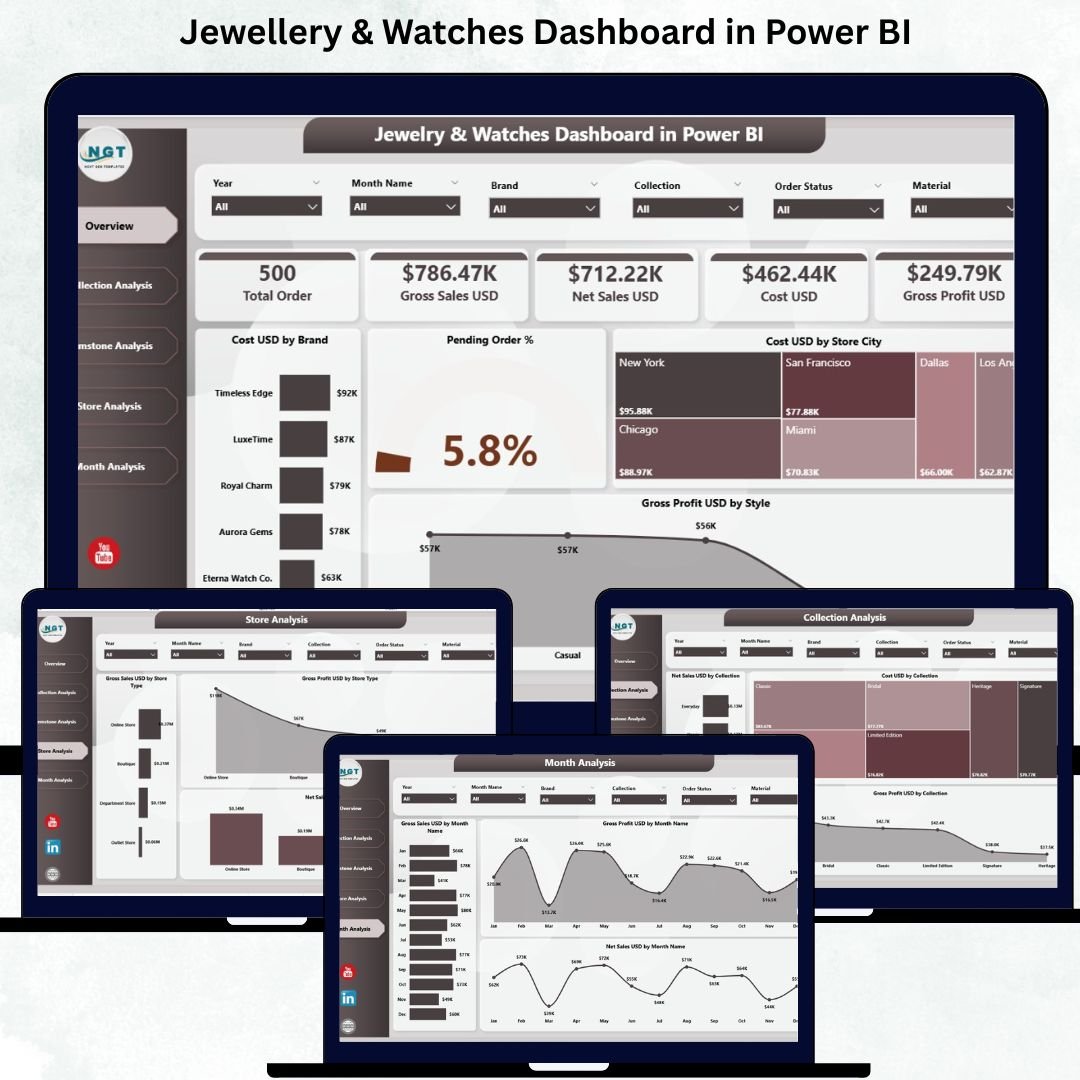
The jewellery and watches industry demands elegance, precision, and high customer trust. Every day, retailers deal with complex product categories, premium pricing, gemstones, collections, and store-level variations. Without the right insights, brands struggle with scattered spreadsheets, delayed reporting, and slow decision-making. The Jewellery & Watches Dashboard in Power BI solves these challenges by bringing every important metric into one powerful visual platform 💎📊.
With this dashboard, retail leaders, analysts, and store managers get real-time visibility into sales, collections, gemstones, stores, and performance trends. Power BI converts raw data into meaningful charts, slicers, and KPI cards so teams can take faster, smarter, and more confident decisions.
💠 Key Features of the Jewellery & Watches Dashboard in Power BI
This dashboard includes five well-structured pages designed to offer complete, clear, and actionable insights.
💎 1. Overview Page — Your Complete Business Summary
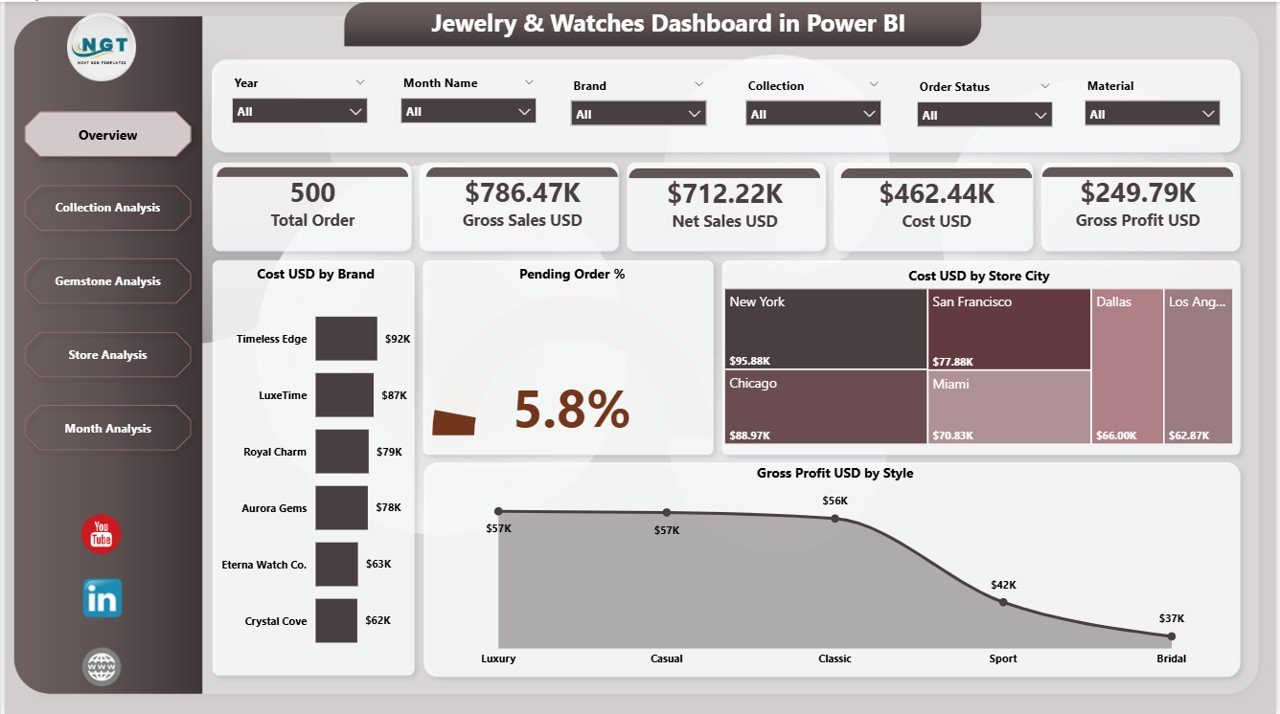
The Overview Page works as the main control center of the dashboard. It provides instant insights using:
✔️ Smart Slicers
Filter data by:
-
Brand
-
Collection
-
Gemstone
-
Store City
-
Month
The slicers update the visuals instantly, ensuring a personalized view.
✔️ 4 KPI Cards
The dashboard highlights high-value KPIs such as:
-
Total Cost (USD)
-
Total Pending Orders (%)
-
Gross Profit (USD)
-
Other performance KPIs
✔️ Insightful Charts
-
Cost (USD) by Brand – Reveals cost contribution by brand.
-
Pending Order % – Tracks unfulfilled orders.
-
Cost (USD) by Store City – Shows city-wise cost performance.
-
Gross Profit (USD) by Style – Identifies most profitable jewellery styles.
This page gives leadership a complete picture of business performance within seconds.
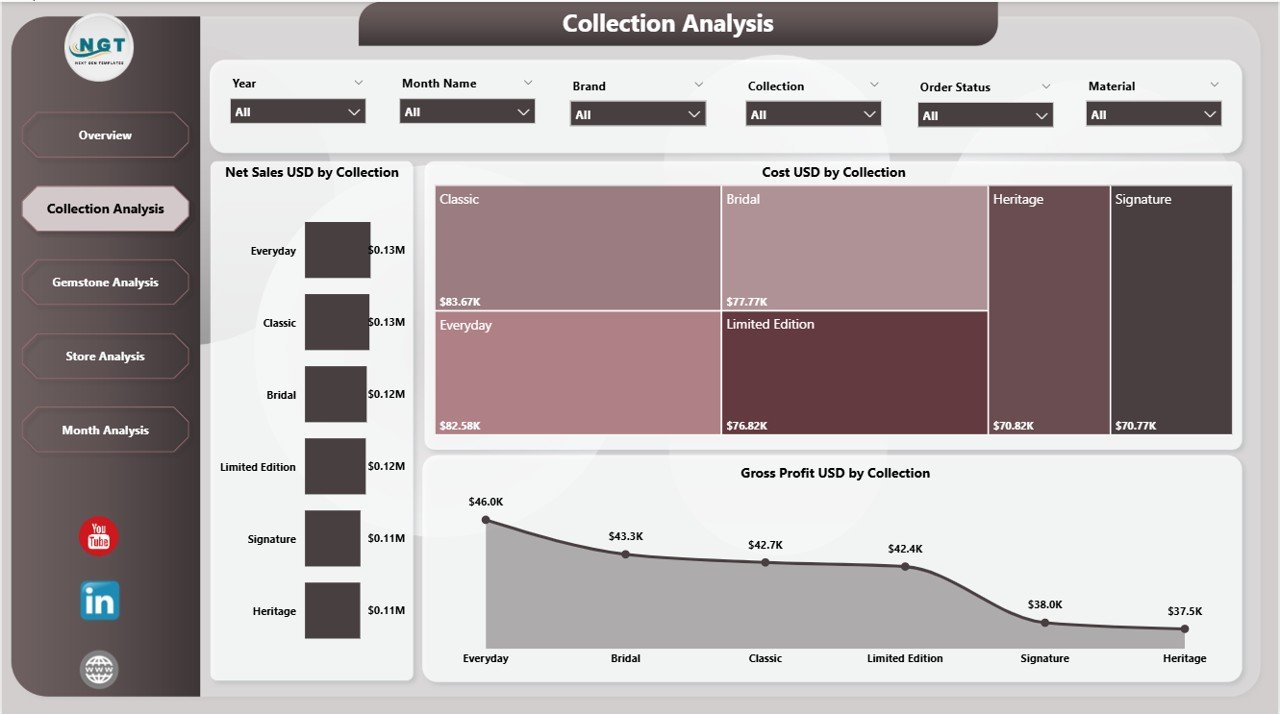
👑 2. Collection Analysis — Understand Your Best-Performing Collections
Luxury brands rely heavily on collections such as Premium, Bridal, Classic, Diamond, Gold, and Limited Edition. This page shows how each collection ranks in the market.
✔️ Charts in Collection Analysis
-
Net Sales (USD) by Collection
-
Cost (USD) by Collection
-
Gross Profit (USD) by Collection
This page helps you refine pricing, plan promotions, and understand customer buying behaviour across styles.
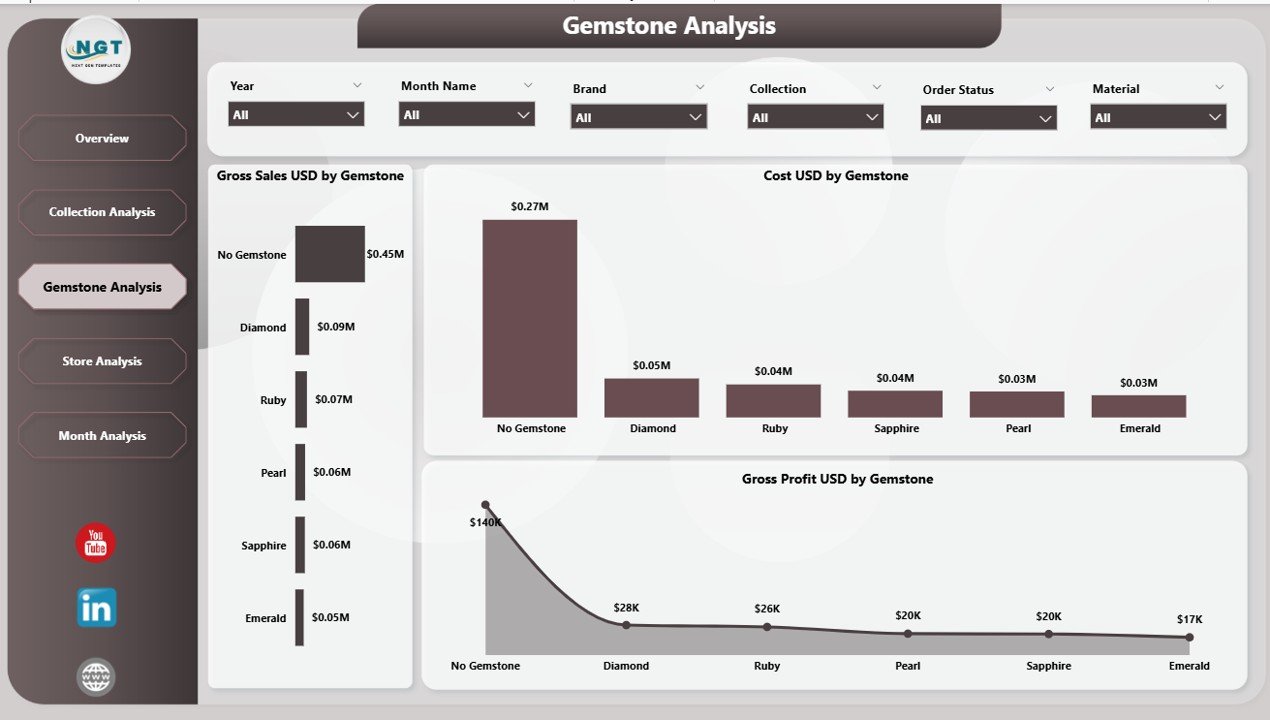
💎 3. Gemstone Analysis — Deep Insights Into Stone Performance
Gemstones like diamonds, rubies, pearls, emeralds, and sapphires generate different levels of demand and profit.
✔️ Charts on This Page
-
Cost (USD) by Gemstone – Helps optimize stone purchasing.
-
Gross Profit (USD) by Gemstone – Highlights high-margin stones.
-
Gross Sales (USD) by Gemstone – Reveals best-selling gemstones.
This page helps your business plan inventory smarter and negotiate better with suppliers.
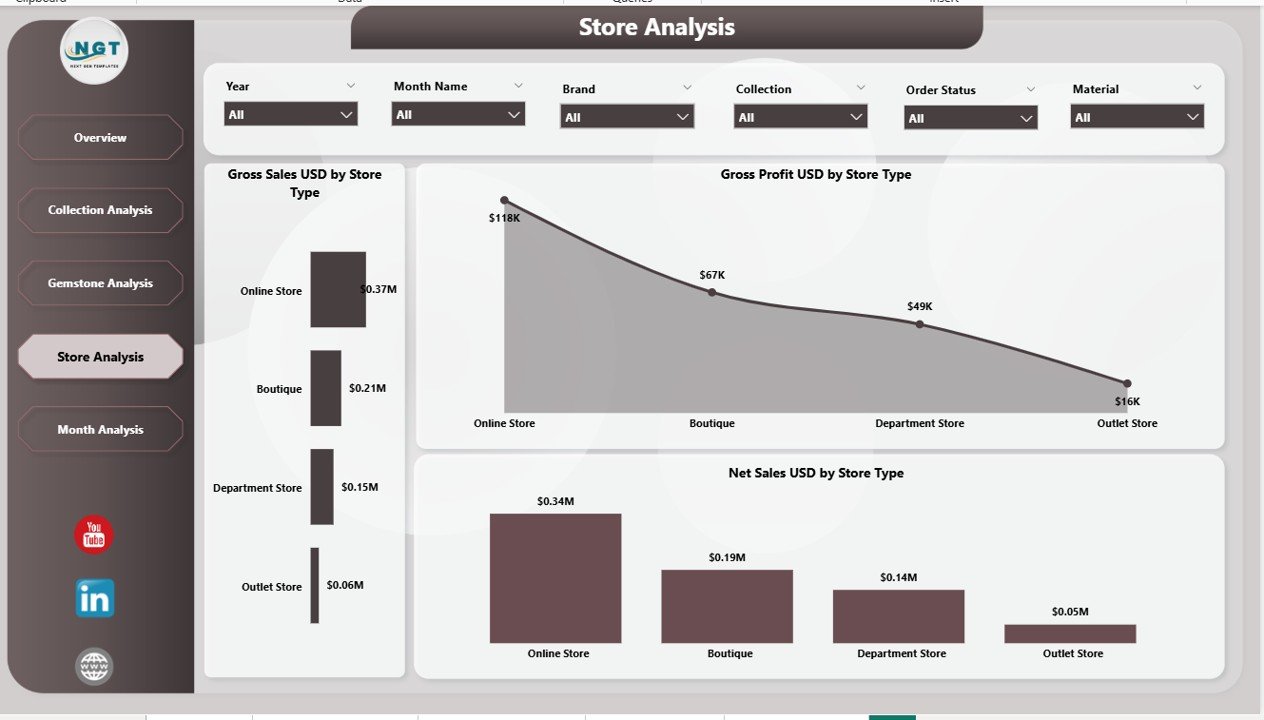
🏬 4. Store Analysis — Compare Performance Across Cities
Each store shows unique customer behaviour. The Store Analysis page helps identify:
-
High-performing cities
-
Underperforming stores
-
Stores with strong gemstone sales
-
Locations requiring stock or staffing improvements
✔️ Key Store-Level Charts
-
Net Sales (USD) by Stone Type
-
Gross Profit (USD) by Stone Type
-
Gross Sales (USD) by Stone Type
This allows you to evaluate every store with precision.
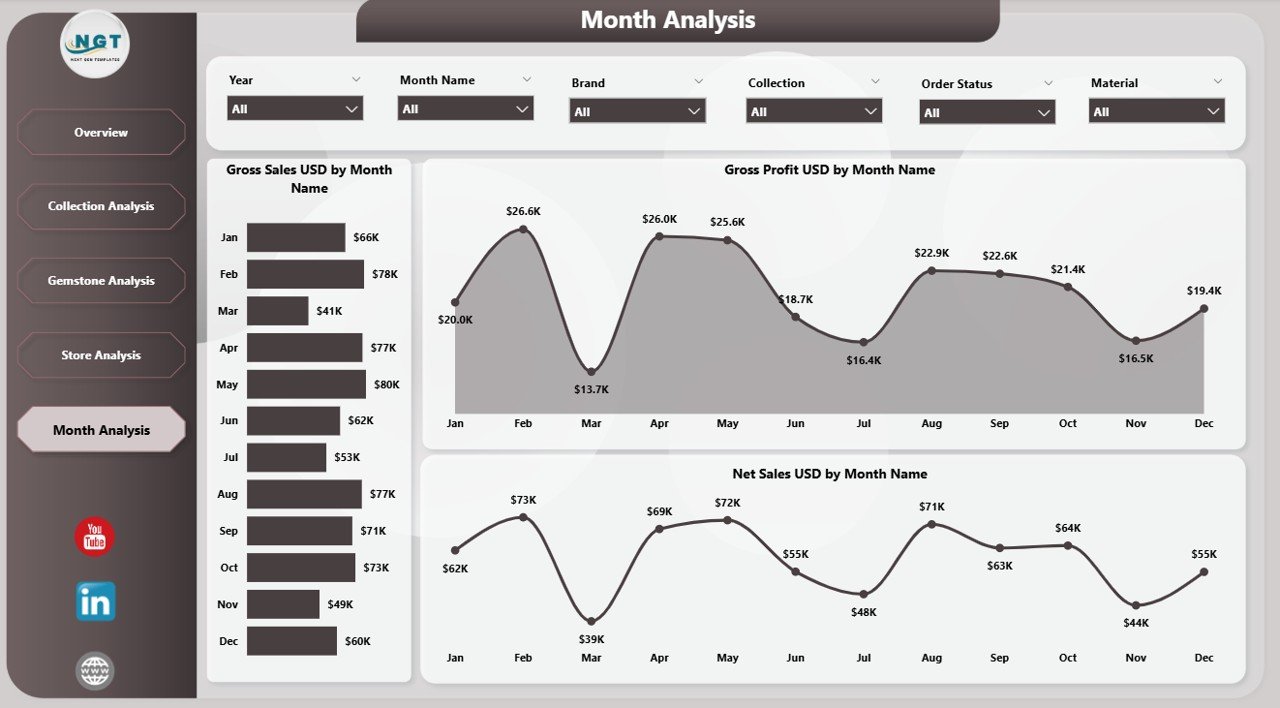
📅 5. Monthly Trends — Track Yearly Growth & Seasonal Performance
Jewellery and watches peak during festivals, wedding seasons, and holidays. This page reveals those patterns.
✔️ Charts on Monthly Trends
-
Net Sales (USD) by Month
-
Gross Profit (USD) by Month
-
Gross Sales (USD) by Month
These charts help teams plan events, promotions, and year-end strategies.
⚡ How Power BI Enhances Jewellery & Watch Reporting
Power BI offers speed, clarity, and automation. Its benefits include:
-
Instant data refresh
-
Drill-down capabilities
-
Clear visuals
-
Large dataset support
-
Interactive filters
-
Easy sharing with teams
This creates a strong data-driven culture across the brand.
🌟 Advantages of the Jewellery & Watches Dashboard
-
Faster decision-making
-
Strong visibility across brands & stores
-
Better cost and margin control
-
Improved inventory & gemstone planning
-
Accurate seasonal insights
-
Reduced reporting time
-
Better supplier negotiations
-
Better customer experience through product insights
🛠️ Best Practices for Using the Dashboard
-
Keep data updated and error-free
-
Use slicers for deeper insights
-
Track cost, gross sales, and gross profit regularly
-
Compare results month-to-month
-
Analyze store and gemstone trends frequently
-
Monitor high-potential collections
-
Share dashboard with teams for continuous improvement
🔚 Conclusion
The Jewellery & Watches Dashboard in Power BI transforms complex retail reporting into clean, meaningful insights. Whether you want to analyze gemstones, collections, stores, brands, or monthly trends, this dashboard gives precise and powerful information. When used consistently, it helps brands improve sales, control cost, optimize inventory, and build a more profitable business.
🔗 Click here to read the Detailed blog post
Visit our YouTube channel to learn step-by-step video tutorials































Reviews
There are no reviews yet.