

Independent filmmaking is driven by creativity, passion, and bold ideas—but it is also shaped by tight budgets, financial uncertainty, and constant pressure to deliver returns. Managing production costs, marketing spends, distribution revenue, and ROI across multiple films can quickly become overwhelming when data is scattered across spreadsheets.
Independent Filmmaking Dashboard in Excel That is exactly why the Independent Filmmaking Dashboard in Excel becomes a powerful and practical solution for filmmakers and producers.
This ready-to-use Excel dashboard transforms complex film finance data into clear KPIs, visual insights, and actionable trends. Instead of relying on guesswork or manual calculations, filmmakers gain real-time visibility into costs, revenue, profit, and ROI. As a result, creative teams can balance artistic ambition with financial discipline—without expensive software or technical complexity.
🔑 Key Features of Independent Filmmaking Dashboard in Excel
🎬 Centralized Film Performance Tracking
Track production cost, marketing spend, revenue, profit, and ROI in one dashboard.
💰 Automatic Profit & ROI Calculations
Eliminate manual errors with built-in formulas that calculate profitability instantly.
📊 Interactive KPI Cards
View Total Cost, Marketing Cost, Revenue, Profit, and ROI at a glance.
🎯 Genre & Channel-Wise Analysis
Understand which genres and distribution channels deliver the best returns.
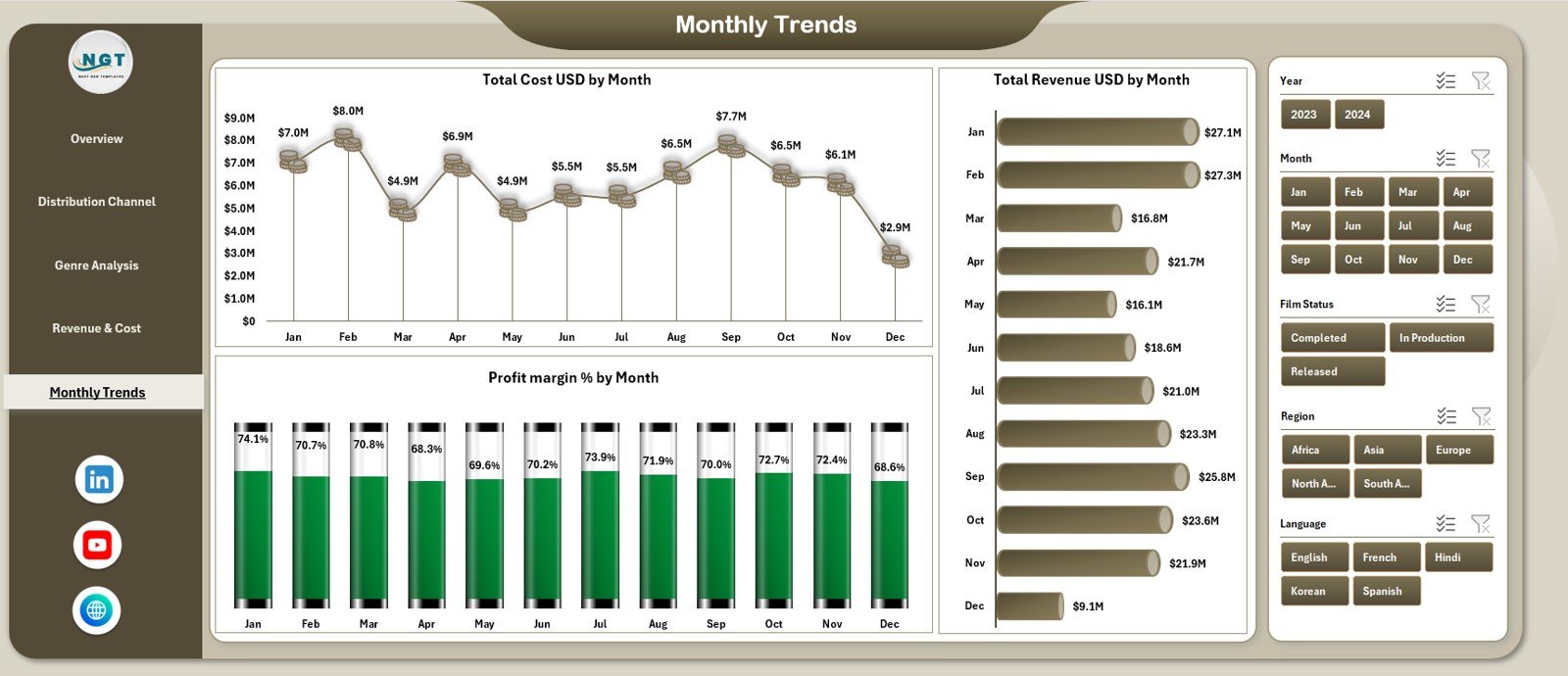
📈 Monthly Trend Analysis
Track cost, revenue, and profit margin trends over time.
🧭 Interactive Slicers & Filters
Filter insights by genre, channel, region, budget category, or month instantly.
⚙️ 100% Excel-Based & Flexible
No advanced tools required—easy to customize and update.
📦 What’s Inside the Independent Filmmaking Dashboard in Excel
This dashboard includes five powerful analytical pages, supported by a structured data sheet:
📊 Overview Page
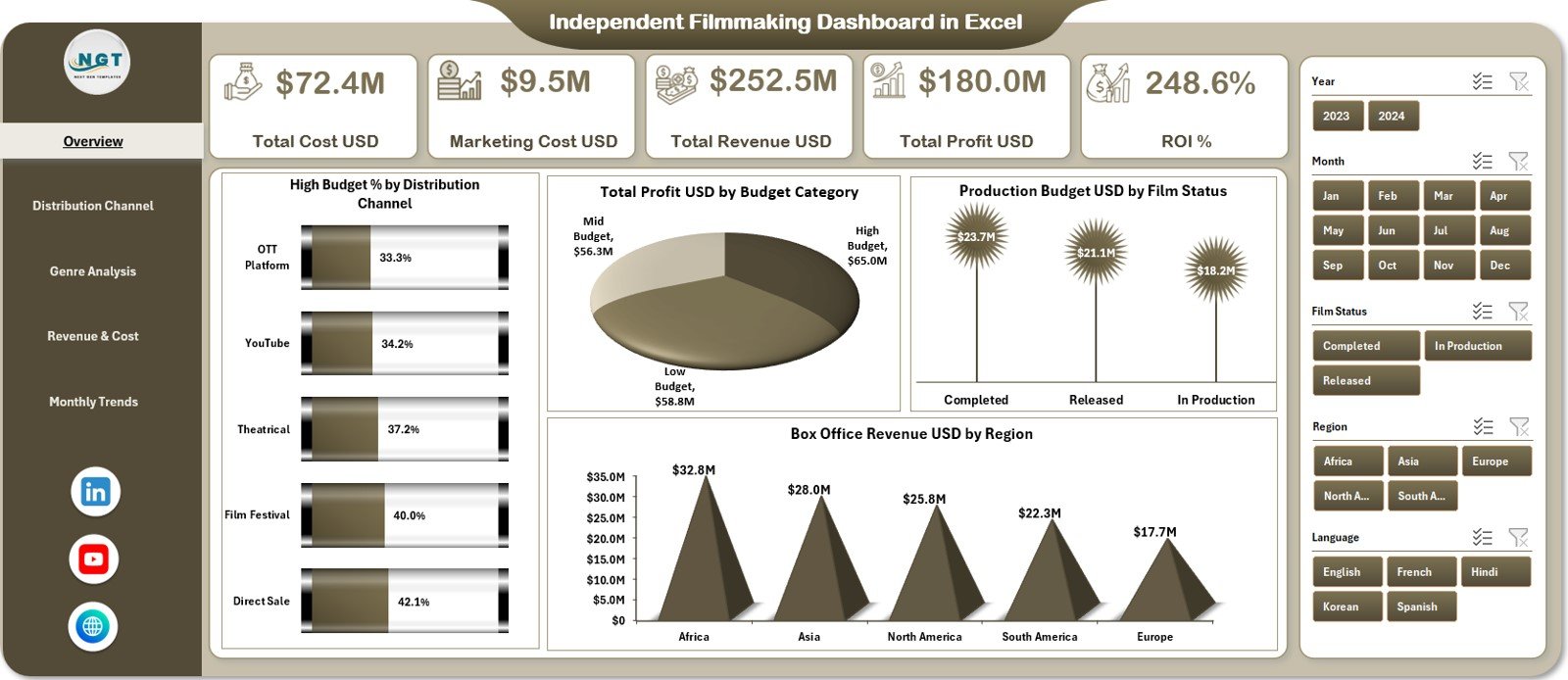
Provides a complete financial snapshot with KPI cards:
-
Total Cost USD
-
Marketing Cost USD
-
Total Revenue USD
-
Total Profit USD
-
ROI %
Includes charts such as:
-
High Budget % by Distribution Channel
-
Total Profit USD by Budget Category
-
Production Budget USD by Film Status
-
Box Office Revenue USD by Region
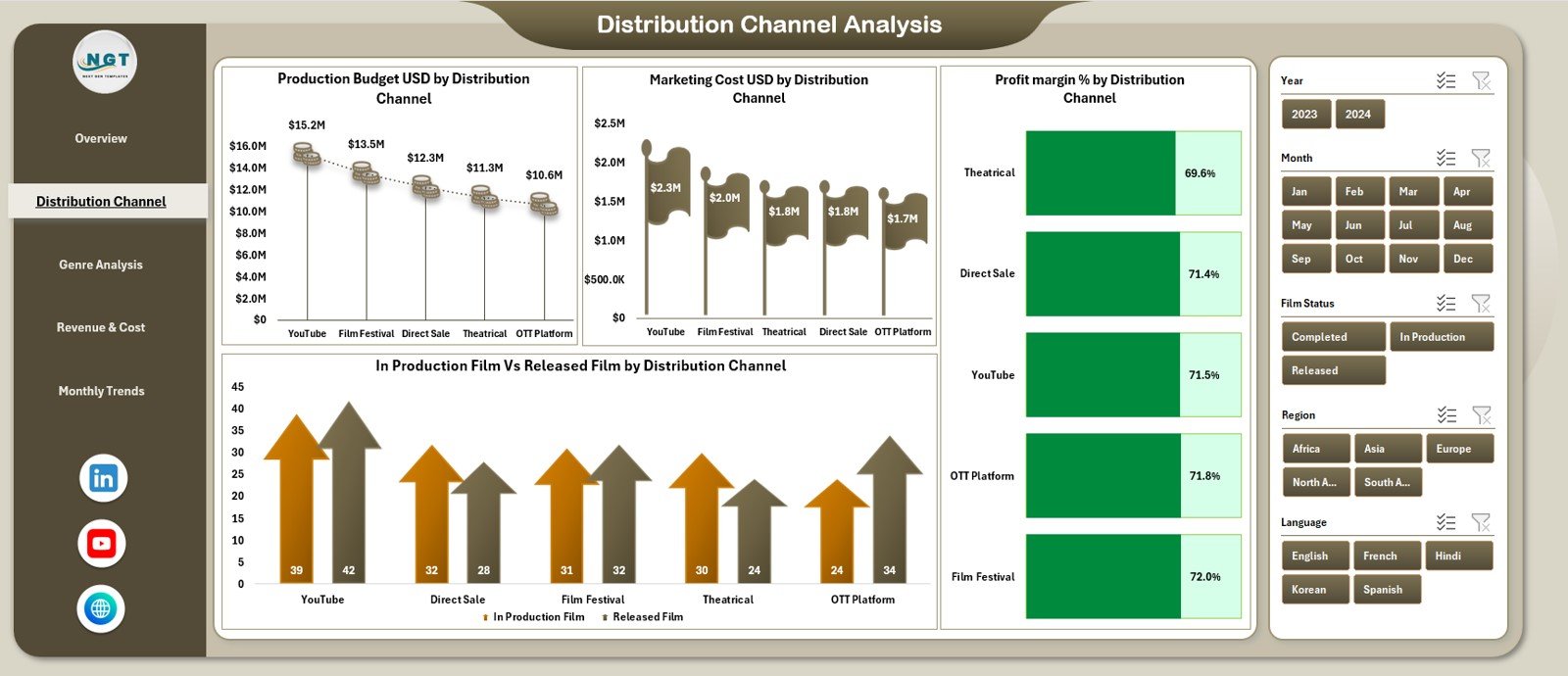
📡 Distribution Channel Analysis Page
Analyzes performance across platforms using:
-
Production Budget by Channel
-
Marketing Cost by Channel
-
Profit Margin % by Channel
-
In-Production vs Released Films by Channel
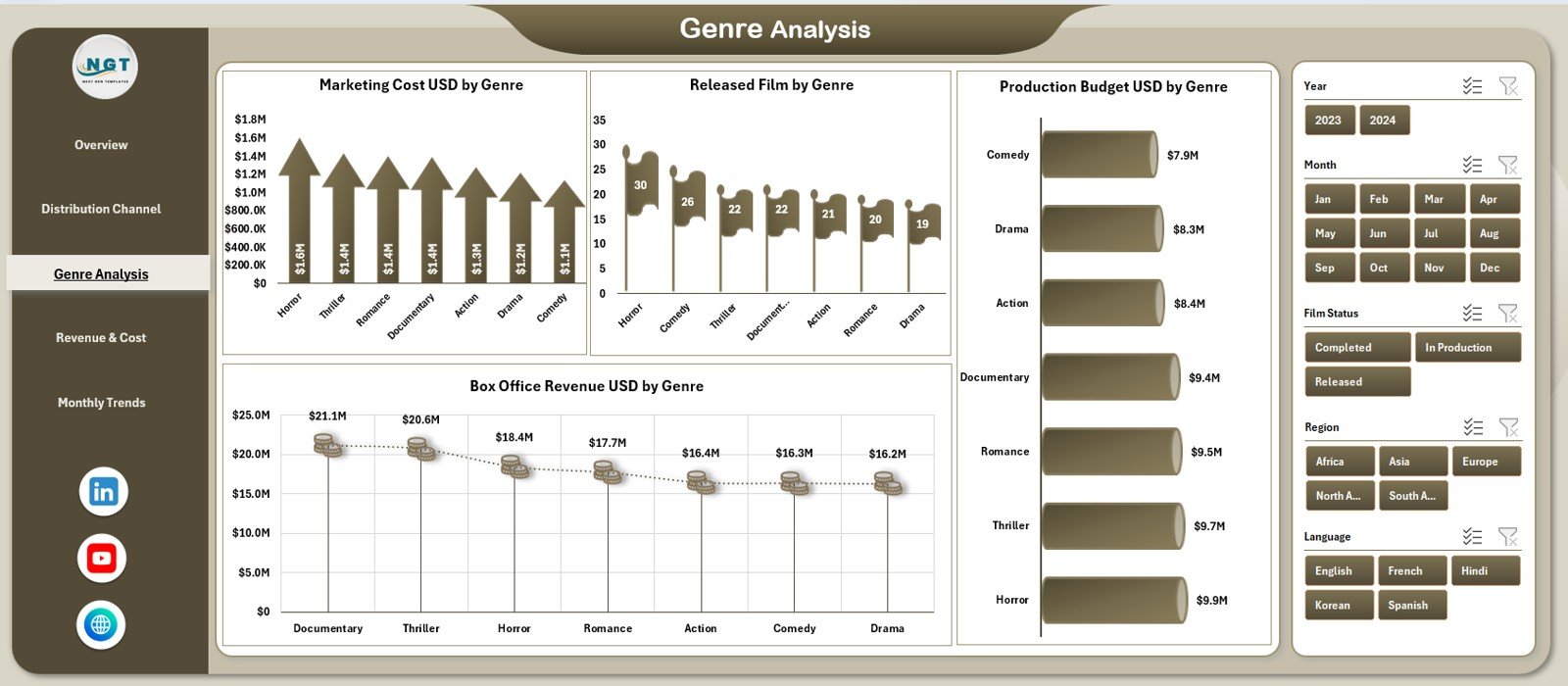
🎭 Genre Analysis Page
Evaluates creative and financial performance by genre:
-
Marketing Cost by Genre
-
Released Films by Genre
-
Box Office Revenue by Genre
-
Production Budget by Genre
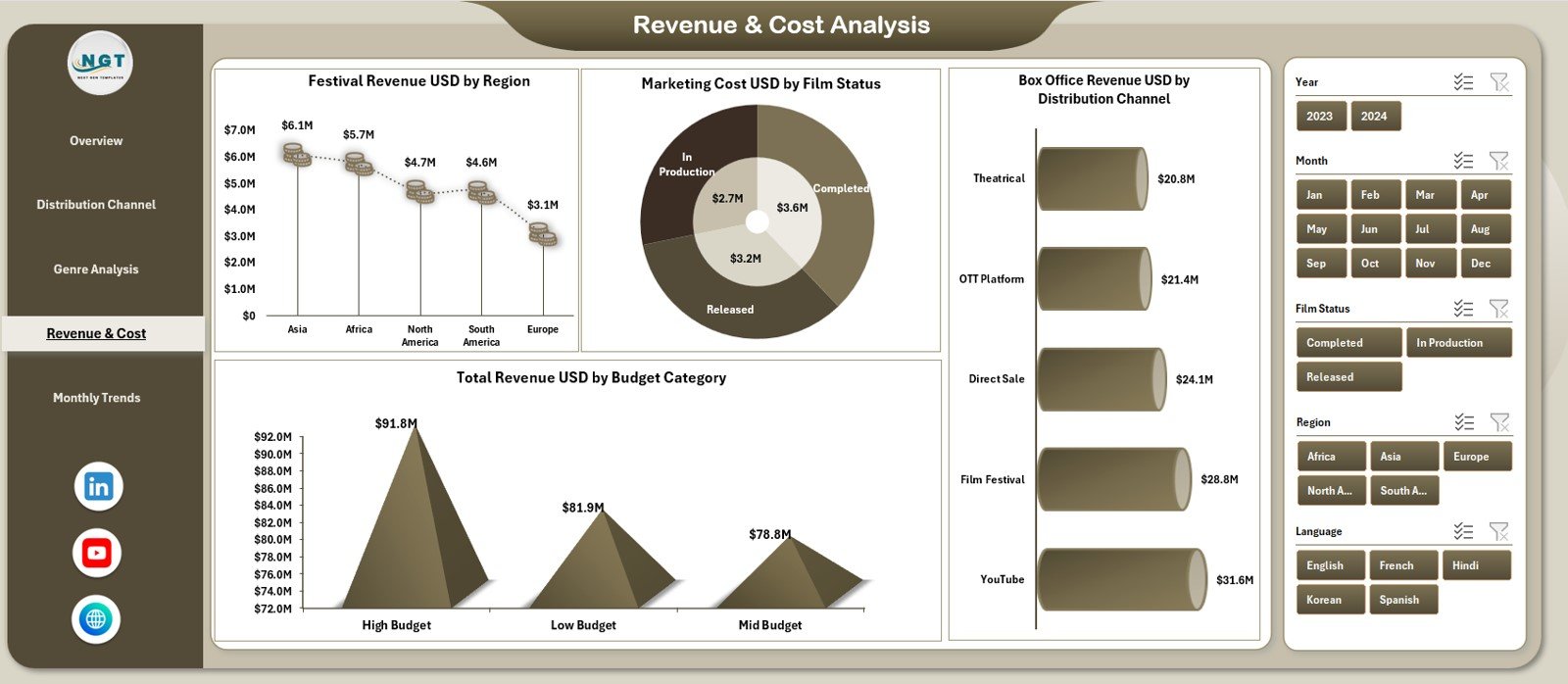
💸 Revenue & Cost Analysis Page
Breaks down detailed financial relationships:
-
Festival Revenue by Region
-
Marketing Cost by Film Status
-
Revenue by Budget Category
-
Box Office Revenue by Channel
📅 Monthly Trends Page
Tracks time-based performance:
-
Total Cost by Month
-
Total Revenue by Month
-
Profit Margin % by Month
🗂️ Data Sheet
Stores all structured film data including budgets, costs, revenue, status, genre, region, and channel.
▶️ How to Use the Independent Filmmaking Dashboard in Excel
Using the dashboard is simple and intuitive:
1️⃣ Enter film data in the Data Sheet
2️⃣ Review KPI cards on the Overview Page
3️⃣ Use slicers to filter by genre, channel, or region
4️⃣ Analyze profitability and ROI across pages
5️⃣ Track monthly trends and financial stability
6️⃣ Apply insights to budgeting and distribution decisions
No advanced Excel skills are required—basic knowledge is enough.
🎯 Who Can Benefit from This Independent Filmmaking Dashboard in Excel
🎥 Independent Filmmakers – Control budgets and track returns
🎬 Film Producers – Monitor project profitability and ROI
📊 Production Managers – Manage costs and timelines effectively
💰 Film Finance Teams – Improve financial transparency
📈 Film Investors & Stakeholders – Review performance clearly
The dashboard supports both creative planning and financial accountability.
👉 Click here to read the Detailed Blog Post
🔔 Visit our YouTube channel to learn step-by-step video tutorials
👉 YouTube.com/@PKAnExcelExpert






























Reviews
There are no reviews yet.