


In today’s fast-changing digital healthcare landscape, remote work and data-driven marketing have become essential. Managing campaigns, teams, and budgets from different locations is no easy task — unless you have the right tools. That’s where the Healthcare Marketing Remote Work Dashboard in Power BI comes in.
This ready-to-use dashboard is a comprehensive, interactive business intelligence solution that empowers healthcare marketers to track performance, measure ROI, and optimize campaigns — all in one centralized platform. Built using Microsoft Power BI, it connects seamlessly with Excel or any data source to provide real-time insights for better decisions, faster.
With this dashboard, you can visualize every aspect of your marketing performance, whether your team is working from the office or remotely. It’s ideal for healthcare organizations that need to manage multiple campaigns, channels, and departments across various regions.
✨ Key Features of the Healthcare Marketing Remote Work Dashboard in Power BI
📊 5 Analytical Pages: Includes Overview, Department Analysis, Campaign Analysis, Channel Analysis, and Monthly Trends — each designed for focused insights.
🧠 Real-Time Analytics: Automatically updates charts and KPIs as new data is added, eliminating manual reporting delays.
💼 Comprehensive Campaign Tracking: Monitor leads, conversions, ROI %, revenue, and cost per campaign with visual clarity.
🧩 Department Performance Analysis: Compare departmental efficiency, productivity, and budget allocation side by side.
📣 Channel Effectiveness Monitoring: Identify top-performing marketing channels to maximize ROI.
🗓️ Monthly Trend Insights: Visualize long-term performance patterns and growth trajectories.
🌎 Perfect for Remote Teams: Access the dashboard anytime, anywhere via Power BI cloud — perfect for distributed teams.
🔐 Data Integration: Connects easily with Excel, CRM systems, and hospital databases for unified reporting.
💡 Zero Coding Required: Power BI’s drag-and-drop interface makes it simple to customize and analyze data.
📘 What’s Inside the Healthcare Marketing Remote Work Dashboard in Power BI

The dashboard includes five powerful analytical pages designed for clarity and decision-making:
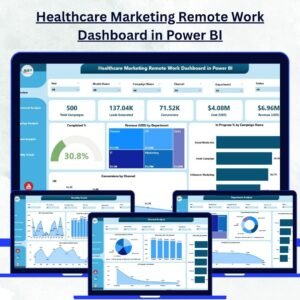
1️⃣ Overview Page: Displays KPIs like Total Completed %, Total Revenue (USD), In Progress %, and Conversion by Channel, along with visual summaries.
2️⃣ Department Analysis Page: Shows Cost by Department, Conversion %, and Planned vs Completed % to assess departmental performance.
3️⃣ Campaign Analysis Page: Highlights campaign ROI, lead generation, and cost comparisons for precise evaluation.
4️⃣ Channel Analysis Page: Compares marketing channels such as email, social media, and referral programs to identify the most profitable platforms.
5️⃣ Monthly Trends Page: Offers time-based insights — including ROI %, Revenue, and Conversion trends across months — for continuous improvement.
⚡ How to Use the Healthcare Marketing Remote Work Dashboard in Power BI
🚀 Step 1: Prepare your Excel or CRM data with campaign, cost, and revenue details.
🔗 Step 2: Import your data into Power BI and refresh visuals using Power Query.
🎨 Step 3: Use slicers to filter by department, channel, or campaign for detailed analysis.
📈 Step 4: Monitor KPIs using color-coded visuals for quick performance checks.
☁️ Step 5: Publish the dashboard to Power BI Service for secure, cloud-based access.
Within minutes, your healthcare marketing team can collaborate remotely while accessing the same, up-to-date performance data.
👥 Who Can Benefit from the Healthcare Marketing Remote Work Dashboard in Power BI
🏥 Healthcare Marketing Managers: Track campaign success, monitor ROI, and optimize spending.
💻 Remote Marketing Teams: Stay aligned and access shared insights from anywhere.
📊 Executives & Decision Makers: Get a holistic view of marketing outcomes in one place.
💰 Finance & Operations Teams: Measure cost vs revenue and justify marketing budgets.
📈 Agencies & Consultants: Manage multiple healthcare clients using one unified analytics tool.
🧠 Analysts & Data Experts: Explore trends, correlations, and actionable insights with full flexibility.
Whether you’re managing a small clinic or a large healthcare network, this dashboard enhances collaboration and accelerates marketing success.
🔗 Click here to read the Detailed Blog Post
🎥 Visit our YouTube channel to learn step-by-step video tutorials
🔗 YouTube.com/@PKAnExcelExpert






























Reviews
There are no reviews yet.