
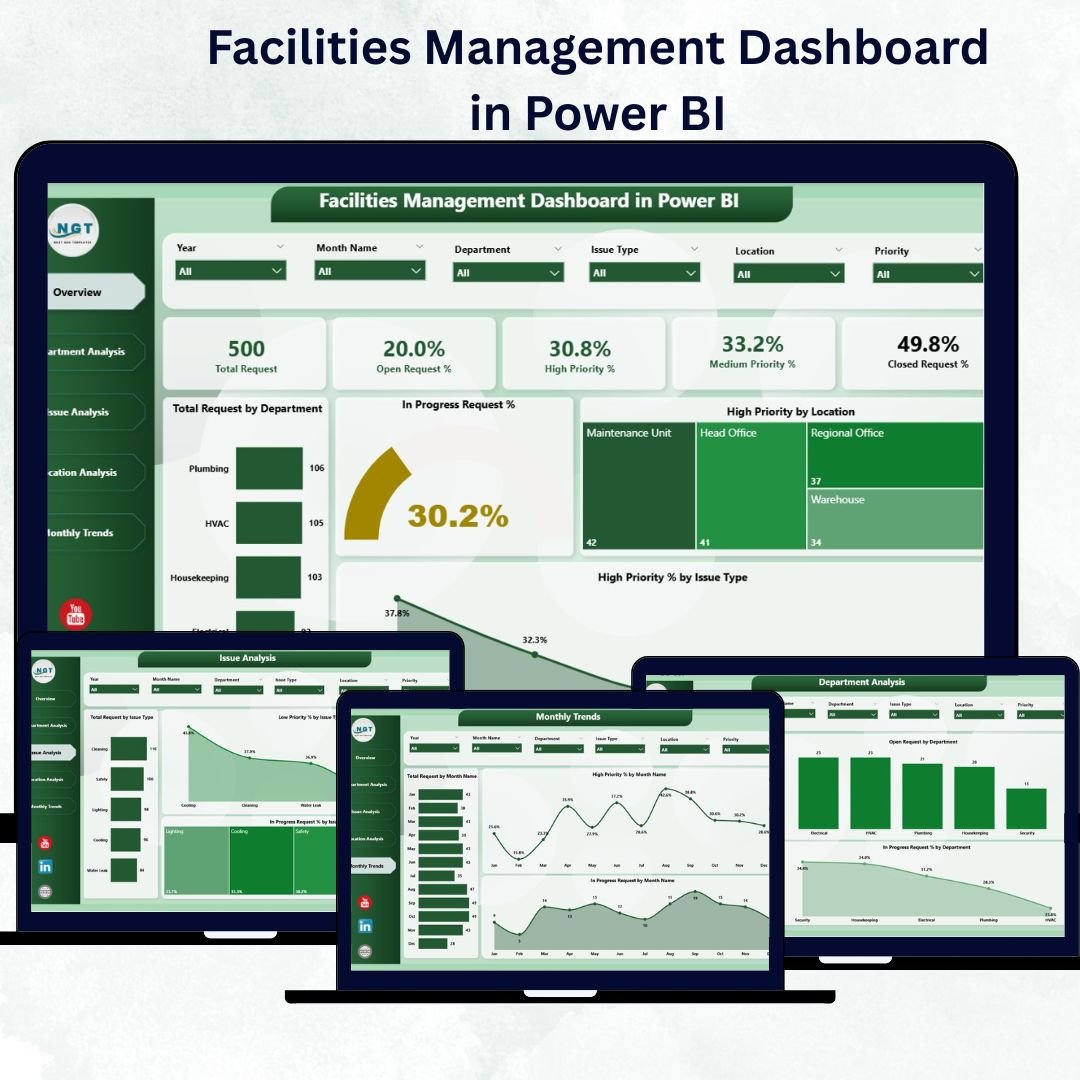

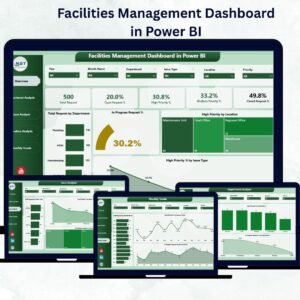
Managing buildings, assets, and maintenance teams across multiple locations can be complex — unless you have the right insights at your fingertips. The Facilities Management Dashboard in Power BI simplifies it all.
This ready-to-use, fully interactive dashboard lets you track maintenance requests, analyze issue trends, and monitor department-wise performance — all from one visual interface. Designed for facility managers, operations heads, and corporate administrators, it transforms raw facility data into actionable intelligence that helps you make informed decisions in real time.
⚙️ Key Features of Facilities Management Dashboard in Power BI
✅ 📊 Five Insightful Pages – A complete analytical ecosystem including Overview, Department Analysis, Issue Analysis, Location Analysis, and Monthly Trends pages.
✅ 🏠 Overview Page – The Command Center
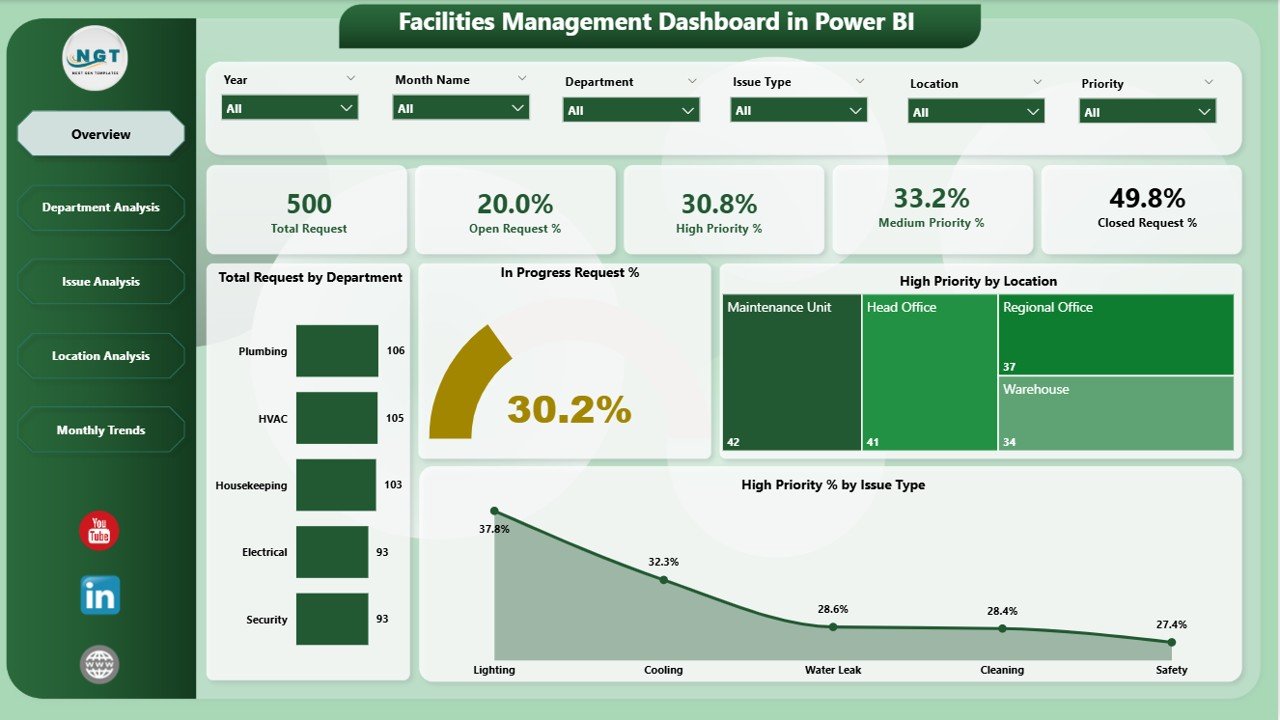
Gain a 360° view of your facilities with:
-
🧾 Summary Cards: Total Requests, Closed Requests, In Progress %, High Priority %.
-
🎛️ Slicers: Filter by Department, Location, or Priority.
-
📈 Charts:
-
Total Requests by Department
-
In Progress Request %
-
High Priority Requests by Location
-
High Priority % by Issue Type
-
This page provides leadership with instant clarity on what’s working and where issues persist.
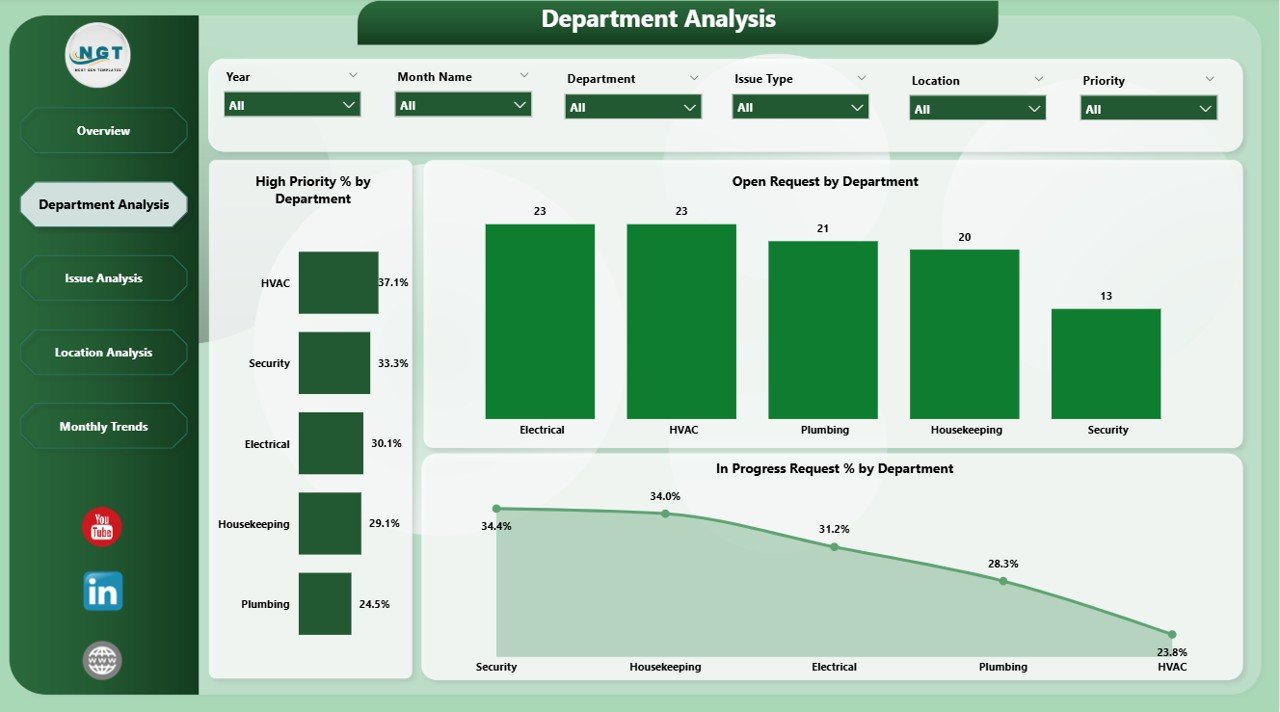
✅ 🏢 Department Analysis Page
Evaluate department-level efficiency using visuals like:
-
High Priority % by Department
-
Open Requests by Department
-
In Progress % by Department
Spot problem areas and allocate maintenance resources effectively.
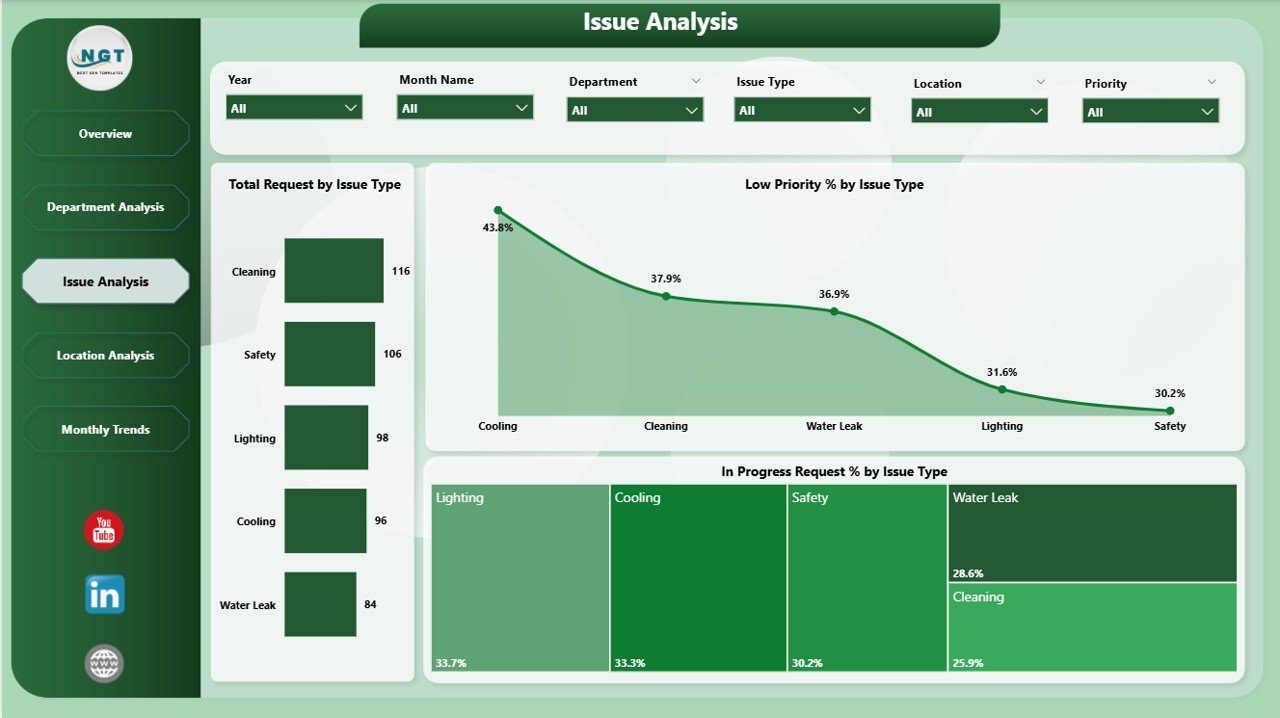
✅ 🔧 Issue Analysis Page
Understand recurring problems through:
-
Total Requests by Issue Type
-
Low Priority % by Issue Type
-
In Progress % by Issue Type
Use this to plan preventive maintenance and reduce downtime.
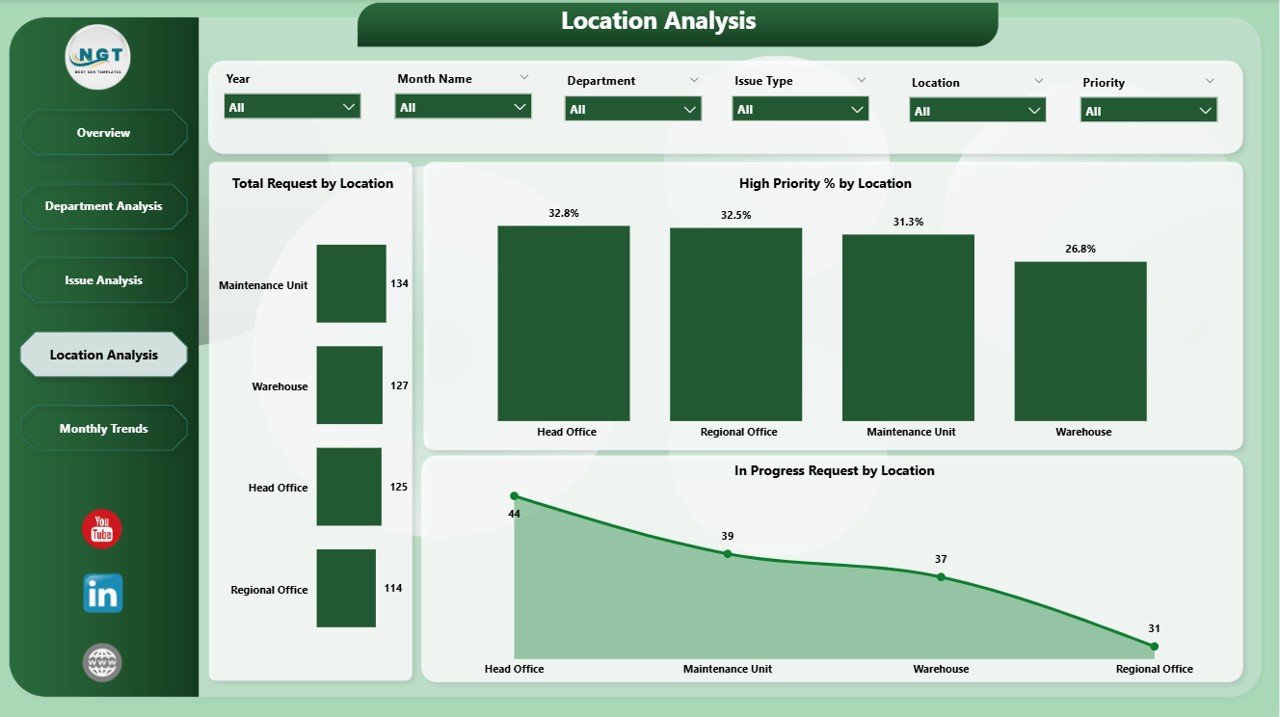
✅ 📍 Location Analysis Page
Perfect for multi-site organizations. Monitor facility health across regions:
-
Total Requests by Location
-
In Progress % by Location
-
High Priority % by Location
Identify which branches or offices need urgent attention or additional support.
✅ 📅 Monthly Trends Page
Visualize performance trends over time with charts like:
-
Total Requests by Month
-
In Progress % by Month
-
High Priority % by Month
Plan better budgets and forecast workloads based on historical trends.
💡 Why Power BI Is Ideal for Facility Management
Power BI brings automation and interactivity to facilities monitoring. Unlike static spreadsheets, it delivers:
-
⚡ Real-Time Updates: Instant visibility into operations.
-
🎯 Interactive Filtering: Drill down by month, location, or department.
-
💼 Custom Reports: Create custom visuals and dashboards.
-
📱 Anywhere Access: View dashboards on desktop or mobile.
-
🔄 Automatic Refresh: Always work with the latest data.
It saves hours of manual reporting — helping managers focus on what truly matters: operational excellence.
🧩 How the Dashboard Works
1️⃣ Data Input: Record requests and maintenance logs in Excel.
2️⃣ Import to Power BI: Connect using Power Query.
3️⃣ Transform & Model: Create relationships between tables (Departments, Issues, Locations).
4️⃣ Calculate KPIs: Use DAX for Total Requests, In Progress %, High Priority %, etc.
5️⃣ Visualize: Build pages with interactive visuals and slicers.
6️⃣ Auto-Refresh: Keep the data live and updated automatically.
This workflow ensures your dashboard stays accurate and current.
🚀 Advantages of Facilities Management Dashboard in Power BI
✅ Centralized Data Visibility: Consolidates data across departments, buildings, and sites.
✅ Faster Decisions: Visual KPIs enable quick prioritization.
✅ Transparency & Accountability: Track progress and ownership per department.
✅ Predictive Insights: Identify patterns to plan preventive maintenance.
✅ Scalability: Suitable for small offices to enterprise-level facilities.
✅ Time Efficiency: Automates manual reporting processes.
✅ Customizable Design: Modify visuals or KPIs anytime — no coding needed.
👥 Who Can Benefit from This Dashboard
🏢 Facility Managers – Monitor requests and issue trends.
⚙️ Operations Heads – Assess performance across departments.
💰 Finance Teams – Evaluate cost impact and efficiency.
🏭 Maintenance Supervisors – Prioritize urgent repairs.
🏬 Corporate Admins – Ensure compliance and service quality.
Whether you manage offices, hospitals, campuses, or factories, this dashboard gives you total operational control.
💼 Best Practices for Maximum Efficiency
✅ Keep data clean and standardized in Excel.
✅ Use slicers for focused analysis.
✅ Review trends monthly to spot recurring issues.
✅ Apply conditional formatting for priority visualization.
✅ Schedule auto-refresh for real-time updates.
✅ Protect data access with Power BI’s role-level security.
🔗 Click here to read the Detailed blog post
📺 Visit our YouTube channel for a step-by-step video tutorial
👉 YouTube.com/@PKAnExcelExpert














Reviews
There are no reviews yet.