
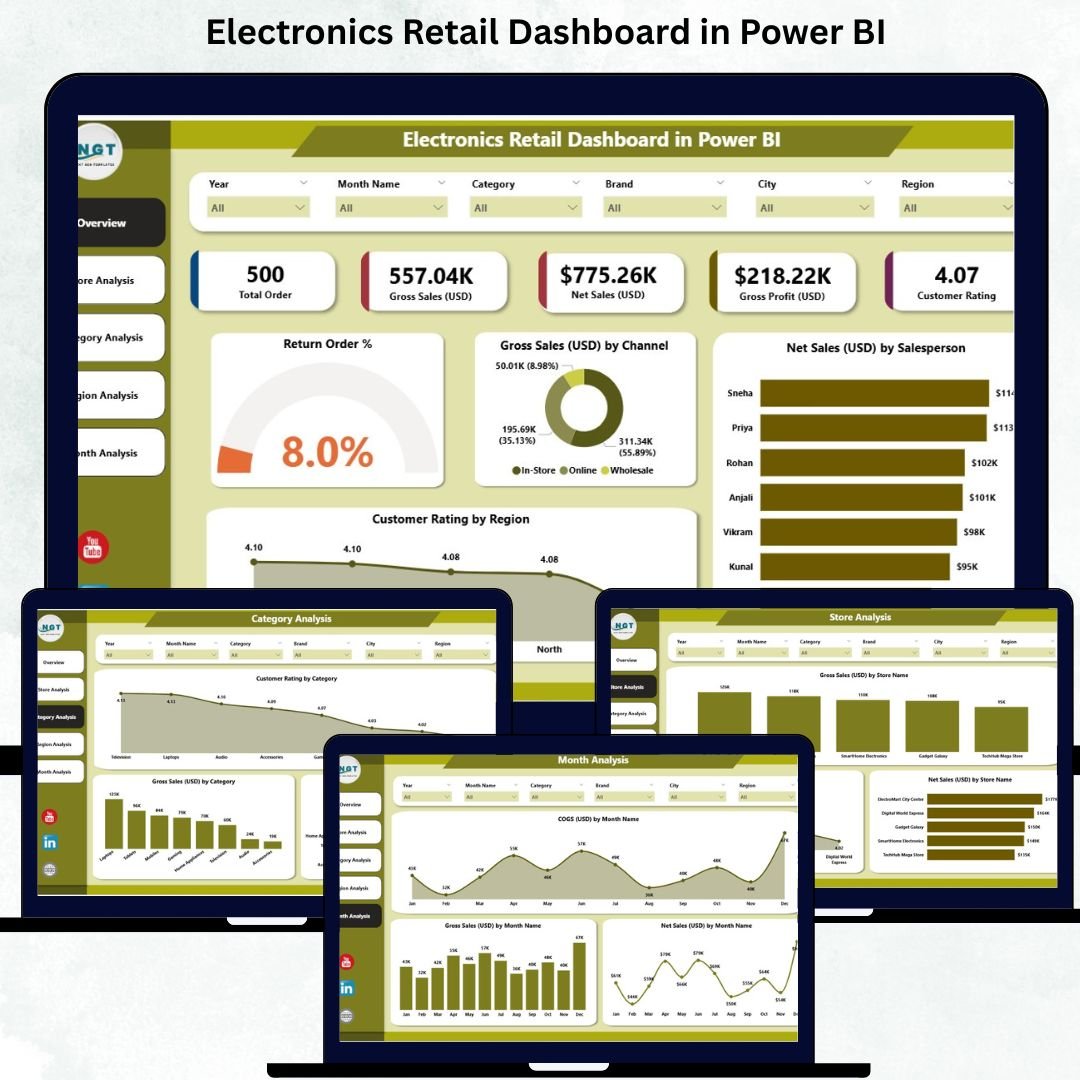
Running an electronics retail business is never simple. Product demand shifts fast, new models launch every month, customer expectations grow, and competition increases daily ⚡📱. Without the right insights, retailers struggle to track performance, monitor returns, compare stores, and identify growth opportunities.
The Electronics Retail Dashboard in Power BI solves these challenges by giving retailers a complete, real-time view of their performance. Whether you manage multiple stores, analyze customer ratings, compare categories, or track regional trends — this dashboard presents everything in one clean, interactive, and powerful visual platform. Power BI converts your raw data into meaningful insights instantly, helping you take better decisions and grow your business confidently.
This ready-to-use dashboard works with Excel or any database. Simply refresh your data source and the visuals update automatically. From KPIs to sales trends, every page of the dashboard is designed to support smart decision-making for owners, managers, and business analysts.
🔥 Key Features of the Electronics Retail Dashboard in Power BI
-
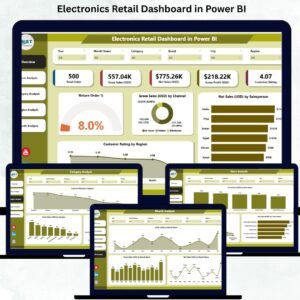
📊 Overview Page – Track return order %, gross sales, net sales by salesperson, customer ratings, and channel-level insights.
-
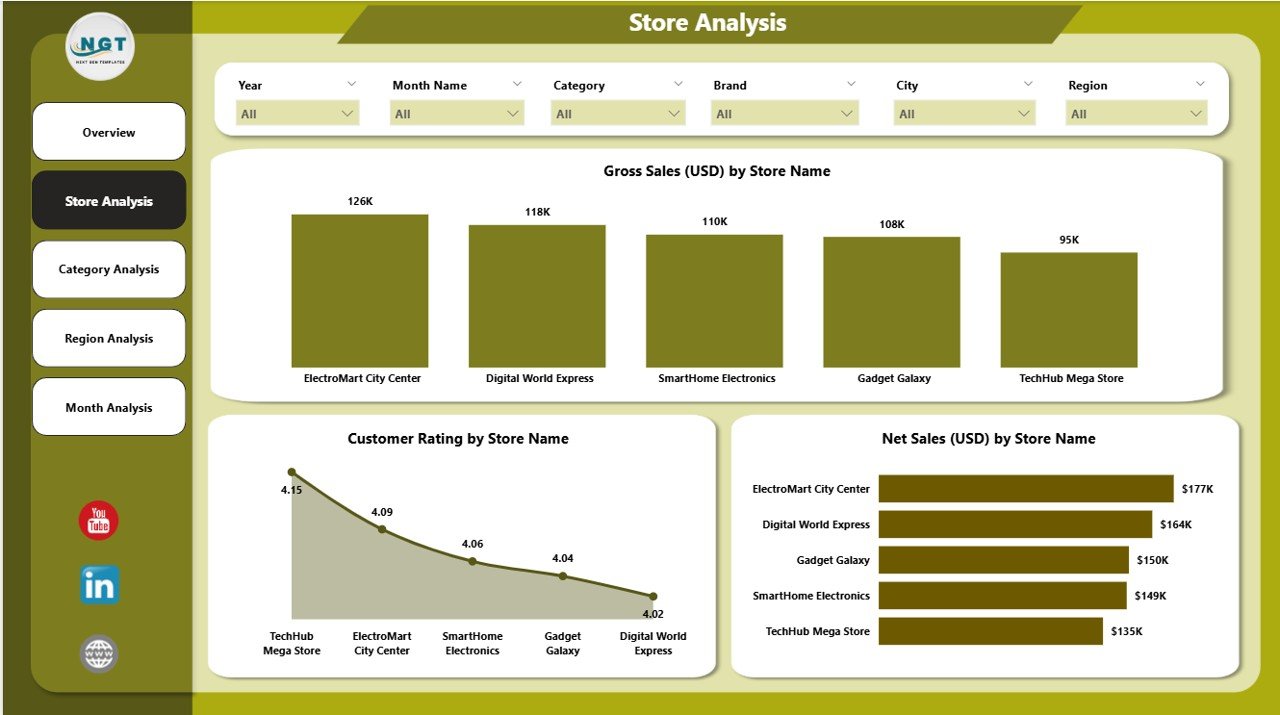
🏬 Store Analysis Page – Compare store-wise sales, customer ratings, and net sales to identify top and low performers.
-
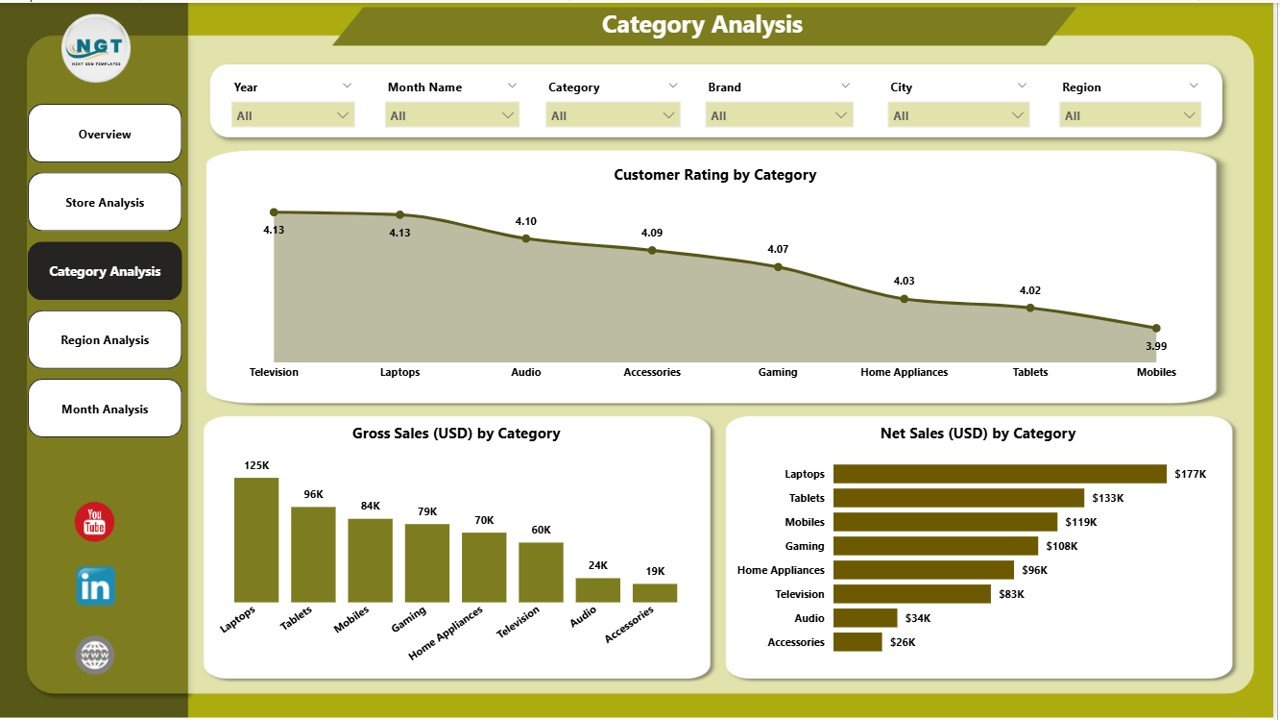
📦 Category Analysis Page – Monitor category demand, customer satisfaction, and sales performance across product types.
-
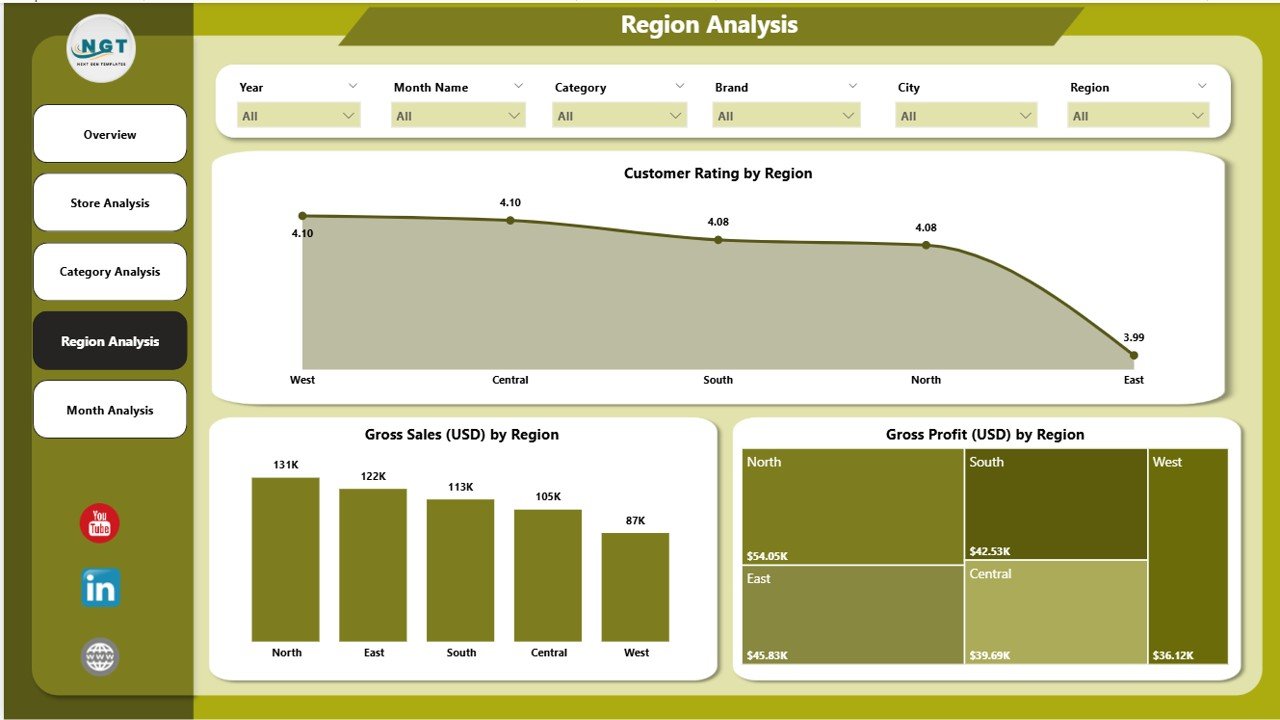
🌍 Region Analysis Page – Understand regional buying trends, profit performance, and customer ratings across locations.
-
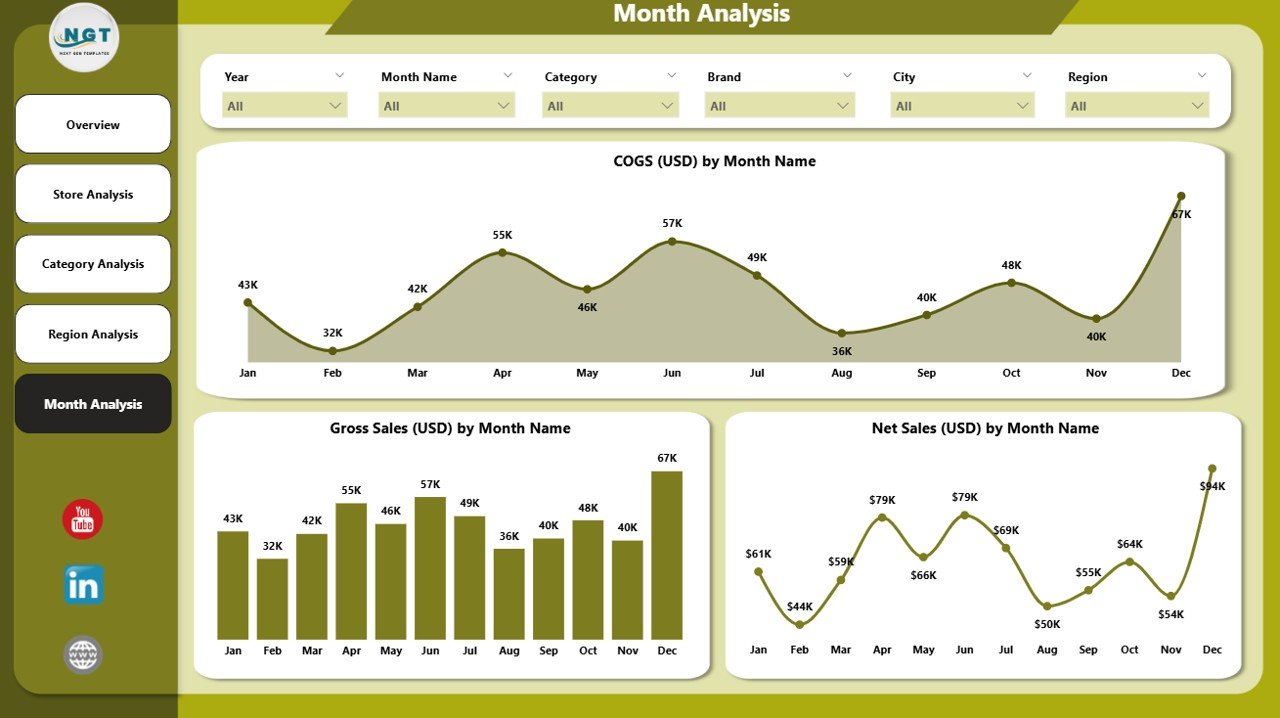
📅 Monthly Trends Page – See seasonal patterns, festival demand, cost trends, and monthly gross sales changes.
-
⚡ Real-Time Refresh – Update your data once and the entire dashboard refreshes instantly.
-
🎯 Smart Slicers – Filter results by month, region, category, store, or channel for deeper insights.
-
💡 Ready for Presentations – Clean, professional visuals ideal for client reviews and management meetings.
📂 What’s Inside the Electronics Retail Dashboard
1. Overview Page – Your Full Business Snapshot
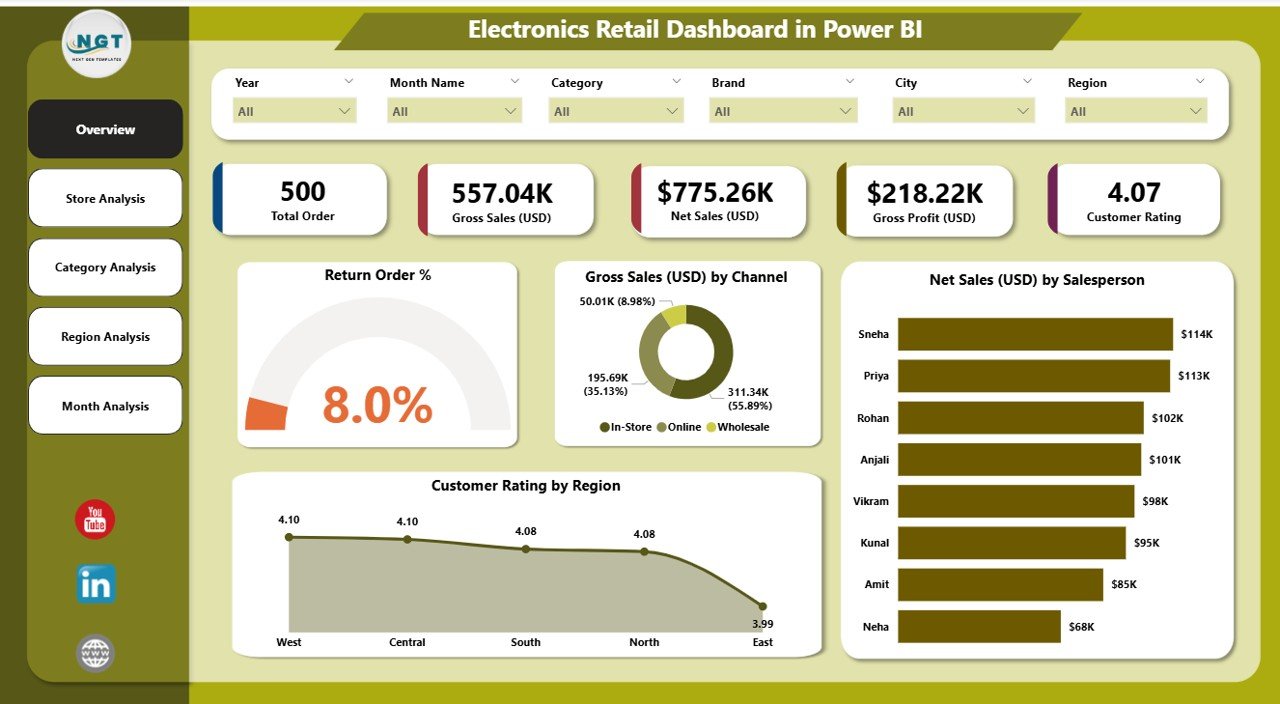
This page includes:
-
Return Order %
-
Gross Sales (USD) by Channel
-
Net Sales (USD) by Salesperson
-
Customer Rating by Region
With slicers for month, region, channel, and category, this page gives you instant clarity on business performance.
2. Store Analysis Page – Compare Store Performance Easily
This page helps retailers understand:
-
Best-performing stores
-
Stores with low customer ratings
-
Stores with low sales or high costs
Key charts include:
-
Sales (USD) by Store
-
Customer Rating by Store
-
Net Sales (USD) by Store
3. Category Analysis Page – Track Category-Level Success
Electronics categories like mobiles, laptops, TVs, and accessories perform differently. This page shows:
-
Customer Rating by Category
-
Gross Sales (USD) by Category
-
Net Sales (USD) by Category
It helps you stock high-performing categories, promote slow-moving ones, and improve inventory planning.
4. Region Analysis Page – Understand Regional Performance
This page highlights:
-
Customer Rating by Region
-
Gross Profit Sales (USD) by Region
-
Gross Sales (USD) by Region
Retailers use this to plan regional campaigns, adjust pricing, and allocate stock effectively.
5. Monthly Trends Page – Track Seasonality & Growth Patterns
Monthly trends reveal festival demand, peak sales periods, and stock planning requirements. Charts include:
-
COGS (USD) by Month
-
Gross Profit (USD) by Month
-
Gross Sales (USD) by Month
Retailers use this to forecast sales and plan stronger monthly strategies.
🌟 Advantages of Using the Electronics Retail Dashboard
✔ Real-time performance visibility
✔ Strong store and category comparison
✔ Clear customer satisfaction analysis
✔ Reduced reporting time with automated visuals
✔ Easy decision-making based on accurate insights
✔ Improved demand forecasting
✔ Powerful trend identification for planning
👥 Who Should Use This Dashboard?
-
Retail store managers
-
Regional managers
-
Business analysts
-
Retail owners
-
Category & merchandising teams
-
Sales leaders
-
Customer experience teams
### Click here to read the Detailed blog post
Visit our YouTube channel to learn step-by-step video tutorials





















Reviews
There are no reviews yet.