

Are you still struggling with scattered healthcare reports and manual calculations? In today’s fast-paced medical environment, bariatric surgery centers need fast, accurate, and data-driven insights. However, tracking patient outcomes, surgery performance, and cost analysis manually can be overwhelming and time-consuming.
👉 Introducing the Bariatric Surgery Centers Dashboard in Excel – a powerful, ready-to-use solution designed to simplify healthcare analytics and help you make smarter decisions instantly.
This dynamic Excel dashboard brings all your critical healthcare KPIs into one centralized and interactive interface. As a result, you can easily monitor BMI changes, surgery duration, patient recovery, and financial performance without switching between multiple reports.
🚀 Key Features of Bariatric Surgery Centers Dashboard in Excel
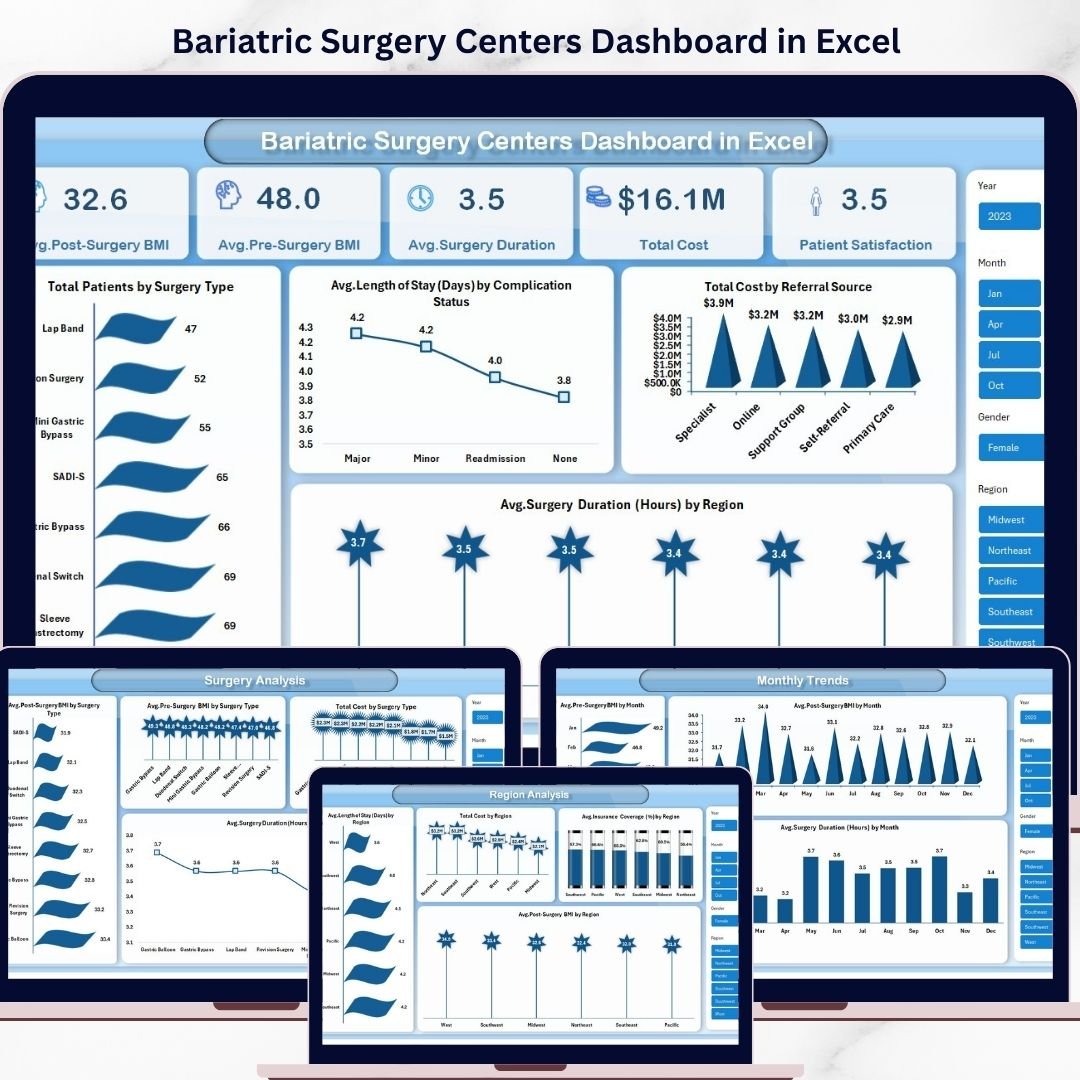
✨ Comprehensive KPI Tracking – Monitor key metrics like Pre & Post Surgery BMI, Surgery Duration, Length of Stay, and Total Cost in one place.
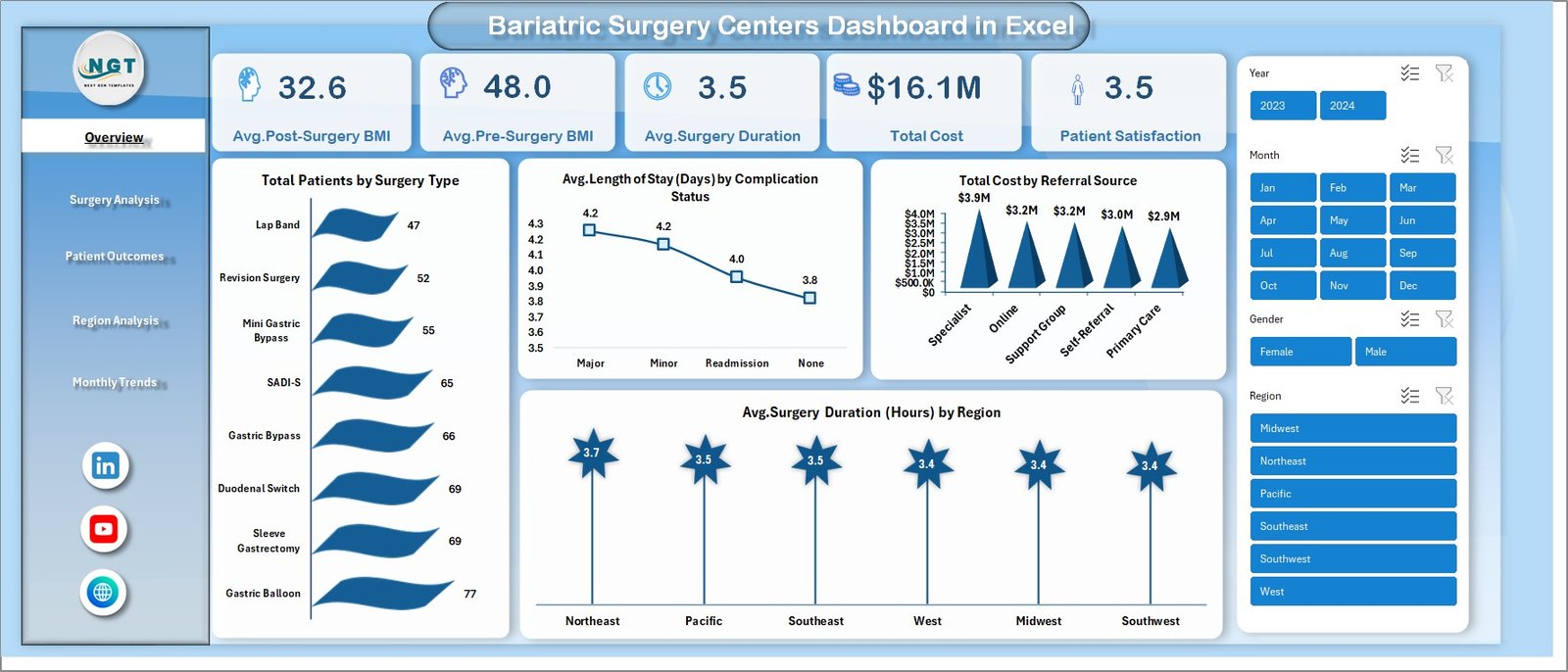
📊 Interactive Visual Dashboard – Analyze data through charts like Patients by Surgery Type, Cost by Referral Source, and Regional Comparisons.
⏱️ Performance Monitoring – Track surgical efficiency and identify areas for improvement quickly.
💰 Advanced Cost Analysis – Understand cost distribution and optimize financial performance.
🌍 Region-Wise Insights – Compare performance across regions to identify high-performing centers.
📈 Monthly Trend Analysis – Detect seasonal trends and forecast future healthcare demand.
🎯 User-Friendly Design – Easy navigation with multiple sheet tabs and slicers for quick filtering.
⚡ Fully Customizable Template – Modify KPIs, charts, and layouts as per your requirements.
📂 What’s Inside the Bariatric Surgery Centers Dashboard in Excel
This ready-to-use Excel template includes multiple well-structured sheet tabs for complete analysis:
📌 Overview Dashboard
Get a quick snapshot of key KPIs such as Avg. BMI, Surgery Duration, and Total Cost along with powerful visual insights.
📌 Surgery Analysis Sheet
Compare different surgery types based on BMI, cost, and duration to identify the most effective procedures.
📌 Patient Outcomes Sheet
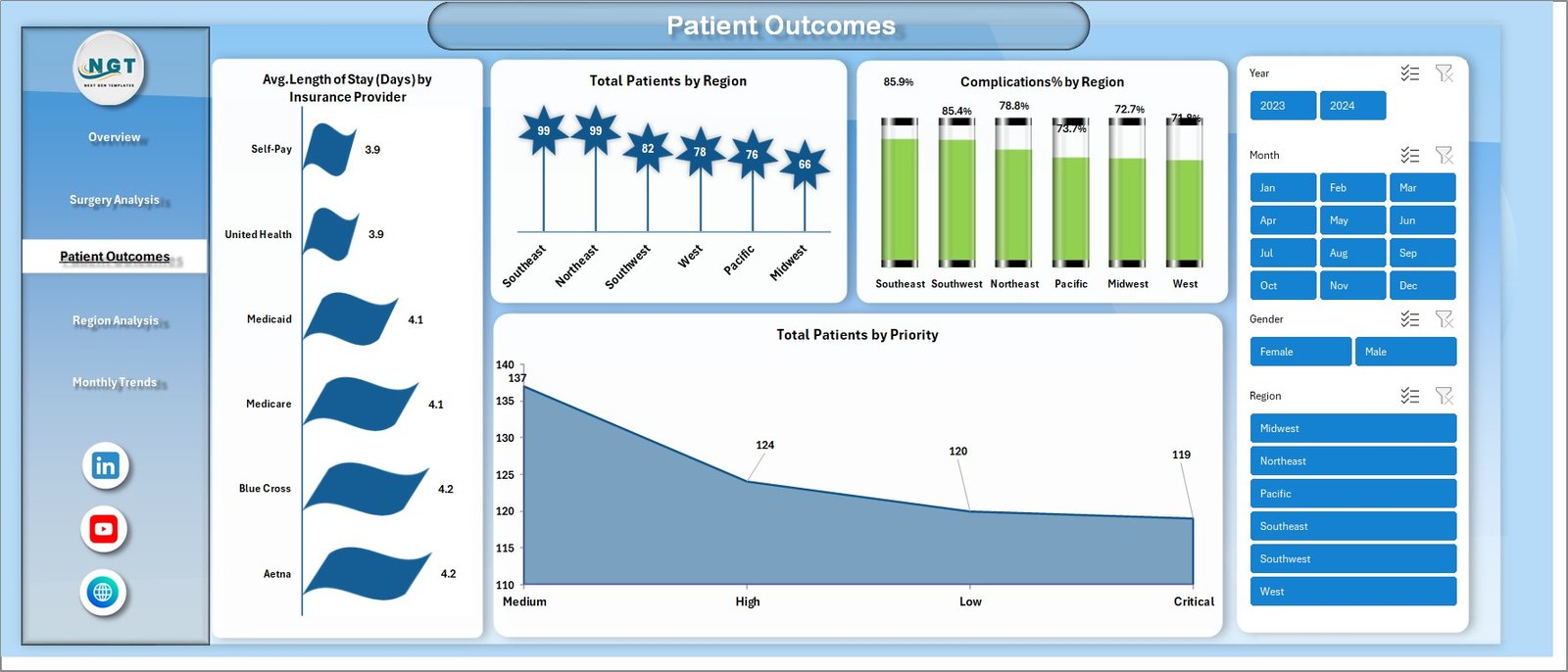
Analyze recovery metrics such as Length of Stay, Complication %, and patient distribution by region and priority.
📌 Region Analysis Sheet
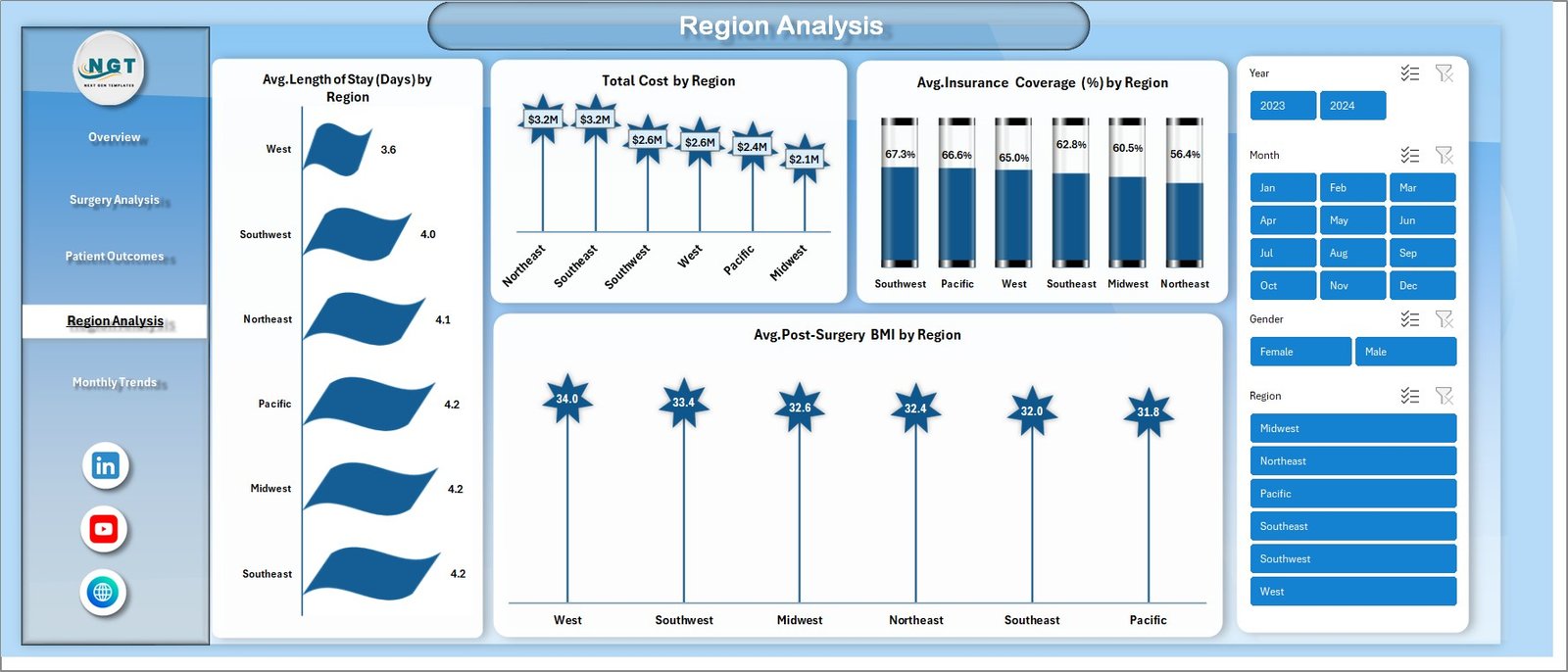
Evaluate performance across different locations including cost, insurance coverage, and BMI outcomes.
📌 Monthly Trends Sheet
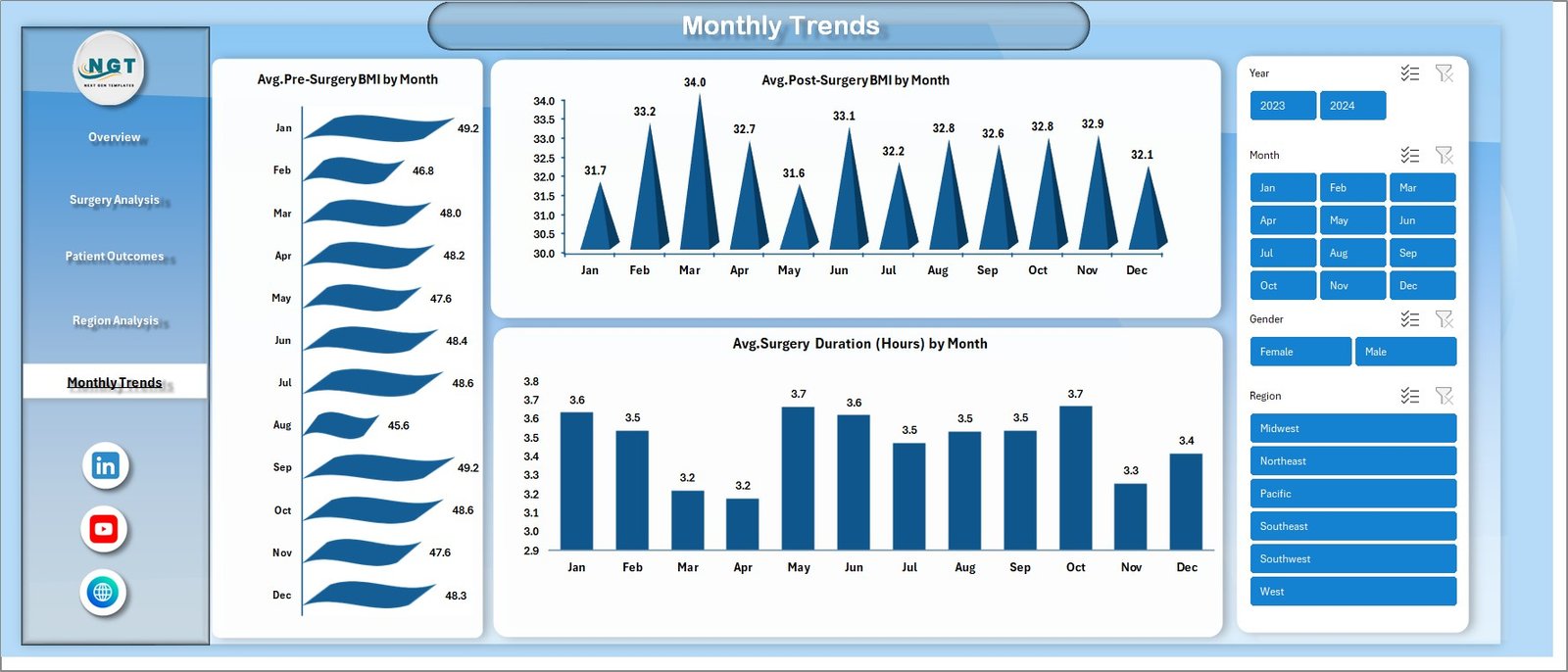
Track performance over time with monthly comparisons of BMI and surgery duration.
🛠️ How to Use the Bariatric Surgery Centers Dashboard in Excel
Using this dashboard is simple and beginner-friendly:
1️⃣ Enter your healthcare data into the data sheet
2️⃣ Refresh pivot tables and charts
3️⃣ Use slicers to filter by region, surgery type, or time
4️⃣ Explore insights across different dashboard tabs
Because of its intuitive design, even users with basic Excel knowledge can start using it immediately.
👨⚕️ Who Can Benefit from This Bariatric Surgery Centers Dashboard in Excel
This dashboard is designed for a wide range of healthcare professionals:
🏥 Hospital Administrators – Monitor operations and improve efficiency
👨⚕️ Surgeons – Analyze surgical performance and outcomes
📊 Healthcare Analysts – Generate insights for better decision-making
💼 Insurance Providers – Evaluate cost and patient coverage trends
🧾 Financial Managers – Track and optimize healthcare expenses
Whether you run a small clinic or a large hospital, this dashboard helps you make data-driven decisions with confidence.
With this powerful Excel dashboard, you no longer need to rely on complex spreadsheets or manual calculations. Instead, you get a centralized system that improves efficiency, enhances patient care, and supports smarter decision-making.
👉 Take control of your healthcare data today and transform the way you manage bariatric surgery performance!






























