



Are you struggling to manage your autonomous vehicle data across multiple spreadsheets? Finding it difficult to track costs, monitor performance, and make smart decisions?
👉 It’s time to simplify your fleet management and boost efficiency!
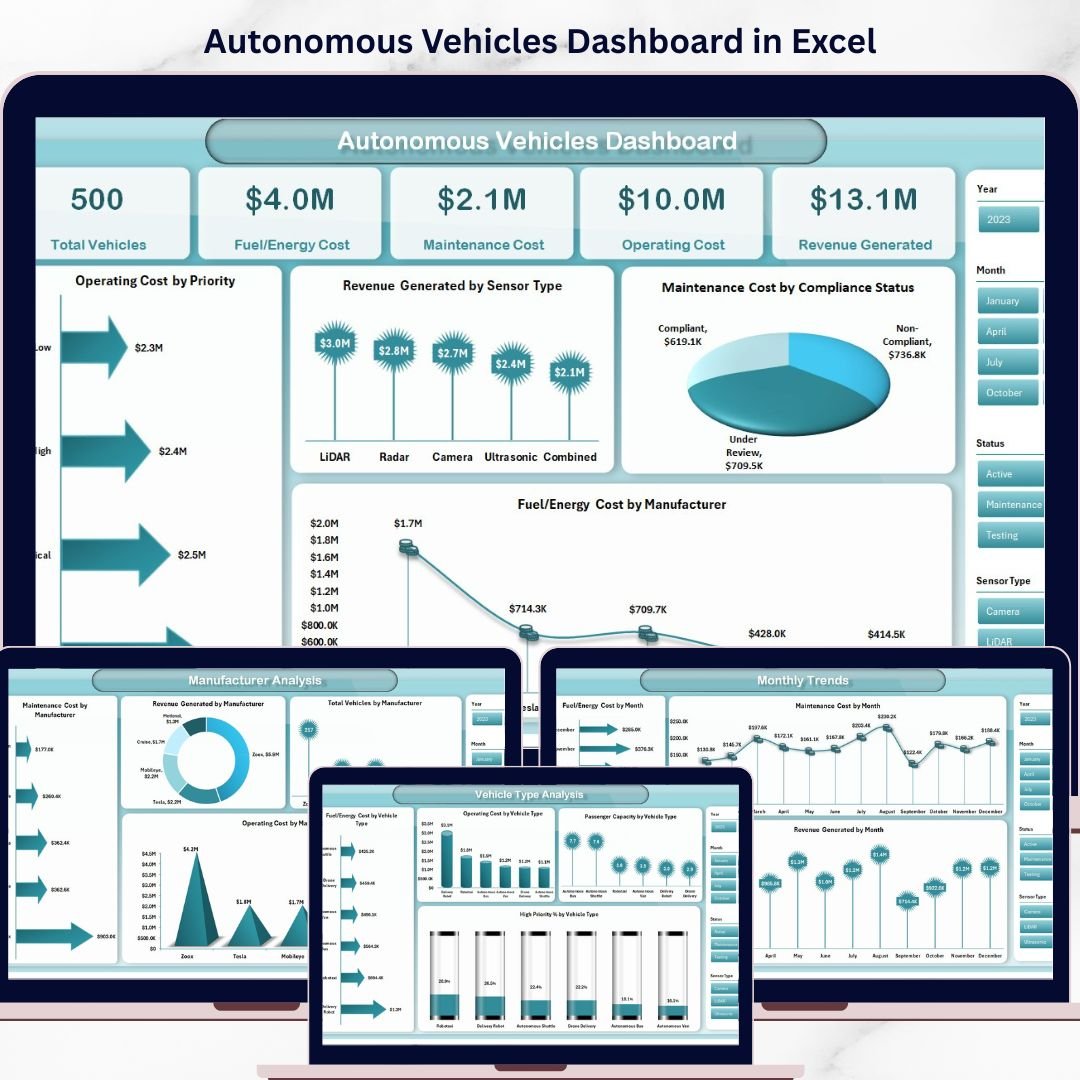
Introducing the Autonomous Vehicles Dashboard in Excel — a powerful, ready-to-use, and interactive solution designed to help you monitor fleet performance, control costs, and improve decision-making—all in one place.
This dashboard transforms complex vehicle data into clear, visual insights. From fuel/energy costs to maintenance and revenue tracking, everything becomes easy to understand. As a result, you can take faster actions, optimize operations, and increase profitability.
🚀 Key Features of Autonomous Vehicles Dashboard in Excel
✨ 🚗 Complete Fleet Overview – Track total vehicles, costs, and revenue at a glance.
✨ 💰 Cost Monitoring – Analyze fuel/energy, maintenance, and operating expenses easily.
✨ 📊 Interactive Dashboard – Use slicers to filter data dynamically.
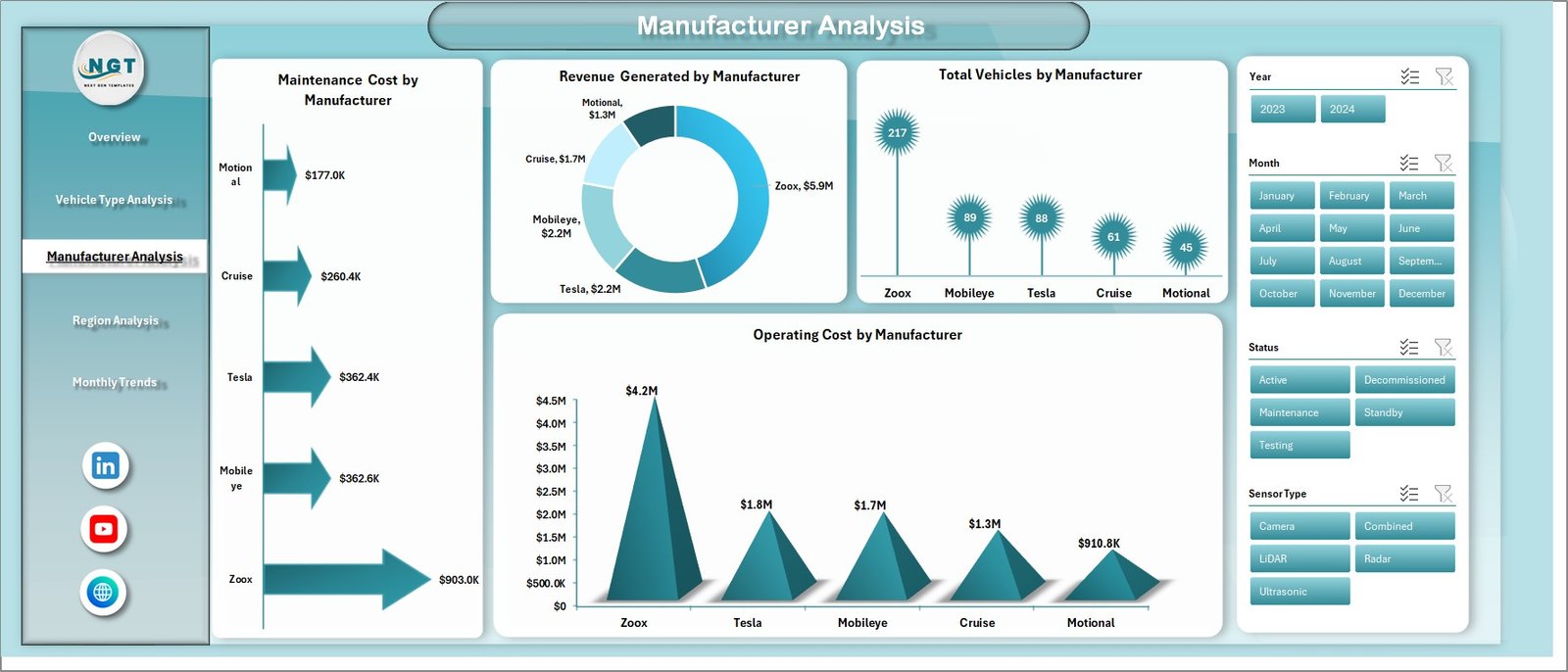
✨ 🏭 Manufacturer Insights – Compare performance across different manufacturers.
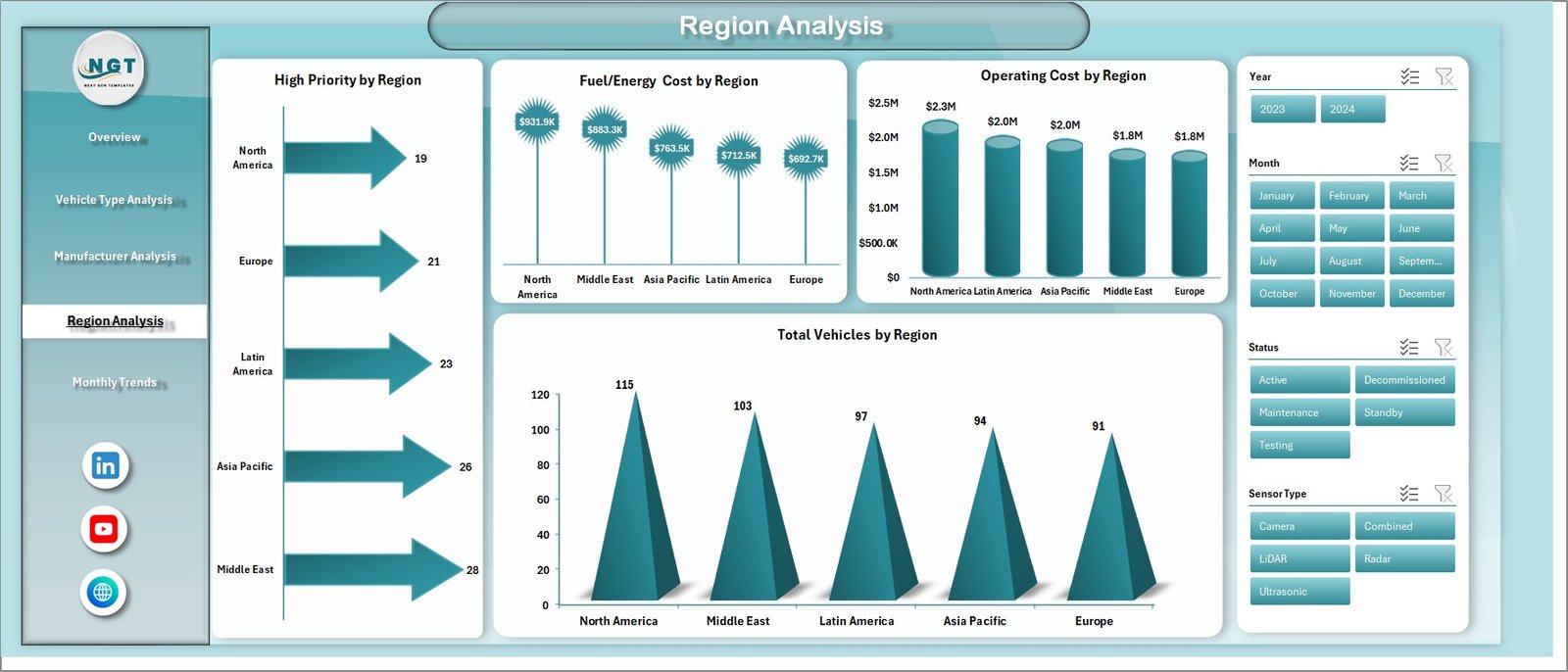
✨ 🌍 Region-Based Analysis – Understand performance across locations.
✨ 🚘 Vehicle Type Analysis – Identify high-performing and cost-efficient vehicles.
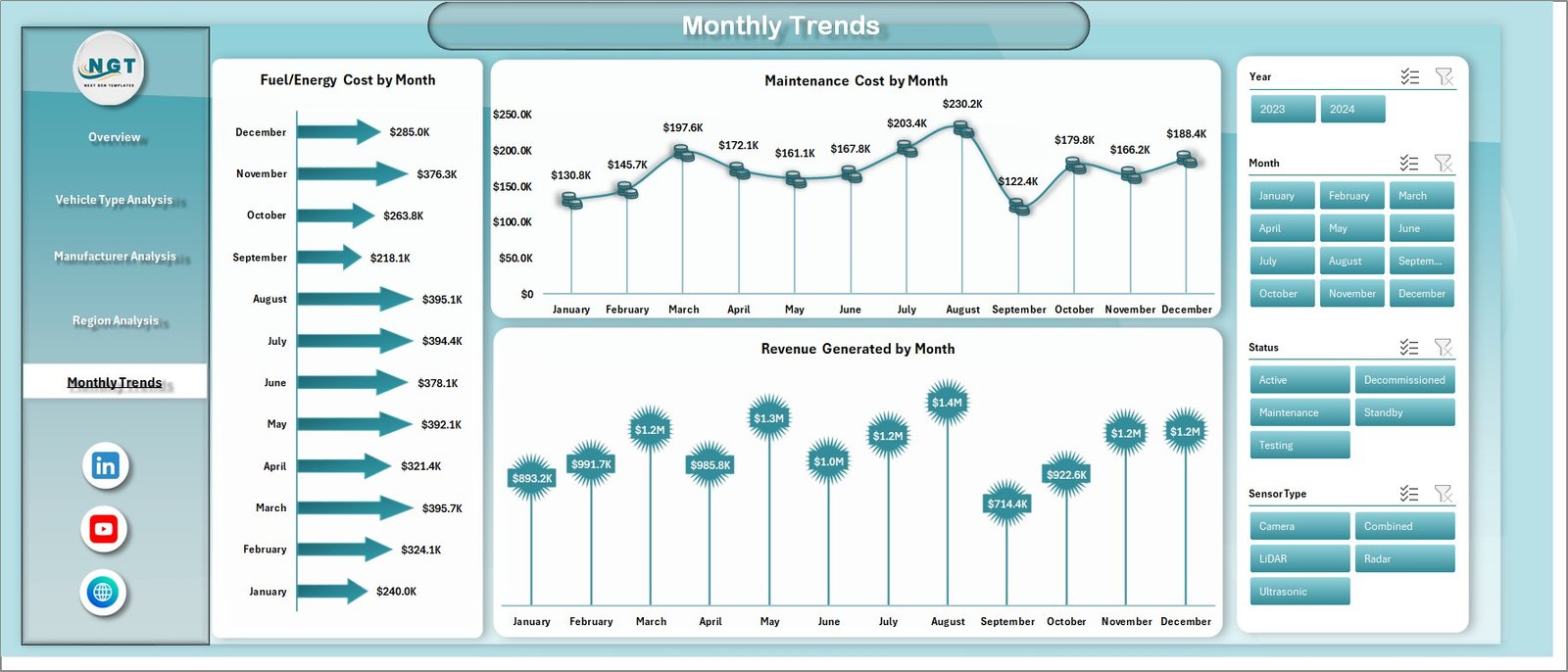
✨ 📅 Monthly Trends Tracking – Monitor performance over time.
✨ ⚡ User-Friendly Design – Simple layout with easy navigation panel.
✨ 🔄 Fully Customizable – Modify as per your business needs.
📦 What’s Inside the Autonomous Vehicles Dashboard in Excel
This dashboard includes 5 powerful analysis pages, along with a Data Sheet and Support Sheet:
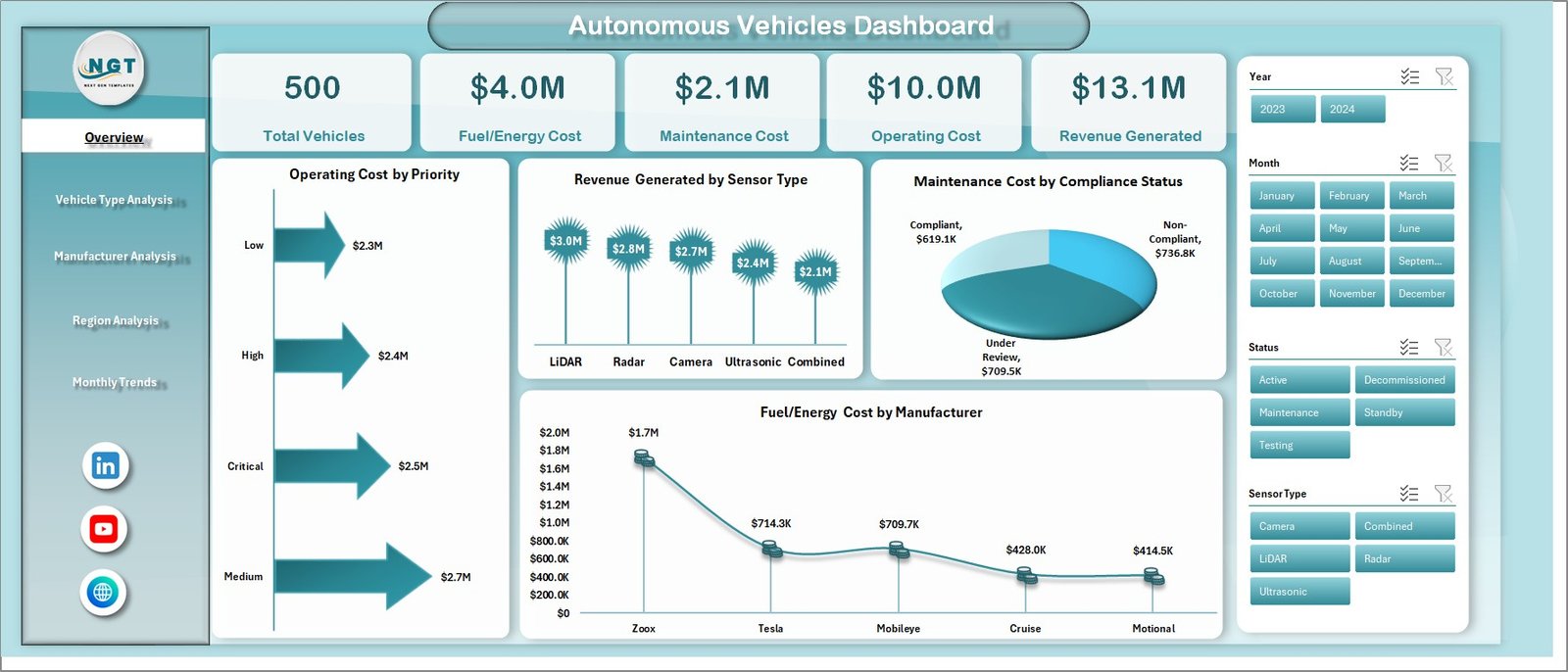
📊 Overview Page – Get a quick snapshot with KPIs like Total Vehicles, Fuel Cost, Maintenance Cost, Operating Cost, and Revenue.
🚘 Vehicle Type Analysis – Compare performance and efficiency across vehicle categories.
🏭 Manufacturer Analysis – Evaluate cost and revenue performance by manufacturer.
🌍 Region Analysis – Track performance across different geographical regions.
📅 Monthly Trends Page – Analyze cost and revenue trends over time.
Additionally, you get:
✔️ Data input sheet for easy data entry
✔️ Support sheet with pivot tables
✔️ Interactive charts and slicers
✔️ Clean and structured format
⚙️ How to Use the Autonomous Vehicles Dashboard in Excel
Using this dashboard is simple and beginner-friendly.
1️⃣ Enter your data into the Data Sheet
2️⃣ Refresh pivot tables from the Support Sheet
3️⃣ Use slicers to filter data by region, vehicle type, or manufacturer
4️⃣ Analyze each dashboard page
5️⃣ Take action based on insights
👉 Within minutes, you can turn raw data into meaningful business decisions.
🎯 Who Can Benefit from This Autonomous Vehicles Dashboard in Excel
This dashboard is perfect for professionals managing fleet operations:
🚗 Fleet Managers – Monitor vehicle performance and reduce costs
📊 Data Analysts – Analyze trends and generate insights quickly
🏢 Transportation Companies – Improve operational efficiency
🚀 Autonomous Vehicle Startups – Track growth and performance
💼 Business Owners – Make data-driven decisions
👉 Whether you manage a small fleet or a large operation, this dashboard helps you stay in control.
💡 This is not just a dashboard—it’s your fleet optimization tool.
Because with the right insights:
✔️ You reduce operational costs
✔️ You improve vehicle utilization
✔️ You enhance decision-making
✔️ You increase profitability
🔗 Click here to read the Detailed blog post
🎥 Visit our YouTube channel to learn step-by-step video tutorials:
👉 https://www.youtube.com/@PKAnExcelExpert






























