
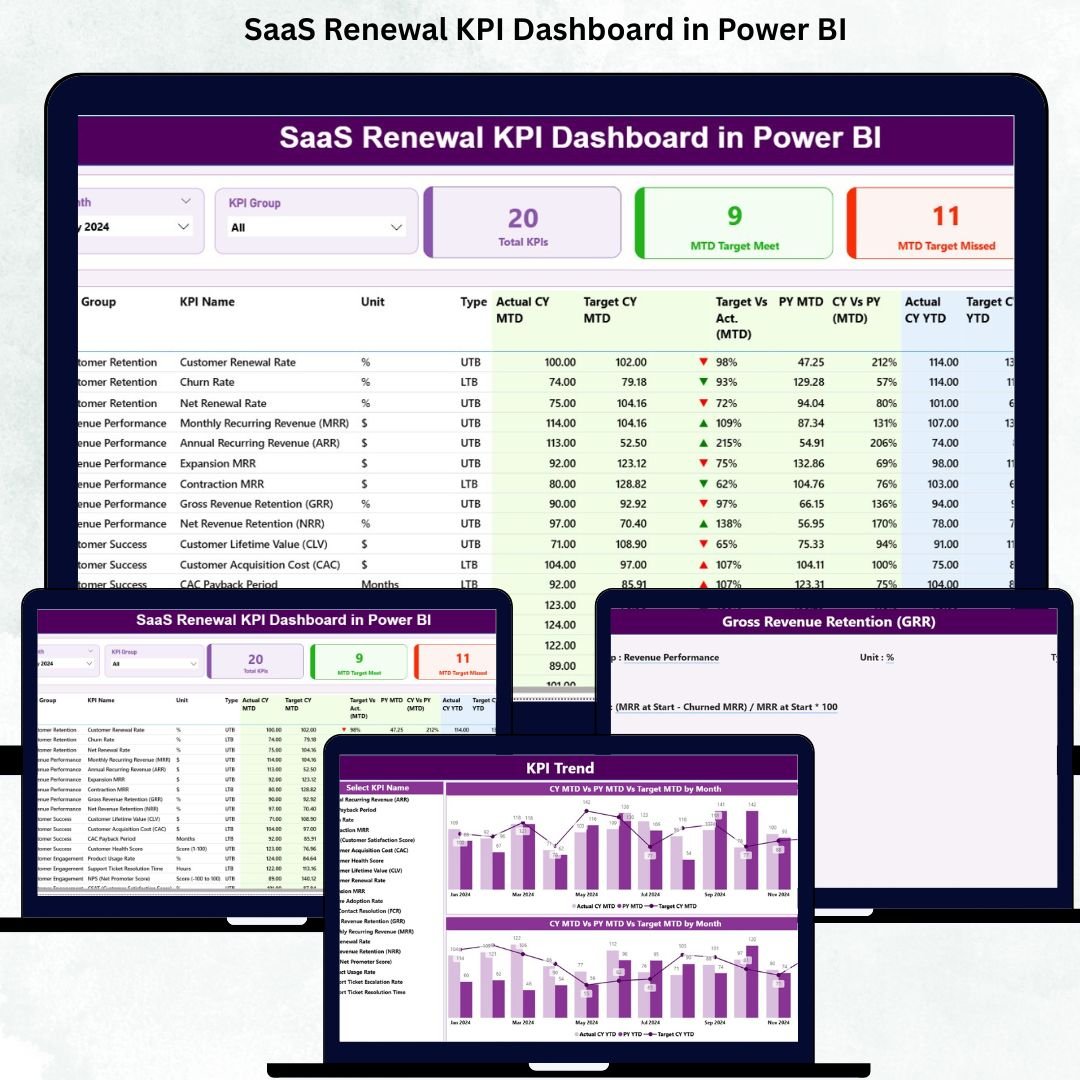

Customer renewals are the lifeline of any SaaS business. When customers stay, upgrade, or expand their subscription, revenue grows consistently. But when renewal rates drop or churn increases, SaaS companies face major setbacks. The challenge becomes even bigger when renewal metrics stay scattered across multiple spreadsheets. That’s exactly why the SaaS Renewal KPI Dashboard in Power BI is the ultimate solution every SaaS company needs.
This powerful dashboard converts all renewal, churn, and subscription metrics into clear, interactive visuals. It provides complete insight into customer behavior, renewal performance, and financial indicators—helping SaaS leaders take fast, confident, and data-driven decisions. Whether you want to track MRR, churn %, expansion revenue, renewal rate, contract values, or customer lifetime value, this dashboard brings every KPI into one clean visual system.
Built using Power BI and an Excel data source, this dashboard makes renewal performance tracking effortless. You simply update your Actual, Target, and KPI Definition sheets in Excel, refresh Power BI, and instantly view updated renewal insights. With slicers, drill-throughs, KPI cards, and dynamic comparison charts, teams gain end-to-end clarity over subscription health.
📊 Key Features of the SaaS Renewal KPI Dashboard in Power BI
This dashboard includes three fully interactive pages, each built for deep SaaS renewal insights.
⭐ 1. Summary Page – Complete Renewal Performance Overview
This is your main dashboard page where all renewal KPIs come together.

🔹 What You’ll See Here:
-
✔ Month Slicer
-
✔ KPI Group Slicer
-
✔ KPI Performance Cards
-
Total KPIs Count
-
MTD Target Met Count
-
MTD Target Missed Count
-
🔹 Detailed KPI Table
The heart of the dashboard includes:
-
KPI Number
-
KPI Group
-
KPI Name
-
Unit
-
Type (LTB / UTB)
-
Actual CY MTD
-
Target CY MTD
-
MTD Icons (▲ green or ▼ red)
-
Target vs Actual (MTD)
-
PY MTD
-
CY vs PY (MTD)
-
Actual CY YTD
-
Target CY YTD
-
YTD Icons
-
Target vs Actual (YTD)
-
PY YTD
-
CY vs PY (YTD)
This page gives a crystal-clear look at your full renewal performance.
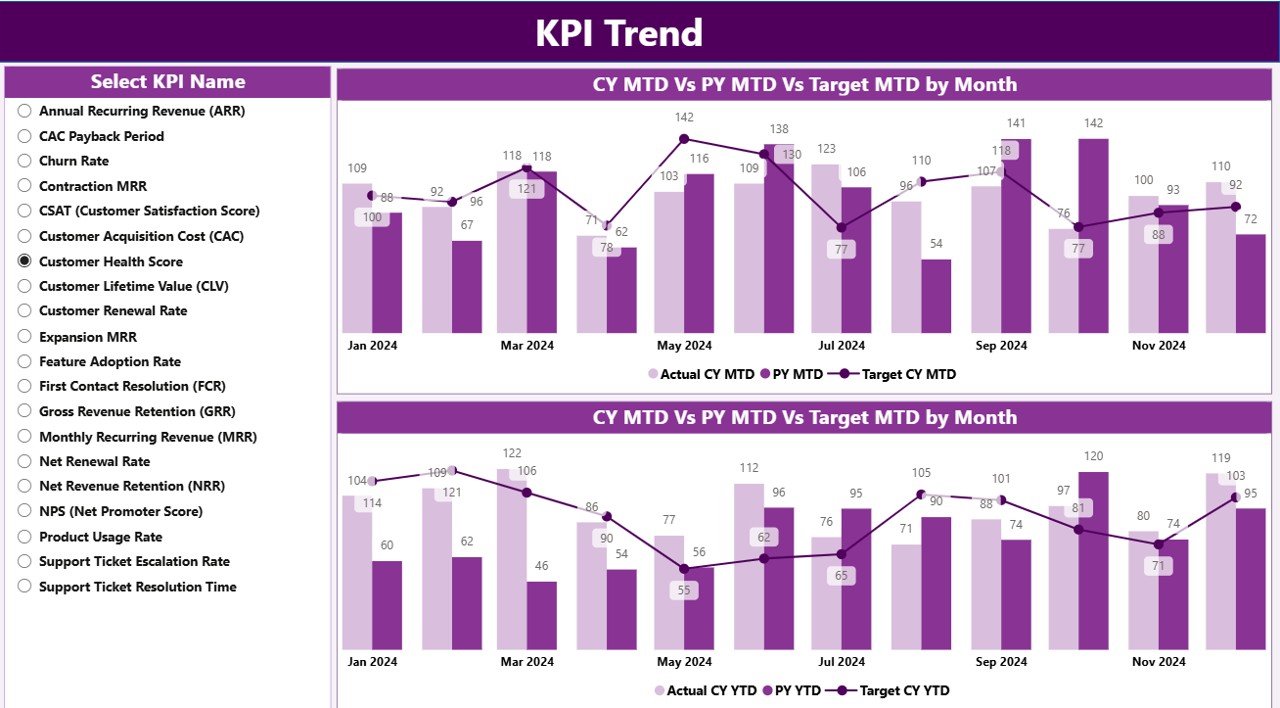
⭐ 2. KPI Trend Page – Track Renewal Trends Over Time
Trends reveal whether customer retention is improving or declining.
🔹 This page includes:
-
KPI selector slicer
-
Combo chart for MTD performance
-
Combo chart for YTD performance
These charts show:
-
Actual CY vs Actual PY
-
Actual vs Target
-
Trend patterns
-
Year-over-year improvement
This page helps SaaS teams understand progress across different renewal periods.
⭐ 3. KPI Definition Page – Understand Each KPI Clearly
This hidden page opens only through drill-through from the Summary Page.
🔹 It displays:
-
KPI Number
-
KPI Group
-
KPI Name
-
Unit
-
Formula
-
Definition
-
Type (UTB or LTB)
This ensures complete clarity for every team member interpreting the dashboard.
📦 What’s Inside the SaaS Renewal KPI Dashboard in Power BI
You get an Excel-powered data system with:
-
📄 Input_Actual Sheet (MTD & YTD actual values)
-
📄 Input_Target Sheet (MTD & YTD targets)
-
📄 KPI Definition Sheet (KPI categories, formulas, definitions)
Power BI reads these sheets and updates all visuals automatically.
🧩 How to Use the SaaS Renewal KPI Dashboard
-
Enter Actual and Target values in Excel
-
Update KPI definitions
-
Load data into Power BI
-
Use Month & KPI Group slicers
-
Review Summary Page for performance
-
Open KPI Trend Page for detailed analysis
-
Drill through KPIs as needed
No coding or technical skills required!
👤 Who Can Benefit from This Dashboard
This dashboard is ideal for:
-
💼 SaaS Founders
-
📊 Customer Success Teams
-
💰 Finance & Revenue Teams
-
🎯 Renewal Teams
-
🧭 SaaS Leadership
-
📈 Growth & Strategy Teams
Anyone responsible for retention, expansion, or customer success will benefit greatly.
### Click hare to read the Detailed blog post
Visit our YouTube channel to learn step-by-step video tutorials
👉 Youtube.com/@PKAnExcelExpert






























Reviews
There are no reviews yet.