

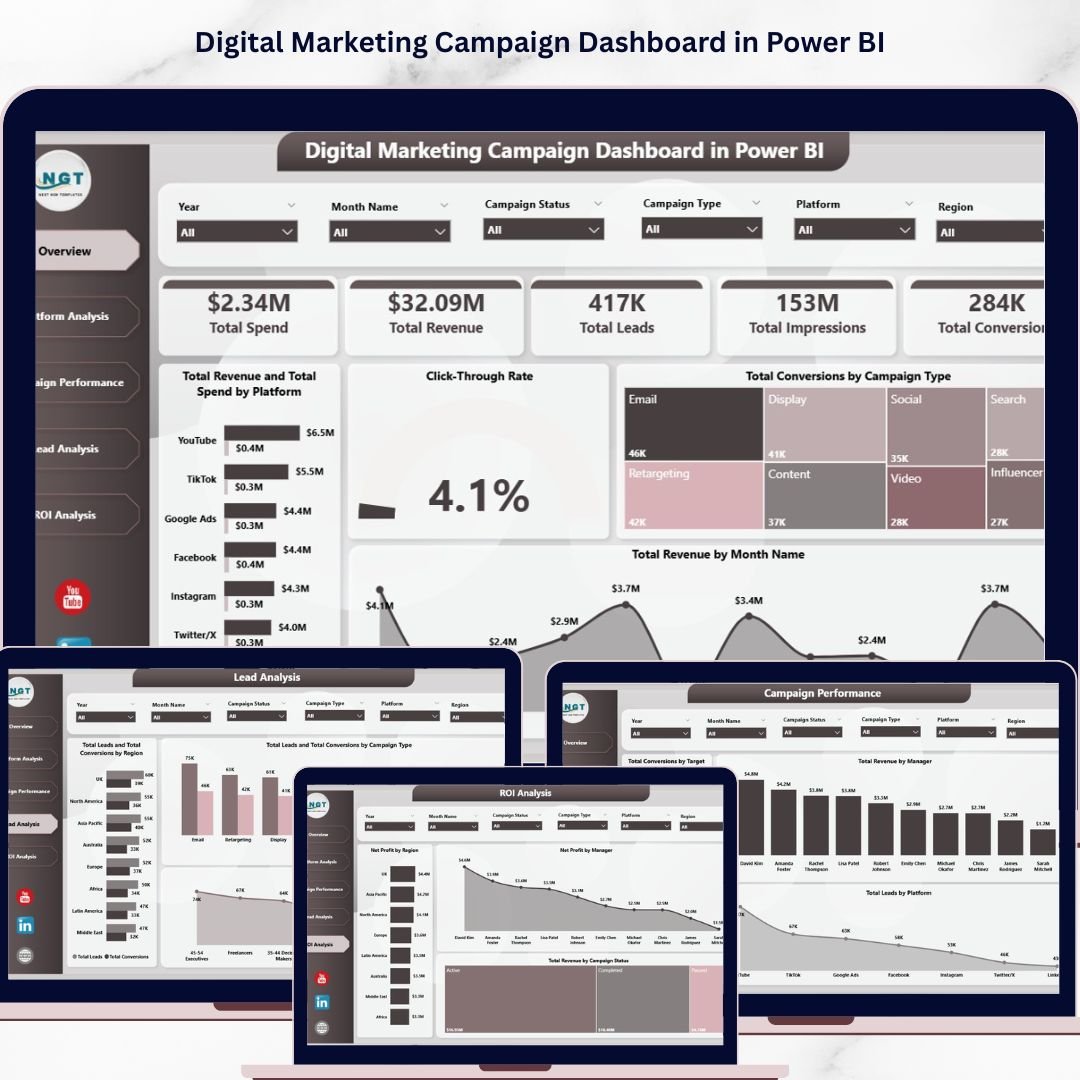
Digital Marketing Campaign Dashboard in Power BI is a powerful, interactive analytics template built for digital marketing managers, campaign strategists, advertising agencies, and growth marketers who want to track campaign spend, revenue, leads, impressions, conversions, and ROI — all from a single dynamic Power BI dashboard. This template includes 5 interactive dashboard pages covering Overview, Platform Analysis, Campaign Performance, Lead Analysis, and ROI Analysis — delivering 360-degree visibility into your digital marketing operations from a single .pbix file 📊🚀.
Whether you manage social media advertising, PPC campaigns, email marketing, or multi-channel digital campaigns, this Power BI Dashboard Template transforms raw marketing data into actionable visual insights instantly. Simply connect your data source, refresh, and start analyzing. Already have the Excel version? Check out the Digital Marketing Campaign Dashboard in Excel for pivot-powered analytics, or explore the Brand Consulting Dashboard in Power BI for client-focused profitability tracking.
🔑 Key Features of Digital Marketing Campaign Dashboard in Power BI
📊 5 Interactive Dashboard Pages — Overview, Platform Analysis, Campaign Performance, Lead Analysis, and ROI Analysis deliver comprehensive marketing analytics from a single Power BI file. This dashboard tracks 5 key metrics including Total Spend, Total Revenue, Total Leads, Total Impressions, and Total Conversions across multiple analytical views.
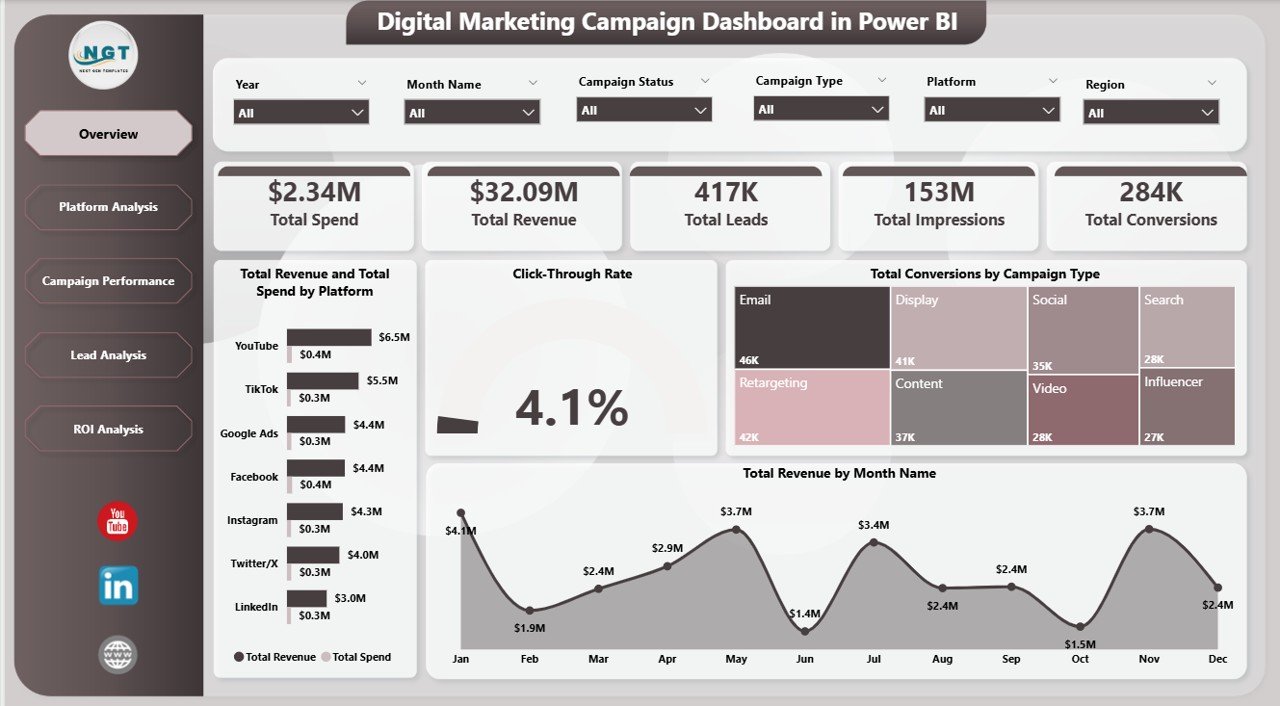
📈 Dynamic KPI Cards on Overview — Instantly view Total Spend, Total Revenue, Total Leads, Total Impressions, and Total Conversions at the top of the Overview page for a quick executive summary of your marketing performance health.
🎛 Multiple Slicers for Quick Filtering — Apply dynamic filters across the dashboard to drill down into specific platforms, campaign types, ad formats, regions, target audiences, and time periods instantly.
💰 Revenue vs Spend Comparison — The Overview page features Total Revenue and Total Spend by Platform comparing financial performance across advertising channels, Click-Through Rate analyzing engagement effectiveness, Total Conversions by Campaign Type showing which strategies drive the most conversions, and Total Revenue by Month Name tracking monthly revenue trends.
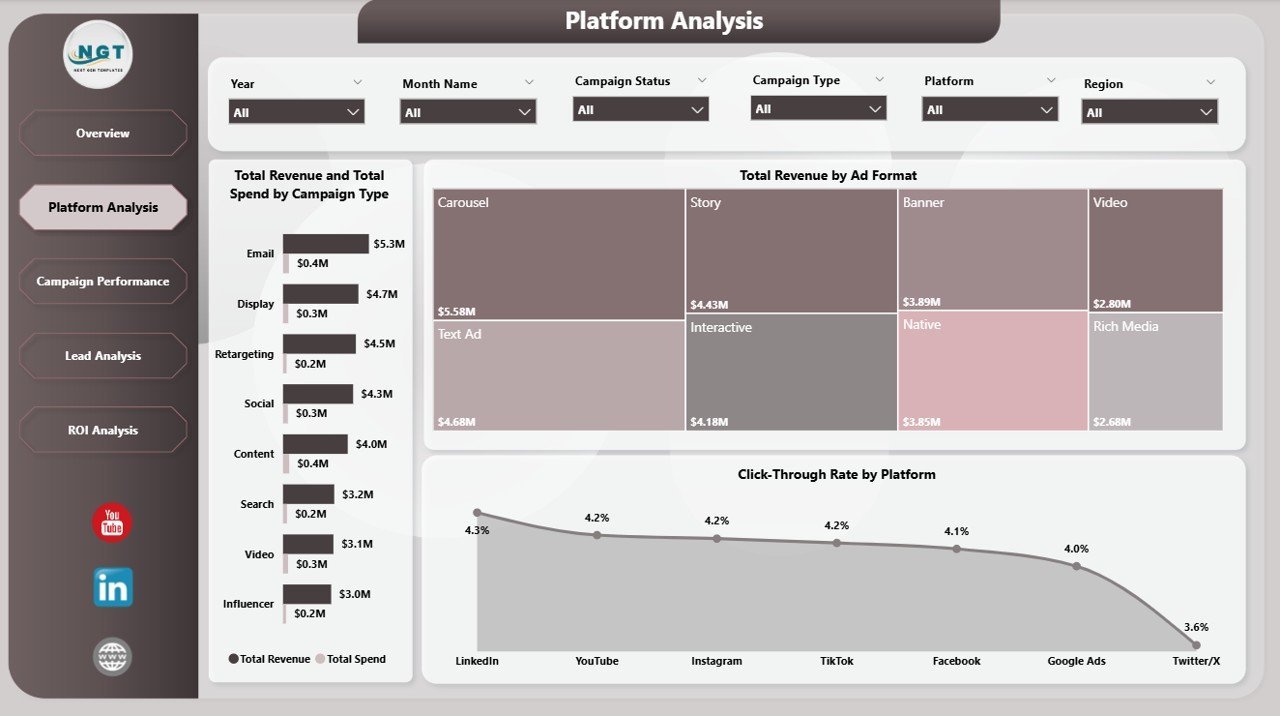
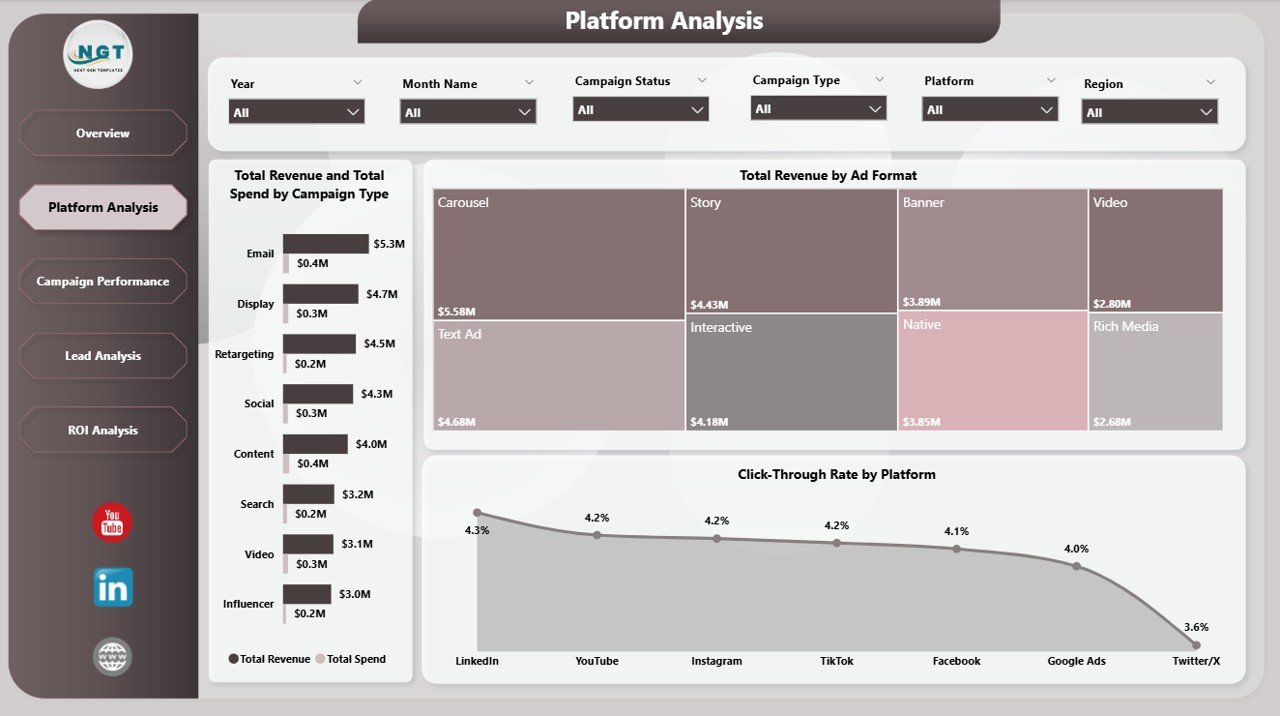
📱 Platform-Level Deep Dive — The Platform Analysis page reveals Total Revenue and Total Spend by Campaign Type, Total Revenue by Ad Format, and Click-Through Rate by Platform for granular channel optimization.
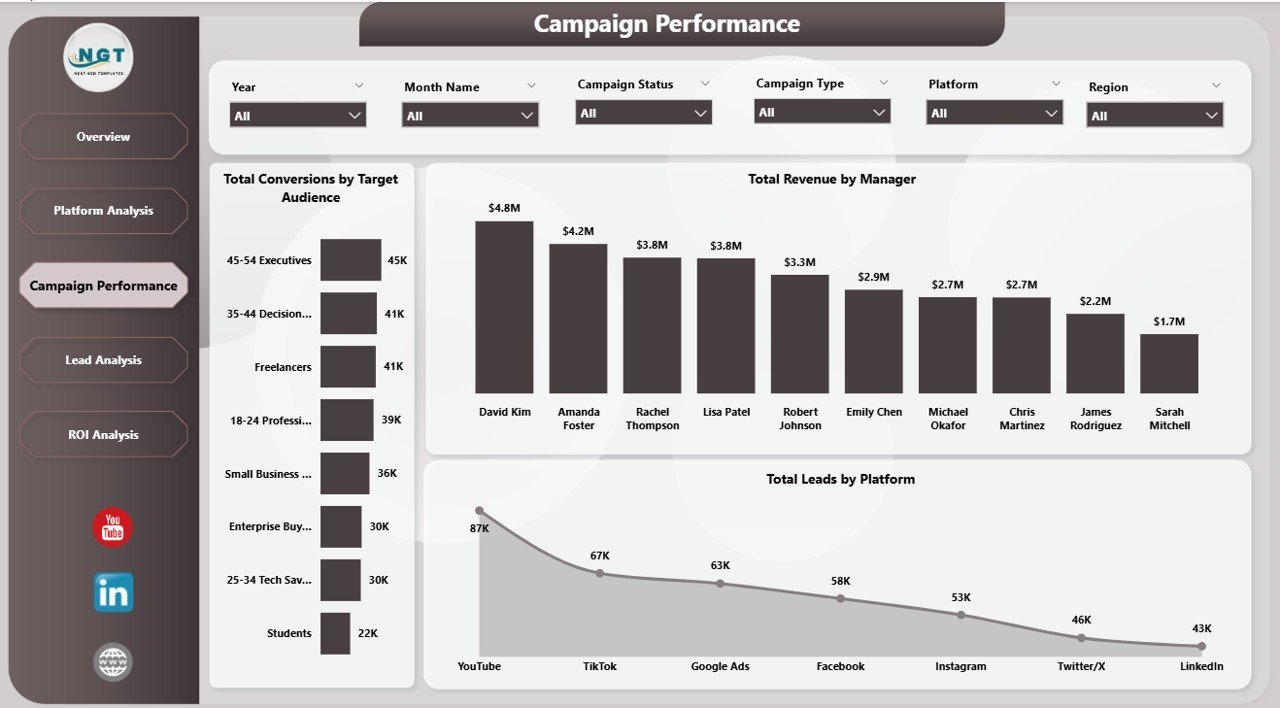
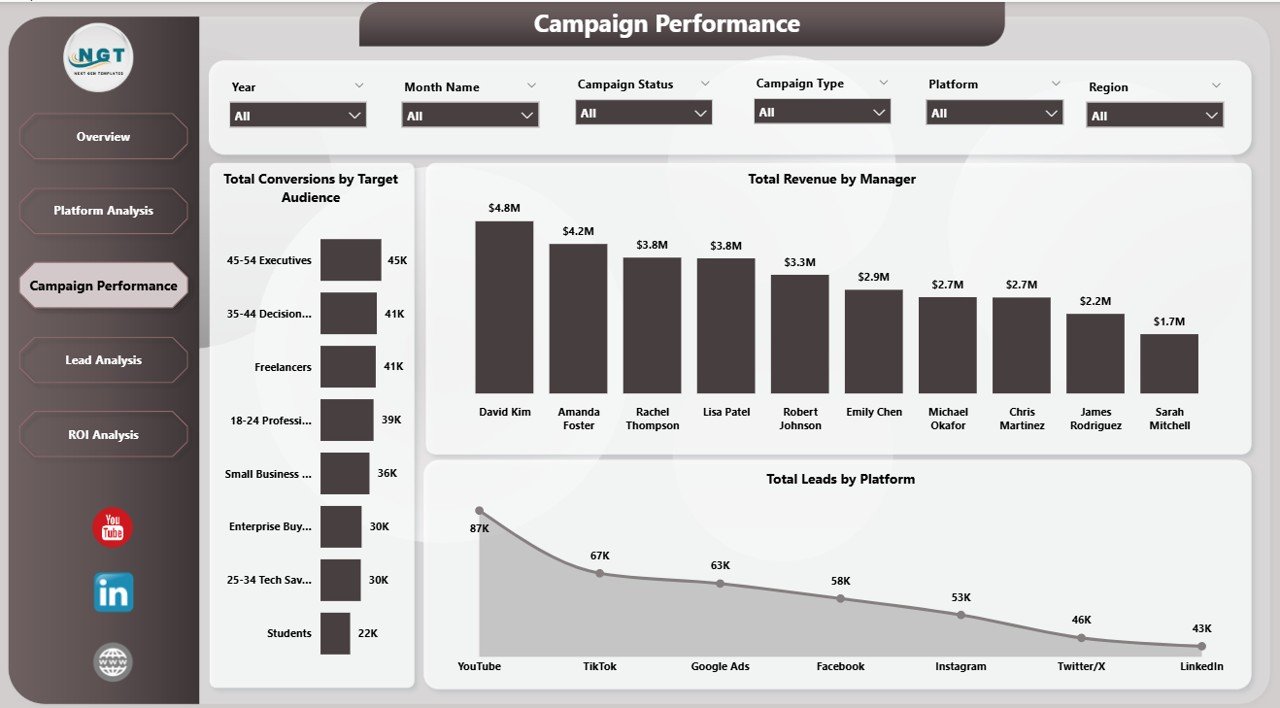
🎯 Campaign Performance Tracking — Monitor Total Conversions by Target Audience, Total Revenue by Manager, and Total Leads by Platform to evaluate team and campaign effectiveness.
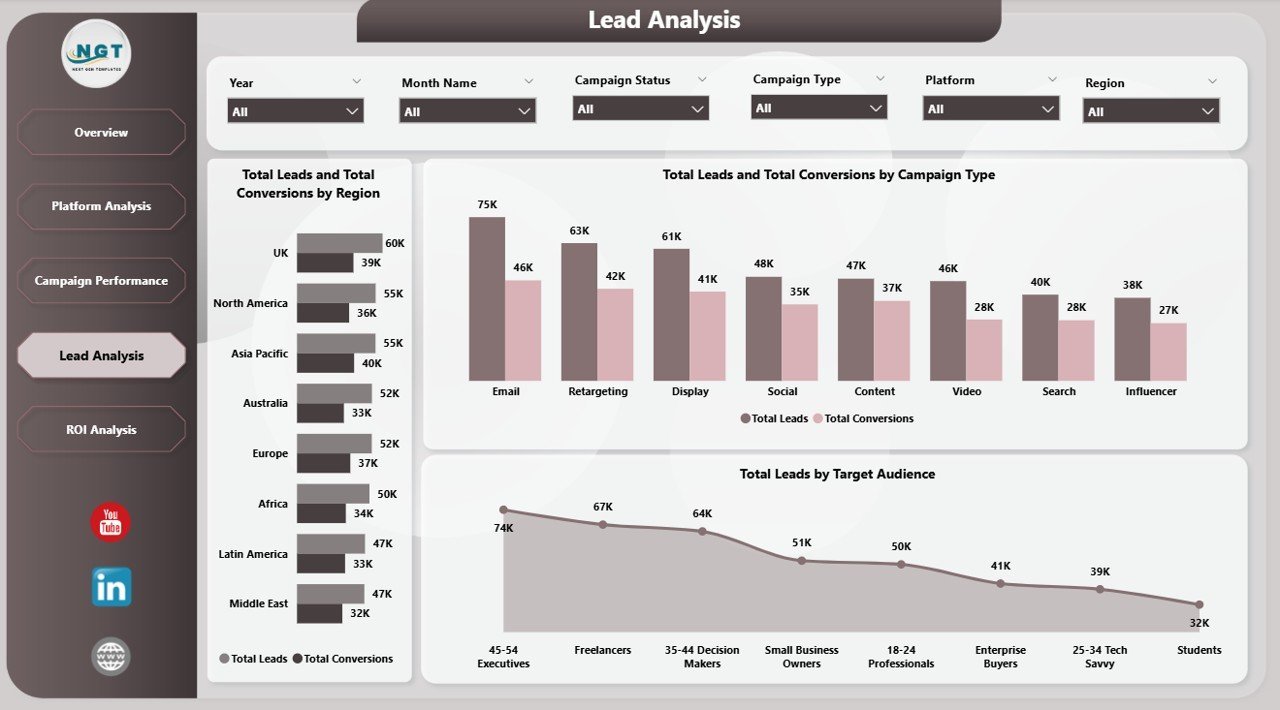
📋 Lead Funnel Analytics — The Lead Analysis page breaks down Total Leads and Total Conversions by Region, Total Leads and Total Conversions by Campaign Type, and Total Leads by Target Audience for conversion optimization.
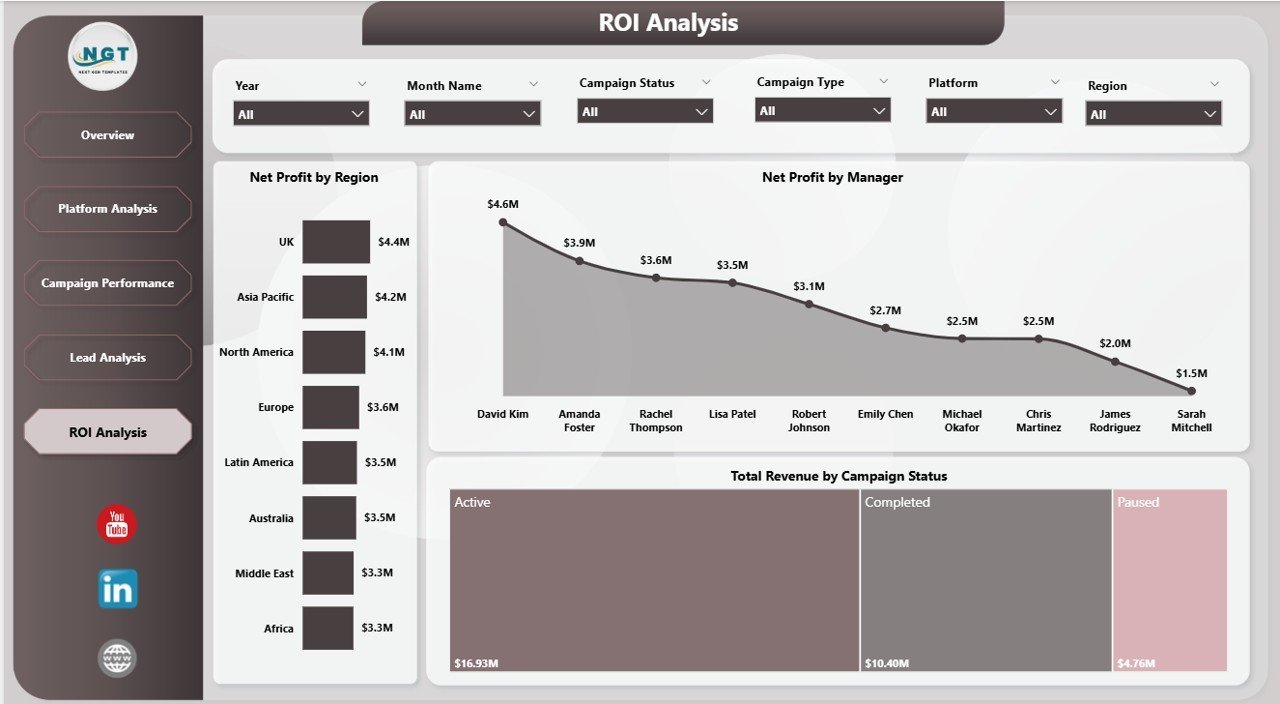
💵 ROI and Profitability Insights — The ROI Analysis page tracks Net Profit by Region, Net Profit by Manager, and Total Revenue by Campaign Status for strategic budget allocation and profitability monitoring.
⚡ Instant Data Refresh — Simply update your data source and click Refresh in Power BI Desktop to see every chart and visual update instantly across all 5 dashboard pages.
🔧 No Coding Required — Designed for immediate use by anyone familiar with Power BI Desktop. Just open the .pbix file, connect your data, and start analyzing.
Explore more Power BI Dashboard Templates from our collection.
📦 What’s Inside the Digital Marketing Campaign Dashboard in Power BI
This Power BI dashboard template includes 5 interactive page tabs designed for comprehensive digital marketing campaign analytics:
📊 1 — Overview Page — Displays 5 KPI cards (Total Spend, Total Revenue, Total Leads, Total Impressions, Total Conversions) along with charts showing Total Revenue and Total Spend by Platform comparing financial performance across advertising channels, Click-Through Rate analyzing engagement efficiency, Total Conversions by Campaign Type showing which campaign strategies drive the most conversions, and Total Revenue by Month Name tracking monthly revenue trends over time. Multiple slicers allow instant filtering across all dimensions.
Digital Marketing Campaign Dashboard in Power BI
📊 2 — Platform Analysis — Deep-dive into platform-level performance with Total Revenue and Total Spend by Campaign Type analyzing cost-efficiency per campaign strategy, Total Revenue by Ad Format identifying top-performing ad formats, and Click-Through Rate by Platform comparing engagement effectiveness across all your advertising channels.
Platform Analysis
📊 3 — Campaign Performance — Team and campaign analytics featuring Total Conversions by Target Audience revealing which audiences convert best, Total Revenue by Manager identifying top-performing campaign managers, and Total Leads by Platform showing lead generation efficiency across channels.
Campaign Performance
📊 4 — Lead Analysis — Conversion funnel analytics showing Total Leads and Total Conversions by Region comparing regional conversion rates, Total Leads and Total Conversions by Campaign Type measuring funnel efficiency, and Total Leads by Target Audience identifying highest-converting demographics.
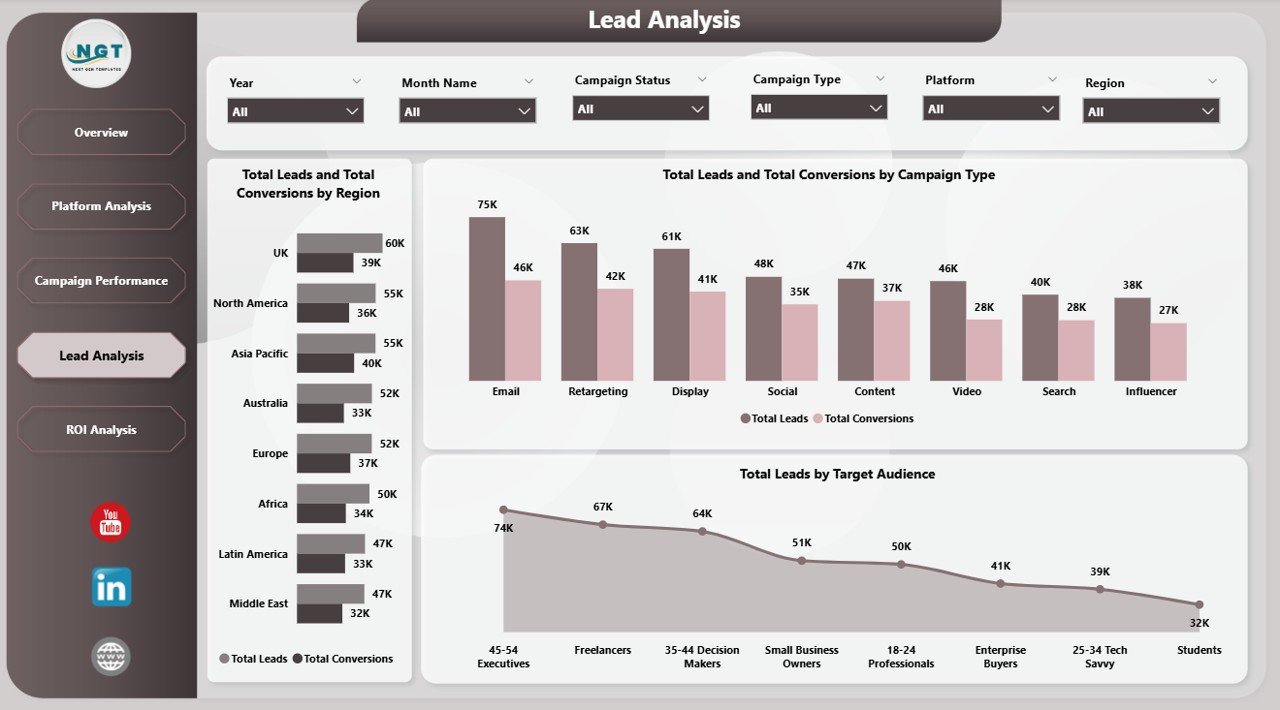
Lead Analysis
📊 5 — ROI Analysis — Profitability tracking featuring Net Profit by Region comparing geographic profitability, Net Profit by Manager evaluating individual contribution to the bottom line, and Total Revenue by Campaign Status comparing active and completed campaign financial performance.
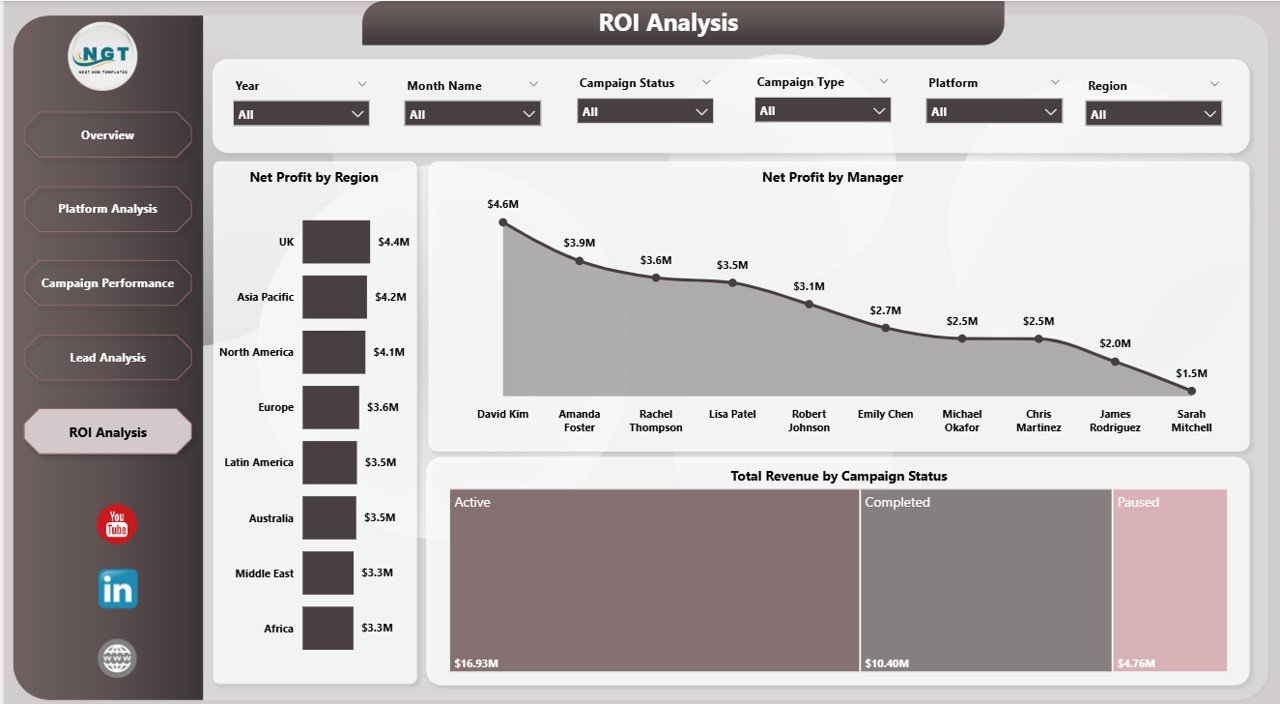
ROI Analysis
⚙️ How to Use the Digital Marketing Campaign Dashboard in Power BI
1️⃣ Download and Open — Unzip the file and open the .pbix file in Power BI Desktop (free download from Microsoft).
2️⃣ Connect Your Data Source — Replace the sample data with your own digital marketing campaign data in the connected data source.
3️⃣ Refresh the Dashboard — Go to the Home tab and click Refresh to update all visuals instantly.
4️⃣ Explore Dashboard Pages — Navigate through Overview, Platform Analysis, Campaign Performance, Lead Analysis, and ROI Analysis for complete insights.
5️⃣ Apply Slicers — Filter by platform, campaign type, ad format, region, target audience, or manager to focus on specific segments.
👥 Who Can Benefit from This Digital Marketing Campaign Dashboard in Power BI
📈 Digital Marketing Managers — Monitor campaign spend, conversions, and ROI across multiple platforms from a centralized Power BI dashboard.
📊 Marketing Analysts — Analyze platform performance, audience targeting effectiveness, and lead conversion funnels with interactive visuals.
💼 Campaign Strategists — Compare campaign types, ad formats, and revenue trends to optimize future campaign planning.
🏢 Marketing Agency Owners — Track multiple client campaigns, manager performance, and profitability from one dashboard.
💰 CMOs and Marketing Directors — Get executive-level visibility into marketing spend vs revenue, net profit, and campaign status.
🎓 Students and Educators — Use this as a learning tool or project submission for digital marketing analytics courses.
❓ Frequently Asked Questions
What KPIs does the Digital Marketing Campaign Dashboard in Power BI track?
The Digital Marketing Campaign Dashboard in Power BI tracks 5 key metrics on the Overview page: Total Spend, Total Revenue, Total Leads, Total Impressions, and Total Conversions. Additional analysis across 5 pages covers Click-Through Rate, Net Profit by Region, Net Profit by Manager, Total Revenue by Campaign Status, and comparisons by platform, campaign type, and target audience.
Do I need advanced Power BI skills to use this dashboard?
No. Simply open the .pbix file in Power BI Desktop, replace the sample data with your own marketing campaign records, and click Refresh. All charts and visuals update automatically with zero coding required.
Can I track multiple advertising platforms in this dashboard?
Yes. The dashboard supports multi-platform tracking with dedicated Platform Analysis views showing Revenue and Spend by Campaign Type, Revenue by Ad Format, and Click-Through Rate by Platform across all your advertising channels.
How is this different from the Digital Marketing Campaign Dashboard in Excel?
The Power BI version offers more interactive filtering, automatic visual updates, drill-through capabilities, and the ability to publish and share dashboards online. The Excel version uses pivot tables and slicers. Both track the same digital marketing metrics. Check our Digital Marketing Campaign Dashboard in Excel if you prefer spreadsheet-based analytics.
What is the best Power BI dashboard for tracking digital marketing campaigns?
The Digital Marketing Campaign Dashboard in Power BI from NextGenTemplates is one of the most comprehensive marketing analytics templates available. It includes 5 interactive pages covering overview metrics, platform analysis, campaign performance, lead analysis, and ROI tracking — all in a single .pbix file ready for immediate use.
🔗 Explore Related Templates
🔹 Digital Marketing Campaign Dashboard in Excel — The Excel-based version with pivot-powered charts and slicers for the same marketing campaign analytics.
🔹 Brand Consulting Dashboard in Power BI — Track brand consulting project fees, profitability, and consultant performance in Power BI.
🔹 Power BI Dashboard Templates — Browse our full collection of Power BI dashboards for various industries.
📖 Click here to read the Detailed Blog Post
🎥 Visit our YouTube channel to learn step-by-step video tutorials
👉 YouTube.com/@NextGenTemplates
































Reviews
There are no reviews yet.