
Clinic Procurement Dashboard in Excel is a demanding task. Clinics must coordinate with multiple vendors, process hundreds of invoices, control shipping costs, manage approvals, and stay within strict budgets—all while maintaining compliance and operational efficiency. However, when procurement data is scattered across Excel files, emails, and manual registers, visibility reduces and decision-making slows down. As a result, costs increase, approval delays grow, and compliance risks rise.
That is exactly why the Clinic Procurement Dashboard in Excel becomes a powerful and practical solution.
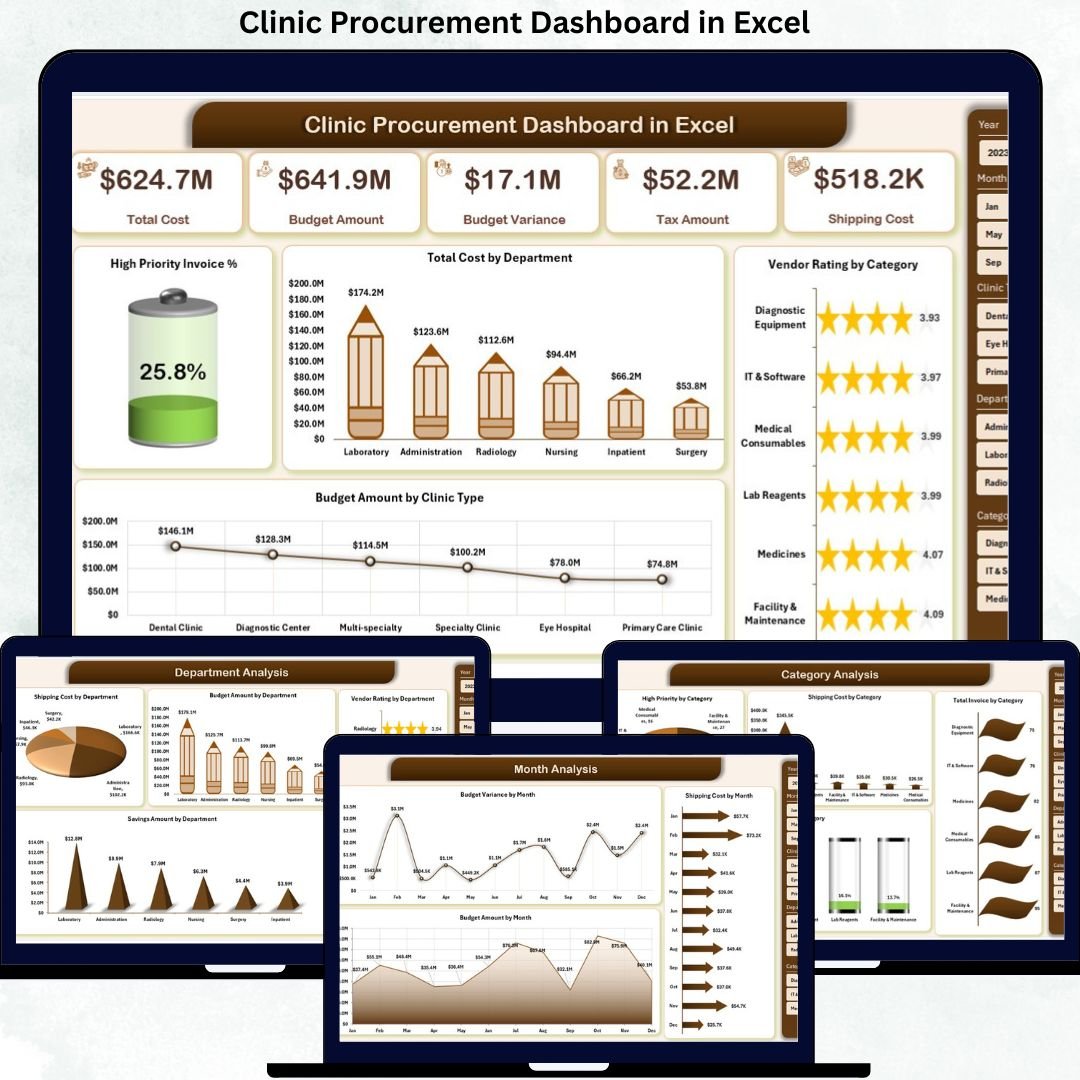
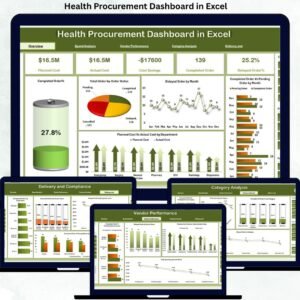
This ready-to-use Excel dashboard transforms raw procurement data into clear KPI cards, interactive charts, and structured analytical views. Instead of manually reviewing procurement registers and static reports, clinic administrators, procurement managers, and finance teams can instantly monitor procurement costs, high-priority invoices, vendor performance, budget utilization, approval efficiency, and monthly trends from one centralized dashboard.
Because the solution is built entirely in Excel, it remains cost-effective, flexible, and easy to deploy. You do not need expensive procurement software or advanced technical skills. Simply update the Data Sheet, refresh the dashboard, and all KPIs and charts update automatically. As a result, clinics save time, reduce manual effort, and gain real-time procurement visibility.
More importantly, this dashboard helps clinics answer critical procurement questions instantly:
-
Which departments are driving the highest procurement costs?
-
Which categories have more high-priority invoices?
-
Where are shipping costs increasing?
-
How efficient is the invoice approval process?
-
Which clinic types consume higher budgets?
-
How does procurement performance change month by month?
With the Clinic Procurement Dashboard in Excel, procurement management becomes structured, transparent, and decision-ready.
🔑 Key Features of Clinic Procurement Dashboard in Excel
📊 Centralized Procurement Reporting – One dashboard for all procurement data
💰 Budget & Cost Control – Track actuals and variances easily
🧾 Invoice Priority & Approval Tracking – Reduce delays
🤝 Vendor Performance Monitoring – Improve supplier quality
🚚 Shipping Cost Analysis – Identify logistics inefficiencies
🏥 Clinic, Department & Category Views – Full visibility
📅 Monthly Trend Analysis – Better forecasting
🎛️ Interactive Filters & Page Navigator – Fast analysis
⚡ Ready-to-Use Excel Template – No setup required
📂 What’s Inside the Clinic Procurement Dashboard in Excel
This professionally designed Excel dashboard includes five structured analytical pages, each focused on a critical procurement dimension.
📊 Overview Page
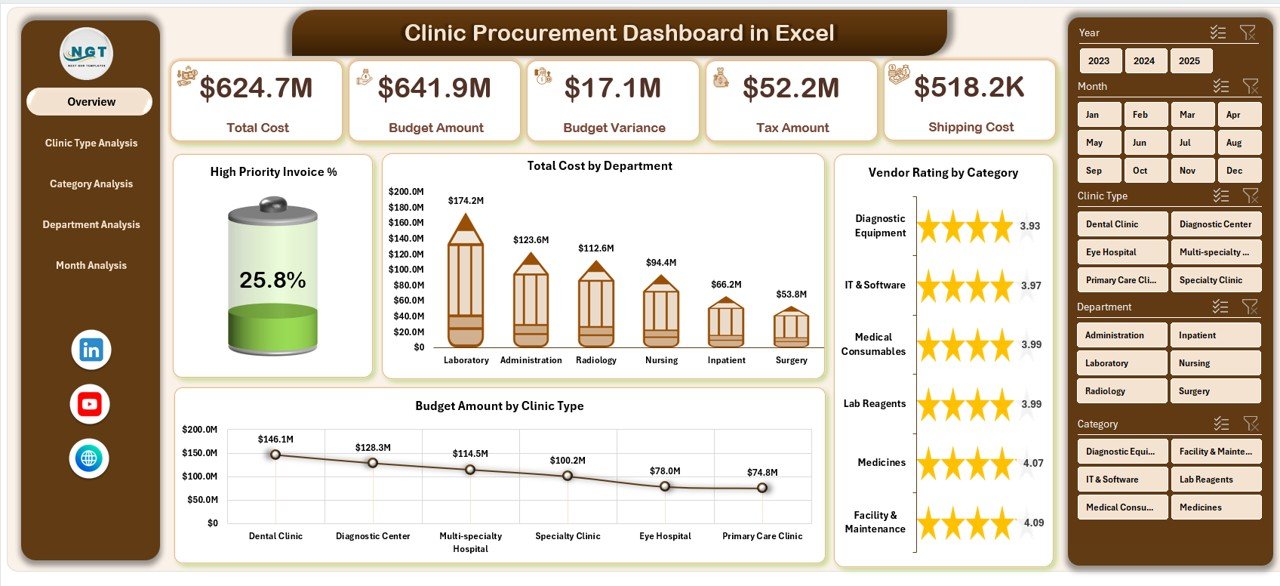
High-level procurement snapshot:
-
High Priority Invoice %
-
Total Procurement Cost
-
Total Cost by Department
-
Vendor Rating by Category
-
Budget Amount by Clinic Type
This page highlights procurement risks instantly.
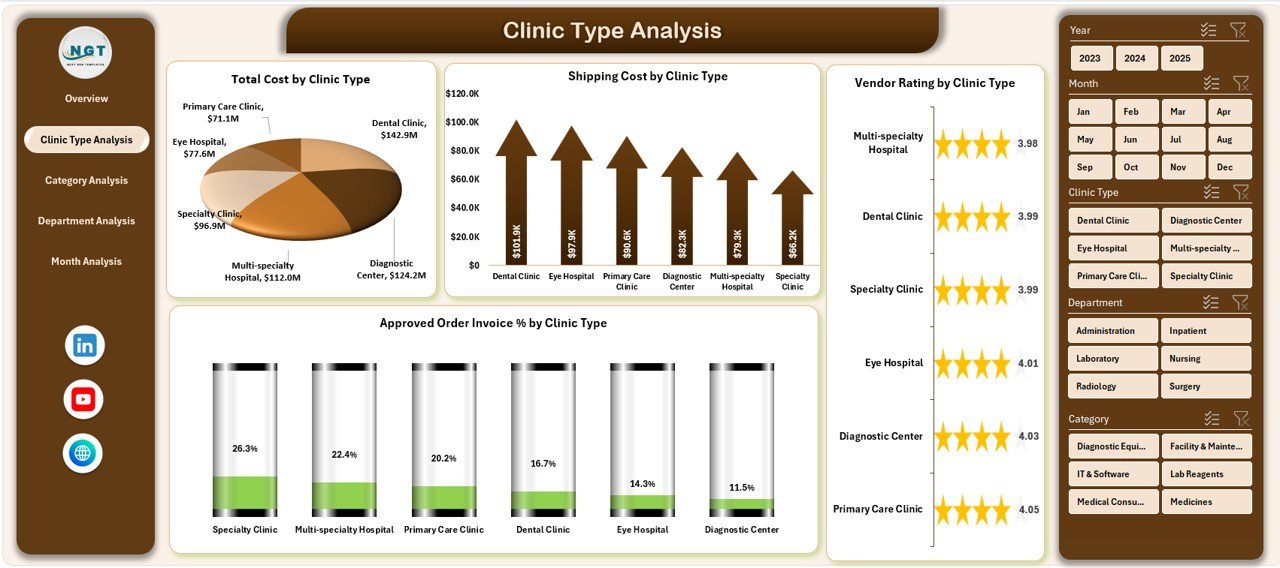
🏥 Clinic Type Analysis Page
Procurement behavior by clinic type:
-
Total Cost by Clinic Type
-
Shipping Cost by Clinic Type
-
Vendor Rating by Clinic Type
-
Approved Order Invoice % by Clinic Type
Helps optimize procurement strategies per clinic type.
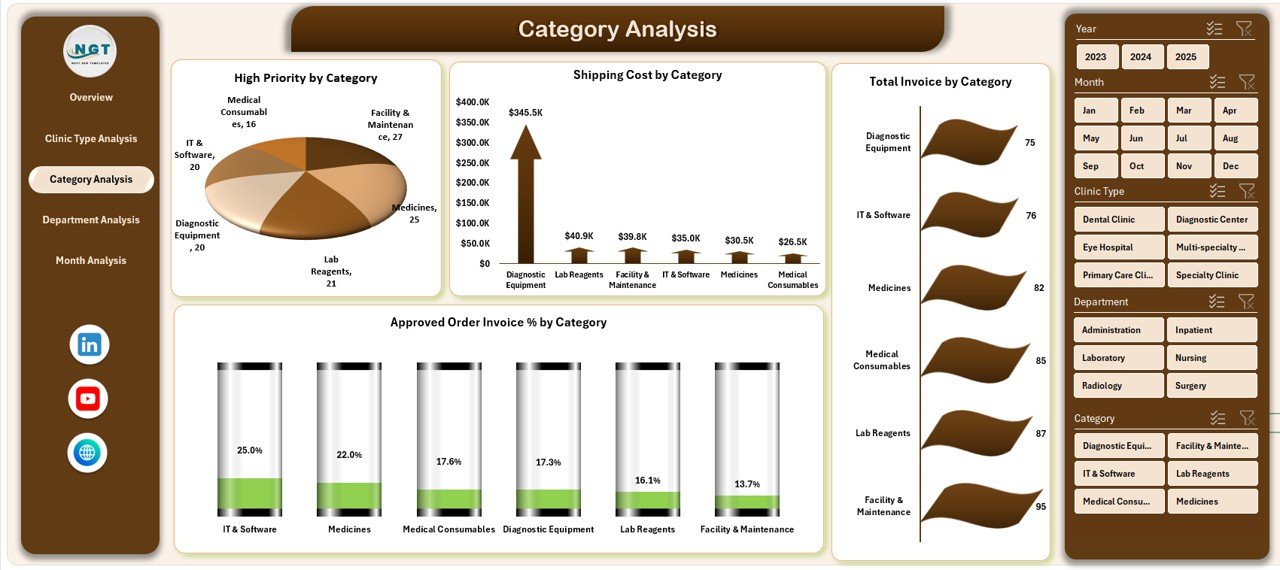
📦 Category Analysis Page
Category-level procurement control:
-
High Priority Invoices by Category
-
Shipping Cost by Category
-
Total Invoice Amount by Category
-
Approved Order Invoice % by Category
Supports smarter sourcing and negotiations.
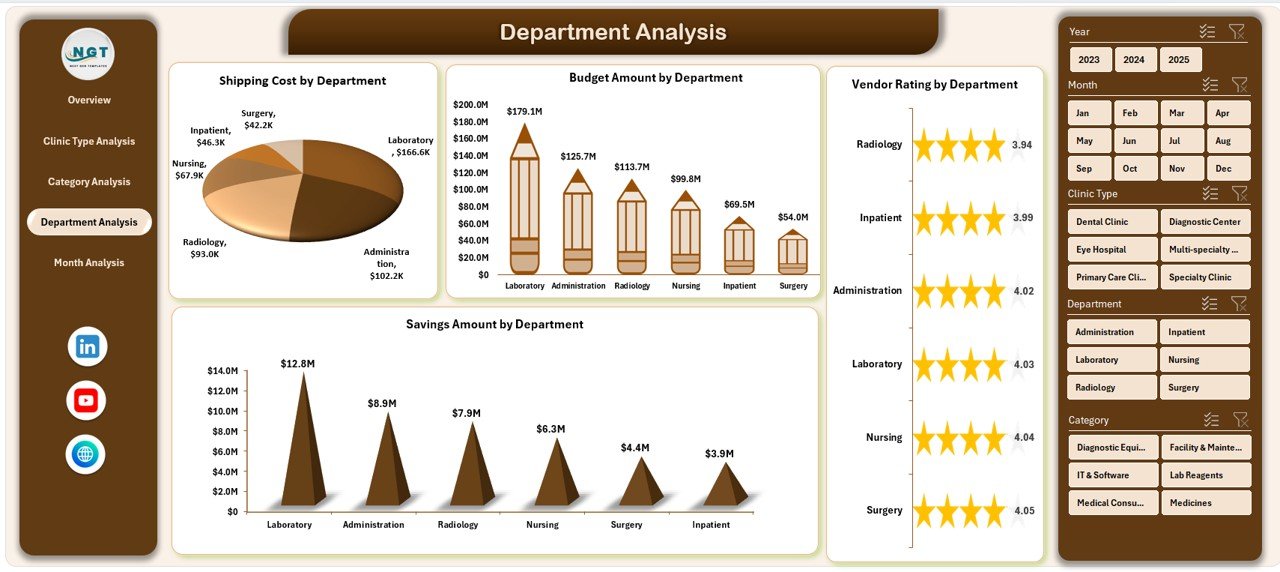
🏢 Department Analysis Page
Department-wise accountability:
-
Shipping Cost by Department
-
Budget Amount by Department
-
Vendor Rating by Department
-
Savings Amount by Department
Improves internal cost control and efficiency.
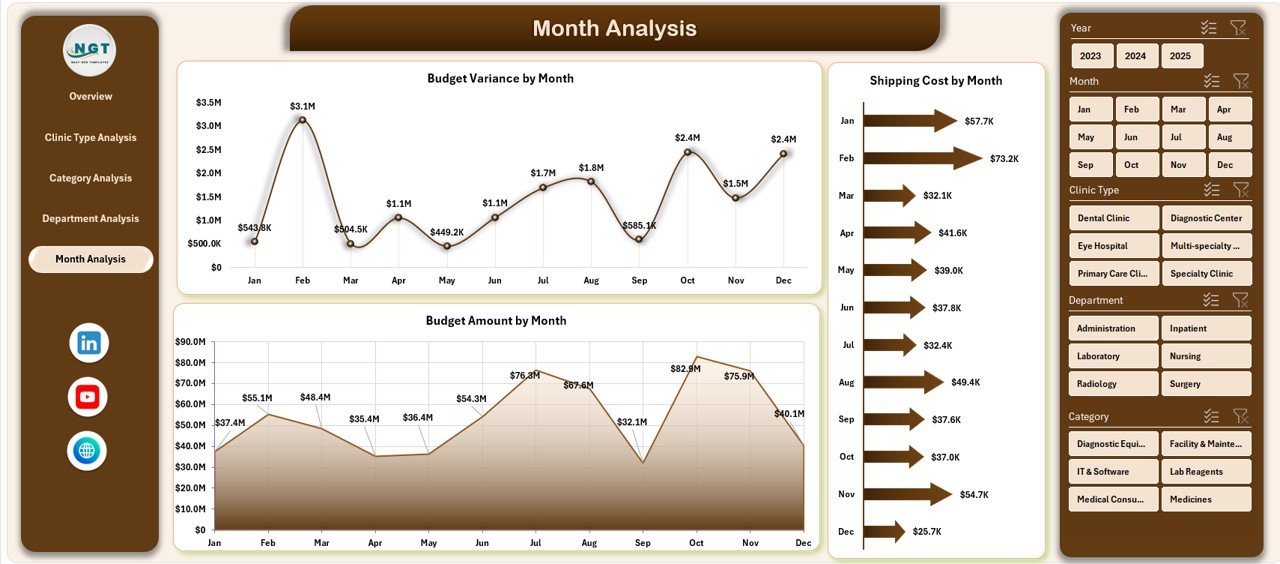
📅 Month Analysis Page
Time-based procurement trends:
-
Shipping Cost by Month
-
Budget Amount by Month
-
Budget Variance by Month
Enables accurate forecasting and planning.
▶️ How to Use the Clinic Procurement Dashboard in Excel
1️⃣ Enter procurement data in the Data Sheet
2️⃣ Refresh pivot tables and charts
3️⃣ Use slicers and the page navigator
4️⃣ Review costs, approvals, vendors, and budgets
5️⃣ Take faster, data-driven procurement actions
No advanced Excel skills required.
👥 Who Can Benefit from This Dashboard
🏥 Clinic Administrators
📊 Procurement Managers
💼 Finance & Accounts Teams
🏢 Operations Managers
🧾 Compliance & Audit Teams
📈 Healthcare Consultants
🎥 Visit our YouTube Channel for step-by-step tutorials
👉 https://www.youtube.com/@PKAnExcelExpert
























Reviews
There are no reviews yet.