




Running a fitness studio successfully is no longer about intuition alone. Today’s competitive fitness industry demands clear visibility, real-time performance tracking, and data-driven decisions. That is exactly where the Fitness Studios KPI Dashboard in Excel becomes your ultimate business companion.
This professionally designed Excel dashboard helps gym owners, fitness managers, and studio operators monitor growth, track profitability, improve operations, and boost member retention—all from one centralized, interactive dashboard. Instead of juggling multiple spreadsheets and manual reports, this solution delivers clarity, control, and confidence in decision-making.
Whether you manage a gym, yoga studio, wellness center, or fitness franchise, this dashboard turns raw data into actionable insights—without the cost or complexity of expensive BI tools.
🚀 Key Features of Fitness Studios KPI Dashboard in Excel
📊 All-in-One KPI View – Track financial, operational, customer, and performance KPIs in a single dashboard
📅 Dynamic Month Selection – Instantly switch months using a dropdown and view updated insights
📈 MTD & YTD Analysis – Monitor Month-to-Date and Year-to-Date performance effortlessly
🎯 Target vs Actual Tracking – Identify gaps and achievements instantly
🔁 Previous Year Comparison – Measure real growth using YoY performance
⬆️⬇️ Smart Conditional Formatting – Visual up/down arrows highlight performance trends
📉 Trend Analysis Charts – Analyze KPI behavior over time with clear visual trends
🧭 User-Friendly Navigation – Quick access using clickable buttons from the Summary page

📦 What’s Inside the Fitness Studios KPI Dashboard
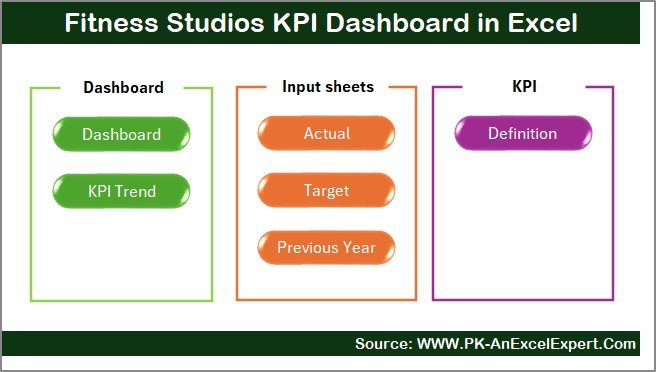
This dashboard includes 7 well-structured Excel worksheets, each designed for a specific purpose:
🗂 Summary Page – Navigation hub with clickable buttons
📊 Dashboard Sheet – Central KPI view with MTD & YTD insights
📉 Trend Sheet – KPI-wise trend analysis with charts and definitions
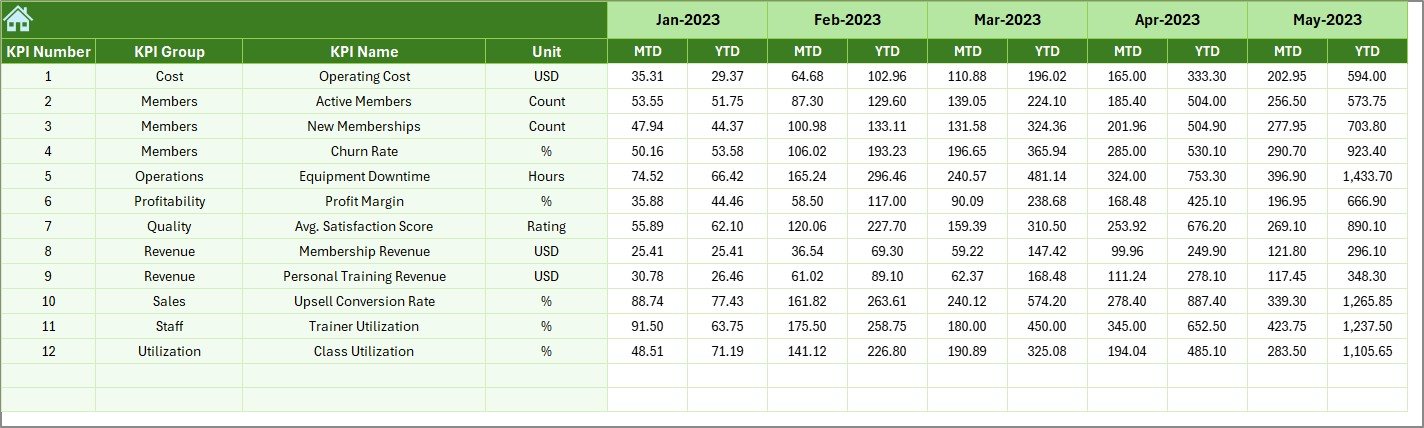
✍️ Actual Numbers Sheet – Enter monthly actual performance values
🎯 Target Sheet – Define MTD and YTD targets for each KPI
📆 Previous Year Sheet – Store historical data for comparison
📘 KPI Definition Sheet – KPI name, group, unit, formula, and definition
This structure ensures accuracy, consistency, and ease of use, even for beginners.
🧭 How to Use the Fitness Studios KPI Dashboard
Using this dashboard is simple and intuitive:
1️⃣ Enter Actual, Target, and Previous Year values in their respective sheets
2️⃣ Select the desired Month from the dropdown
3️⃣ Instantly view updated MTD & YTD KPIs
4️⃣ Analyze Target vs Actual and YoY performance
5️⃣ Use the Trend Sheet to identify patterns and growth opportunities
No advanced Excel skills required—this dashboard is designed for quick adoption and immediate results.
🎯 Who Can Benefit from This Fitness Studios KPI Dashboard?
This dashboard is ideal for:
🏋️ Gym Owners & Fitness Entrepreneurs
🧘 Yoga & Wellness Studio Managers
📋 Operations & Admin Teams
💰 Finance & Revenue Managers
🏢 Fitness Franchise Operators
📊 Business & Fitness Consultants
Anyone responsible for tracking performance, improving efficiency, or driving growth will benefit from this solution.






























Reviews
There are no reviews yet.