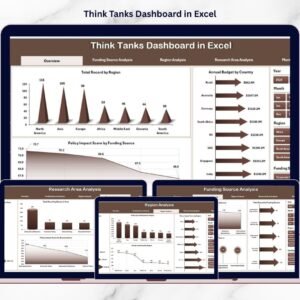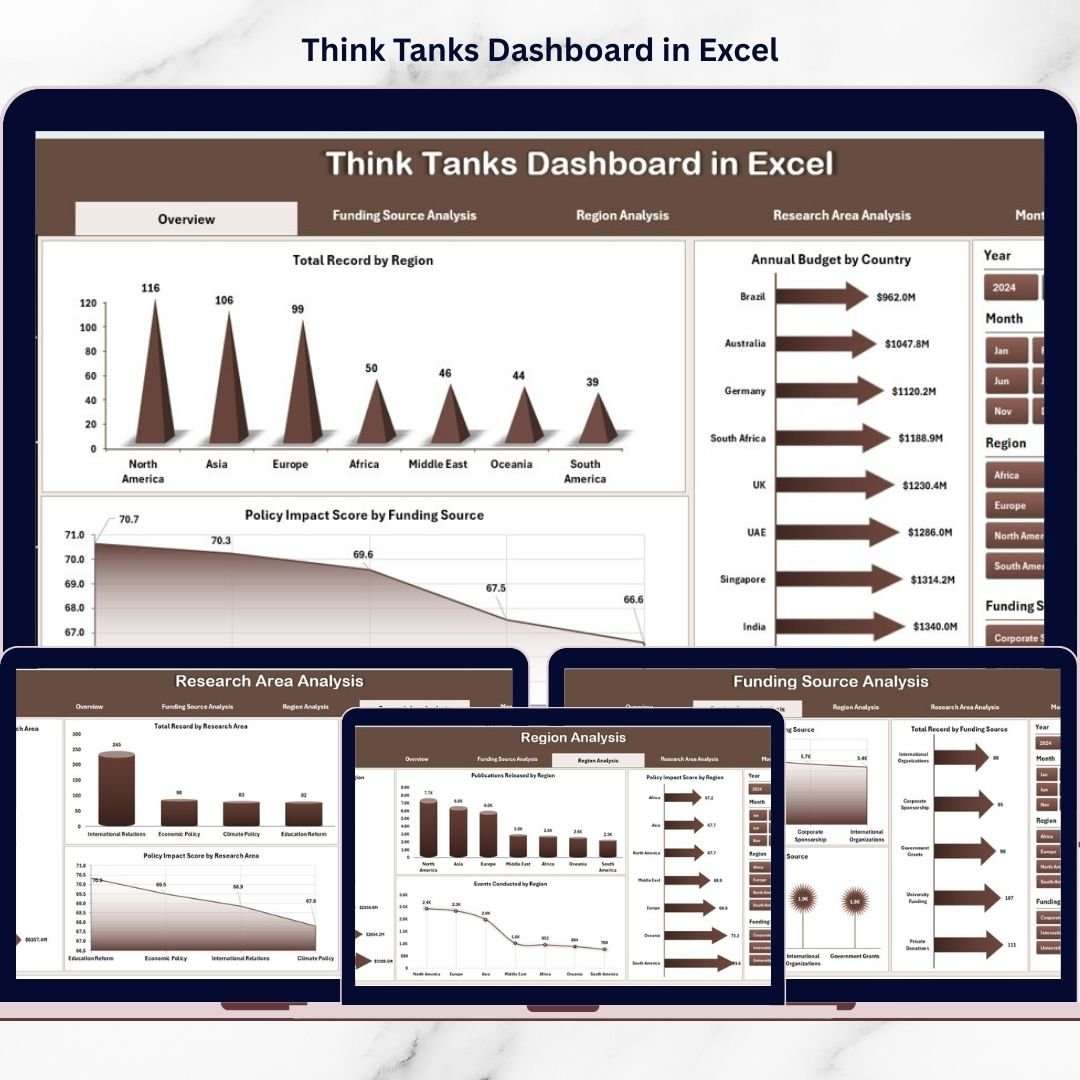
Think tanks play a vital role in shaping public policy, economic strategies, and social development through research, publications, and events. However, managing research outputs, funding performance, regional activities, and policy impact becomes difficult when information is spread across multiple spreadsheets.
The Think Tanks Dashboard in Excel provides a centralized and ready-to-use analytical solution that transforms scattered data into meaningful insights. Instead of compiling reports manually, organizations can monitor research performance, funding efficiency, and policy influence through one interactive dashboard.
This Excel-based system enables leadership teams to analyze performance quickly, improve transparency, and make data-driven strategic decisions.
⭐ Key Feature of Think Tanks Dashboard in Excel
📊 Centralized Research Monitoring – Track publications, events, funding, and impact in one dashboard.
🧭 Interactive Page Navigator – Move easily between analytical pages.
🎯 Dynamic Slicer Filters – Analyze data by region, country, research area, funding score, and time period.
📈 Visual KPI Insights – Instantly understand performance using charts and KPI cards.
💰 Funding Performance Analysis – Evaluate financial efficiency and research outcomes.
🌍 Regional Performance Tracking – Compare impact across geographic locations.
📅 Monthly Trend Analysis – Monitor activity and policy influence over time.
⚡ Automatic Dashboard Updates – Visuals refresh instantly after data updates.
📂 What’s Inside the Think Tanks Dashboard in Excel
The dashboard contains five analytical pages, each designed to provide a specific level of insight.
🏠 Overview Page – Central Performance Hub
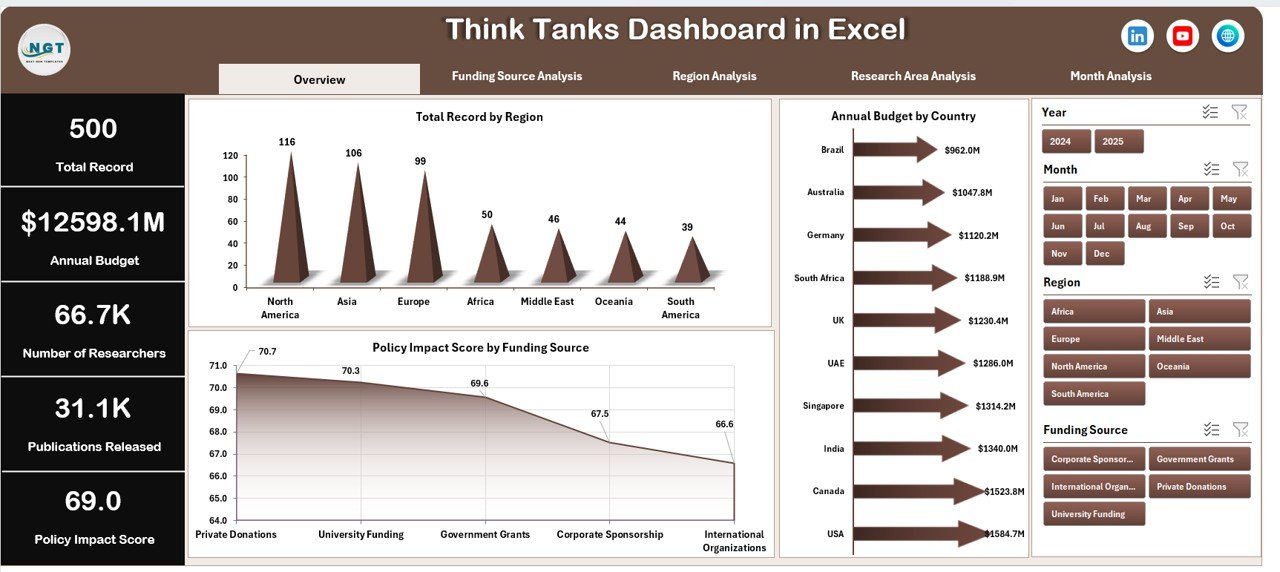
The main executive view providing a snapshot of organizational performance.
Key Elements
Interactive slicers
Four KPI summary cards
High-level analytical charts
Charts Included
Total Records by Region
Annual Budget by Country
Policy Impact Score by Funding Score
This page helps leadership understand overall performance within seconds.
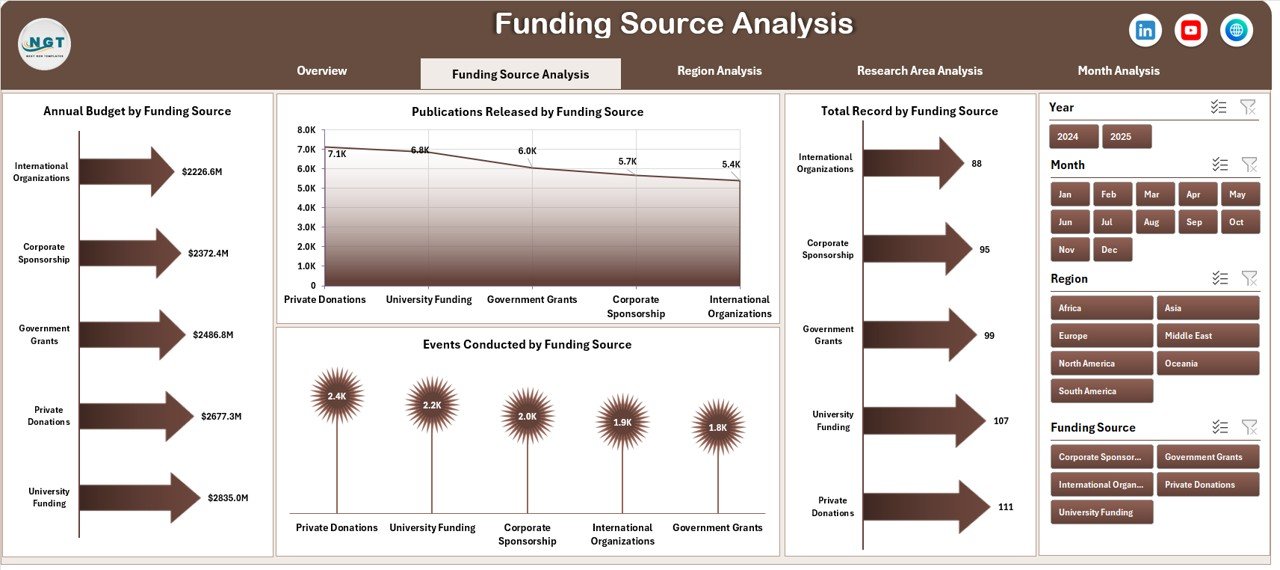
💰 Funding Source Analysis – Financial Impact Insights
Evaluates how funding influences research output.
Charts Included
Total Records by Funding Score
Annual Budget by Funding Score
Publications Released by Funding Score
Events Conducted by Funding Score
Insights
Funding efficiency evaluation
Budget optimization opportunities
Research productivity comparison
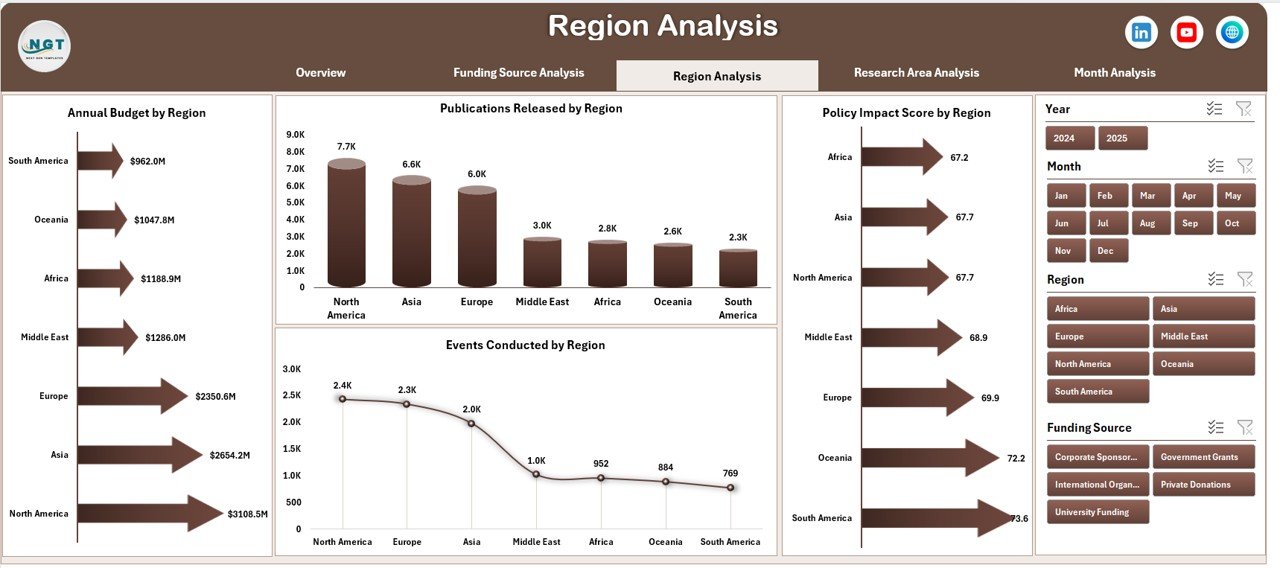
🌍 Region Analysis – Geographic Performance Monitoring
Compares research effectiveness across locations.
Charts Included
Annual Budget by Region
Publications Released by Region
Events Conducted by Region
Policy Impact Score by Region
Organizations identify strong regions and optimize resource allocation.
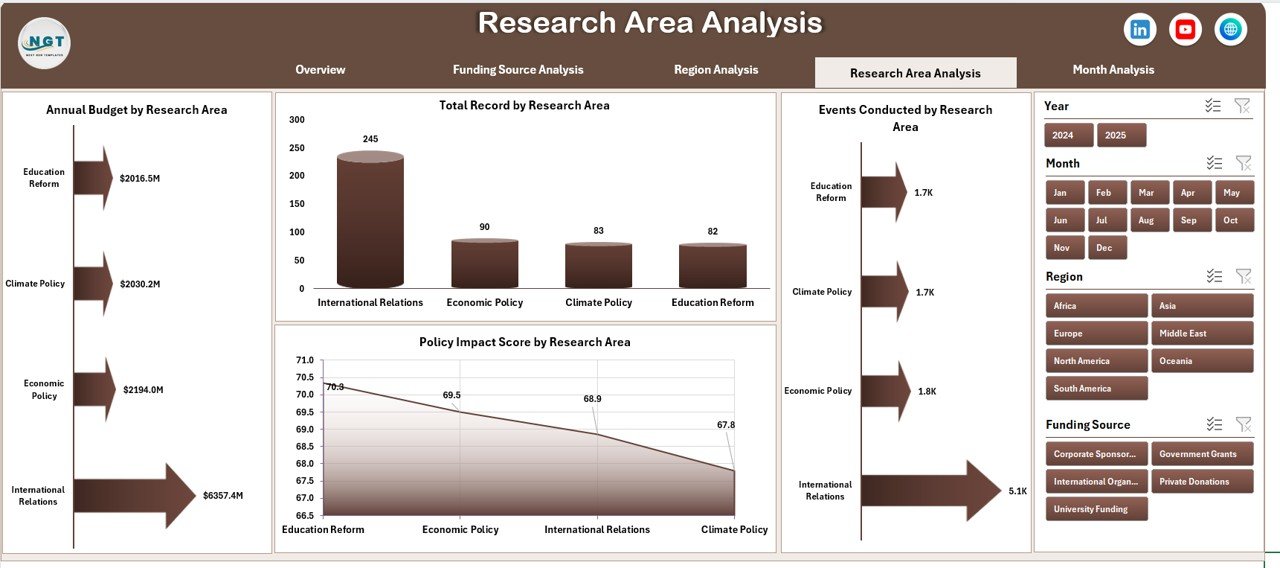
📚 Research Area Analysis – Knowledge Domain Evaluation
Analyzes performance across research topics.
Charts Included
Annual Budget by Research Area
Total Records by Research Area
Events Conducted by Research Area
Policy Impact Score by Research Area
Helps leadership prioritize high-impact research areas.
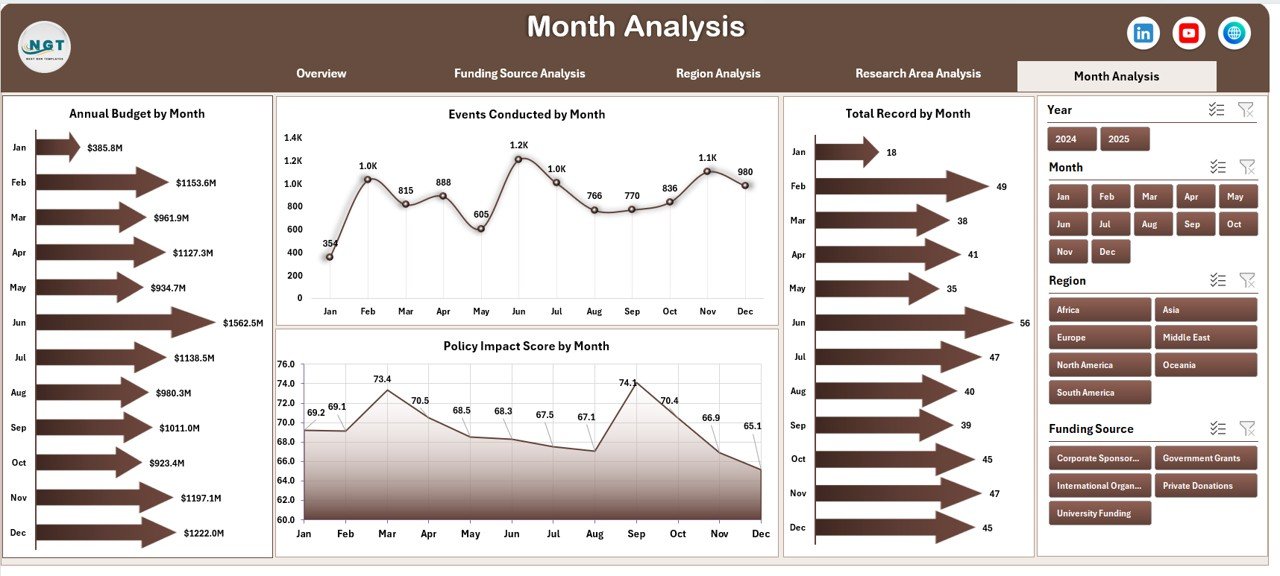
📆 Month Analysis – Performance Trend Tracking
Tracks activity and impact over time.
Charts Included
Annual Budget by Month
Total Records by Month
Events Conducted by Month
Policy Impact Score by Month
Supports forecasting and long-term planning decisions.
🗂️ Supporting Sheets
📄 Data Sheet
Primary data entry area including:
Region
Country
Funding Score
Research Area
Annual Budget
Publications Released
Events Conducted
Policy Impact Score
Month & Year
Dashboard visuals update automatically after data entry.
⚙️ Support Sheet
Handles backend calculations, pivot tables, and formulas to ensure accurate analytics.
🚀 How to Use the Think Tanks Dashboard in Excel
1️⃣ Prepare standardized research data
2️⃣ Enter records into the Data Sheet
3️⃣ Apply slicer filters for analysis
4️⃣ Review insights across analytical pages
5️⃣ Identify trends and improvement areas
6️⃣ Take strategic actions based on insights
📊 Insights You Can Extract
Operational Insights
Research productivity tracking
Publication performance analysis
Event effectiveness monitoring
Financial Insights
Budget utilization efficiency
Funding impact evaluation
Resource optimization opportunities
Strategic Insights
Policy influence measurement
Research prioritization decisions
Regional expansion planning
✅ Advantages of Think Tanks Dashboard in Excel
✔ Centralized performance monitoring
✔ Faster executive decision-making
✔ Improved funding allocation
✔ Clear performance visualization
✔ Dynamic filtering and analysis
✔ Cost-effective analytics solution
✔ Easy collaboration across teams
👥 Who Can Benefit from This Dashboard
Policy Research Organizations
Non-Profit Institutions
Government Research Bodies
Academic Research Centers
International Development Agencies
Strategy and Policy Analysts
Any research-driven organization can use this dashboard effectively.
💡 Best Practices for Maximum Value
Maintain clean and standardized data
Update records monthly
Use consistent KPI definitions
Keep visuals simple and readable
Protect backend sheets from edits
Review trends regularly for planning
🧠 How This Dashboard Improves Decision-Making
When leadership views consolidated insights:
High funding with low impact becomes visible immediately
High-performing research areas receive more investment
Regional inefficiencies are identified quickly
Monthly performance trends guide planning
Therefore, organizations shift from reactive reporting to proactive strategy.
🏁 Conclusion
The Think Tanks Dashboard in Excel provides a powerful yet simple platform for monitoring research activities, funding efficiency, and policy impact. Instead of managing fragmented spreadsheets, organizations gain a unified analytical environment that supports faster and smarter decisions.
With interactive slicers, structured analytical pages, and automated visuals, leadership can focus more on research impact and less on report preparation.
Ultimately, this dashboard converts data into actionable intelligence — empowering think tanks to strengthen influence, transparency, and strategic outcomes.
### Click hare to read the Detailed blog post
Visit our YouTube channel to learn step-by-step video tutorials
👉 Youtube.com/@PKAnExcelExpert