
Running a mental health facility is rewarding—but it isn’t without its administrative headaches. From scheduling appointments to managing patient histories and tracking expenses, clinic managers and mental health professionals often juggle multiple tasks that pull attention away from providing quality care. Thankfully, there’s a smart and affordable solution designed specifically to simplify these operations.Mental Health Center Management System
Enter the Mental Health Center Management System V1.0—an all-in-one Excel + VBA tool that gives mental health clinics an organized, secure, and scalable platform to manage daily workflows efficiently. Whether you’re a therapist, counselor, or administrative professional, this system empowers you to streamline key processes—all without expensive software or steep learning curves.
In this blog post, we explore 7 ways this system can transform your clinic operations and why it’s one of the smartest investments you can make for your practice today.Mental Health Center Management System
1. Secure and Role-based Login System
Your patient data deserves protection. The Mental Health Center Management System offers a secure login form with user-specific credentials, helping you ensure that sensitive information stays confidential. It also supports role-based access—meaning admins, therapists, or support staff see only what they’re supposed to.
This level of security is essential for maintaining compliance and trust in mental health practices, where data privacy is paramount.
2. Centralized Dashboard for Instant Control
Imagine having one screen that gives you immediate access to appointments, patient records, treatment logs, expenses, and more. That’s exactly what the system’s Main Form dashboard offers:
-
Intuitive navigation with list views
-
Powerful filters for quick searches
-
Sort options to find records in seconds
No more endless scrolling through Excel sheets—just fast, smooth navigation across your clinic’s core data.
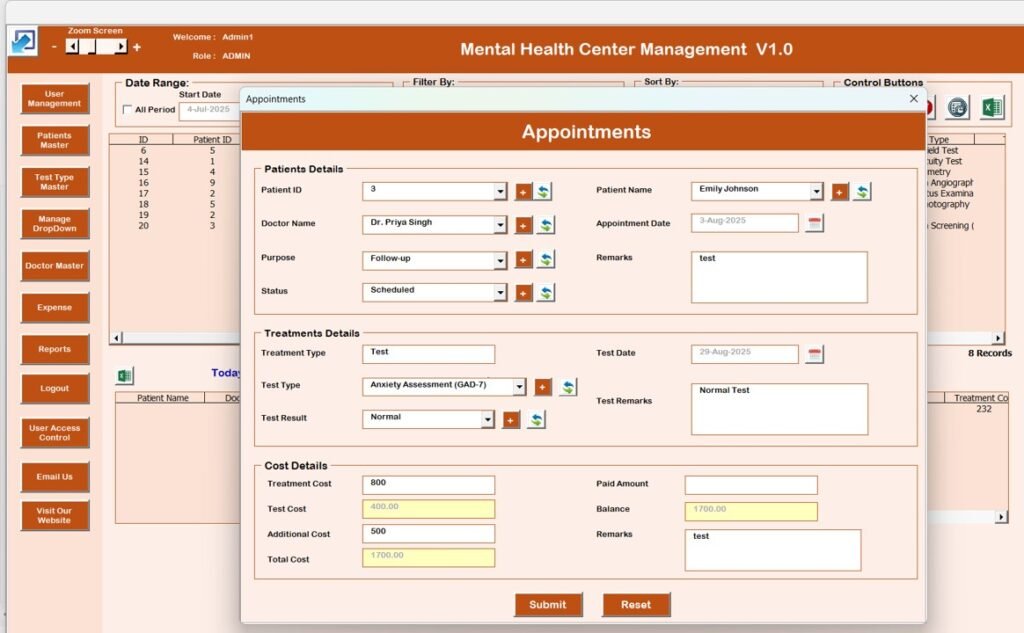
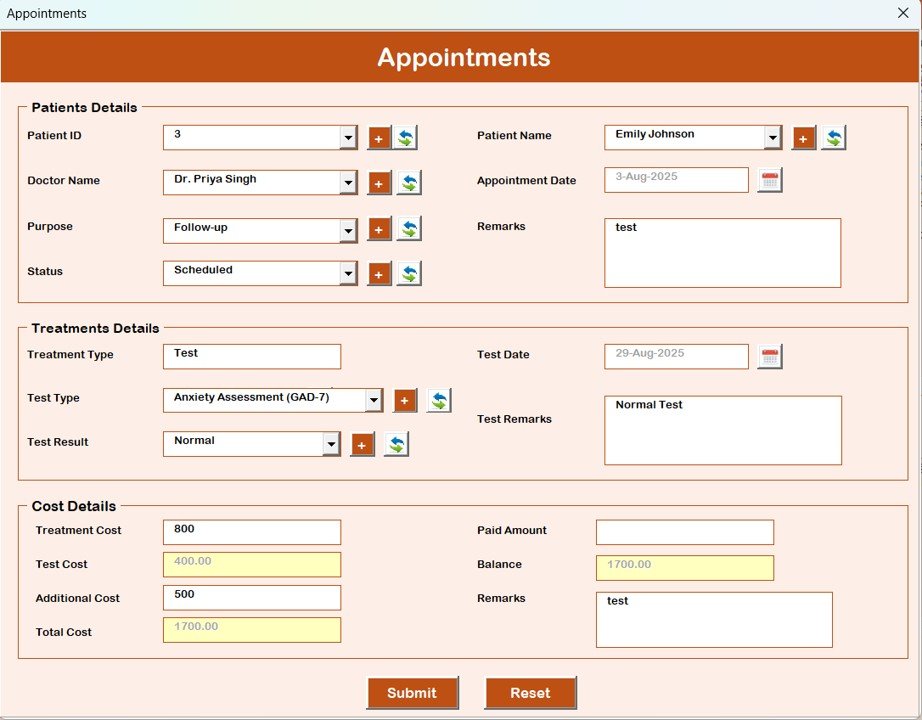
3. Efficient Appointment Scheduling & Tracking
Managing appointments manually across multiple systems can lead to double bookings, missed sessions, or client dissatisfaction. With this tool, you can:
-
Schedule new appointments with ease
-
View appointment histories
-
Track visit statuses to avoid conflicts
The appointment module ensures you stay organized while reducing client wait times and scheduling errors.
4. Comprehensive Patient Master Database
A strong practice relies on accurate patient data. The patient master module in this system lets you:
-
Record personal, contact, and medical details
-
Track treatment plans and visit logs
-
Personalize care plans for better outcomes
By centralizing patient history and treatment details, you eliminate redundancy and improve service delivery—especially for clinics with multiple specialists.
5. Treatment & Progress Monitoring
Every mental health professional knows that treatment plans evolve. The treatment master feature helps you:
-
Define therapy types and session details
-
Assign treatments to specific patients
-
Monitor progress over time
This functionality not only enhances the quality of care but also provides actionable insights during consultations and follow-up sessions.
6. Expense Tracking—Stay Financially Smart
Running a clinic isn’t just about patient care—it’s also about sustainability. The system includes a robust expense management module that lets you:
-
Log clinic expenses (sessions, utilities, supplies)
-
Compare actual vs. planned costs
-
Maintain financial transparency
Tracking your finances directly within your clinic management tool simplifies budgeting and helps you make smarter financial decisions.
7. Reports & Export Capabilities for Insights and Compliance
Data is only valuable if it’s actionable. That’s why the Mental Health Center Management System offers built-in tools to generate reports and export them for external use. Key capabilities include:
-
Appointment and patient reports
-
Treatment and financial summaries
-
Export options for Excel analysis
These reports are ideal for internal performance reviews, staff meetings, and compliance documentation.
Why Clinics Love This Excel-Powered Solution
Here’s why more mental health professionals are turning toward this Excel + VBA processing system:
🎯 All-in-One Management System
No need for multiple tools—manage everything from scheduling to expenses within one platform.
🔒 Secure and Customizable
Enjoy password protection, role-based access, and the ability to customize fields based on your unique clinic needs.
⏱️ Time-Saving Automation
Automate repetitive tasks and reduce manual errors with streamlined workflows powered by VBA.
📊 Real-Time Reports
Access updated reports whenever needed, helping you monitor performance and improve operations.
💡 Affordable and Flexible
Unlike expensive software subscriptions, this Excel-based solution offers enterprise-like features at an accessible price point.
How to Get Started: Simple & Ready to Use
Getting started is simple:
-
Purchase and download the template.
-
Open it in Microsoft Excel (no internet needed).
-
Log in with your credentials.
-
Start entering appointments, patients, treatments, and financial data.
-
Generate insights using built-in reports.
This ease of use means you can focus more on patient care and less on administrative complexity.
Conclusion: A Smart, Scalable Clinic Management Solution
The Mental Health Center Management System V1.0 brings essential tools together in one seamless platform—helping mental health professionals stay organized, efficient, and data-driven. From secure access control to advanced reporting, this system is ideal for clinics, therapists, and healthcare practices aiming to modernize their operations without a steep learning curve.
Visit our YouTube channel to learn step-by-step video tutorials